



Own Nameservers on CyberPanel (PowerDNS): The 4 Steps the Panel Skips (Tested)
CyberPanel comes with PowerDNS, so your server can answer DNS for your domains with your own and . The panel has a Create Nameserver page and a Default Nameservers setting, so it looks like two clicks. On our lab server (CyberPanel 3.0, PowerDNS 4.8.3, Ubuntu 24.04) it wasn't: port 53 was closed, the zones we made had no NS records, and one form fails without any message. We set it up end to end and checked it from the internet with public resolvers.
Before you start: own nameservers mean that if this one server is down, your domains don't resolve at all, and email to them bounces after a while. Both "ns1" and "ns2" point to the same server here, which is what most single-server setups do; most registries accept that (a few, like .de, check for two different servers), but it's not real redundancy. Cloudflare or your registrar's DNS is the safer default. Do this if you need it: reseller branding, a panel that should manage DNS itself, or learning.
What you need
Step 1: Open port 53 in the firewall
PowerDNS was already running and listening on (TCP and UDP). CyberPanel's Security > Firewall page even lists "dns udp 53" and "dnstcp tcp 53":
CyberPanel's Firewall page lists DNS on port 53:

But the real firewall, firewalld, had no rule for 53, and a query from a second server got:
PowerDNS listens, but firewalld has no rule for 53:
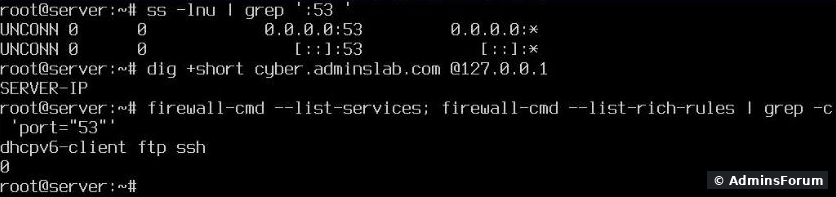
The panel's list and firewalld didn't match (firewalld also allowed ports the page didn't show). Check what's really open with, not with the panel page. Open DNS:
Opening DNS in firewalld:

After that the external query answered.
Step 2: Create the nameserver names (Create Nameserver)
DNS > Create Nameserver: a domain, two names and the server IP for each.
Create Nameserver, filled in:
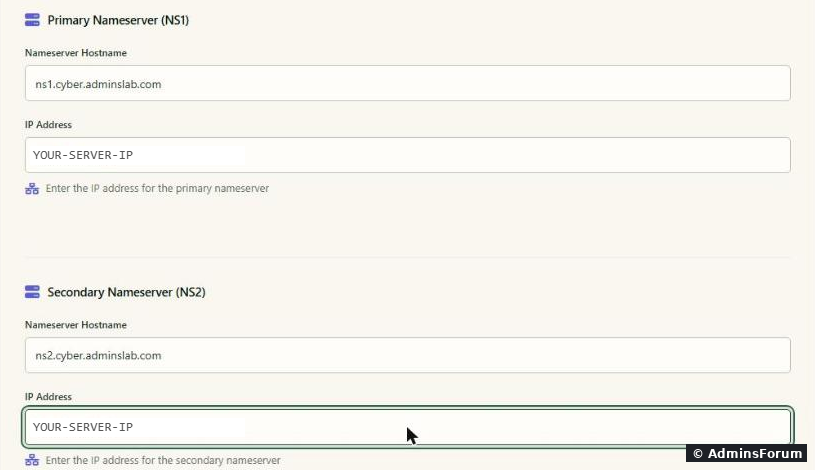
Trap: "Domain Name" must be a DNS zone that already exists on the server. We first entered (a website on the server) and got . CyberPanel had created the zone under the parent domain, , so that's what the field wanted. Look at the zone list in DNS > Add/Delete Records if you're not sure.
All this page does is add two A records ( and pointing to the server) in that zone:
The result: two A records in that zone:
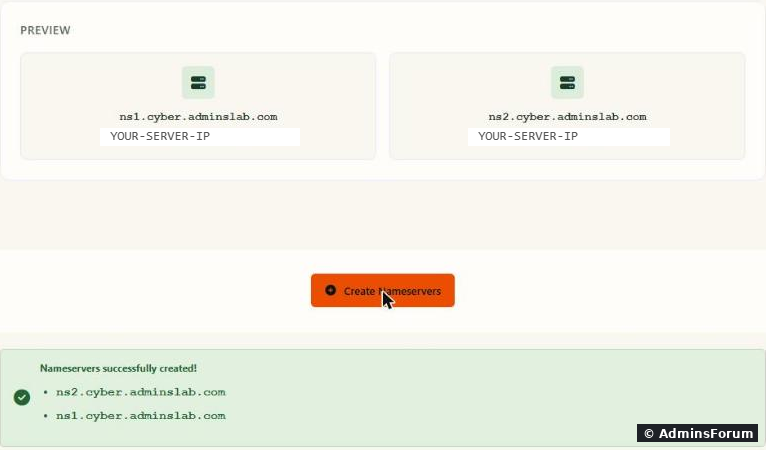
It doesn't register anything at your registrar and it doesn't add NS records to any domain.
Step 3: Make the names resolve on the internet (glue)
The rest of the world has to find and before it can ask them anything. Two cases:
Step 4: Default Nameservers, and the NS records it didn't add
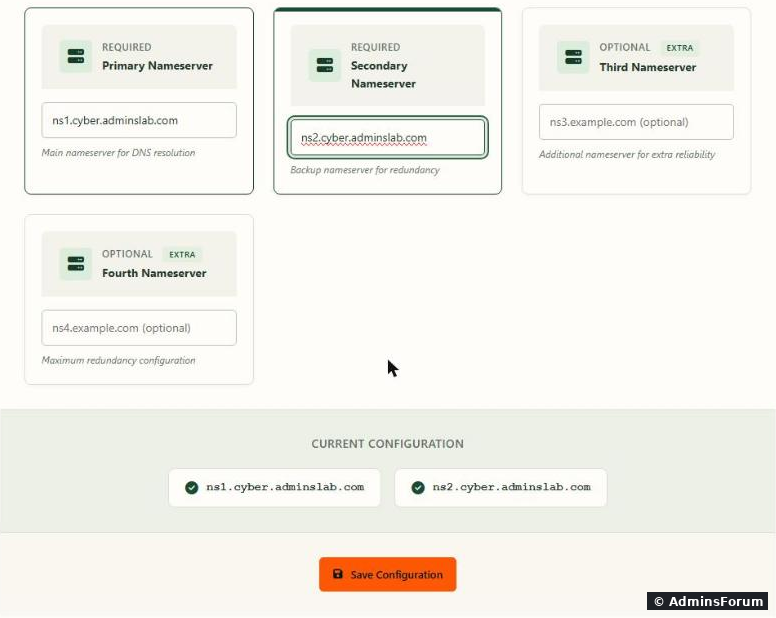
DNS > Default Nameservers: enter ns1 and ns2. CyberPanel saves them in.
Default Nameservers:
Then we created a new zone in DNS > Create DNS Zone. It got exactly one record, an SOA, and no NS records and no A record:
In CyberPanel's code, the default nameservers are only used when a website for a main domain creates its zone. Zones from Create DNS Zone, and zones made for subdomain websites (our zone), had no NS records in our tests. A zone without NS records answers queries, but it's incomplete and DNS checkers flag it. So check every zone and add them by hand in DNS > Add/Delete Records, Nameserver tab: name = the domain, nameserver = , then again with . Add an A record for the domain itself on the A Record tab too, if it doesn't have one.
Second trap: type the TTL. The TTL box shows "3600", but that's only a grey hint, the field is empty. Click Add NS Record like that and nothing happens: no record, no error. The browser's request came back with as the error message, which the page never shows. Type into the box and it works:
NS records added by hand (with the TTL typed in):
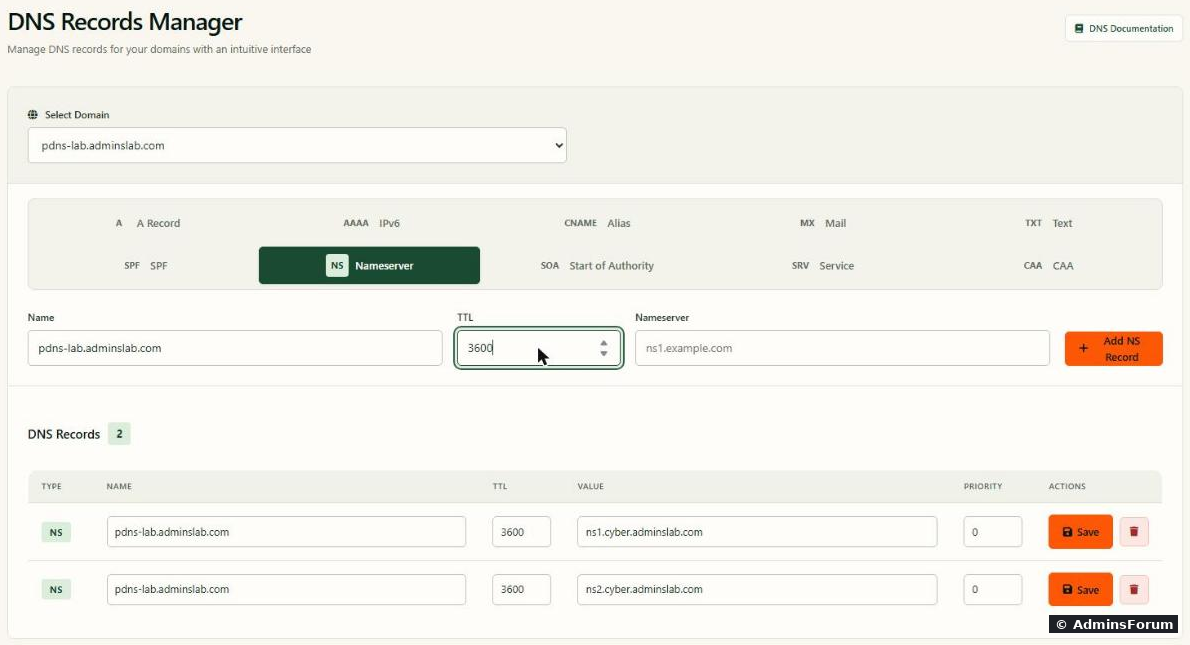
(The SOA record isn't in this list; it's on the SOA tab. Its first field was, not our real ns1, so it's worth a look there too.)
Step 5: Point the domain to your nameservers
At the registrar of the domain you're moving, set the nameservers to and . Our test domain was a subdomain of a domain on Cloudflare, so we "delegated" it there instead: two NS records in Cloudflare, to and . Registrar changes can take hours; ours worked within a minute.
Step 6: Test it from outside
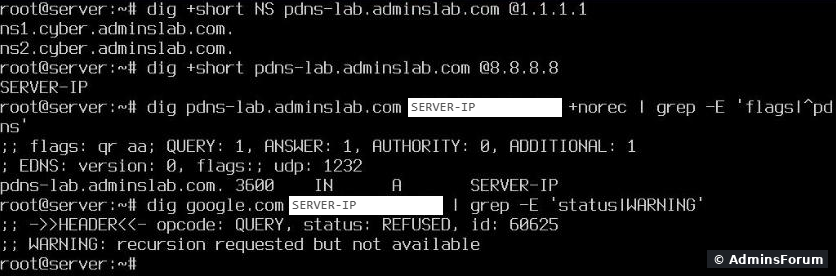
Ask public resolvers, not the server itself:
The delegation test, and the open-resolver check:
After the move: deleted websites leave their DNS records behind
When CyberPanel creates a website and the server does DNS for it, it adds an A record, an MX record and an SPF TXT record for it. When you delete the website, they stay. We had deleted three test sites; all nine records were still in the zone, and PowerDNS still answered them:
Websites deleted, DNS records still there:
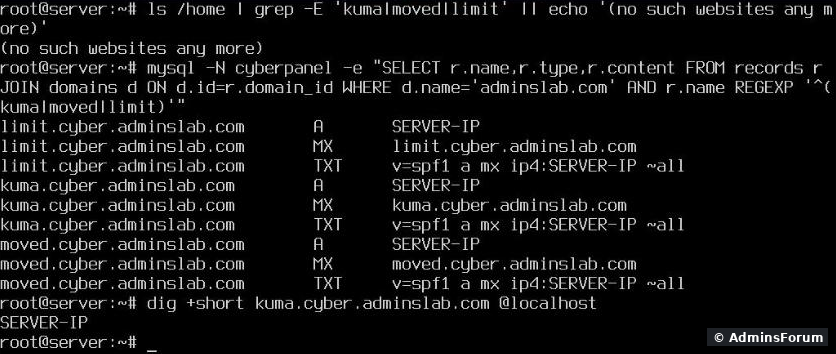
With your own nameservers that's live DNS: a deleted site's name still points to your server, and its old SPF record still says your server may send mail for it. After you delete a website, remove its records in Add/Delete Records, or delete the whole zone in DNS > Delete Zone if the domain is gone.
Checklist
More CyberPanel guides
CyberPanel comes with PowerDNS, so your server can answer DNS for your domains with your own
Code:
ns1Code:
ns2Before you start: own nameservers mean that if this one server is down, your domains don't resolve at all, and email to them bounces after a while. Both "ns1" and "ns2" point to the same server here, which is what most single-server setups do; most registries accept that (a few, like .de, check for two different servers), but it's not real redundancy. Cloudflare or your registrar's DNS is the safer default. Do this if you need it: reseller branding, a panel that should manage DNS itself, or learning.
What you need
- A domain for the nameserver names (we used andCode:
ns1.cyber.adminslab.com; with your own domain it's usuallyCode:ns2.cyber.adminslab.com).Code:ns1.example.com
- Access to that domain's registrar, for the glue records (Step 3).
- A test domain or subdomain to move first. We used .Code:
pdns-lab.adminslab.com
Step 1: Open port 53 in the firewall
PowerDNS was already running and listening on
Code:
0.0.0.0:53CyberPanel's Firewall page lists DNS on port 53:
But the real firewall, firewalld, had no rule for 53, and a query from a second server got
Code:
no servers could be reachedPowerDNS listens, but firewalld has no rule for 53:
The panel's list and firewalld didn't match (firewalld also allowed ports the page didn't show). Check what's really open with
Code:
firewall-cmd --list-allCode:
firewall-cmd --permanent --add-service=dns
firewall-cmd --reloadAfter that the external query answered.
Step 2: Create the nameserver names (Create Nameserver)
DNS > Create Nameserver: a domain, two names and the server IP for each.
Create Nameserver, filled in:
Trap: "Domain Name" must be a DNS zone that already exists on the server. We first entered
Code:
cyber.adminslab.comCode:
Domains matching query does not existCode:
adminslab.comAll this page does is add two A records (
Code:
ns1...Code:
ns2...The result: two A records in that zone:
It doesn't register anything at your registrar and it doesn't add NS records to any domain.
Step 3: Make the names resolve on the internet (glue)
The rest of the world has to find
Code:
ns1Code:
ns2- The nameserver names are in a domain whose DNS stays elsewhere (our case: stays on Cloudflare). Just add two normal A records there:Code:
adminslab.comandCode:ns1.cyberto the server IP. On Cloudflare: DNS only (grey cloud), never proxied.Code:ns2.cyber
- The nameserver names are in the same domain they serve (forCode:
ns1.example.com). Then you need glue records at the registrar ofCode:example.com. Registrars call it "child nameservers", "register nameservers" or "host records": enterCode:example.comandCode:ns1.example.comwith the server IP. Without glue, nobody can resolve ns1.example.com, because it would need ns1.example.com to do it.Code:ns2.example.com
Step 4: Default Nameservers, and the NS records it didn't add
DNS > Default Nameservers: enter ns1 and ns2. CyberPanel saves them in
Code:
/home/cyberpanel/defaultNameserversDefault Nameservers:
Then we created a new zone in DNS > Create DNS Zone. It got exactly one record, an SOA, and no NS records and no A record:
Code:
dns-lab.adminslab.com SOA ns1.dns-lab.adminslab.com hostmaster.dns-lab.adminslab.com 1 10800 3600 1209600 3600Code:
adminslab.comCode:
ns1...Code:
ns2...Second trap: type the TTL. The TTL box shows "3600", but that's only a grey hint, the field is empty. Click Add NS Record like that and nothing happens: no record, no error. The browser's request came back with
Code:
'ttl'Code:
3600NS records added by hand (with the TTL typed in):
(The SOA record isn't in this list; it's on the SOA tab. Its first field was
Code:
ns1.<zone>Step 5: Point the domain to your nameservers
At the registrar of the domain you're moving, set the nameservers to
Code:
ns1...Code:
ns2...Code:
pdns-labCode:
ns1.cyber.adminslab.comCode:
ns2.cyber.adminslab.comStep 6: Test it from outside
Ask public resolvers, not the server itself:
Code:
dig +short NS pdns-lab.adminslab.com @1.1.1.1
dig +short pdns-lab.adminslab.com @8.8.8.8
dig pdns-lab.adminslab.com @YOUR-SERVER-IP +norec
dig google.com @YOUR-SERVER-IP- Cloudflare's 1.1.1.1 returned our two nameservers, and Google's 8.8.8.8 returned the server IP: the delegation works.
- The server answers with the flag (authoritative answer) for its own zone.Code:
aa
- For it answers REFUSED. Good: PowerDNS on CyberPanel is authoritative only and doesn't resolve other domains for anyone. An "open resolver" gets abused for DDoS amplification. If you ever see an answer with an IP for google.com from your server, something else (a recursor) is listening on 53.Code:
google.com
After the move: deleted websites leave their DNS records behind
When CyberPanel creates a website and the server does DNS for it, it adds an A record, an MX record and an SPF TXT record for it. When you delete the website, they stay. We had deleted three test sites; all nine records were still in the zone, and PowerDNS still answered them:
Websites deleted, DNS records still there:
With your own nameservers that's live DNS: a deleted site's name still points to your server, and its old SPF record still says your server may send mail for it. After you delete a website, remove its records in Add/Delete Records, or delete the whole zone in DNS > Delete Zone if the domain is gone.
Checklist
- Port 53 TCP and UDP open in firewalld (), not just in the panel's list.Code:
firewall-cmd --list-all
- ns1/ns2 A records in their zone (Create Nameserver), plus glue at the registrar or A records at the DNS host of that domain.
- Every zone has NS records for ns1 and ns2 and an A record. Type the TTL when you add them.
- Nameservers changed at the registrar, checked with andCode:
dig @1.1.1.1.Code:dig @8.8.8.8
- Your server answers REFUSED for domains it doesn't host.
- Old records cleaned up after you delete a website.
More CyberPanel guides
- Fail2ban brute-force protection
- Change PHP version per website
- Git deployment from GitHub
- SSH key login, passwords off
- Create a website
- Issue SSL and fix failed certificates
- Subdomains, addon domains and aliases
- Rewrite rules, force HTTPS, HSTS
- Install WordPress with LiteSpeed Cache
- Cron jobs and a real WP-Cron
- Redis object cache for WordPress
- Databases and phpMyAdmin
- Email, DKIM, SPF and DMARC
- Email forwarding, catch-all, plus-addressing
- Mail queue, spam senders, blacklists
- CyberPanel DNS vs Cloudflare
- Packages and website limits
- Deploy Laravel on CyberPanel
- WordPress staging (clone) fixes
- Backups: create, restore, schedule
- File Manager and FTP
- Reset the admin password from SSH
- Log files and config locations
- Check and restart services
- First steps after install
- ModSecurity + OWASP rules (fix)
- CLI cheat sheet
- Install CyberPanel on Ubuntu 24.04
- Firewall explained
- Install PHP extensions
- Change PHP settings (php.ini)
- Update CyberPanel safely
- Server Error (500) after a fresh install
- Packages, users and ACLs
- Upgrade CyberPanel safely
- Real visitor IPs behind Cloudflare
- Import a large SQL file over SSH
- Remote MySQL access for one IP
- Move WordPress to CyberPanel by hand
- Fix "Error establishing a database connection"
- Fix PHP2Shell (CVE-2026-109618/109619)
- Docker apps on your domain with SSL
- CyberPanel on a small VPS: RAM tuning