



How to Deploy Laravel on CyberPanel (OpenLiteSpeed): Tested Step by Step
Laravel runs fine on CyberPanel's OpenLiteSpeed, and the that ships with Laravel works as it is. The two things that trip people up are the document root (it must be , not the project folder) and the development settings Laravel starts with. We deployed a fresh Laravel 13 app on our test server at and checked every step.
What you need
Step 1: Create the project as the site user
Never run Composer as root for a website. Files would belong to root and PHP couldn't write to. Run it as the site's user, from the site's home folder (one level above ):
Run plain as root and it stops to ask "Continue as root/super user [yes]?". That prompt is the hint you are about to do it wrong.
The installer ended with the first migrations (, , : DONE). New Laravel projects use SQLite by default, so this works without a database. Check it:
We got Laravel Framework 13.38.0.
Step 2: Add the domain with the right document root
Then add the domain in Websites > Create Sub/Addon Domain, with the document root pointing at Laravel's folder:
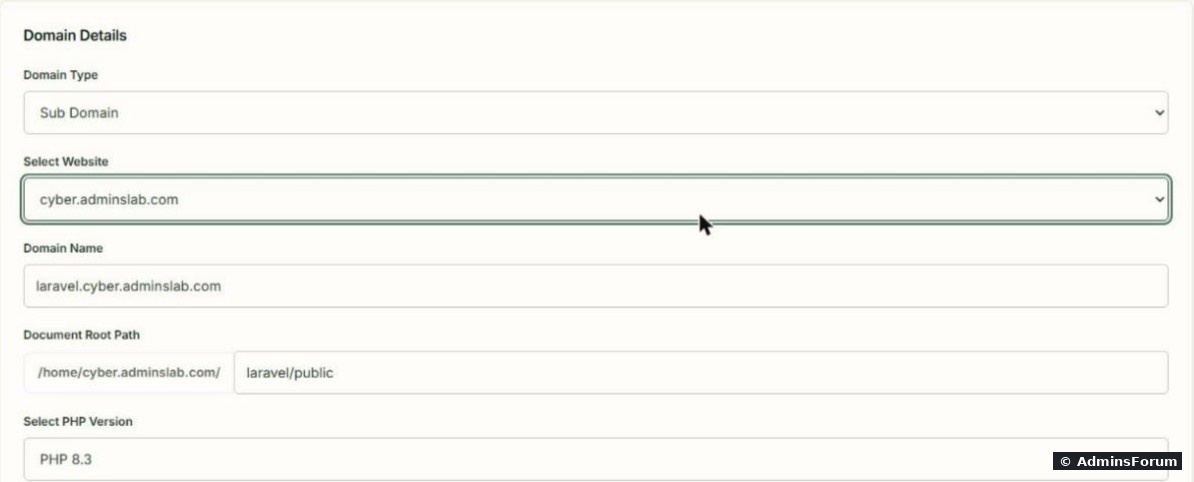
Why public/? Everything above ( with your app key and passwords, , ) must not be reachable from the web.
Step 3: Remove CyberPanel's index.html
CyberPanel drops its "CyberPanel Installed" page into every new document root. In our folder we found a new next to Laravel's , and the folder permissions had changed to (owner , group ). Laravel still answered on , but don't leave it to chance:
Step 4: Switch .env to production
A fresh Laravel project ships with development settings. This is what had right after install:
on a live site shows full error pages with file paths and settings to anyone who triggers an error. Fix it:
caches config, events, routes and views. Run it again after every change to or after you deploy new code, or the old cached values stay active.
Step 5: Check it
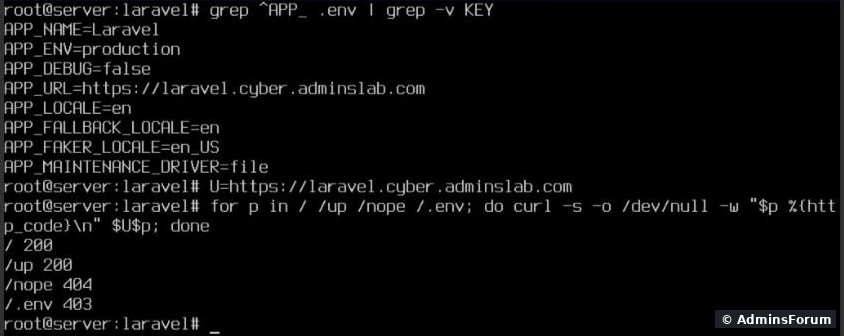
After switching to production and caching, every check passed:
Step 6: The scheduler
If your app uses Laravel's task scheduler, it needs one cron job that runs every minute. You can add it in the panel (cron jobs in CyberPanel) or from SSH as root:
The list now showed our existing WordPress job plus the new Laravel line. Use the full PHP path of the version your site runs.
Using MySQL instead of SQLite
We stayed on SQLite for this test. For MySQL/MariaDB, create a database and user in CyberPanel (databases in CyberPanel), then set in:
and run followed by (as the site user).
Common problems
More CyberPanel guides
Tested on CyberPanel 3.0 (build 8, OpenLiteSpeed edition) on Ubuntu 24.04, October 2026. Menu names can change slightly between versions.
Laravel runs fine on CyberPanel's OpenLiteSpeed, and the
Code:
.htaccessCode:
public/Code:
laravel.cyber.adminslab.comWhat you need
- A website in CyberPanel (ours is , Linux userCode:
cyber.adminslab.com). See creating a website.Code:cyber2602
- Composer and git: both were already installed by CyberPanel (, Composer 2.10.3).Code:
/usr/bin/composer
- PHP 8.3 or newer with the usual extensions. On our server mbstring, xml, dom, curl, zip, pdo_mysql, bcmath, fileinfo, tokenizer, openssl, ctype and intl were all loaded. Check yours: .Code:
php -m
- A DNS A record for the new name pointing to your server (ours: at Cloudflare, DNS only).Code:
laravel.cyber
Step 1: Create the project as the site user
Never run Composer as root for a website. Files would belong to root and PHP couldn't write to
Code:
storage/Code:
public_htmlCode:
cd /home/cyber.adminslab.com
sudo -u cyber2602 -H composer create-project laravel/laravel laravel --no-interactionCode:
composerThe installer ended with the first migrations (
Code:
create_users_tableCode:
create_cache_tableCode:
create_jobs_tableCode:
cd laravel
sudo -u cyber2602 php artisan --versionStep 2: Add the domain with the right document root
Then add the domain in Websites > Create Sub/Addon Domain, with the document root pointing at Laravel's
Code:
public- Domain Type: Sub Domain (or Addon Domain for a different domain name)
- Domain Name: Code:
laravel.cyber.adminslab.com - Document Root Path: (CyberPanel putsCode:
laravel/publicin front)Code:/home/cyber.adminslab.com/
- PHP: the same version you used in Step 1
Why public/? Everything above
Code:
public/Code:
.envCode:
storage/Code:
vendor/Step 3: Remove CyberPanel's index.html
CyberPanel drops its "CyberPanel Installed" page into every new document root. In our
Code:
laravel/publicCode:
index.htmlCode:
index.phpCode:
drwxr-x---Code:
cyber2602Code:
nogroupCode:
/Code:
rm /home/cyber.adminslab.com/laravel/public/index.htmlStep 4: Switch .env to production
A fresh Laravel project ships with development settings. This is what
Code:
.envCode:
APP_ENV=local
APP_DEBUG=true
APP_URL=http://localhost:8000
DB_CONNECTION=sqlite
Code:
APP_DEBUG=trueCode:
cd /home/cyber.adminslab.com/laravel
sed -i 's/^APP_ENV=.*/APP_ENV=production/; s/^APP_DEBUG=.*/APP_DEBUG=false/' .env
sed -i 's|^APP_URL=.*|APP_URL=https://laravel.cyber.adminslab.com|' .env
sudo -u cyber2602 php artisan optimize
Code:
optimizeCode:
.envStep 5: Check it
After switching to production and caching, every check passed:
Code:
U=https://laravel.cyber.adminslab.com
for p in / /up /nope /.env; do curl -s -o /dev/null -w "$p %{http_code}\n" $U$p; done- : the welcome page.Code:
/ 200
- : Laravel's health route. This proves URL rewriting works: OpenLiteSpeed read Laravel's ownCode:
/up 200, no extra rules needed.Code:public/.htaccess
- : a Laravel 404, not a server error.Code:
/nope 404
- : blocked (and it's outside the document root anyway).Code:
/.env 403
Step 6: The scheduler
If your app uses Laravel's task scheduler, it needs one cron job that runs every minute. You can add it in the panel (cron jobs in CyberPanel) or from SSH as root:
Code:
L='* * * * * cd /home/cyber.adminslab.com/laravel && /usr/local/lsws/lsphp83/bin/php artisan schedule:run >/dev/null 2>&1'
(crontab -u cyber2602 -l; echo "$L") | crontab -u cyber2602 -
crontab -u cyber2602 -lUsing MySQL instead of SQLite
We stayed on SQLite for this test. For MySQL/MariaDB, create a database and user in CyberPanel (databases in CyberPanel), then set in
Code:
.envCode:
DB_CONNECTION=mysql
DB_HOST=127.0.0.1
DB_PORT=3306
DB_DATABASE=yoursite_db
DB_USERNAME=yoursite_user
DB_PASSWORD=the-password-you-setCode:
sudo -u SITEUSER php artisan migrate --forceCode:
php artisan optimizeCommon problems
- You see the "CyberPanel Installed" page: Step 3, delete .Code:
public/index.html
- You see a directory listing or Laravel's source: the document root is the project folder, not .Code:
public/
- 500 error, "Permission denied" in storage/logs: files were created as root. Fix: .Code:
chown -R cyber2602:cyber2602 /home/cyber.adminslab.com/laravel
- Changes to .env do nothing: the config is cached. Run again (as the site user).Code:
php artisan optimize
- Composer runs out of memory on a small VPS: in front of the command, or add swap.Code:
COMPOSER_MEMORY_LIMIT=-1
More CyberPanel guides
- Fail2ban brute-force protection
- Change PHP version per website
- Git deployment from GitHub
- SSH key login, passwords off
- Create a website
- Issue SSL and fix failed certificates
- Subdomains, addon domains and aliases
- Rewrite rules, force HTTPS, HSTS
- Install WordPress with LiteSpeed Cache
- Cron jobs and a real WP-Cron
- Redis object cache for WordPress
- Databases and phpMyAdmin
- Email, DKIM, SPF and DMARC
- Email forwarding, catch-all, plus-addressing
- Mail queue, spam senders, blacklists
- CyberPanel DNS vs Cloudflare
- Packages and website limits
- WordPress staging (clone) fixes
- Backups: create, restore, schedule
- File Manager and FTP
- Reset the admin password from SSH
- Log files and config locations
- Check and restart services
- First steps after install
- ModSecurity + OWASP rules (fix)
- CLI cheat sheet
- Install CyberPanel on Ubuntu 24.04
- Firewall explained
- Install PHP extensions
- Change PHP settings (php.ini)
- Update CyberPanel safely
- Server Error (500) after a fresh install
- Packages, users and ACLs
- Upgrade CyberPanel safely
- Real visitor IPs behind Cloudflare
- Docker apps on your domain with SSL
- Import a large SQL file over SSH
- Remote MySQL access for one IP
- Move WordPress to CyberPanel by hand
- Fix "Error establishing a database connection"
- Fix PHP2Shell (CVE-2026-109618/109619)
- Run your own nameservers (PowerDNS)
- CyberPanel on a small VPS: RAM tuning
Tested on CyberPanel 3.0 (build 8, OpenLiteSpeed edition) on Ubuntu 24.04, October 2026. Menu names can change slightly between versions.