



CyberPanel Mail Queue: Fix Stuck Emails, Find Spam Senders, Check Blacklists
"My emails aren't arriving" usually ends in one of three places: the mail is stuck in your server's queue, something on the server is sending spam, or your IP is on a blacklist. CyberPanel 3.0 has a free Mail Queue page for the first one. For the other two we used a few SSH commands. We tested all of it on our own CyberPanel server.
A quick note before you start: in the Email menu, Email Limits (per-mailbox sending limits) and Email Debugger are paid add-ons. On our free install both links opened the CyberPanel add-ons sales page instead of a settings page. Mail Queue is free and works.
What the queue is
When your server can't hand a message to the receiving server right away, Postfix keeps it in the queue and tries again for up to five days. Messages marked deferred are waiting for another try; the reason is shown next to each one. A few deferred messages are normal. Hundreds usually mean a problem.
See the queue
To have something to look at, we held outgoing mail for a minute and sent three test messages to example.com. From SSH, lists them:
Each entry shows the queue ID, size, time, sender, recipient, and in brackets the reason (ours said , because we held it on purpose). Common real reasons are (port 25 blocked by your provider or the other side is down), (greylisting or rate limiting at the receiver) and (a typo in the domain).
How we held it, if you want to practise:
The last line puts it back to normal. Don't forget it, or no mail leaves your server.
The Mail Queue page in CyberPanel
Open Email > Mail Queue ().
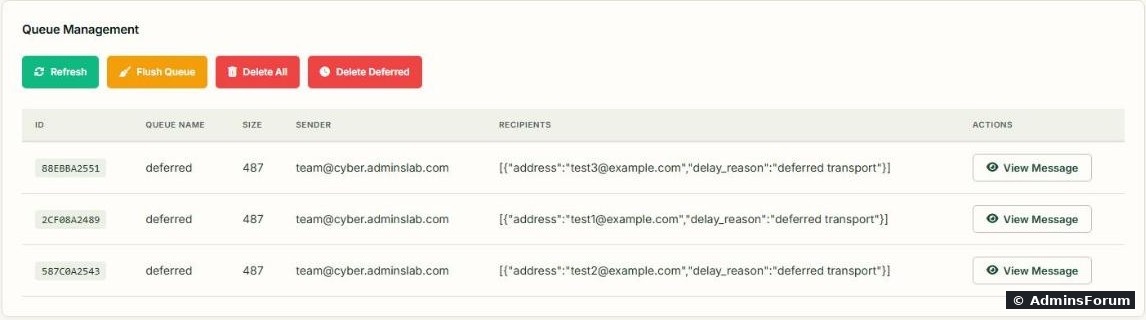
The same three messages on the Mail Queue page:
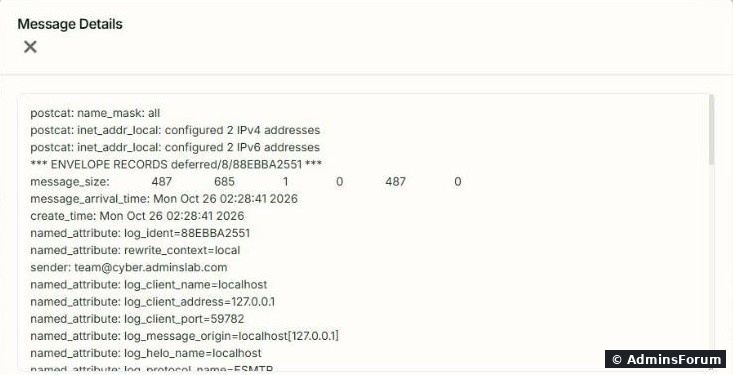
View Message opens the full queue file: envelope, sender, client, headers and body:
The buttons:.
Is a mailbox or website sending spam?
If the queue suddenly fills up, find out who is sending. This counts senders in today's log:

Ours showed our own test senders at the top. On a hacked server you see one address with hundreds or thousands of messages. Then:
Are you on a blacklist?
A blacklist (DNSBL) is a list of IPs that sent spam. You check it with a DNS lookup of your IP written backwards. We did this on the server:
No output means "not listed"... but not always.
Blacklist checks from the server itself can lie. Here is what our server returned:

To test the test, we looked up, an address every blacklist lists on purpose. SpamCop answered (listed, so the check works). Spamhaus answered NXDOMAIN, as if even its test address were clean. The reason was in : our server uses Google's public DNS (), and Spamhaus doesn't answer queries that come through big public resolvers. So an empty Spamhaus result from such a server tells you nothing.
What to do instead:
Common problems
More CyberPanel guides
Tested on CyberPanel 3.0 (build 8, OpenLiteSpeed edition) on Ubuntu 24.04, October 2026. Menu names can change slightly between versions.
"My emails aren't arriving" usually ends in one of three places: the mail is stuck in your server's queue, something on the server is sending spam, or your IP is on a blacklist. CyberPanel 3.0 has a free Mail Queue page for the first one. For the other two we used a few SSH commands. We tested all of it on our own CyberPanel server.
A quick note before you start: in the Email menu, Email Limits (per-mailbox sending limits) and Email Debugger are paid add-ons. On our free install both links opened the CyberPanel add-ons sales page instead of a settings page. Mail Queue is free and works.
What the queue is
When your server can't hand a message to the receiving server right away, Postfix keeps it in the queue and tries again for up to five days. Messages marked deferred are waiting for another try; the reason is shown next to each one. A few deferred messages are normal. Hundreds usually mean a problem.
See the queue
To have something to look at, we held outgoing mail for a minute and sent three test messages to example.com. From SSH,
Code:
postqueue -pCode:
postqueue -pCode:
(deferred transport)Code:
Connection timed outCode:
451 4.7.1 Try again laterCode:
Host not foundHow we held it, if you want to practise:
Code:
postconf -e 'defer_transports = smtp'; systemctl reload postfix
# send a few test messages to an address @example.com
postconf -X defer_transports; systemctl reload postfix
The Mail Queue page in CyberPanel
Open Email > Mail Queue (
Code:
https://YOUR-SERVER-IP:8090/emailPremium/mailQueueThe same three messages on the Mail Queue page:
View Message opens the full queue file: envelope, sender, client, headers and body:
The buttons:
- Refresh: reload the list. After a delete, the table kept showing the old rows until we clicked Refresh, although the panel said "Successfully deleted" and the queue was already empty from SSH.
- Flush Queue: try to deliver everything now (from SSH: ). Use it after you fixed the cause, for example after your provider opened port 25.Code:
postqueue -f
- Delete Deferred: removes only messages waiting for a retry (from SSH: ). We used this one; all three test messages were gone.Code:
postsuper -d ALL deferred
- Delete All: empties the whole queue, including mail that is about to go out. Only for a spam flood.
Code:
postsuper -d QUEUEIDIs a mailbox or website sending spam?
If the queue suddenly fills up, find out who is sending. This counts senders in today's log:
Code:
journalctl -t postfix/qmgr -o cat --since today | grep -o 'from=<[^>]*>' | sort | uniq -c | sort -rn | head- If it's a mailbox, its password was guessed or leaked. Change it in Email > Change Password and delete its spam from the queue.
- If it's the website user or an address like , a form or a plugin is being abused (or the site is infected). Check the site, update plugins, add a captcha to forms. See where CyberPanel keeps its logs.Code:
Are you on a blacklist?
A blacklist (DNSBL) is a list of IPs that sent spam. You check it with a DNS lookup of your IP written backwards. We did this on the server:
Code:
IP=$(hostname -I | awk '{print $1}')
REV=$(echo $IP | awk -F. '{print $4"."$3"."$2"."$1}')
dig +short $REV.zen.spamhaus.org
dig +short $REV.bl.spamcop.netBlacklist checks from the server itself can lie. Here is what our server returned:
To test the test, we looked up
Code:
127.0.0.2Code:
127.0.0.2Code:
/etc/resolv.confCode:
8.8.8.8What to do instead:
- Check your IP on the blacklist websites themselves (Spamhaus has a free IP lookup page; MXToolbox and similar tools check many lists at once).
- Always run the test first, so you know the lookup works.Code:
127.0.0.2
- If you use SpamAssassin or Rspamd to filter incoming mail, the same problem means their Spamhaus checks may silently do nothing on a server that uses public DNS.
Common problems
- Everything to Gmail/Outlook is deferred with "Connection timed out": outgoing port 25 is blocked. Test: . Ask your provider to open it.Code:
timeout 6 bash -c '</dev/tcp/gmail-smtp-in.l.google.com/25' && echo OPEN || echo BLOCKED
- Bounces you never sent fill the queue (sender , MAILER-DAEMON): spammers used your domain as the fake sender, or a catch-all accepted spam. See our catch-all notes.Code:
<>
- Mail is delivered but lands in spam: queue is fine, check SPF, DKIM and DMARC: CyberPanel email setup.
- Mail logs: there was no on our Ubuntu 24.04 server; useCode:
/var/log/mail.log.Code:journalctl -t postfix/smtp -n 50
More CyberPanel guides
- Fail2ban brute-force protection
- Change PHP version per website
- Git deployment from GitHub
- SSH key login, passwords off
- Create a website
- Issue SSL and fix failed certificates
- Subdomains, addon domains and aliases
- Rewrite rules, force HTTPS, HSTS
- Install WordPress with LiteSpeed Cache
- Cron jobs and a real WP-Cron
- Redis object cache for WordPress
- Databases and phpMyAdmin
- Email, DKIM, SPF and DMARC
- Email forwarding, catch-all, plus-addressing
- CyberPanel DNS vs Cloudflare
- Packages and website limits
- Deploy Laravel on CyberPanel
- WordPress staging (clone) fixes
- Backups: create, restore, schedule
- File Manager and FTP
- Reset the admin password from SSH
- Log files and config locations
- Check and restart services
- First steps after install
- ModSecurity + OWASP rules (fix)
- CLI cheat sheet
- Install CyberPanel on Ubuntu 24.04
- Firewall explained
- Install PHP extensions
- Change PHP settings (php.ini)
- Update CyberPanel safely
- Server Error (500) after a fresh install
- Packages, users and ACLs
- Upgrade CyberPanel safely
- Real visitor IPs behind Cloudflare
- Docker apps on your domain with SSL
- Import a large SQL file over SSH
- Remote MySQL access for one IP
- Move WordPress to CyberPanel by hand
- Fix "Error establishing a database connection"
- Fix PHP2Shell (CVE-2026-109618/109619)
- Run your own nameservers (PowerDNS)
- CyberPanel on a small VPS: RAM tuning
Tested on CyberPanel 3.0 (build 8, OpenLiteSpeed edition) on Ubuntu 24.04, October 2026. Menu names can change slightly between versions.