



How to Check, Restart and Fix CyberPanel Services (OpenLiteSpeed, MariaDB, Mail)
Most "CyberPanel is broken" moments come down to one service that stopped: the web server, the database, DNS, FTP or mail. This guide shows how to see what's running, restart the right thing, and find out why it stopped.
In the panel
Open Server > Services Status. Each service has a status, its memory use and Stop/Restart buttons:
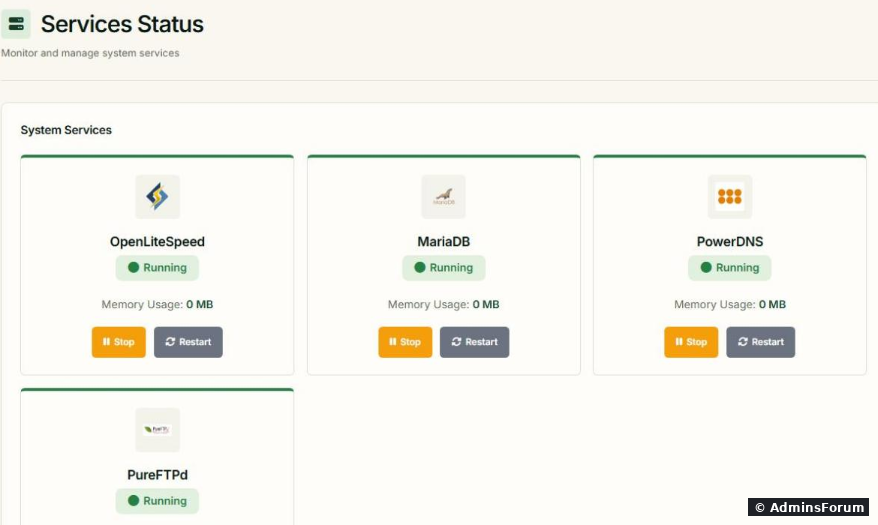
You see OpenLiteSpeed (websites), MariaDB (databases), PowerDNS (DNS zones) and PureFTPd (FTP). Green "Running" is good. If one says "Stopped", click Restart and reload the page.
The panel itself can't show you its own status: if the panel won't load, use SSH.
From SSH: what runs what
Each line says active, inactive, failed or activating/deactivating (stuck). Restart one with:
Which one to restart?, or the Restart PHP button on the PHP settings page.
Find out why it stopped
Restarting fixes the symptom. The log tells you the cause:
Replace with the service you're checking. Other useful logs:
Common reasons services stop
Stuck? Post the output of and the last 30 lines of the failing service's journal in CyberPanel Support.
More CyberPanel guides
Tested on CyberPanel 3.0 (build 8, OpenLiteSpeed edition) on Ubuntu 24.04, October 2026. Menu names can change slightly between versions.
Most "CyberPanel is broken" moments come down to one service that stopped: the web server, the database, DNS, FTP or mail. This guide shows how to see what's running, restart the right thing, and find out why it stopped.
In the panel
Open Server > Services Status. Each service has a status, its memory use and Stop/Restart buttons:
You see OpenLiteSpeed (websites), MariaDB (databases), PowerDNS (DNS zones) and PureFTPd (FTP). Green "Running" is good. If one says "Stopped", click Restart and reload the page.
The panel itself can't show you its own status: if the panel won't load, use SSH.
From SSH: what runs what
- : the CyberPanel interface on port 8090.Code:
lscpd
- : OpenLiteSpeed, which serves all your websites.Code:
lsws
- : the database for your sites and for CyberPanel itself.Code:
mariadb
- : PowerDNS.Code:
pdns
- (sending/receiving) andCode:
postfix(IMAP/POP3): mail.Code:dovecot
- : FTP (that's its name on Ubuntu).Code:
pure-ftpd-mysql
Code:
systemctl is-active lscpd lsws mariadb pdns postfix dovecot pure-ftpd-mysqlCode:
systemctl restart lswsWhich one to restart?
- Panel won't load on 8090: check first, then restartCode:
mariadb. A "Server Error (500)" usually means the database: see our Server Error (500) fix.Code:lscpd
- All websites down, panel fine: .Code:
systemctl restart lsws
- "Error establishing a database connection" on WordPress: .Code:
mariadb
- Mail not arriving or apps can't log in: andCode:
postfix.Code:dovecot
- Domain doesn't resolve (only if you host DNS here): .Code:
pdns
Code:
systemctl restart lswsFind out why it stopped
Restarting fixes the symptom. The log tells you the cause:
Code:
systemctl status mariadb --no-pager
journalctl -u mariadb -b --no-pager | tail -40Code:
mariadb- Web server: Code:
/usr/local/lsws/logs/error.log - CyberPanel: Code:
/home/cyberpanel/error-logs.txt - Mail: Code:
/var/log/mail.log
Common reasons services stop
- Out of memory: Linux kills the biggest process, often MariaDB. Check andCode:
free -h. Add swap or more RAM.Code:dmesg -T | grep -i -E 'killed process|out of memory'
- Disk full: . Old backups and logs are the usual culprits.Code:
df -h
- A config change: undo the last thing you changed.
Stuck? Post the output of
Code:
systemctl is-active lscpd lsws mariadb pdns postfix dovecotMore CyberPanel guides
- Fail2ban brute-force protection
- Change PHP version per website
- Git deployment from GitHub
- SSH key login, passwords off
- Create a website
- Issue SSL and fix failed certificates
- Subdomains, addon domains and aliases
- Rewrite rules, force HTTPS, HSTS
- Install WordPress with LiteSpeed Cache
- Cron jobs and a real WP-Cron
- Redis object cache for WordPress
- Databases and phpMyAdmin
- Email, DKIM, SPF and DMARC
- Email forwarding, catch-all, plus-addressing
- Mail queue, spam senders, blacklists
- CyberPanel DNS vs Cloudflare
- Packages and website limits
- Deploy Laravel on CyberPanel
- WordPress staging (clone) fixes
- Backups: create, restore, schedule
- File Manager and FTP
- Reset the admin password from SSH
- Log files and config locations
- First steps after install
- ModSecurity + OWASP rules (fix)
- CLI cheat sheet
- Install CyberPanel on Ubuntu 24.04
- Firewall explained
- Install PHP extensions
- Change PHP settings (php.ini)
- Update CyberPanel safely
- Server Error (500) after a fresh install
- Packages, users and ACLs
- Upgrade CyberPanel safely
- Real visitor IPs behind Cloudflare
- Docker apps on your domain with SSL
- Import a large SQL file over SSH
- Remote MySQL access for one IP
- Move WordPress to CyberPanel by hand
- Fix "Error establishing a database connection"
- Fix PHP2Shell (CVE-2026-109618/109619)
- Run your own nameservers (PowerDNS)
- CyberPanel on a small VPS: RAM tuning
Tested on CyberPanel 3.0 (build 8, OpenLiteSpeed edition) on Ubuntu 24.04, October 2026. Menu names can change slightly between versions.