



Import a Large SQL File in CyberPanel Over SSH (phpMyAdmin Stops at 2 MB)
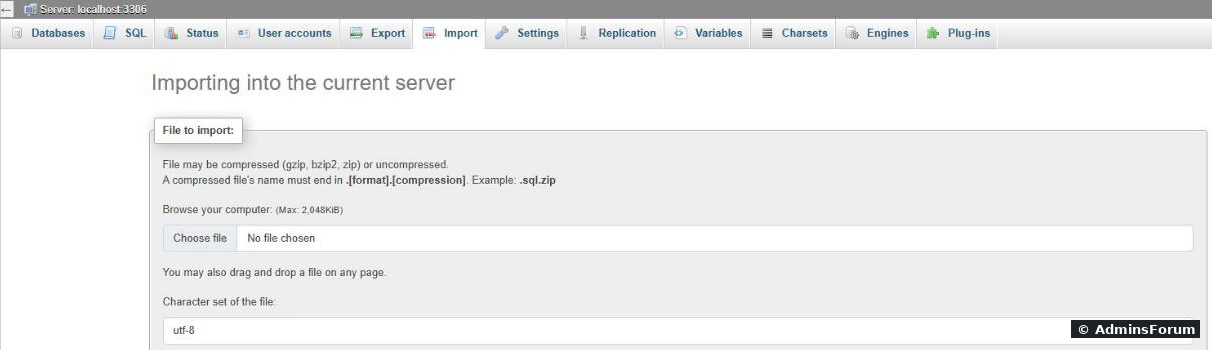
You moved a site to CyberPanel, open phpMyAdmin, click Import, and the limit next to the file field says (Max: 2,048KiB). That's 2 MB, so almost any real database is too big, even zipped. You could raise PHP's limits, but there's a faster and more reliable way: import over SSH. We tested it on our lab server (CyberPanel 3.0, MariaDB 10.11, Ubuntu 24.04) with a 241 MB dump, and on purpose ran into the five errors people hit most, with the fix for each.
phpMyAdmin's Import page on a default CyberPanel server:
Why 2 MB, and why we don't just raise it
CyberPanel's phpMyAdmin runs on the panel's own PHP, but it reads the same php.ini as your PHP 8.3 websites: on our server (, ). Raising it there raises it for every PHP 8.3 site too, and big imports through a browser still run into PHP timeouts. SSH has none of these limits.
Step 1: Create the empty database
In CyberPanel: Databases > Create Database, pick the website, enter a database name, user and password. Write down the exact database and user names as List Databases shows them, in case a prefix was added. Ours: database, user .
Step 2: Get the dump onto the server
Upload the or file over SFTP to the website's home folder (for example ), or from your PC:
Keep it compressed. Our dump was 241 MB as plain SQL and 19 MB as , and you never have to unpack it on the server. Don't leave dumps inside , where anyone could download them.
Step 3: Import
The simple way, it asks for the database user's password:
For a plain file: .
What we used, with a progress bar and the password kept out of the command line and history:
( was already installed on our server; if not: .)
Our 241 MB test import:
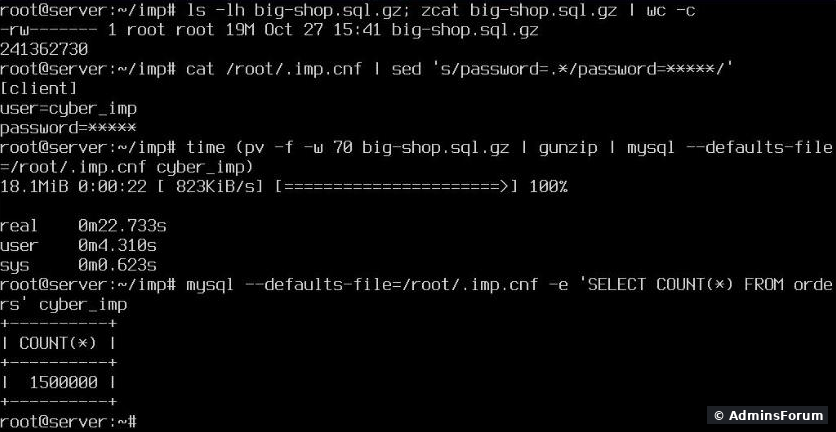
241 MB, 1.5 million rows, 23 seconds. For really big imports run it inside or , so a dropped SSH connection doesn't kill it halfway. Delete when you're done.
Why the database user and not root? Importing as the site's own user shows the problems your site would also have later (missing rights, wrong database names) and can't touch other databases by mistake. One more catch: on CyberPanel root has its own. With that file is still read and quietly logged us in as root; (as above) uses only your file.
Error 1: "ERROR 2006 (HY000): Server has gone away"
The dump contains a single row bigger than the server allows (images or files stored in the database, big serialized options). MariaDB's default is 16 MB; our test row was 20 MB. Raising the limit only on the client side did not help, the server has to allow it too:
Server has gone away, and the fix:
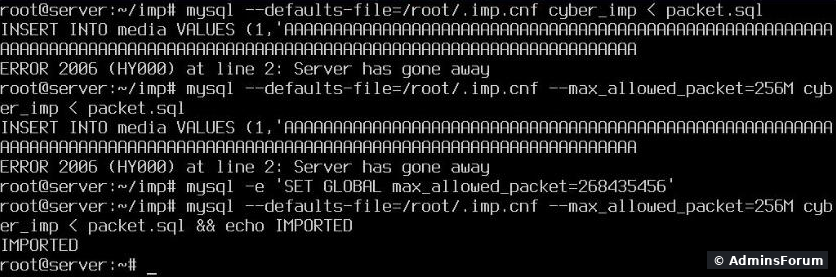
To test quickly, (256 MB) works until the next MariaDB restart. To make it permanent, add a small config file and restart:
Keep on the import command as well, because the client has its own limit.
Error 2: "Unknown collation: utf8mb4_0900_ai_ci"
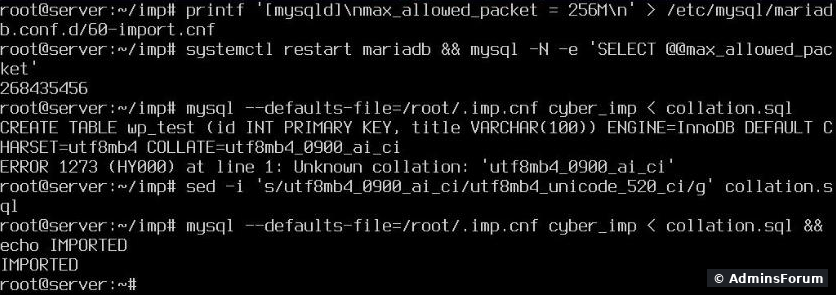
The dump comes from MySQL 8, CyberPanel runs MariaDB. Our MariaDB 10.11.19 didn't know MySQL 8's default collation. Replace it with one MariaDB has, in the file, before importing:
For a : Making it permanent, then the collation error and its fix:
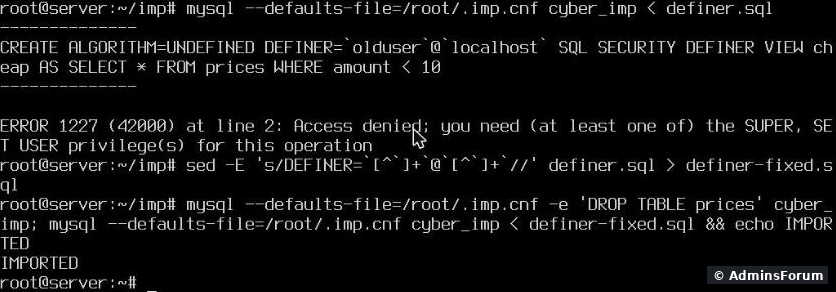
Error 3: "Access denied; you need (at least one of) the SUPER, SET USER privilege(s)"
The dump has views, triggers or procedures with, a user from the old server. Only root may create objects for another user. Remove the DEFINER parts; the objects then belong to the user who imports them:
The DEFINER error and the fix:
Error 4: "Access denied for user ... to database 'oldshop'"
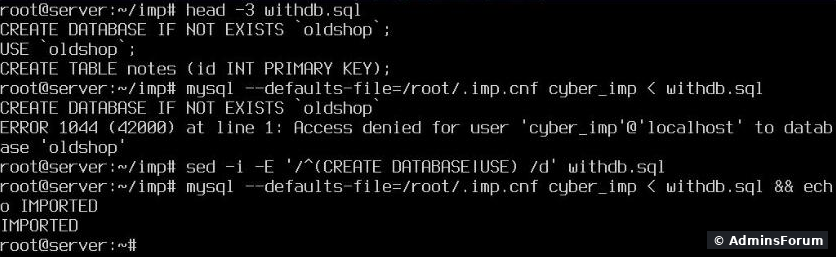
Some dumps start with and . Then the import tries to create or switch to the old database name, and your CyberPanel user isn't allowed there. Check the top of the file with , then delete those lines:
A dump with its own CREATE DATABASE and USE lines:
Error 5: "Table ... already exists"
A failed import stops halfway and leaves the tables it already created. Run it again and it fails on the first one. Start over with an empty database: drop and re-create it in Databases, or drop the leftover tables in phpMyAdmin, then import again.
After the import
More CyberPanel guides
You moved a site to CyberPanel, open phpMyAdmin, click Import, and the limit next to the file field says (Max: 2,048KiB). That's 2 MB, so almost any real database is too big, even zipped. You could raise PHP's limits, but there's a faster and more reliable way: import over SSH. We tested it on our lab server (CyberPanel 3.0, MariaDB 10.11, Ubuntu 24.04) with a 241 MB dump, and on purpose ran into the five errors people hit most, with the fix for each.
phpMyAdmin's Import page on a default CyberPanel server:
Why 2 MB, and why we don't just raise it
CyberPanel's phpMyAdmin runs on the panel's own PHP, but it reads the same php.ini as your PHP 8.3 websites:
Code:
/usr/local/lsws/lsphp83/etc/php/8.3/litespeed/php.iniCode:
upload_max_filesize = 2MCode:
post_max_size = 8MStep 1: Create the empty database
In CyberPanel: Databases > Create Database, pick the website, enter a database name, user and password. Write down the exact database and user names as List Databases shows them, in case a prefix was added. Ours: database
Code:
cyber_impCode:
cyber_impStep 2: Get the dump onto the server
Upload the
Code:
.sqlCode:
.sql.gzCode:
/home/example.com/Code:
scp shop.sql.gz root@YOUR-SERVER-IP:/root/imp/Code:
.gzCode:
public_htmlStep 3: Import
The simple way, it asks for the database user's password:
Code:
gunzip < shop.sql.gz | mysql -u cyber_imp -p cyber_impCode:
.sqlCode:
mysql -u cyber_imp -p cyber_imp < shop.sqlWhat we used, with a progress bar and the password kept out of the command line and history:
Code:
printf '[client]\nuser=cyber_imp\npassword=YOUR-DB-PASSWORD\n' > /root/.imp.cnf
chmod 600 /root/.imp.cnf
pv shop.sql.gz | gunzip | mysql --defaults-file=/root/.imp.cnf cyber_impCode:
pvCode:
apt install pvOur 241 MB test import:
241 MB, 1.5 million rows, 23 seconds. For really big imports run it inside
Code:
screenCode:
tmuxCode:
/root/.imp.cnfWhy the database user and not root? Importing as the site's own user shows the problems your site would also have later (missing rights, wrong database names) and can't touch other databases by mistake. One more catch: on CyberPanel root has its own
Code:
/root/.my.cnfCode:
--defaults-extra-fileCode:
--defaults-fileError 1: "ERROR 2006 (HY000): Server has gone away"
The dump contains a single row bigger than the server allows (images or files stored in the database, big serialized options). MariaDB's default
Code:
max_allowed_packetServer has gone away, and the fix:
To test quickly,
Code:
SET GLOBAL max_allowed_packet=268435456Code:
printf '[mysqld]\nmax_allowed_packet = 256M\n' > /etc/mysql/mariadb.conf.d/60-import.cnf
systemctl restart mariadb
mysql -N -e 'SELECT @@max_allowed_packet'Code:
--max_allowed_packet=256MCode:
mysqlError 2: "Unknown collation: utf8mb4_0900_ai_ci"
The dump comes from MySQL 8, CyberPanel runs MariaDB. Our MariaDB 10.11.19 didn't know MySQL 8's default collation. Replace it with one MariaDB has, in the file, before importing:
Code:
sed -i 's/utf8mb4_0900_ai_ci/utf8mb4_unicode_520_ci/g' shop.sqlCode:
.gzCode:
gunzip < shop.sql.gz | sed 's/utf8mb4_0900_ai_ci/utf8mb4_unicode_520_ci/g' | mysql ...Error 3: "Access denied; you need (at least one of) the SUPER, SET USER privilege(s)"
The dump has views, triggers or procedures with
Code:
DEFINER=`olduser`@`localhost`Code:
sed -E 's/DEFINER=`[^`]+`@`[^`]+`//g' shop.sql > shop-fixed.sqlError 4: "Access denied for user ... to database 'oldshop'"
Some dumps start with
Code:
CREATE DATABASECode:
USE `oldshop`Code:
headCode:
sed -i -E '/^(CREATE DATABASE|USE) /d' shop.sqlError 5: "Table ... already exists"
A failed import stops halfway and leaves the tables it already created. Run it again and it fails on the first one. Start over with an empty database: drop and re-create it in Databases, or drop the leftover tables in phpMyAdmin, then import again.
After the import
- Count rows in a big table and compare with the old server: Code:
mysql -u USER -p -e 'SELECT COUNT(*) FROM wp_posts' DBNAME - Put the new database name, user and password in your app's config (,Code:
wp-config.php).Code:.env
- Delete the dump and from the server.Code:
/root/.imp.cnf
- If you added only for this import, you can keep it: 256 MB is a normal value. Delete it and restart MariaDB if you prefer the default.Code:
60-import.cnf
More CyberPanel guides
- Fail2ban brute-force protection
- Change PHP version per website
- Git deployment from GitHub
- SSH key login, passwords off
- Create a website
- Issue SSL and fix failed certificates
- Subdomains, addon domains and aliases
- Rewrite rules, force HTTPS, HSTS
- Install WordPress with LiteSpeed Cache
- Cron jobs and a real WP-Cron
- Redis object cache for WordPress
- Databases and phpMyAdmin
- Email, DKIM, SPF and DMARC
- Email forwarding, catch-all, plus-addressing
- Mail queue, spam senders, blacklists
- CyberPanel DNS vs Cloudflare
- Packages and website limits
- Deploy Laravel on CyberPanel
- WordPress staging (clone) fixes
- Backups: create, restore, schedule
- File Manager and FTP
- Reset the admin password from SSH
- Log files and config locations
- Check and restart services
- First steps after install
- ModSecurity + OWASP rules (fix)
- CLI cheat sheet
- Install CyberPanel on Ubuntu 24.04
- Firewall explained
- Install PHP extensions
- Change PHP settings (php.ini)
- Update CyberPanel safely
- Server Error (500) after a fresh install
- Packages, users and ACLs
- Upgrade CyberPanel safely
- Real visitor IPs behind Cloudflare
- Docker apps on your domain with SSL
- Remote MySQL access for one IP
- Move WordPress to CyberPanel by hand
- Fix "Error establishing a database connection"
- Fix PHP2Shell (CVE-2026-109618/109619)
- Run your own nameservers (PowerDNS)
- CyberPanel on a small VPS: RAM tuning