



Fix "Error Establishing a Database Connection" in WordPress on CyberPanel
The page is white with one sentence: Error establishing a database connection. WordPress shows the same message for half a dozen different problems, so guessing wastes time. We broke a test WordPress site on CyberPanel (3.0, OpenLiteSpeed, MariaDB 10.11) on purpose, in every common way, and noted the exact error behind each one. With one command you can see which one you have.
Step 1: Get the real error
Log in with SSH and go to the site's folder (the one with). Run WP-CLI as the website's user (find it with ):
It uses the same settings as the website, but prints the real database error:
WordPress hides the reason, WP-CLI tells you:
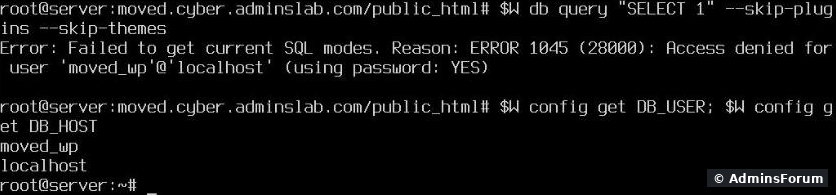
Here:, a wrong password. Find your error in the list below. To see what the site uses:
Watch out, the homepage can look fine. With LiteSpeed Cache, the homepage still loaded from the cache (, status 200) while and every page not in the cache showed the error. So test , not only the homepage:
Homepage fine, login page broken:
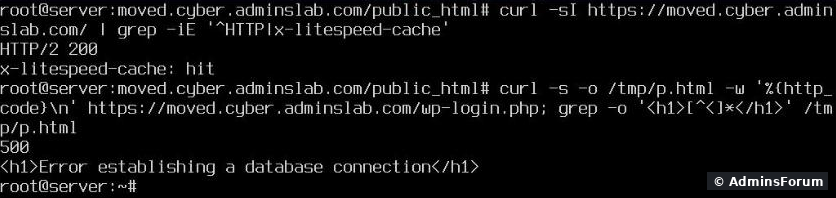
ERROR 1045: Access denied ... (using password: YES)
The password in doesn't match the database user's. On CyberPanel the usual reason: someone changed it in Databases > List Databases > Change. That changes the password in MariaDB only; still has the old one. We changed the user's password directly in MariaDB, which is what that button does, and got exactly this error. Fix: put the current password in :
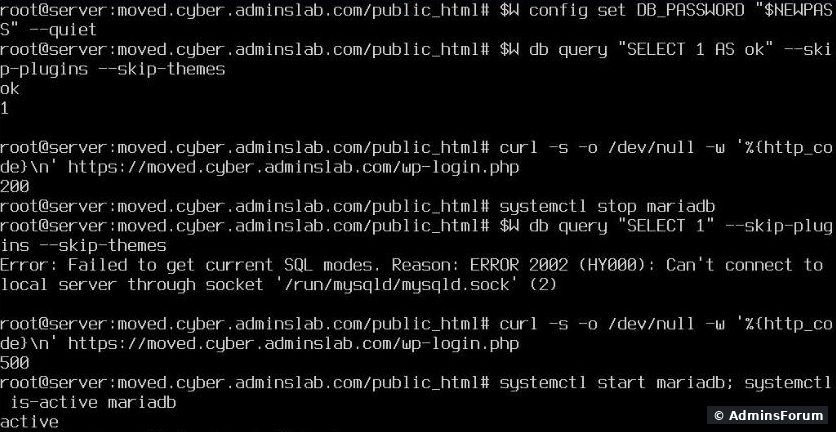
Don't know it? Set a new one in List Databases > Change, then the same command. Right after that our test query answered and the login page loaded again (screenshot below).
ERROR 2002: Can't connect to local server through socket
MariaDB isn't running, so every site on the server that uses a database is down at once. We stopped MariaDB for this test:
Password fixed, then MariaDB stopped:
Then find out why it stopped, or it will happen again:
On small VPSes the most common reason is RAM: the kernel kills the biggest process (MariaDB) when memory runs out. Add swap or more RAM, or lower MariaDB's . A full disk () also stops MariaDB.
ERROR 1044: Access denied for user ... to database '...'
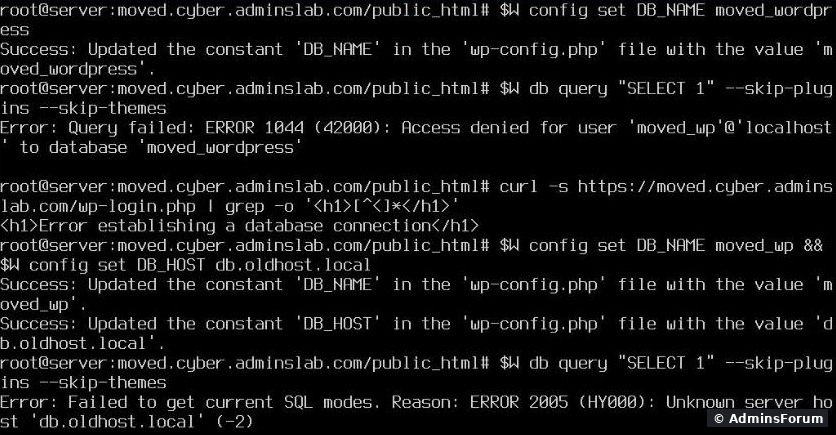
The user and password are right, but is wrong, or this user has no rights on that database. Common after a migration, when the database got a different name on the new server. Check the exact names in Databases > List Databases and set the right one:
ERROR 2005: Unknown server host '...'
still has the old host's database server (some hosts use names like or an internal IP). On CyberPanel the database runs on the same server:
Both errors in our test:
Wrong database name, then a wrong host:
is right for CyberPanel (, which our older site used, works too). CyberPanel creates every database user for both and .
Still broken?
Quick reference
More CyberPanel guides
The page is white with one sentence: Error establishing a database connection. WordPress shows the same message for half a dozen different problems, so guessing wastes time. We broke a test WordPress site on CyberPanel (3.0, OpenLiteSpeed, MariaDB 10.11) on purpose, in every common way, and noted the exact error behind each one. With one command you can see which one you have.
Step 1: Get the real error
Log in with SSH and go to the site's folder (the one with
Code:
wp-config.phpCode:
grep extUser /usr/local/lsws/conf/vhosts/DOMAIN/vhost.confCode:
cd /home/example.com/public_html
sudo -u SITEUSER -H wp db query "SELECT 1" --skip-plugins --skip-themesWordPress hides the reason, WP-CLI tells you:
Here:
Code:
ERROR 1045 ... Access denied for user 'moved_wp'@'localhost' (using password: YES)Code:
sudo -u SITEUSER -H wp config get DB_NAME
sudo -u SITEUSER -H wp config get DB_USER
sudo -u SITEUSER -H wp config get DB_HOST
Watch out, the homepage can look fine. With LiteSpeed Cache, the homepage still loaded from the cache (
Code:
x-litespeed-cache: hitCode:
wp-login.phpCode:
/wp-login.phpHomepage fine, login page broken:
ERROR 1045: Access denied ... (using password: YES)
The password in
Code:
wp-config.phpCode:
wp-config.phpCode:
wp-config.phpCode:
sudo -u SITEUSER -H wp config set DB_PASSWORD 'THE-PASSWORD' --quietCode:
1ERROR 2002: Can't connect to local server through socket
MariaDB isn't running, so every site on the server that uses a database is down at once. We stopped MariaDB for this test:
Password fixed, then MariaDB stopped:
Code:
systemctl start mariadb
systemctl status mariadbCode:
journalctl -u mariadb -n 50
dmesg -T | grep -iE 'out of memory|killed process'Code:
innodb_buffer_pool_sizeCode:
df -hERROR 1044: Access denied for user ... to database '...'
The user and password are right, but
Code:
DB_NAMECode:
sudo -u SITEUSER -H wp config set DB_NAME the_real_nameERROR 2005: Unknown server host '...'
Code:
DB_HOSTCode:
mysql.example.comCode:
sudo -u SITEUSER -H wp config set DB_HOST localhostWrong database name, then a wrong host:
Code:
localhostCode:
localhost:3306Code:
localhostCode:
127.0.0.1Still broken?
- Query works in WP-CLI, website still shows the error: purge the cache () and test again. Also check for a secondCode:
sudo -u SITEUSER -H wp litespeed-purge allone folder aboveCode:wp-config.php; WordPress reads that one if the first is missing.Code:public_html
- "Too many connections": a plugin or a bot flood uses up all connections; check with .Code:
mysqladmin -u root -p processlist
- "Table ... is marked as crashed" (MyISAM after a crash): .Code:
sudo -u SITEUSER -H wp db repair
Quick reference
- 1045, access denied (using password: YES): wrong password, set .Code:
DB_PASSWORD
- 2002, can't connect through socket: MariaDB down, start it and find out why.
- 1044, access denied to database: wrong or no rights.Code:
DB_NAME
- 2005, unknown server host: wrong , useCode:
DB_HOST.Code:localhost
More CyberPanel guides
- Fail2ban brute-force protection
- Change PHP version per website
- Git deployment from GitHub
- SSH key login, passwords off
- Create a website
- Issue SSL and fix failed certificates
- Subdomains, addon domains and aliases
- Rewrite rules, force HTTPS, HSTS
- Install WordPress with LiteSpeed Cache
- Cron jobs and a real WP-Cron
- Redis object cache for WordPress
- Databases and phpMyAdmin
- Email, DKIM, SPF and DMARC
- Email forwarding, catch-all, plus-addressing
- Mail queue, spam senders, blacklists
- CyberPanel DNS vs Cloudflare
- Packages and website limits
- Deploy Laravel on CyberPanel
- WordPress staging (clone) fixes
- Backups: create, restore, schedule
- File Manager and FTP
- Reset the admin password from SSH
- Log files and config locations
- Check and restart services
- First steps after install
- ModSecurity + OWASP rules (fix)
- CLI cheat sheet
- Install CyberPanel on Ubuntu 24.04
- Firewall explained
- Install PHP extensions
- Change PHP settings (php.ini)
- Update CyberPanel safely
- Server Error (500) after a fresh install
- Packages, users and ACLs
- Upgrade CyberPanel safely
- Real visitor IPs behind Cloudflare
- Docker apps on your domain with SSL
- Import a large SQL file over SSH
- Remote MySQL access for one IP
- Move WordPress to CyberPanel by hand
- Fix PHP2Shell (CVE-2026-109618/109619)
- Run your own nameservers (PowerDNS)
- CyberPanel on a small VPS: RAM tuning