



CyberPanel WordPress Staging (Clone): Why It Came Out Empty and How We Fixed It
A staging site is a private copy of your live WordPress where you can test updates, a new theme or a plugin before touching the real site. CyberPanel has a one-click Clone/Staging button for this. We used it on our test WordPress () and it took two tries and a few fixes to get a staging copy you can actually trust. Here is all of it.
Before you start
Step 1: Make sure /usr/bin/wp exists
CyberPanel's staging code calls WP-CLI at the fixed path. Many people (and the official WP-CLI install steps) put it in instead, which is what we did in our WordPress install guide. Check:
Ours said . The staging code first checks that works (it does, through your PATH), so it doesn't install its own copy, and then every later command fails quietly. Fix it with a link:
Step 2: Start the clone
Open your website in Websites > List Websites > Manage and click Clone/Staging. The page asks for one thing, the staging domain:
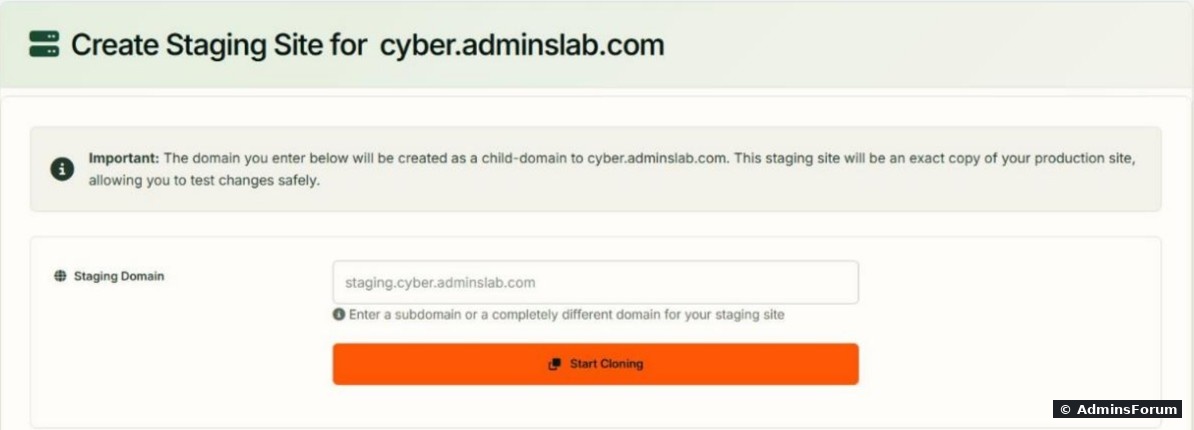
The staging site is created as a child domain of the live site, in its own folder () with its own new database. Type the name and click Start Cloning. The progress bar shows "Creating domain", "Creating and copying database", "Fixing permissions" and so on.
A minute later the panel reported success. On our first try, that message was wrong:
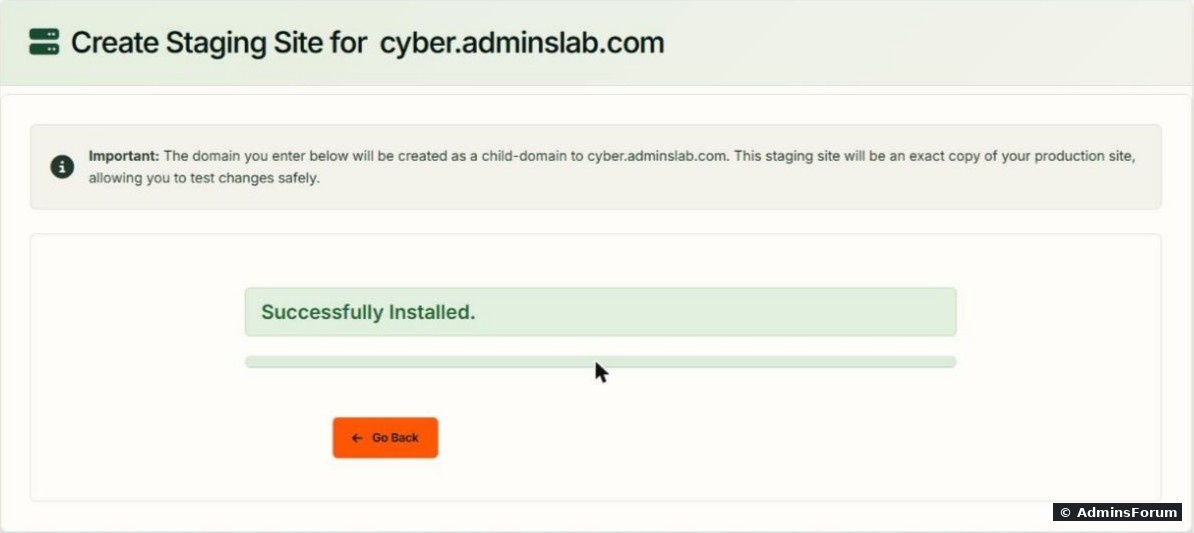
Our first run (before Step 1): "Successfully Installed", but the staging folder held only CyberPanel's, 8 KB in total. No WordPress, no database copy. The only clue in was the SSL step. Always check after a clone:
To retry, remove the empty child domain and its folder first. From SSH:
Second run (after Step 1): the folder had the full site (120 MB) and pointed to a new database. That's when we found the next problems.
Step 3: Fix the four leftovers
Run these as the site user from the staging folder. Ours:
1. Stale object cache: WordPress still thinks it's the live site.
returned , the live address. But the staging database itself already had the staging address:
returned for both. The difference came from the Redis object cache: the clone copied the live site's LiteSpeed Cache settings, including Redis database 2, and most likely the staging copy cached its options while they still held the live URL, before CyberPanel replaced them. Give the staging site its own Redis database and flush it:
After that, matched the database. (Don't flush while staging still uses the live site's database number: empties the whole Redis database, live cache included. See Redis object cache on CyberPanel.)
2. http instead of https. The staging database had although CyberPanel had issued SSL. Replace it everywhere:
WP-CLI made 9 replacements.
3. Google can index your staging site. was (copied from live). Turn on "Discourage search engines":
After purging LiteSpeed Cache () the staging pages carried . For a real lock, also password-protect the staging site.
4. CyberPanel's index.html. The staging folder still had the "CyberPanel Installed" next to WordPress's . Delete it: .
After these fixes, the staging copy was correct:
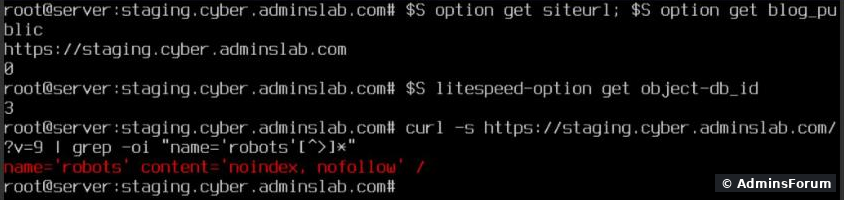
Staging now answered with its own https address,, its own Redis database (). The live site was untouched: , .
Things to know
More CyberPanel guides
Tested on CyberPanel 3.0 (build 8, OpenLiteSpeed edition) on Ubuntu 24.04, October 2026. Menu names can change slightly between versions.
A staging site is a private copy of your live WordPress where you can test updates, a new theme or a plugin before touching the real site. CyberPanel has a one-click Clone/Staging button for this. We used it on our test WordPress (
Code:
cyber.adminslab.comBefore you start
- Create a DNS A record for the staging name (ours: , at Cloudflare, DNS only) so CyberPanel can issue SSL for it.Code:
staging.cyber.adminslab.com
- Run the check in Step 1 first. It decides whether your clone works at all.
Step 1: Make sure /usr/bin/wp exists
CyberPanel's staging code calls WP-CLI at the fixed path
Code:
/usr/bin/wpCode:
/usr/local/bin/wpCode:
ls -l /usr/bin/wp /usr/local/bin/wpCode:
ls: cannot access '/usr/bin/wp': No such file or directoryCode:
wpCode:
ln -s /usr/local/bin/wp /usr/bin/wpStep 2: Start the clone
Open your website in Websites > List Websites > Manage and click Clone/Staging. The page asks for one thing, the staging domain:
The staging site is created as a child domain of the live site, in its own folder (
Code:
/home/cyber.adminslab.com/staging.cyber.adminslab.comA minute later the panel reported success. On our first try, that message was wrong:
Our first run (before Step 1): "Successfully Installed", but the staging folder held only CyberPanel's
Code:
index.htmlCode:
/home/cyberpanel/error-logs.txtCode:
du -sh /home/yourdomain.com/staging.yourdomain.com
ls /home/yourdomain.com/staging.yourdomain.comCode:
cyberpanel deleteChild --childDomain staging.yourdomain.com
rm -r /home/yourdomain.com/staging.yourdomain.comCode:
wp-config.phpStep 3: Fix the four leftovers
Run these as the site user from the staging folder. Ours:
Code:
cd /home/cyber.adminslab.com/staging.cyber.adminslab.com
S='sudo -u cyber2602 wp'
1. Stale object cache: WordPress still thinks it's the live site.
Code:
$S option get siteurlCode:
https://cyber.adminslab.comCode:
$S db query "SELECT option_name,option_value FROM wp_options WHERE option_name IN ('siteurl','home')"Code:
http://staging.cyber.adminslab.comCode:
$S litespeed-option set object-db_id 3
$S cache flushCode:
option get siteurlCode:
wp cache flush2. http instead of https. The staging database had
Code:
http://staging...Code:
$S search-replace 'http://staging.cyber.adminslab.com' 'https://staging.cyber.adminslab.com' --all-tables --report-changed-only3. Google can index your staging site.
Code:
blog_publicCode:
1Code:
$S option update blog_public 0Code:
$S litespeed-purge allCode:
<meta name='robots' content='noindex, nofollow'>4. CyberPanel's index.html. The staging folder still had the "CyberPanel Installed"
Code:
index.htmlCode:
index.phpCode:
rm index.htmlAfter these fixes, the staging copy was correct:
Staging now answered with its own https address,
Code:
blog_public 0Code:
3Code:
https://cyber.adminslab.comCode:
blog_public 1Things to know
- Same Linux user. Staging runs as the live site's user and counts toward the same package limits (a domain, a database). See packages and limits.
- No automatic push back. Changes you make on staging stay there. Copy them to live yourself (or redo them on live once they work).
- Cron. Our live site had WP-Cron disabled and a real cron job (cron guide); the staging was rebuilt withoutCode:
wp-config.php, so staging uses normal WP-Cron. That's fine for testing.Code:DISABLE_WP_CRON
- Emails. A staging copy can send real emails (order mails, newsletters). Disable mail plugins or use an SMTP catcher on staging.
- Delete it when done. , then remove the folder and the staging database.Code:
cyberpanel deleteChild --childDomain staging.yourdomain.com
More CyberPanel guides
- Fail2ban brute-force protection
- Change PHP version per website
- Git deployment from GitHub
- SSH key login, passwords off
- Create a website
- Issue SSL and fix failed certificates
- Subdomains, addon domains and aliases
- Rewrite rules, force HTTPS, HSTS
- Install WordPress with LiteSpeed Cache
- Cron jobs and a real WP-Cron
- Redis object cache for WordPress
- Databases and phpMyAdmin
- Email, DKIM, SPF and DMARC
- Email forwarding, catch-all, plus-addressing
- Mail queue, spam senders, blacklists
- CyberPanel DNS vs Cloudflare
- Packages and website limits
- Deploy Laravel on CyberPanel
- Backups: create, restore, schedule
- File Manager and FTP
- Reset the admin password from SSH
- Log files and config locations
- Check and restart services
- First steps after install
- ModSecurity + OWASP rules (fix)
- CLI cheat sheet
- Install CyberPanel on Ubuntu 24.04
- Firewall explained
- Install PHP extensions
- Change PHP settings (php.ini)
- Update CyberPanel safely
- Server Error (500) after a fresh install
- Packages, users and ACLs
- Upgrade CyberPanel safely
- Real visitor IPs behind Cloudflare
- Docker apps on your domain with SSL
- Import a large SQL file over SSH
- Remote MySQL access for one IP
- Move WordPress to CyberPanel by hand
- Fix "Error establishing a database connection"
- Fix PHP2Shell (CVE-2026-109618/109619)
- Run your own nameservers (PowerDNS)
- CyberPanel on a small VPS: RAM tuning
Tested on CyberPanel 3.0 (build 8, OpenLiteSpeed edition) on Ubuntu 24.04, October 2026. Menu names can change slightly between versions.