



CyberPanel Packages, Users and ACLs: Set Limits Before You Create Websites
Every website in CyberPanel belongs to a package (its limits) and an owner (a user). Get these right before you create sites, because the defaults catch a lot of people out.
The Default package is tiny
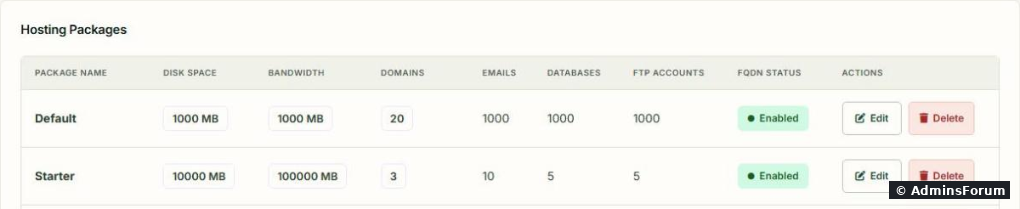
Open Users & Plans > Packages. A fresh install has one package, Default, and its limits are small. Here it is next to two packages we added ourselves, Starter and Business (where 0 shows as Unlimited):
Step 1: Create a package
Users & Plans > Create Package:
From SSH it's one line (we tested this on our server):
More commands in the CyberPanel CLI cheat sheet.
Step 2: Users (only if others will log in)
If you're the only one using the panel, the admin user can own all sites and you can skip this. For clients or team members, Users & Plans > Create User:
Step 3: Custom ACLs (fine-tuned permissions)
The built-in user ACL is fine for most clients. If you need something in between, Users & Plans > Create ACL gives you checkboxes per area: Version Management, User Management, Website Management (create, modify, suspend, delete), Package Management, Database Management, DNS Management, Email Management and FTP Management. Example: a "developer" ACL that can manage databases and FTP but can't delete websites.
Change things later
Good defaults for a personal server
One package called Unlimited with 0 for domains, disk and bandwidth, and generous numbers for the rest. Admin owns everything. You don't need resellers or custom ACLs until someone else logs in.
More CyberPanel guides
Tested on CyberPanel 3.0 (build 8, OpenLiteSpeed edition) on Ubuntu 24.04, October 2026. Menu names can change slightly between versions.
Every website in CyberPanel belongs to a package (its limits) and an owner (a user). Get these right before you create sites, because the defaults catch a lot of people out.
The Default package is tiny
Open Users & Plans > Packages. A fresh install has one package, Default, and its limits are small. Here it is next to two packages we added ourselves, Starter and Business (where 0 shows as Unlimited):
- Disk Space 1000 MB and Bandwidth 1000 MB per month.
- 20 domains, and 1000 emails, databases and FTP accounts.
Step 1: Create a package
Users & Plans > Create Package:
- Package Name: the form pre-fills (the owner's name) in front, so typing "Starter" gives admin_Starter. Packages made from the command line keep the exact name you give.Code:
admin_
- Domains, Disk Space (MB), Bandwidth (MB): 0 means unlimited for these three. For your own server, unlimited is fine. For clients, set real numbers.
- FTP Accounts, Databases, Email Accounts: how many of each.
- Allow Fully Qualified Domains: lets child domains be full domain names, not just subdomains.
- Enforce Disk Limits: actually stop sites at the disk limit, instead of just showing it.
From SSH it's one line (we tested this on our server):
Code:
cyberpanel createPackage --owner admin --packageName Starter --diskSpace 10000 --bandwidth 100000 --emailAccounts 10 --dataBases 5 --ftpAccounts 5 --allowedDomains 3Step 2: Users (only if others will log in)
If you're the only one using the panel, the admin user can own all sites and you can skip this. For clients or team members, Users & Plans > Create User:
- First Name / Last Name: letters only, and together at most 20 characters.
- Access Control List (ACL): admin (everything), reseller (can create their own users and sites) or user (manages only their own sites).
- Websites Limit: how many sites this user may create.
- Username, Password (Generate gives a strong one) and Security Level (HIGH binds the session to the user's IP).
Step 3: Custom ACLs (fine-tuned permissions)
The built-in user ACL is fine for most clients. If you need something in between, Users & Plans > Create ACL gives you checkboxes per area: Version Management, User Management, Website Management (create, modify, suspend, delete), Package Management, Database Management, DNS Management, Email Management and FTP Management. Example: a "developer" ACL that can manage databases and FTP but can't delete websites.
Change things later
- Modify Package changes limits for every site on that package.
- Move one site to another package: Code:
cyberpanel changePackage --domainName example.com --packageName Starter - Modify User changes a user's details, password, ACL and 2FA. See first steps after install for securing the admin account.
- Suspend a user (and all their sites) without deleting anything: (Code:
cyberpanel suspendUser --userName jane --state SUSPENDundoes it)Code:--state UnSuspend
Good defaults for a personal server
One package called Unlimited with 0 for domains, disk and bandwidth, and generous numbers for the rest. Admin owns everything. You don't need resellers or custom ACLs until someone else logs in.
More CyberPanel guides
- Fail2ban brute-force protection
- Change PHP version per website
- Git deployment from GitHub
- SSH key login, passwords off
- Create a website
- Issue SSL and fix failed certificates
- Subdomains, addon domains and aliases
- Rewrite rules, force HTTPS, HSTS
- Install WordPress with LiteSpeed Cache
- Cron jobs and a real WP-Cron
- Redis object cache for WordPress
- Databases and phpMyAdmin
- Email, DKIM, SPF and DMARC
- Email forwarding, catch-all, plus-addressing
- Mail queue, spam senders, blacklists
- CyberPanel DNS vs Cloudflare
- Packages and website limits
- Deploy Laravel on CyberPanel
- WordPress staging (clone) fixes
- Backups: create, restore, schedule
- File Manager and FTP
- Reset the admin password from SSH
- Log files and config locations
- Check and restart services
- First steps after install
- ModSecurity + OWASP rules (fix)
- CLI cheat sheet
- Install CyberPanel on Ubuntu 24.04
- Firewall explained
- Install PHP extensions
- Change PHP settings (php.ini)
- Update CyberPanel safely
- Server Error (500) after a fresh install
- Upgrade CyberPanel safely
- Real visitor IPs behind Cloudflare
- Docker apps on your domain with SSL
- Import a large SQL file over SSH
- Remote MySQL access for one IP
- Move WordPress to CyberPanel by hand
- Fix "Error establishing a database connection"
- Fix PHP2Shell (CVE-2026-109618/109619)
- Run your own nameservers (PowerDNS)
- CyberPanel on a small VPS: RAM tuning
Tested on CyberPanel 3.0 (build 8, OpenLiteSpeed edition) on Ubuntu 24.04, October 2026. Menu names can change slightly between versions.