



CyberPanel ModSecurity + OWASP Rules: It Said Enabled, but Blocked Nothing
CyberPanel 3.0 has a one-click ModSecurity web application firewall (WAF) with the OWASP Core Rule Set. On our test server both switches turned green, the panel said "Operation successful", and SQL injection, XSS and path traversal requests still went straight through to WordPress. The module wasn't even loading. Here is how to test your WAF properly, what was broken, and the fix that made it block attacks.
If you came here looking for CSF: CyberPanel 3.0 doesn't offer it any more. The old page returned "Not Found" on our server, and the Security menu only lists the built-in Firewall, ModSecurity and the Imunify add-ons. See the CyberPanel firewall guide for ports and rules.
Step 1: Test before you change anything
A WAF you haven't tested is a guess. We used a tiny shell function that prints the HTTP status for a request against our WordPress site:
These are harmless test strings; WordPress ignores them. Without a WAF, all three come back 200:
Use a new parameter name or value for each test run (we used, then , , ...). LiteSpeed Cache can store the first answer for a URL and serve it again later, which hides whether the WAF changed anything.
Step 2: Install ModSecurity in the panel
Open Security > ModSecurity ():
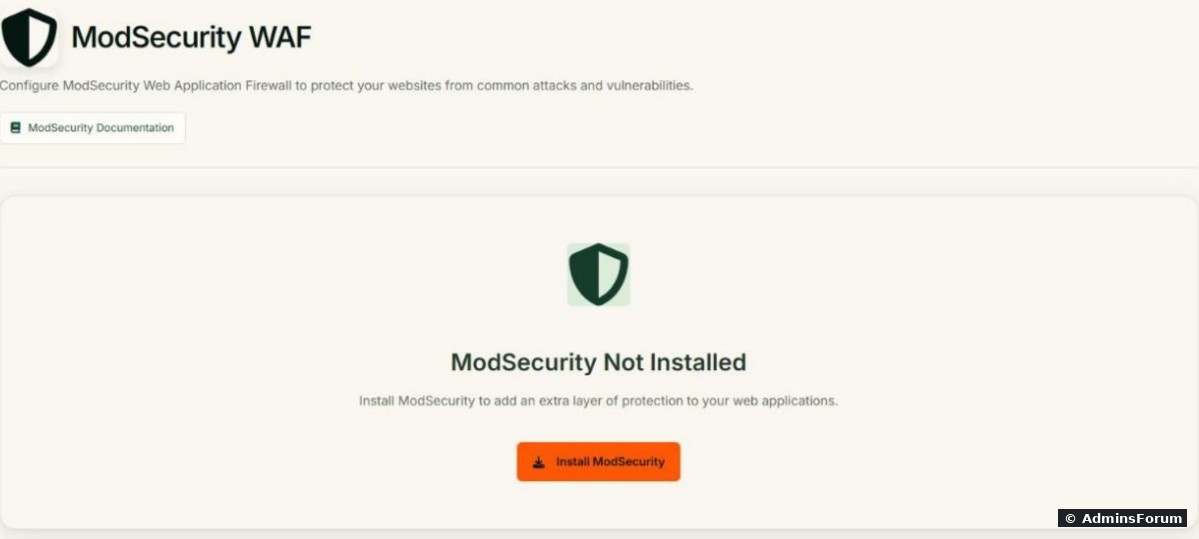
Click Install ModSecurity. After a few seconds the configuration page appeared with the engine, audit log and rule engine all switched on:
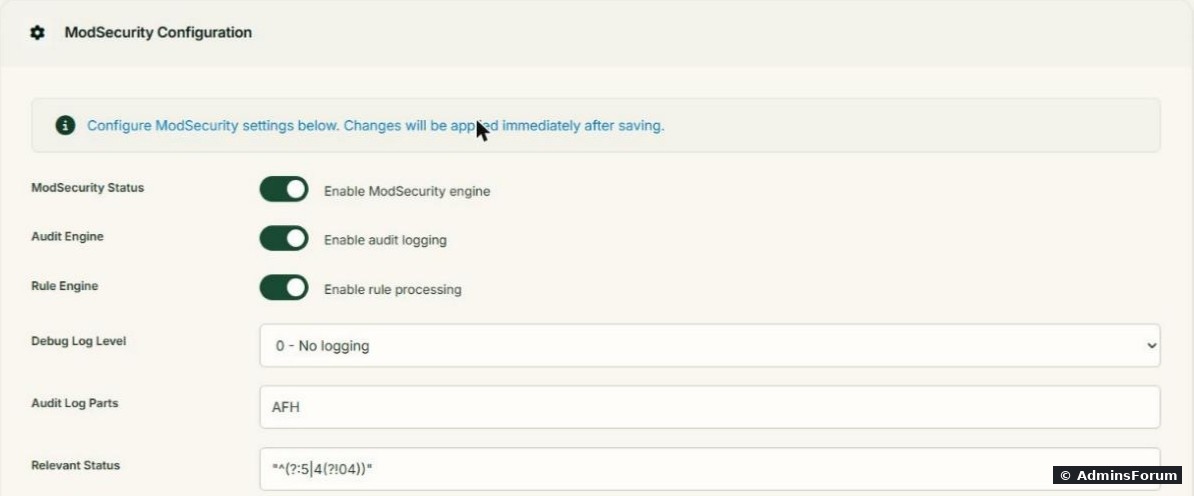
Step 3: Turn on the OWASP rules
Open Security > Rule Packs () and switch on OWASP ModSecurity Core Rules. Our panel showed only this one pack and answered "Operation successful". It downloaded the rules to and added them to the OpenLiteSpeed config. Note the version: CRS 3.0, a very old release of the rule set.
Then we ran the tests again. Still 200, 200, 200. Nothing was blocked.
Step 4: Check whether the module actually loads
The panel can't tell you this. The web server's error log can:
OpenLiteSpeed started without ModSecurity, quietly, while the panel showed it as enabled. A missing library, so we installed it:
The next error:
This one isn't a missing package ( was installed). The that CyberPanel had put in place (57 MB, dated November 2025) didn't fit this system. Next to it, CyberPanel had kept the module that came with OpenLiteSpeed as (83 MB). We kept a copy of CyberPanel's file and put the original back:
(If you have more than one backup file, copy the right one by its full name instead of using .) This time the log said .
Step 5: Test again
With new parameter names, so no cached answers:
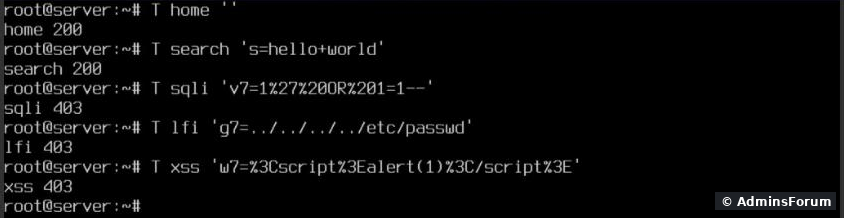
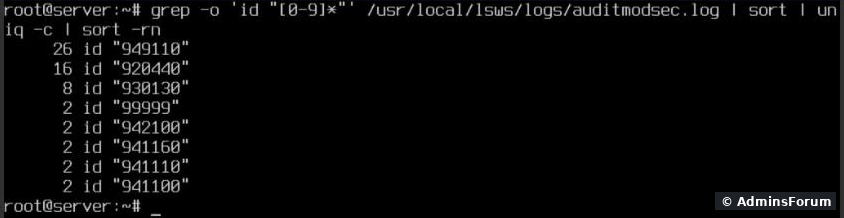
Rule is the OWASP "anomaly score exceeded" rule that does the actual blocking; is SQL injection, the rules are XSS, and is a small "Drive Access" rule () that CyberPanel adds itself in . Rules and (restricted file types and paths) came from bots on the internet probing for files like , , and within a few hours of the WAF going live, which is the WAF doing its job.
Before you leave it on
Quick check after any change
If the first line says "initialized successfully" and the second prints 403, your WAF works.
More CyberPanel guides
Tested on CyberPanel 3.0 (build 8, OpenLiteSpeed edition) on Ubuntu 24.04, October 2026. Menu names can change slightly between versions.
CyberPanel 3.0 has a one-click ModSecurity web application firewall (WAF) with the OWASP Core Rule Set. On our test server both switches turned green, the panel said "Operation successful", and SQL injection, XSS and path traversal requests still went straight through to WordPress. The module wasn't even loading. Here is how to test your WAF properly, what was broken, and the fix that made it block attacks.
If you came here looking for CSF: CyberPanel 3.0 doesn't offer it any more. The old
Code:
/firewall/csfStep 1: Test before you change anything
A WAF you haven't tested is a guess. We used a tiny shell function that prints the HTTP status for a request against our WordPress site:
Code:
W=https://yourdomain.com
T(){ curl -s -o /dev/null -w "$1 %{http_code}\n" "$W/?$2"; }
T sqli 'id=1%27%20OR%201=1--'
T lfi 'f=../../../../etc/passwd'
T xss 'q=%3Cscript%3Ealert(1)%3C/script%3E'Code:
sqli 200
lfi 200
xss 200
Use a new parameter name or value for each test run (we used
Code:
idCode:
uidCode:
kCode:
rStep 2: Install ModSecurity in the panel
Open Security > ModSecurity (
Code:
https://YOUR-SERVER-IP:8090/firewall/modSecurityClick Install ModSecurity. After a few seconds the configuration page appeared with the engine, audit log and rule engine all switched on:
Step 3: Turn on the OWASP rules
Open Security > Rule Packs (
Code:
/firewall/modSecRulesPacksCode:
/usr/local/lsws/conf/modsec/owasp-modsecurity-crs-3.0-master/Then we ran the tests again. Still 200, 200, 200. Nothing was blocked.
Step 4: Check whether the module actually loads
The panel can't tell you this. The web server's error log can:
Code:
grep -i 'mod_security' /usr/local/lsws/logs/error.log | tail -3Code:
Failed to load module [mod_security], error: libyajl.so.2: cannot open shared object file: No such file or directoryCode:
apt-get install -y libyajl2
systemctl restart lswsCode:
Failed to load module [mod_security], error: /usr/local/lsws/modules/mod_security.so: undefined symbol: pcre_freeCode:
libpcre3Code:
mod_security.soCode:
mod_security.so.backup.<number>Code:
cd /usr/local/lsws/modules
ls -l mod_security.so*
cp mod_security.so /root/mod_security.so.cyberpanel
cp mod_security.so.backup.* mod_security.so
systemctl restart lsws
grep -i 'mod_security' /usr/local/lsws/logs/error.log | tail -2Code:
*Code:
[Module: mod_security mod_security 1.4] has been initialized successfullyStep 5: Test again
With new parameter names, so no cached answers:
- Home page and a normal WordPress search (): 200.Code:
?s=hello+world
- Path traversal, SQL injection, XSS: 403.
Code:
grep -o 'id "[0-9]*"' /usr/local/lsws/logs/auditmodsec.log | sort | uniq -c | sort -rnRule
Code:
949110Code:
942100Code:
941xxxCode:
99999Code:
../Code:
/usr/local/lsws/conf/modsec/rules.confCode:
920440Code:
930130Code:
/.svn/wc.dbCode:
/.ssh/id_rsaCode:
/backup.sqlCode:
/wp-config.phpBefore you leave it on
- False positives. OWASP rules sometimes block normal things: saving a post with code in it, page builders, some plugin forms. Test your admin area and forms. When something legit gets a 403, find its rule ID in and disable just that rule for your site, rather than turning the WAF off.Code:
auditmodsec.log
- The rule set is old. CRS 3.0 from the panel is years behind the current release. It still blocked our tests, but newer CRS versions catch more and cause fewer false positives.
- Updates can undo the fix. A CyberPanel update may put its own back. After every update run theCode:
mod_security.sofrom Step 4 and one test from Step 1.Code:grep
- Logs grow. records every blocked request. Bots will fill it. Keep an eye on its size.Code:
auditmodsec.log
Quick check after any change
Code:
grep -i 'mod_security' /usr/local/lsws/logs/error.log | tail -1
T test$RANDOM 'x=../../../../etc/passwd'More CyberPanel guides
- Fail2ban brute-force protection
- Change PHP version per website
- Git deployment from GitHub
- SSH key login, passwords off
- Create a website
- Issue SSL and fix failed certificates
- Subdomains, addon domains and aliases
- Rewrite rules, force HTTPS, HSTS
- Install WordPress with LiteSpeed Cache
- Cron jobs and a real WP-Cron
- Redis object cache for WordPress
- Databases and phpMyAdmin
- Email, DKIM, SPF and DMARC
- Email forwarding, catch-all, plus-addressing
- Mail queue, spam senders, blacklists
- CyberPanel DNS vs Cloudflare
- Packages and website limits
- Deploy Laravel on CyberPanel
- WordPress staging (clone) fixes
- Backups: create, restore, schedule
- File Manager and FTP
- Reset the admin password from SSH
- Log files and config locations
- Check and restart services
- First steps after install
- CLI cheat sheet
- Install CyberPanel on Ubuntu 24.04
- Firewall explained
- Install PHP extensions
- Change PHP settings (php.ini)
- Update CyberPanel safely
- Server Error (500) after a fresh install
- Packages, users and ACLs
- Upgrade CyberPanel safely
- Real visitor IPs behind Cloudflare
- Docker apps on your domain with SSL
- Import a large SQL file over SSH
- Remote MySQL access for one IP
- Move WordPress to CyberPanel by hand
- Fix "Error establishing a database connection"
- Fix PHP2Shell (CVE-2026-109618/109619)
- Run your own nameservers (PowerDNS)
- CyberPanel on a small VPS: RAM tuning
Tested on CyberPanel 3.0 (build 8, OpenLiteSpeed edition) on Ubuntu 24.04, October 2026. Menu names can change slightly between versions.