



CyberPanel Packages and Website Limits: What Is Really Enforced (Tested)
In CyberPanel every website belongs to a package: a set of limits for disk space, bandwidth, domains, email accounts, databases and FTP accounts. If you host sites for clients, packages are how you keep one customer from using everything. But some limits are only a number on a page. We made a small test package, put our live test site on it, and tried to break the limits.
The packages you start with
Open Users & Plans > List Packages. Our server had three packages:
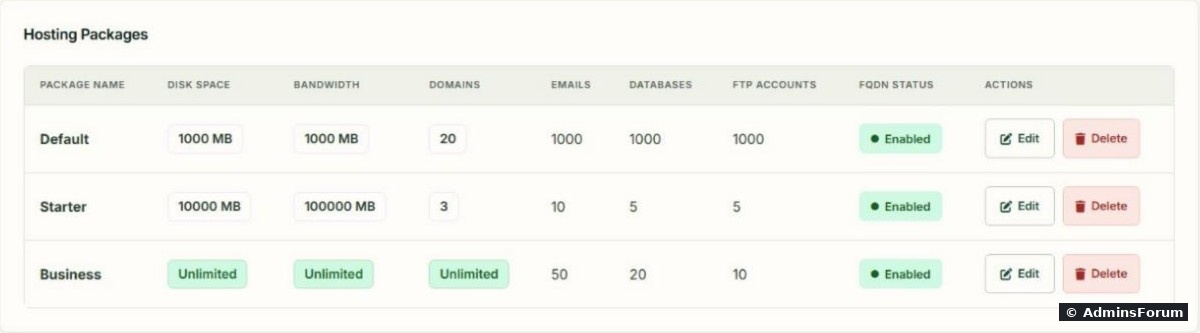
Default, Starter and Business. "0" or "Unlimited" means no limit. Look at Default: 1000 MB disk and 20 domains, but 1000 email accounts and databases. Check what your sites are actually on before you rely on it.
Create a package
Open Users & Plans > Create Package (). Our test package:
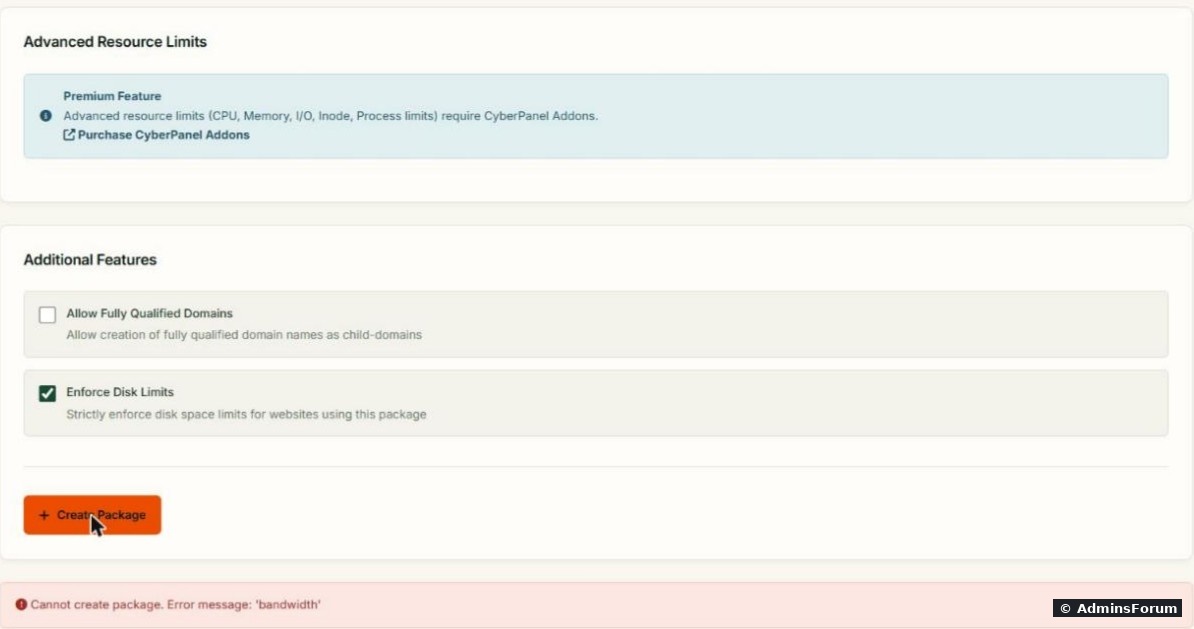
The Bandwidth field shows a grey "0", but that's only a placeholder. The field is empty, and the panel crashes on it. Type a real 0 (or a number) in every field you leave "unlimited".
Then the Enforce Disk Limits box. Ticking it gave a different error:
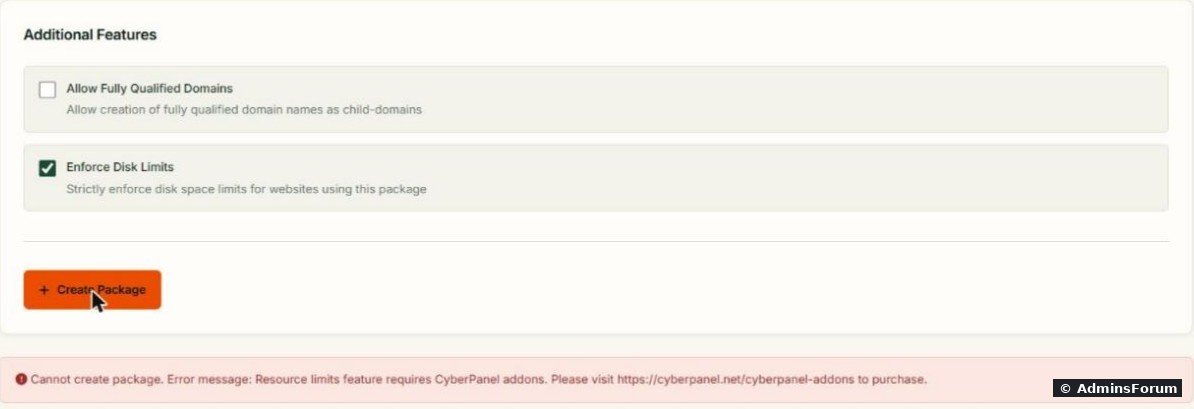
Enforce Disk Limits is a paid feature, like the Advanced Resource Limits box (CPU, memory, I/O, inodes, processes) above it. With the box unticked, the package was created: .
Note the name: in the package list and dropdowns it became admin_LimitTest. CyberPanel puts the owner's username in front of every package you create.
Assign the package to a website
To move a website to another package, open Websites > Modify Website:
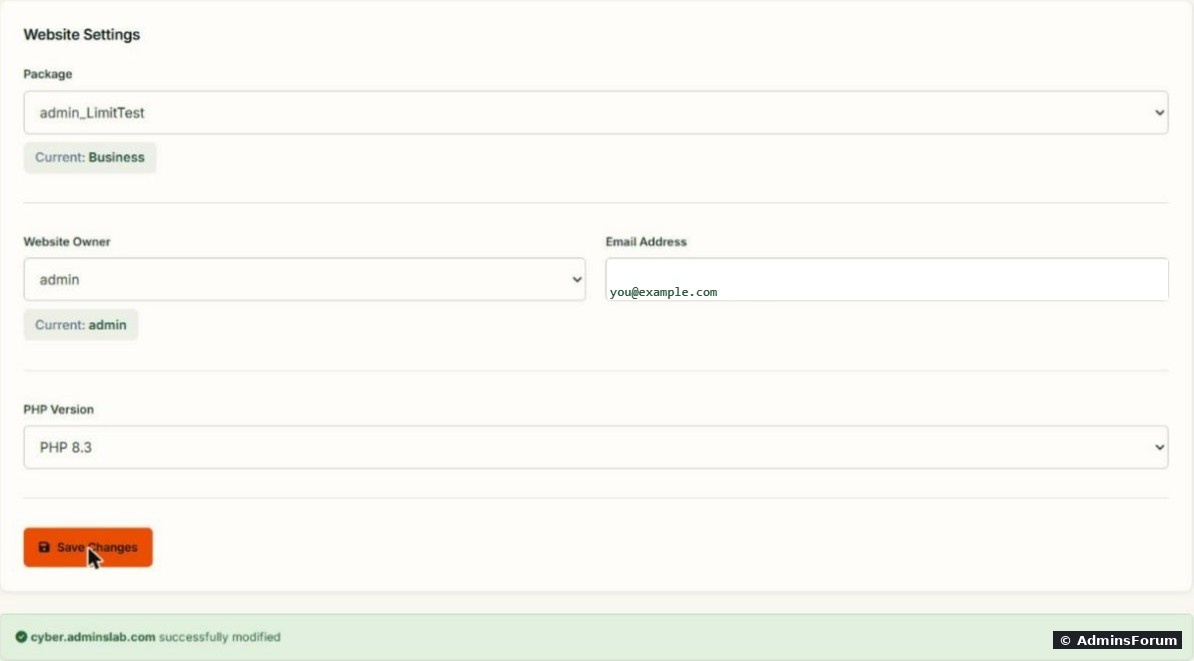
Pick the website, then the package. On our build the Owner and PHP Version dropdowns came up empty, so we picked them again (admin, PHP 8.3) before Save Changes, to be safe. The panel let us move the site onto a package whose limits it already exceeded (it had 2 domains, the package allows 1). Nothing was removed; new things just get blocked.
What we tested, and what happened
With the test package on our site, the email limit worked straight away:
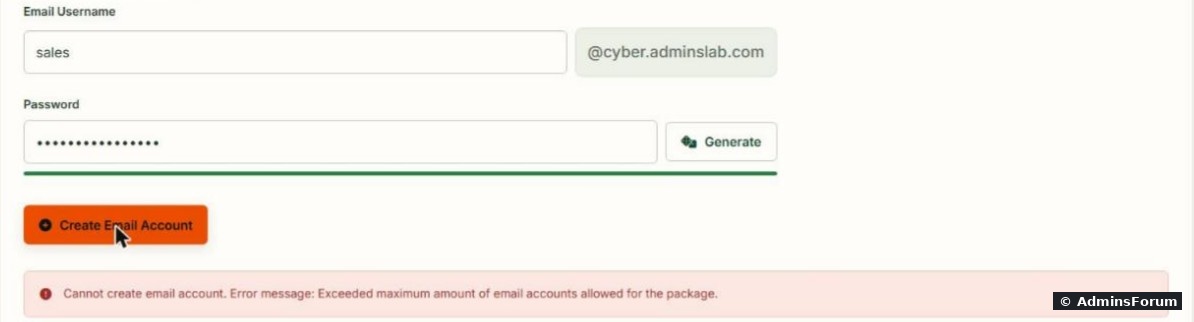
The site had two mailboxes, the limit was 2, and the third () was refused.
The disk limit is a different story. As the site user, we wrote a 400 MB file into a site with a 300 MB limit:
The write succeeded () and the site went from 190 MB to 590 MB, almost double its limit. The disk number in a package is a figure for the overview page, not a wall. Hard limits need the paid add-on, or Linux disk quotas you set up yourself.
And the website page still showed the old number:

The overview still said 190 MB of 300 MB after the file was written. CyberPanel refreshes this number on a schedule, not live, so don't use it to check a site that is filling the disk right now. Use instead. (We deleted the test file and moved the site back to Business afterwards.)
Bandwidth works the same way: the overview counts it ( on our site, where 0 means unlimited). We didn't see anything that would stop a site when it passes a bandwidth number, and we didn't test it.
What this means in practice
Related
More CyberPanel guides
Tested on CyberPanel 3.0 (build 8, OpenLiteSpeed edition) on Ubuntu 24.04, October 2026. Menu names can change slightly between versions.
In CyberPanel every website belongs to a package: a set of limits for disk space, bandwidth, domains, email accounts, databases and FTP accounts. If you host sites for clients, packages are how you keep one customer from using everything. But some limits are only a number on a page. We made a small test package, put our live test site on it, and tried to break the limits.
The packages you start with
Open Users & Plans > List Packages. Our server had three packages:
Default, Starter and Business. "0" or "Unlimited" means no limit. Look at Default: 1000 MB disk and 20 domains, but 1000 email accounts and databases. Check what your sites are actually on before you rely on it.
Create a package
Open Users & Plans > Create Package (
Code:
https://YOUR-SERVER-IP:8090/packages/createPackage- Name: Code:
LimitTest - Domains 1, Disk Space 300 MB, FTP Accounts 1, Databases 1, Email Accounts 2
Code:
Cannot create package. Error message: 'bandwidth'Then the Enforce Disk Limits box. Ticking it gave a different error:
Code:
Cannot create package. Error message: Resource limits feature requires CyberPanel addons.Code:
Package LimitTest successfully createdNote the name: in the package list and dropdowns it became admin_LimitTest. CyberPanel puts the owner's username in front of every package you create.
Assign the package to a website
To move a website to another package, open Websites > Modify Website:
Pick the website, then the package. On our build the Owner and PHP Version dropdowns came up empty, so we picked them again (admin, PHP 8.3) before Save Changes, to be safe. The panel let us move the site onto a package whose limits it already exceeded (it had 2 domains, the package allows 1). Nothing was removed; new things just get blocked.
What we tested, and what happened
With the test package on our site, the email limit worked straight away:
Code:
Cannot create email account. Error message: Exceeded maximum amount of email accounts allowed for the package.Code:
sales@- Databases (limit 1): creating a second database failed with "Maximum database limit reached for this website."
- Domains (limit 1): adding a subdomain failed with Code:
Exceeded maximum number of domains for this package. [404] - Disk space (limit 300 MB): not enforced. See below.
The disk limit is a different story. As the site user, we wrote a 400 MB file into a site with a 300 MB limit:
Code:
sudo -u SITEUSER dd if=/dev/zero of=/home/yourdomain.com/big.bin bs=1M count=400
du -sh /home/yourdomain.comCode:
RC=0And the website page still showed the old number:
The overview still said 190 MB of 300 MB after the file was written. CyberPanel refreshes this number on a schedule, not live, so don't use it to check a site that is filling the disk right now. Use
Code:
du -sh /home/yourdomain.comBandwidth works the same way: the overview counts it (
Code:
18 MB of 0 MBWhat this means in practice
- Email, database and domain counts are real limits (we didn't test FTP). Use them for client packages.
- Disk and bandwidth are for display only on the free version. On a shared server, keep an eye on disk yourself: lists the biggest sites.Code:
du -sh /home/*/ | sort -h | tail
- Always fill every number field when you create or edit a package.
- A client who outgrows a package keeps everything they have; they just can't add more until you move them up.
Related
- Create a website in CyberPanel (you pick the package there).
- Subdomains and addon domains, which count toward the domain limit.
- Databases and phpMyAdmin.
More CyberPanel guides
- Fail2ban brute-force protection
- Change PHP version per website
- Git deployment from GitHub
- SSH key login, passwords off
- Create a website
- Issue SSL and fix failed certificates
- Subdomains, addon domains and aliases
- Rewrite rules, force HTTPS, HSTS
- Install WordPress with LiteSpeed Cache
- Cron jobs and a real WP-Cron
- Redis object cache for WordPress
- Databases and phpMyAdmin
- Email, DKIM, SPF and DMARC
- Email forwarding, catch-all, plus-addressing
- Mail queue, spam senders, blacklists
- CyberPanel DNS vs Cloudflare
- Deploy Laravel on CyberPanel
- WordPress staging (clone) fixes
- Backups: create, restore, schedule
- File Manager and FTP
- Reset the admin password from SSH
- Log files and config locations
- Check and restart services
- First steps after install
- ModSecurity + OWASP rules (fix)
- CLI cheat sheet
- Install CyberPanel on Ubuntu 24.04
- Firewall explained
- Install PHP extensions
- Change PHP settings (php.ini)
- Update CyberPanel safely
- Server Error (500) after a fresh install
- Packages, users and ACLs
- Upgrade CyberPanel safely
- Real visitor IPs behind Cloudflare
- Docker apps on your domain with SSL
- Import a large SQL file over SSH
- Remote MySQL access for one IP
- Move WordPress to CyberPanel by hand
- Fix "Error establishing a database connection"
- Fix PHP2Shell (CVE-2026-109618/109619)
- Run your own nameservers (PowerDNS)
- CyberPanel on a small VPS: RAM tuning
Tested on CyberPanel 3.0 (build 8, OpenLiteSpeed edition) on Ubuntu 24.04, October 2026. Menu names can change slightly between versions.