



CyberPanel CLI Cheat Sheet: Every cyberpanel Command With Working Examples
Everything you click in CyberPanel can also be done with the cyberpanel command over SSH. That's handy for scripts, for creating 20 sites at once, and for the day the web panel won't load. This cheat sheet lists every function in CyberPanel 3.0 (we pulled the list straight from the installed CLI) with examples.
The basics
Run it as root. Here it is creating a package:
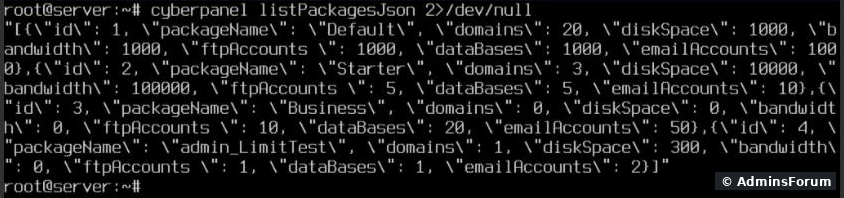
and then listing all packages as JSON. Business is the one we just created; admin_LimitTest came later, from our packages test:
Websites
Add to issue SSL during creation and to create a DKIM key; takes the version number only (, not "PHP 8.3"). For a child domain the folder defaults to ; change it with . A package must exist before you create a website. See packages, users and ACLs.
SSL certificates
The domain's DNS must already point to this server, or Let's Encrypt can't verify it.
Databases
Email
FTP
DNS (PowerDNS)
Get the from listDNSJson first.
Packages and users
Note: the CLI uses the exact name you give (). The web form instead pre-fills the owner's name as a prefix (), so a package made there is called . Check the real name with before using it.
Backups
Backups land in (the CLI has a option, but in 3.0 createBackup ignores it). Give restoreBackup the full path to the file. Copy backups off the server too.
Apps, maintenance and tools
switches to LiteSpeed Enterprise and needs a paid license key ().
Panel-related commands outside the cyberpanel tool
Scripting tips
More CyberPanel guides
Tested on CyberPanel 3.0 (build 8, OpenLiteSpeed edition) on Ubuntu 24.04, October 2026. Menu names can change slightly between versions.
Everything you click in CyberPanel can also be done with the cyberpanel command over SSH. That's handy for scripts, for creating 20 sites at once, and for the day the web panel won't load. This cheat sheet lists every function in CyberPanel 3.0 (we pulled the list straight from the installed CLI) with examples.
The basics
Code:
cyberpanel FUNCTION --option value --option valueCode:
cyberpanel createPackage --owner admin --packageName Business --diskSpace 0 --bandwidth 0 --emailAccounts 50 --dataBases 20 --ftpAccounts 10 --allowedDomains 0 2>/dev/null
{"success": 1, "errorMessage": "None"}- Most commands answer in JSON. means it worked.Code:
{"success": 1, "errorMessage": "None"}
- lists all options.Code:
cyberpanel --help
- On Ubuntu 24.04 you may see Python lines like before the answer. They're harmless warnings from Python 3.12, not errors. AddCode:
SyntaxWarning: invalid escape sequenceto hide them.Code:2>/dev/null
- Put values with spaces or special characters in single quotes: .Code:
--password 'My$ecret!'
Websites
Code:
cyberpanel createWebsite --package Default --owner admin --domainName example.com --email [email protected] --php 8.3
cyberpanel deleteWebsite --domainName example.com
cyberpanel createChild --masterDomain example.com --childDomain shop.example.com --owner admin --php 8.3
cyberpanel deleteChild --childDomain shop.example.com
cyberpanel changePHP --domainName example.com --php 8.3
cyberpanel changePackage --domainName example.com --packageName Starter
cyberpanel listWebsitesJson
cyberpanel listWebsitesPrettyCode:
--ssl 1Code:
--dkim 1Code:
--phpCode:
8.3Code:
public_html/CHILDDOMAINCode:
--pathSSL certificates
Code:
cyberpanel issueSSL --domainName example.com          # Let's Encrypt for a site
cyberpanel hostNameSSL --domainName panel.example.com   # SSL for the panel on :8090
cyberpanel mailServerSSL --domainName example.com       # SSL for mail (IMAP/SMTP)
cyberpanel issueSelfSignedSSL --domainName example.comDatabases
Code:
cyberpanel createDatabase --databaseWebsite example.com --dbName example_wp --dbUsername example_user --dbPassword 'StrongPass123'
cyberpanel deleteDatabase --dbName example_wp
cyberpanel listDatabasesJson --databaseWebsite example.com
cyberpanel listDatabasesPretty --databaseWebsite example.comCode:
cyberpanel createEmail --domainName example.com --userName info --password 'StrongPass123'
cyberpanel changeEmailPassword --email [email protected] --password 'NewPass456'
cyberpanel deleteEmail --email [email protected]
cyberpanel listEmailsJson --domainName example.com
cyberpanel listEmailsPretty --domainName example.com
FTP
Code:
cyberpanel createFTPAccount --domainName example.com --userName ftpuser --password 'StrongPass123' --owner admin
cyberpanel changeFTPPassword --userName example_ftpuser --password 'NewPass456'
cyberpanel deleteFTPAccount --userName example_ftpuser
cyberpanel listFTPJson --domainName example.com
cyberpanel listFTPPretty --domainName example.com
DNS (PowerDNS)
Code:
cyberpanel createDNSZone --owner admin --domainName example.com
cyberpanel createDNSRecord --domainName example.com --name www.example.com --recordType A --value 203.0.113.10 --priority 0 --ttl 3600
cyberpanel listDNSJson --domainName example.com
cyberpanel listDNSPretty --domainName example.com
cyberpanel deleteDNSRecord --recordID 12
cyberpanel listDNSZonesJson
cyberpanel deleteDNSZone --domainName example.comCode:
recordIDPackages and users
Code:
cyberpanel createPackage --owner admin --packageName Starter --diskSpace 10000 --bandwidth 100000 --emailAccounts 10 --dataBases 5 --ftpAccounts 5 --allowedDomains 3
cyberpanel deletePackage --packageName Starter
cyberpanel listPackagesJson
cyberpanel listPackagesPretty
cyberpanel createUser --firstName Jane --lastName Doe --email [email protected] --userName jane --password 'StrongPass123' --websitesLimit 5 --selectedACL user --securityLevel HIGH
cyberpanel editUser --userName jane --firstName Jane --lastName Doe --email [email protected] --password 'NewPass456' --securityLevel HIGH
cyberpanel suspendUser --userName jane --state SUSPEND
cyberpanel deleteUser --userName jane
cyberpanel listUsersCode:
StarterCode:
admin_Code:
admin_StarterCode:
listPackagesJsonBackups
Code:
cyberpanel createBackup --domainName example.com
cyberpanel restoreBackup --fileName /home/example.com/backup/backup-example.com-DATE.tar.gzCode:
/home/example.com/backup/Code:
--backupPathApps, maintenance and tools
Code:
cyberpanel installWordPress --domainName example.com --email [email protected] --userName wpadmin --password 'StrongPass123' --siteTitle 'My Site'
cyberpanel installJoomla --domainName example.com --password 'StrongPass123' --siteTitle 'My Site'
cyberpanel version
cyberpanel upgrade        # upgrade CyberPanel (snapshot first)
cyberpanel utility        # menu with handy maintenance tools
cyberpanel help
Code:
switchTOLSWSCode:
--licenseKeyPanel-related commands outside the cyberpanel tool
- : reset the panel's admin password.Code:
adminPass NEWPASSWORD
- : restart the panel. More in checking and restarting services.Code:
systemctl restart lscpd
Scripting tips
- Check the JSON: Code:
cyberpanel createWebsite ... 2>/dev/null | grep -q '"success": 1' && echo OK - Don't put real passwords in shell history: read them into a variable first () and useCode:
read -s PASS.Code:--password "$PASS"
- Test on one site before looping over fifty.
More CyberPanel guides
- Fail2ban brute-force protection
- Change PHP version per website
- Git deployment from GitHub
- SSH key login, passwords off
- Create a website
- Issue SSL and fix failed certificates
- Subdomains, addon domains and aliases
- Rewrite rules, force HTTPS, HSTS
- Install WordPress with LiteSpeed Cache
- Cron jobs and a real WP-Cron
- Redis object cache for WordPress
- Databases and phpMyAdmin
- Email, DKIM, SPF and DMARC
- Email forwarding, catch-all, plus-addressing
- Mail queue, spam senders, blacklists
- CyberPanel DNS vs Cloudflare
- Packages and website limits
- Deploy Laravel on CyberPanel
- WordPress staging (clone) fixes
- Backups: create, restore, schedule
- File Manager and FTP
- Reset the admin password from SSH
- Log files and config locations
- Check and restart services
- First steps after install
- ModSecurity + OWASP rules (fix)
- Install CyberPanel on Ubuntu 24.04
- Firewall explained
- Install PHP extensions
- Change PHP settings (php.ini)
- Update CyberPanel safely
- Server Error (500) after a fresh install
- Packages, users and ACLs
- Upgrade CyberPanel safely
- Real visitor IPs behind Cloudflare
- Docker apps on your domain with SSL
- Import a large SQL file over SSH
- Remote MySQL access for one IP
- Move WordPress to CyberPanel by hand
- Fix "Error establishing a database connection"
- Fix PHP2Shell (CVE-2026-109618/109619)
- Run your own nameservers (PowerDNS)
- CyberPanel on a small VPS: RAM tuning
Tested on CyberPanel 3.0 (build 8, OpenLiteSpeed edition) on Ubuntu 24.04, October 2026. Menu names can change slightly between versions.