



Fail2ban on CyberPanel 3.0: Brute-Force Protection Without CSF (Tested)
Older CyberPanel versions came with CSF (ConfigServer Security & Firewall), which also blocked IPs that kept guessing passwords. In CyberPanel 3.0 CSF is gone ( returns 404) and the panel has nothing that replaces the brute-force part. The firewall page only opens and closes ports. So every SSH and mail login guess just keeps coming. Fail2ban fixes that: it watches the logs and blocks an IP in the firewall after a few failed logins. We set it up on our CyberPanel 3.0 test server (Ubuntu 24.04) and found one jail that silently did nothing.
Step 1: See what's hitting your server
First, how bad is it? Our test server had been online for two days:
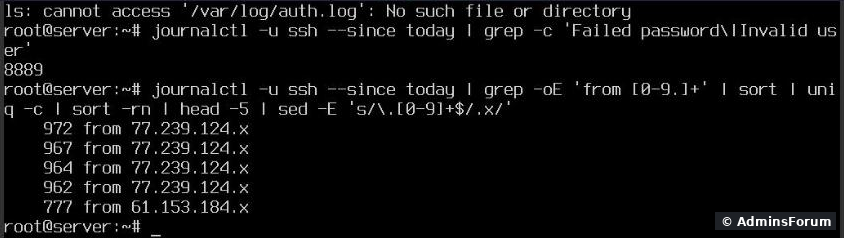
8,889 failed SSH logins since midnight, almost 1,000 from each of the top addresses. (We blanked the last part of the IPs.) Note the first line: there is no on this server. Ubuntu 24.04 cloud images often don't run rsyslog, all logs live in the systemd journal. Many fail2ban tutorials point at and would watch a file that doesn't exist.
The mail side gets the same treatment, just slower: gave 20 on our server (bots guessing mailbox passwords over SMTP).
Step 2: Install fail2ban
We installed it and looked at what the package had set up.
Good news on Ubuntu 24.04: the package's own already sets (read the journal, no log file needed) and , and turns on the jail. Within a minute of installing, the sshd jail had read the journal and banned the first 2 IPs. Version 1.0.2, no extra steps.
Step 3: Does it get along with CyberPanel's firewall?
CyberPanel uses firewalld, which also works with nftables. Fail2ban puts its bans in its own table,, next to firewalld's .
Firewall changes are usually applied with a reload. We checked that fail2ban's bans survive one:
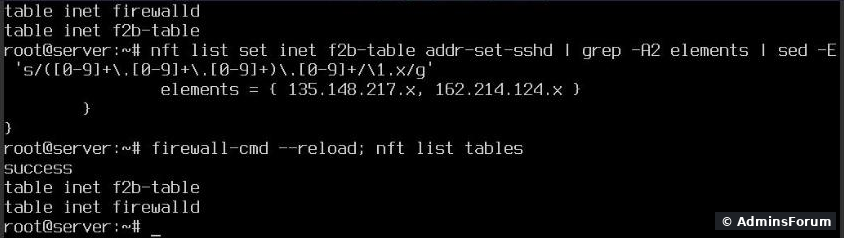
Both tables were still there after , and the banned IPs were still in . So you don't have to switch fail2ban to a firewalld action; the default works. Bans also come back after a fail2ban restart (they're kept in fail2ban's database).
Step 4: The Postfix jail that sees nothing
fail2ban comes with a jail, but its filter only looks for log lines from . On Ubuntu 24.04 Postfix runs as . We tested the filter against today's journal, without and with a fix:

Test any filter yourself the same way before you trust it:
(The filter matches , which is the right unit name on our server. It had 0 failures because the bots were going for SMTP, not IMAP.)
Step 5: Your settings in jail.local
Never edit; put your changes in :
After the restart, the three login jails on our server:
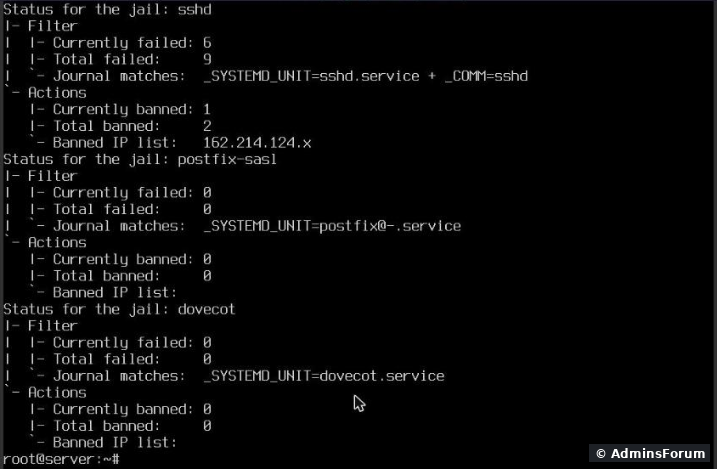
The jail now shows : proof that the override is active.
Step 6: Banned yourself? Unban
We tested ban, check and unban with a documentation IP (, never a real host):
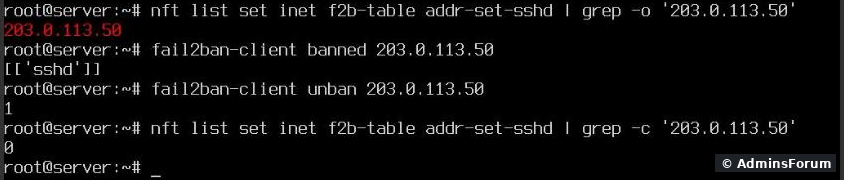
answers with the jail names (); after the IP was gone from the nftables set. If you're locked out of SSH, run the unban from your VPS provider's console. Then add your IP to .
What fail2ban doesn't cover here
More CyberPanel guides
Tested on CyberPanel 3.0 (build 8, OpenLiteSpeed edition) on Ubuntu 24.04 with fail2ban 1.0.2, October 2026.
Older CyberPanel versions came with CSF (ConfigServer Security & Firewall), which also blocked IPs that kept guessing passwords. In CyberPanel 3.0 CSF is gone (
Code:
/firewall/csfStep 1: See what's hitting your server
First, how bad is it? Our test server had been online for two days:
Code:
journalctl -u ssh --since today | grep -c 'Failed password\|Invalid user'
journalctl -u ssh --since today | grep -oE 'from [0-9.]+' | sort | uniq -c | sort -rn | head -5Code:
/var/log/auth.logCode:
auth.logThe mail side gets the same treatment, just slower:
Code:
journalctl --since today | grep -c 'SASL LOGIN authentication failed'Step 2: Install fail2ban
Code:
apt-get install -y fail2ban
fail2ban-client statusGood news on Ubuntu 24.04: the package's own
Code:
/etc/fail2ban/jail.d/defaults-debian.confCode:
backend = systemdCode:
banaction = nftablesCode:
sshdStep 3: Does it get along with CyberPanel's firewall?
CyberPanel uses firewalld, which also works with nftables. Fail2ban puts its bans in its own table,
Code:
inet f2b-tableCode:
inet firewalldFirewall changes are usually applied with a reload. We checked that fail2ban's bans survive one:
Code:
nft list tables
firewall-cmd --reload
nft list tablesCode:
firewall-cmd --reloadCode:
addr-set-sshdStep 4: The Postfix jail that sees nothing
fail2ban comes with a
Code:
postfix-saslCode:
postfix.serviceCode:
- Stock filter: 0 lines read. The jail would run, look healthy, and never ban anyone.
- With the fix: 2,192 Postfix lines read, 19 failed logins matched.
Code:
printf '[Init]\njournalmatch = [email protected]\n' > /etc/fail2ban/filter.d/postfix.localCode:
fail2ban-regex systemd-journal 'postfix[mode=auth]' | grep '^Lines'Code:
dovecotCode:
dovecot.serviceStep 5: Your settings in jail.local
Never edit
Code:
jail.confCode:
/etc/fail2ban/jail.localCode:
[DEFAULT]
bantime = 1h
findtime = 10m
maxretry = 5
ignoreip = 127.0.0.1/8 ::1

[sshd]
enabled = true

[postfix-sasl]
enabled = true

[dovecot]
enabled = true

[recidive]
enabled = true- bantime / findtime / maxretry: 5 failures within 10 minutes = banned for 1 hour. The default ban is only 10 minutes, which bots simply wait out.
- ignoreip: add your own static IP here (space separated) so you can never lock yourself out.
- recidive: watches fail2ban's own log and bans repeat offenders for a week across all ports.
Code:
systemctl restart fail2ban
fail2ban-client status sshdThe
Code:
postfix-saslCode:
Journal matches: [email protected]Step 6: Banned yourself? Unban
We tested ban, check and unban with a documentation IP (
Code:
203.0.113.50Code:
fail2ban-client set sshd banip 203.0.113.50   # ban by hand
fail2ban-client banned 203.0.113.50            # which jails ban this IP?
fail2ban-client unban 203.0.113.50             # remove it from all jails
Code:
bannedCode:
[['sshd']]Code:
unbanCode:
ignoreipWhat fail2ban doesn't cover here
- The CyberPanel login on port 8090. We didn't find a ready filter for it. Protect it with 2FA and a strong password, and if you can, allow port 8090 only from your own IP in the firewall.
- Website attacks (SQL injection, WordPress login floods). That's the job of a WAF: see ModSecurity on CyberPanel, plus a login-limit plugin for WordPress.
- The best SSH fix is no passwords at all. With key-only SSH login the guesses can't succeed; fail2ban then just keeps the logs quiet.
More CyberPanel guides
- Change PHP version per website
- Git deployment from GitHub
- SSH key login, passwords off
- Create a website
- Issue SSL and fix failed certificates
- Subdomains, addon domains and aliases
- Rewrite rules, force HTTPS, HSTS
- Install WordPress with LiteSpeed Cache
- Cron jobs and a real WP-Cron
- Redis object cache for WordPress
- Databases and phpMyAdmin
- Email, DKIM, SPF and DMARC
- Email forwarding, catch-all, plus-addressing
- Mail queue, spam senders, blacklists
- CyberPanel DNS vs Cloudflare
- Packages and website limits
- Deploy Laravel on CyberPanel
- WordPress staging (clone) fixes
- Backups: create, restore, schedule
- File Manager and FTP
- Reset the admin password from SSH
- Log files and config locations
- Check and restart services
- First steps after install
- ModSecurity + OWASP rules (fix)
- CLI cheat sheet
- Install CyberPanel on Ubuntu 24.04
- Firewall explained
- Install PHP extensions
- Change PHP settings (php.ini)
- Update CyberPanel safely
- Server Error (500) after a fresh install
- Packages, users and ACLs
- Upgrade CyberPanel safely
- Real visitor IPs behind Cloudflare
- Docker apps on your domain with SSL
- Import a large SQL file over SSH
- Remote MySQL access for one IP
- Move WordPress to CyberPanel by hand
- Fix "Error establishing a database connection"
- Fix PHP2Shell (CVE-2026-109618/109619)
- Run your own nameservers (PowerDNS)
- CyberPanel on a small VPS: RAM tuning
Tested on CyberPanel 3.0 (build 8, OpenLiteSpeed edition) on Ubuntu 24.04 with fail2ban 1.0.2, October 2026.