



CyberPanel Email Forwarding, Catch-All and Plus-Addressing (With 2 Fixes)
Three small email features that people ask about all the time: send a copy of one mailbox to another address, catch mail sent to addresses that don't exist, and accept. All three are in CyberPanel's Email menu. The first two worked straight away on our test server. Plus-addressing needed two fixes from SSH, and the second one is easy to miss because the panel says nothing.
Our test domain is cyber.adminslab.com with two mailboxes, and . If you don't have mail set up yet, start with our CyberPanel email setup guide.
1. Forward a mailbox
Open Email > Forwarding, pick the website and the mailbox, choose Forward to email, type the destination and click Add Forwarding. The rule shows up in the table below:
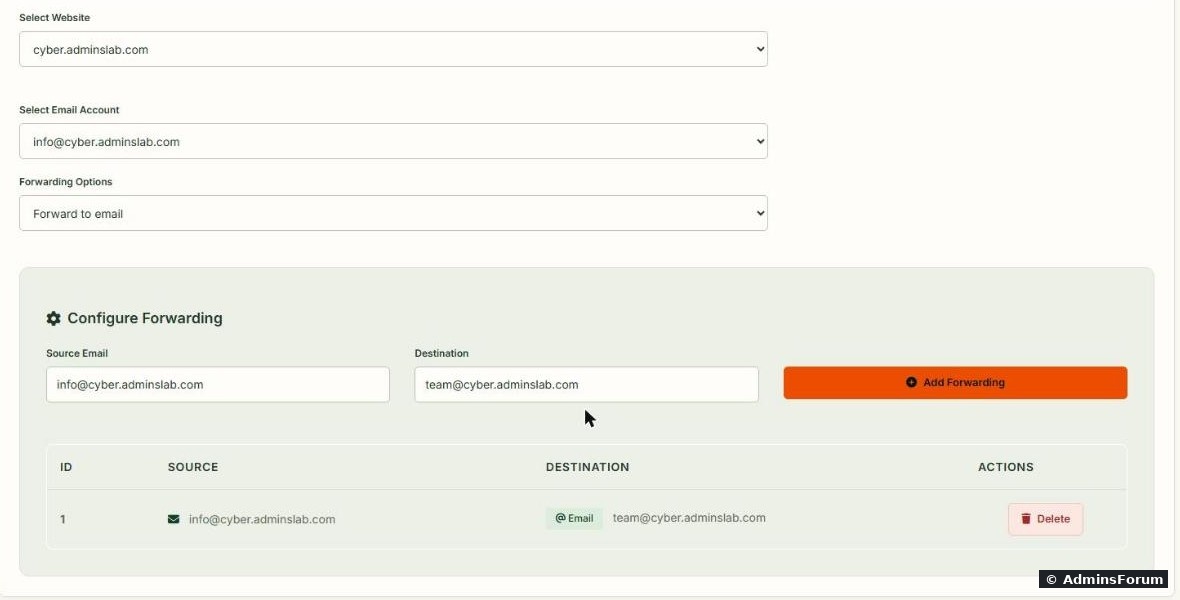
We forwarded to . The destination can be any address, inside or outside your server. The other option in the dropdown, Pipe to program, hands each message to a script instead (some help desk tools use this).
Does the original mailbox keep a copy? Yes.
Then we sent a test message to info@ and read the mail log. One message, two deliveries:

The log shows delivered and delivered. So the mailbox still fills up; clean it or set up a rule in your mail app if you only read the copy. To stop forwarding, use the Delete button next to the rule.
Forwarding to Gmail, Outlook and other big providers works, but be careful with spam: when your server forwards a spam message, the receiving provider sees your server sending it. If you forward a busy public address, turn on spam filtering first (Email > SpamAssassin or Rspamd on the same menu).
2. Catch-all address
A catch-all receives mail sent to any address at your domain that has no mailbox and no forwarding rule: typos like, old addresses, made-up ones.
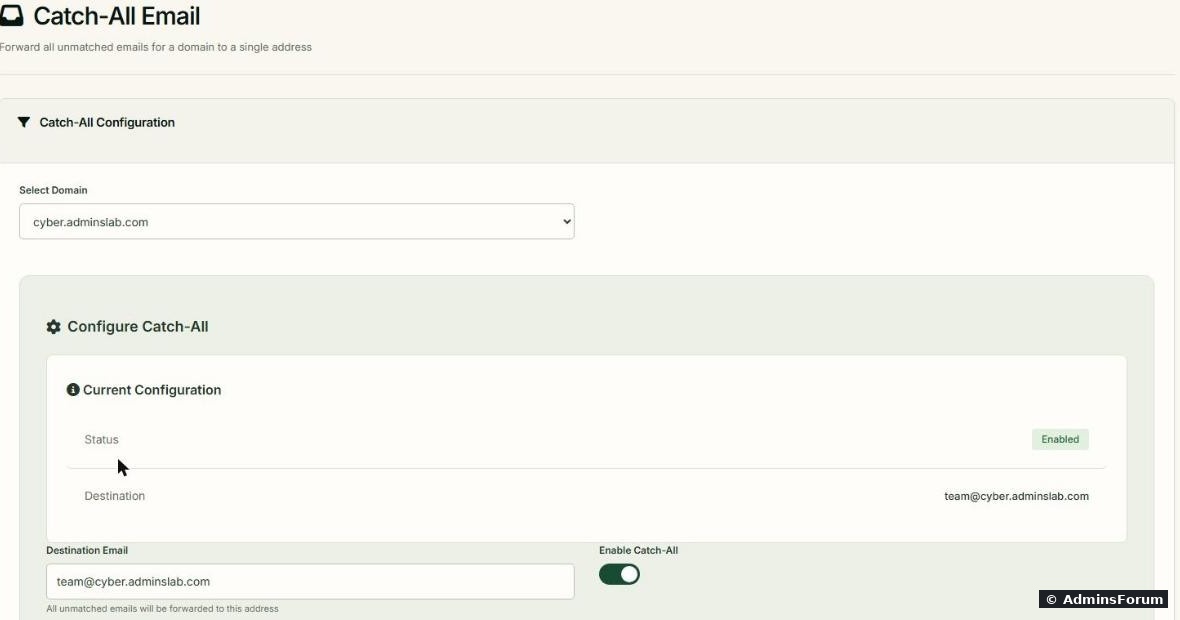
Open Email > Catch-All, pick the domain, type the destination and click Save Configuration. The box above the form confirms it:
Test it with an address that doesn't exist, and with one that does:

( is a small test tool: .) landed in with , and still went to its own mailbox (plus the forwarded copy). Real mailboxes are not affected by the catch-all.
Should you leave it on? Usually not for long. Spammers send to thousands of guessed names (, , random strings), and a catch-all accepts all of it. Turn it on while you move from an old setup to find which addresses people still use, then create those as mailboxes or forwards and remove the catch-all with Remove Catch-All.
3. Plus-addressing (user+tag@domain)
With plus-addressing, is delivered to . You give a different tag to every site you sign up at, then filter on it, and you can see who sold your address.
Fix 1: the settings page can't save.
When we switched on plus-addressing in Email > Plus-Addressing and clicked Save Global Settings, CyberPanel couldn't write the Postfix config:
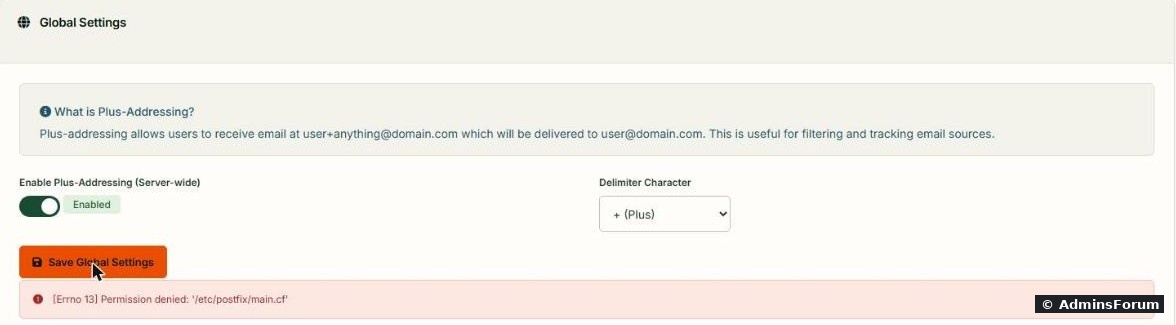
The toggle shows "Enabled", but nothing was saved: still printed an empty value. The panel process isn't allowed to write that root-owned file. Set it from SSH as root instead:
The last command now prints .
Before the fix, with a catch-all on, simply went to the catch-all, because Postfix saw it as an unknown address. Without a catch-all it would have bounced.
Fix 2: "user unknown" after turning it on. With the delimiter set, our next test bounced:
Postfix now understood the tag, but it still passed the full address to Dovecot's delivery program, and Dovecot has no user by that name. The delivery line in was:
Change it to hand Dovecot the plain mailbox name, and the full address separately:
is the part before the , is the domain. Dovecot 2.3.21 on our server already had , so nothing to change there ( to check yours).
After both fixes, all three cases from one test run:
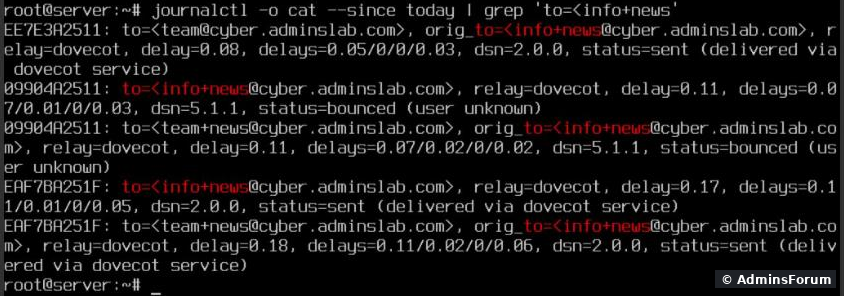
delivered to info (and its forwarded copy to team), delivered normally, and the catch-all still worked. said : no stuck or bounced mail.
Keep your backups (, ). A CyberPanel upgrade can rewrite these files; after an upgrade, check both settings again with and .
A note on test mail and bounces
When the user-unknown test bounced, Postfix tried to send the bounce back to our made-up sender at another domain, and it sat in the queue. Use one of your own mailboxes as the sender when you test (). To remove a stuck message, find its ID with and delete it with .
Common problems
More CyberPanel guides
Tested on CyberPanel 3.0 (build 8, OpenLiteSpeed edition) on Ubuntu 24.04, October 2026. Menu names can change slightly between versions.
Three small email features that people ask about all the time: send a copy of one mailbox to another address, catch mail sent to addresses that don't exist, and accept
Code:
Our test domain is cyber.adminslab.com with two mailboxes,
Code:
info@Code:
team@1. Forward a mailbox
Open Email > Forwarding, pick the website and the mailbox, choose Forward to email, type the destination and click Add Forwarding. The rule shows up in the table below:
We forwarded
Code:
info@Code:
team@Does the original mailbox keep a copy? Yes.
Then we sent a test message to info@ and read the mail log. One message, two deliveries:
Code:
journalctl --since "-3min" --no-pager -o cat | grep "to="Code:
to=<info@...>Code:
to=<team@...>, orig_to=<info@...>Forwarding to Gmail, Outlook and other big providers works, but be careful with spam: when your server forwards a spam message, the receiving provider sees your server sending it. If you forward a busy public address, turn on spam filtering first (Email > SpamAssassin or Rspamd on the same menu).
2. Catch-all address
A catch-all receives mail sent to any address at your domain that has no mailbox and no forwarding rule: typos like
Code:
infp@Open Email > Catch-All, pick the domain, type the destination and click Save Configuration. The box above the form confirms it:
Test it with an address that doesn't exist, and with one that does:
Code:
swaks -s 127.0.0.1 -f [email protected] -t [email protected]
swaks -s 127.0.0.1 -f [email protected] -t [email protected]Code:
swaksCode:
apt install -y swaksCode:
nobody123@Code:
team@Code:
orig_to=<nobody123@...>Code:
info@Should you leave it on? Usually not for long. Spammers send to thousands of guessed names (
Code:
admin@Code:
sales@3. Plus-addressing (user+tag@domain)
With plus-addressing,
Code:
Code:
info@Fix 1: the settings page can't save.
When we switched on plus-addressing in Email > Plus-Addressing and clicked Save Global Settings, CyberPanel couldn't write the Postfix config:
Code:
[Errno 13] Permission denied: '/etc/postfix/main.cf'Code:
postconf recipient_delimiterCode:
cp /etc/postfix/main.cf /root/main.cf.bak
postconf -e 'recipient_delimiter = +'
systemctl reload postfix
postconf recipient_delimiterCode:
recipient_delimiter = +Before the fix, with a catch-all on,
Code:
info+news@Fix 2: "user unknown" after turning it on. With the delimiter set, our next test bounced:
Code:
to=<[email protected]>, relay=dovecot, dsn=5.1.1, status=bounced (user unknown)Code:
info+news@...Code:
/etc/postfix/master.cfCode:
flags=DRhu user=vmail:vmail argv=/usr/lib/dovecot/deliver -f ${sender} -d ${recipient}Code:
cp /etc/postfix/master.cf /root/master.cf.bak
sed -i 's|-d ${recipient}|-d ${user}@${nexthop} -a ${recipient}|' /etc/postfix/master.cf
grep dovecot/deliver /etc/postfix/master.cf
systemctl reload postfix
Code:
${user}Code:
+Code:
${nexthop}Code:
recipient_delimiter = +Code:
doveconf recipient_delimiterAfter both fixes, all three cases from one test run:
Code:
info+news@Code:
info@Code:
postqueue -pCode:
Mail queue is emptyKeep your backups (
Code:
/root/main.cf.bakCode:
/root/master.cf.bakCode:
postconf recipient_delimiterCode:
grep dovecot/deliver /etc/postfix/master.cfA note on test mail and bounces
When the user-unknown test bounced, Postfix tried to send the bounce back to our made-up sender at another domain, and it sat in the queue. Use one of your own mailboxes as the sender when you test (
Code:
Code:
postqueue -pCode:
postsuper -d QUEUEIDCommon problems
- Forwarded mail never arrives at Gmail/Outlook: check the log line for that recipient (). ACode:
journalctl -o cat | grep "to=<[email protected]>"orCode:status=bouncedline says why; often it's spam filtering or missing SPF/DKIM on your server.Code:deferred
- Catch-all doesn't catch anything: the address has a mailbox or forward already, or MX for the domain doesn't point at this server.
- Plus address bounces with "user unknown": fix 2 above isn't applied (or was overwritten by an upgrade).
- Plus address goes to the catch-all instead of the mailbox: fix 1 isn't applied; is empty.Code:
postconf recipient_delimiter
More CyberPanel guides
- Fail2ban brute-force protection
- Change PHP version per website
- Git deployment from GitHub
- SSH key login, passwords off
- Create a website
- Issue SSL and fix failed certificates
- Subdomains, addon domains and aliases
- Rewrite rules, force HTTPS, HSTS
- Install WordPress with LiteSpeed Cache
- Cron jobs and a real WP-Cron
- Redis object cache for WordPress
- Databases and phpMyAdmin
- Email, DKIM, SPF and DMARC
- Mail queue, spam senders, blacklists
- CyberPanel DNS vs Cloudflare
- Packages and website limits
- Deploy Laravel on CyberPanel
- WordPress staging (clone) fixes
- Backups: create, restore, schedule
- File Manager and FTP
- Reset the admin password from SSH
- Log files and config locations
- Check and restart services
- First steps after install
- ModSecurity + OWASP rules (fix)
- CLI cheat sheet
- Install CyberPanel on Ubuntu 24.04
- Firewall explained
- Install PHP extensions
- Change PHP settings (php.ini)
- Update CyberPanel safely
- Server Error (500) after a fresh install
- Packages, users and ACLs
- Upgrade CyberPanel safely
- Real visitor IPs behind Cloudflare
- Docker apps on your domain with SSL
- Import a large SQL file over SSH
- Remote MySQL access for one IP
- Move WordPress to CyberPanel by hand
- Fix "Error establishing a database connection"
- Fix PHP2Shell (CVE-2026-109618/109619)
- Run your own nameservers (PowerDNS)
- CyberPanel on a small VPS: RAM tuning
Tested on CyberPanel 3.0 (build 8, OpenLiteSpeed edition) on Ubuntu 24.04, October 2026. Menu names can change slightly between versions.