



CyberPanel Rewrite Rules: Force HTTPS (301, Not 302) and Add an HSTS Header
OpenLiteSpeed reads rewrite rules from like Apache, and CyberPanel has an editor with ready-made templates. We used it on our test site cyber.adminslab.com (WordPress with LiteSpeed Cache) and found two things you should know: the built-in HTTPS template uses a temporary redirect, and Apache-style lines in .htaccess do nothing.
Where to edit rewrite rules
In Websites, open your site and click Full Settings. On the Config tab, open Rewrite Rules and pick a template. Force HTTP -> HTTPS adds these lines on top of your existing rules:
The other templates: Force WWW -> NON-WWW, Force NON-WWW -> WWW and Disable Wordpress XMLRPC & Trackback. The editor shows the whole of the site (ours already had the LiteSpeed Cache block), so you can also type your own rules there. Click Save Rewrite Rules; the change worked immediately on our server.
The 302 problem
Before saving, plain http gave (the site was reachable on both http and https). After saving the template:
without a code means 302 Found, a temporary redirect. Search engines keep the http address indexed with a 302. For a permanent move you want 301. Change the flag to in the editor (or with SSH) and save:
After changing the flag to 301, http requests are redirected permanently, keeping the path and query string:
Force non-www (or www) with a 301
Use one canonical address. To send www to non-www permanently:
Make sure the www name has DNS and is covered by the SSL certificate, or the redirect fails with a certificate error first. See the SSL guide.
HSTS: why .htaccess doesn't work
On Apache you'd add to .htaccess. We tried exactly that, restarted OpenLiteSpeed, and checked both a cached page and : no HSTS header. OpenLiteSpeed uses .htaccess for rewrite rules, not for headers.
The working way is the virtual host config.
On the same Config tab, open vHost Conf and add a context with the header at the end:
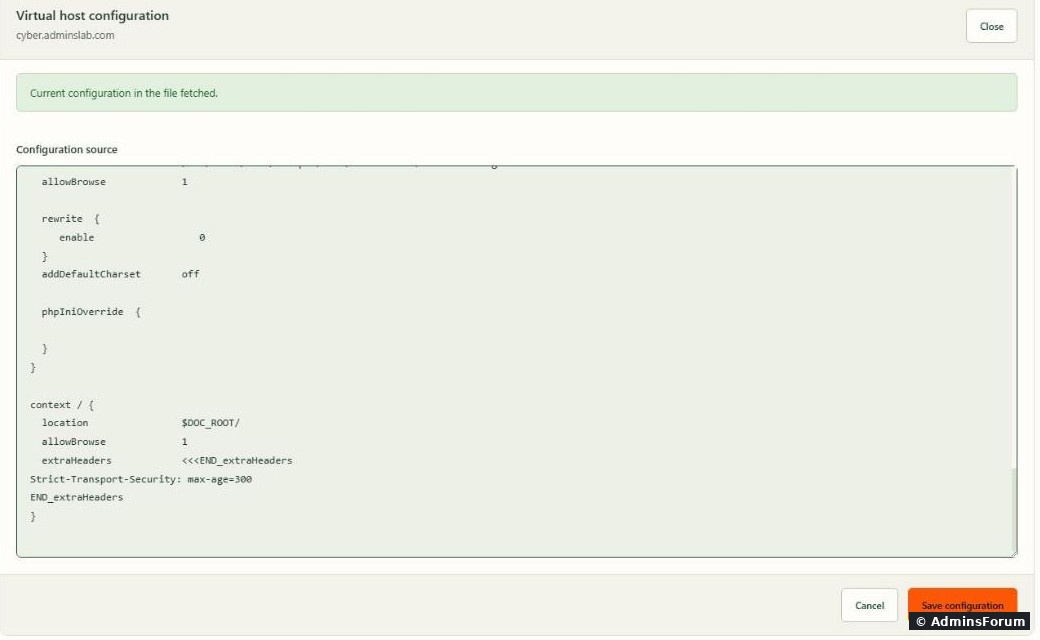
Save, and every page now sends the header:
We checked afterwards that the http-to-https 301 and LiteSpeed Cache () still worked with the new context.
Start small. We used (5 minutes) to test. Browsers remember HSTS for the whole max-age, so if HTTPS ever breaks, visitors can't bypass it. When everything has worked for a while, raise it to a year: . Only add when every subdomain has a valid certificate.
Common problems
More CyberPanel guides
Tested on CyberPanel 3.0 (build 8, OpenLiteSpeed edition) on Ubuntu 24.04, October 2026. Menu names can change slightly between versions.
OpenLiteSpeed reads rewrite rules from
Code:
.htaccessCode:
HeaderWhere to edit rewrite rules
In Websites, open your site and click Full Settings. On the Config tab, open Rewrite Rules and pick a template. Force HTTP -> HTTPS adds these lines on top of your existing rules:
Code:
RewriteEngine On
RewriteCond %{HTTPS}  !=on
RewriteRule ^/?(.*) https://%{SERVER_NAME}/$1 [R,L]Code:
.htaccessThe 302 problem
Before saving, plain http gave
Code:
200 OKCode:
curl -sI http://cyber.adminslab.com/test?x=1 | head -1
HTTP/1.1 302 Found
Code:
[R,L]Code:
[R=301,L]Code:
sed -i 's/\[R,L\]/[R=301,L]/' /home/yourdomain.com/public_html/.htaccess
systemctl restart lswsCode:
HTTP/1.1 301 Moved Permanently
location: https://cyber.adminslab.com/test?x=1
Force non-www (or www) with a 301
Use one canonical address. To send www to non-www permanently:
Code:
RewriteEngine On
RewriteCond %{HTTP_HOST} ^www\.(.+)$ [NC]
RewriteRule ^/?(.*) https://%1/$1 [R=301,L]HSTS: why .htaccess doesn't work
On Apache you'd add
Code:
Header always set Strict-Transport-Security "max-age=..."Code:
wp-login.phpThe working way is the virtual host config.
On the same Config tab, open vHost Conf and add a context with the header at the end:
Code:
context / {
  location                $DOC_ROOT/
  allowBrowse             1
  extraHeaders            <<<END_extraHeaders
Strict-Transport-Security: max-age=300
END_extraHeaders
}Code:
curl -sI https://cyber.adminslab.com/ | grep -i strict-transport
strict-transport-security: max-age=300Code:
x-litespeed-cache: hitStart small. We used
Code:
max-age=300Code:
max-age=31536000Code:
includeSubDomainsCommon problems
- Too many redirects: Cloudflare in "Flexible" SSL mode sends http to your server, which redirects to https forever. Use Full (strict).
- Rule seems ignored: restart OpenLiteSpeed after editing .htaccess over SSH: .Code:
systemctl restart lsws
- Site broken after saving the vHost Conf: a typo in the config. Restore your copy () and restart lsws. Always back up the file first.Code:
cp /root/vhost.bak /usr/local/lsws/conf/vhosts/yourdomain.com/vhost.conf
- WordPress rules: keep your own rules above the /Code:
# BEGIN LSCACHEblocks and don't edit inside them; plugins rewrite those blocks.Code:# BEGIN WordPress
More CyberPanel guides
- Fail2ban brute-force protection
- Change PHP version per website
- Git deployment from GitHub
- SSH key login, passwords off
- Create a website
- Issue SSL and fix failed certificates
- Subdomains, addon domains and aliases
- Install WordPress with LiteSpeed Cache
- Cron jobs and a real WP-Cron
- Redis object cache for WordPress
- Databases and phpMyAdmin
- Email, DKIM, SPF and DMARC
- Email forwarding, catch-all, plus-addressing
- Mail queue, spam senders, blacklists
- CyberPanel DNS vs Cloudflare
- Packages and website limits
- Deploy Laravel on CyberPanel
- WordPress staging (clone) fixes
- Backups: create, restore, schedule
- File Manager and FTP
- Reset the admin password from SSH
- Log files and config locations
- Check and restart services
- First steps after install
- ModSecurity + OWASP rules (fix)
- CLI cheat sheet
- Install CyberPanel on Ubuntu 24.04
- Firewall explained
- Install PHP extensions
- Change PHP settings (php.ini)
- Update CyberPanel safely
- Server Error (500) after a fresh install
- Packages, users and ACLs
- Upgrade CyberPanel safely
- Real visitor IPs behind Cloudflare
- Docker apps on your domain with SSL
- Import a large SQL file over SSH
- Remote MySQL access for one IP
- Move WordPress to CyberPanel by hand
- Fix "Error establishing a database connection"
- Fix PHP2Shell (CVE-2026-109618/109619)
- Run your own nameservers (PowerDNS)
- CyberPanel on a small VPS: RAM tuning
Tested on CyberPanel 3.0 (build 8, OpenLiteSpeed edition) on Ubuntu 24.04, October 2026. Menu names can change slightly between versions.