



Yesterday, 12:01 PM
PHP-FPM worker limits should fit the memory and workload of the PHP applications on your server. Measure warmed workers, reserve resources for the database and other services, then compare a controlled workload before increasing concurrency.
Tested: aaPanel Free 8.0.7, Ubuntu 22.04.5, two CPUs and 3.8Gi RAM. WordPress uses the PHP 8.5 FPM socket /tmp/php-cgi-85.sock. We backed up the pool configuration and tested a smaller dynamic pool. This is a lab sizing example, not a universal high-traffic configuration.
1. Establish a baseline and confirm the right PHP version
Start with Measure Website Performance Before Tuning. In aaPanel, confirm the website's selected PHP version. The default command-line php can be a different version from the PHP-FPM pool serving the site.
Our actual Nginx handler used PHP 8.5 through a Unix socket. We left its connection address and permissions unchanged. Review every site sharing the PHP version before changing a global pool: the settings can affect more than one website.
2. Warm the workload and separate cache hits from PHP work
A cached anonymous response may never reach PHP. In our lab, the existing Nginx FastCGI rules bypass cache for requests with a query string. We verified the response header Nginx-Cache: BYPASS for the measured WordPress requests.
We sent 20 warmup requests, then measured 20 requests at concurrency 2 in each phase. Requests used the same lab hostname over loopback HTTPS with normal certificate validation. This removes most external network variation but does not simulate remote users or a full browser.
Do not assume adding a query string bypasses every cache. Inspect your own rules and headers. Test representative pages, including the expensive workflows your users actually perform.
3. Measure worker memory
Useful SSH checks include:
Identify the master for the correct PHP version and measure its children. RSS includes shared pages; adding every RSS value can double-count shared memory. On Linux, /proc/PID/smaps_rollup includes proportional set size (PSS), which distributes shared pages between processes. Reading these files may require administrator privileges.
After the cache-bypassed warmup, our sampled workers had a maximum RSS around 51–53MiB. Other pages, plugins and traffic can use more. These are sampled values, not guaranteed per-worker maximums. Reserve extra headroom rather than basing the entire pool on the smallest idle worker.
4. Choose a memory budget before choosing a worker count
Reserve memory for the OS, Nginx, database, Redis, mail and any other PHP versions. Estimate a ceiling:
This is an upper-bound planning estimate, not a throughput recommendation. Shared memory, request spikes and application behavior still need measurement. CPU capacity, database limits and acceptable queue time can require a smaller count.
For this shared 3.8Gi lab we used a conservative 1GiB PHP planning budget and a 100MiB per-worker allowance, larger than this light sample. That suggests roughly ten workers before additional headroom; we tested a limit of eight. Do not copy eight simply because your server also has 4GB RAM.
5. Open the native aaPanel worker settings
Choose App Store → Installed → PHP-8.5 → Setting → Optimization. In our release, the form includes Running mode, max_children, start_servers, min_spare_servers and max_spare_servers.
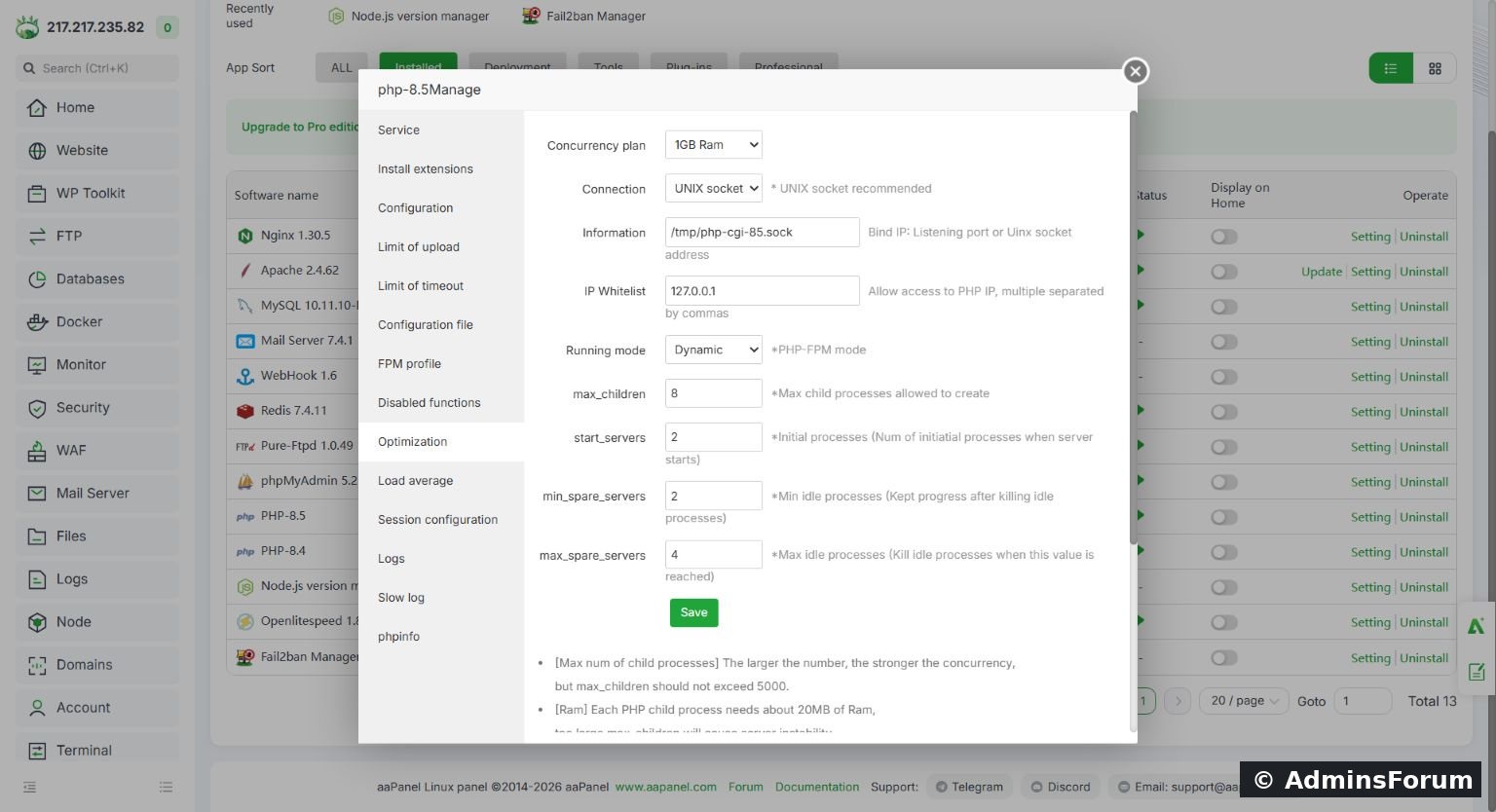
The native PHP Optimization screen shows the tested dynamic-pool values.
The lab changes were:
Previously the pool used max_children 80, start_servers 10, min_spare_servers 10 and max_spare_servers 30. The form's RAM presets and approximate per-worker memory guidance cannot replace your application's measurements.
What each setting does
6. Back up, validate and reload
We backed up /www/server/php/85/etc/php-fpm.conf before editing it through SSH, then ran:
Configuration validation passed. The native screen was inspected afterwards and reflected the saved values. For a UI change, use its Save action and verify the resulting configuration and service state; our test applied the changes through SSH rather than claiming we clicked Save in the UI.
A configuration test proves syntax, not application behavior. Keep the backup and a working SSH recovery route. Restore it and reload if meaningful requests fail or monitoring shows unacceptable queueing/resource use.
7. Compare the same workload honestly
After 20 warmup requests, each measured phase used 20 requests at concurrency 2:
8. Monitor queues and real traffic before a production decision
Inspect PHP-FPM status, listen-queue behavior, slow requests, memory pressure, CPU saturation and database activity under a representative bounded load. Keep status endpoints private. Increase a limit only when evidence shows workers are the bottleneck and the server has resources for them.
Do not use PHP memory_limit multiplied by worker count as an exact process-memory measurement. Keep application errors and OOM events in view, and test expensive pages as well as the homepage.
Reference: Official PHP-FPM configuration documentation.
AdminsForum performance series. Original pool configuration retained at /www/backup/af-performance-20261014/php85-fpm-before.conf in the lab; do not publish your own private configuration values.
Tested: aaPanel Free 8.0.7, Ubuntu 22.04.5, two CPUs and 3.8Gi RAM. WordPress uses the PHP 8.5 FPM socket /tmp/php-cgi-85.sock. We backed up the pool configuration and tested a smaller dynamic pool. This is a lab sizing example, not a universal high-traffic configuration.
1. Establish a baseline and confirm the right PHP version
Start with Measure Website Performance Before Tuning. In aaPanel, confirm the website's selected PHP version. The default command-line php can be a different version from the PHP-FPM pool serving the site.
Our actual Nginx handler used PHP 8.5 through a Unix socket. We left its connection address and permissions unchanged. Review every site sharing the PHP version before changing a global pool: the settings can affect more than one website.
2. Warm the workload and separate cache hits from PHP work
A cached anonymous response may never reach PHP. In our lab, the existing Nginx FastCGI rules bypass cache for requests with a query string. We verified the response header Nginx-Cache: BYPASS for the measured WordPress requests.
We sent 20 warmup requests, then measured 20 requests at concurrency 2 in each phase. Requests used the same lab hostname over loopback HTTPS with normal certificate validation. This removes most external network variation but does not simulate remote users or a full browser.
Do not assume adding a query string bypasses every cache. Inspect your own rules and headers. Test representative pages, including the expensive workflows your users actually perform.
3. Measure worker memory
Useful SSH checks include:
Code:
ps -eo pid,ppid,user,rss,comm | grep php-fpmAfter the cache-bypassed warmup, our sampled workers had a maximum RSS around 51–53MiB. Other pages, plugins and traffic can use more. These are sampled values, not guaranteed per-worker maximums. Reserve extra headroom rather than basing the entire pool on the smallest idle worker.
4. Choose a memory budget before choosing a worker count
Reserve memory for the OS, Nginx, database, Redis, mail and any other PHP versions. Estimate a ceiling:
Code:
worker ceiling ≈ PHP memory budget / conservative memory per workerFor this shared 3.8Gi lab we used a conservative 1GiB PHP planning budget and a 100MiB per-worker allowance, larger than this light sample. That suggests roughly ten workers before additional headroom; we tested a limit of eight. Do not copy eight simply because your server also has 4GB RAM.
5. Open the native aaPanel worker settings
Choose App Store → Installed → PHP-8.5 → Setting → Optimization. In our release, the form includes Running mode, max_children, start_servers, min_spare_servers and max_spare_servers.
The native PHP Optimization screen shows the tested dynamic-pool values.
The lab changes were:
Code:
pm = dynamic
pm.max_children = 8
pm.start_servers = 2
pm.min_spare_servers = 2
pm.max_spare_servers = 4What each setting does
- pm.max_children: the pool's simultaneous request-worker limit. Requests can queue when all workers are busy.
- pm.start_servers: initial children for dynamic mode.
- pm.min_spare_servers: desired minimum idle children in dynamic mode.
- pm.max_spare_servers: desired maximum idle children in dynamic mode.
- static mode: keeps a fixed worker count; plan its persistent memory use.
- ondemand mode: spawns workers when needed; startup behavior and idle settings differ from dynamic mode.
6. Back up, validate and reload
We backed up /www/server/php/85/etc/php-fpm.conf before editing it through SSH, then ran:
Code:
/www/server/php/85/sbin/php-fpm -t
/etc/init.d/php-fpm-85 reloadA configuration test proves syntax, not application behavior. Keep the backup and a working SSH recovery route. Restore it and reload if meaningful requests fail or monitoring shows unacceptable queueing/resource use.
7. Compare the same workload honestly
After 20 warmup requests, each measured phase used 20 requests at concurrency 2:
- Before: 20/20 HTTP 200; median TTFB 173 ms; sample p95 189 ms; 12 sampled children; aggregate child PSS about 113MiB.
- After: 20/20 HTTP 200; median TTFB 180 ms; sample p95 196 ms; 4 sampled children; aggregate child PSS about 72MiB.
8. Monitor queues and real traffic before a production decision
Inspect PHP-FPM status, listen-queue behavior, slow requests, memory pressure, CPU saturation and database activity under a representative bounded load. Keep status endpoints private. Increase a limit only when evidence shows workers are the bottleneck and the server has resources for them.
Do not use PHP memory_limit multiplied by worker count as an exact process-memory measurement. Keep application errors and OOM events in view, and test expensive pages as well as the homepage.
Reference: Official PHP-FPM configuration documentation.
AdminsForum performance series. Original pool configuration retained at /www/backup/af-performance-20261014/php85-fpm-before.conf in the lab; do not publish your own private configuration values.