



Yesterday, 01:11 PM
HTTP 500 means the server could not complete the request. It does not tell you which PHP error occurred. Match the request with the relevant logs, identify the actual cause, make one targeted repair and verify the response and fresh log entries.
Tested: aaPanel Free 8.0.7, Ubuntu 22.04.5, Nginx 1.30.5 and PHP 8.5.11. An isolated temporary PHP page called an undefined function, returned 500 and generated a fatal-error record. Removing that call returned 200 with the intended response and no new matching error entry. We removed the test page afterwards. No production application or global PHP settings were changed.
1. Record the failing request
Write down the exact hostname/path, time and timezone, method, status and recent changes. Check whether static files work, every PHP page fails or only one application action fails. Do not repeatedly submit an order, email or other side-effecting request merely to collect errors.
For a harmless GET endpoint you control:
Replace the hostname and path. On Windows use curl.exe and NUL. Keep certificate validation enabled, and separately inspect the body. A browser's generic error page is not a diagnostic explanation.
A CDN or application framework can return its own 500. Determine which layer handled the request before assuming the PHP service has stopped.
2. Open the matching website logs
In the tested aaPanel interface choose Website → PHP Project → the exact site's Log button. Inspect Access log and Error log and use Refresh. Confirm the displayed source path and selected hostname.
Our site used /www/wwwlogs/adminslab.com.log and /www/wwwlogs/adminslab.com.error.log. The application may use another private log too. The panel's administrative log is not a substitute for the website's log.
Read Check Website Logs in aaPanel for time matching, rotation and safe SSH searches.
3. Find the fatal error, not just the status code
The lab access log recorded the temporary page with HTTP 500 at 13:08:03 UTC. The matching Nginx error entry contained:
This identified an undefined function in the temporary script. It did not indicate that Nginx, MySQL or the entire VPS needed reinstalling. The file/line and error type directed the investigation.
A framework stack can include several files. Trace the relevant application operation and recent deployment instead of editing a random vendor file named in the stack. Preserve a small matching excerpt before changing anything.
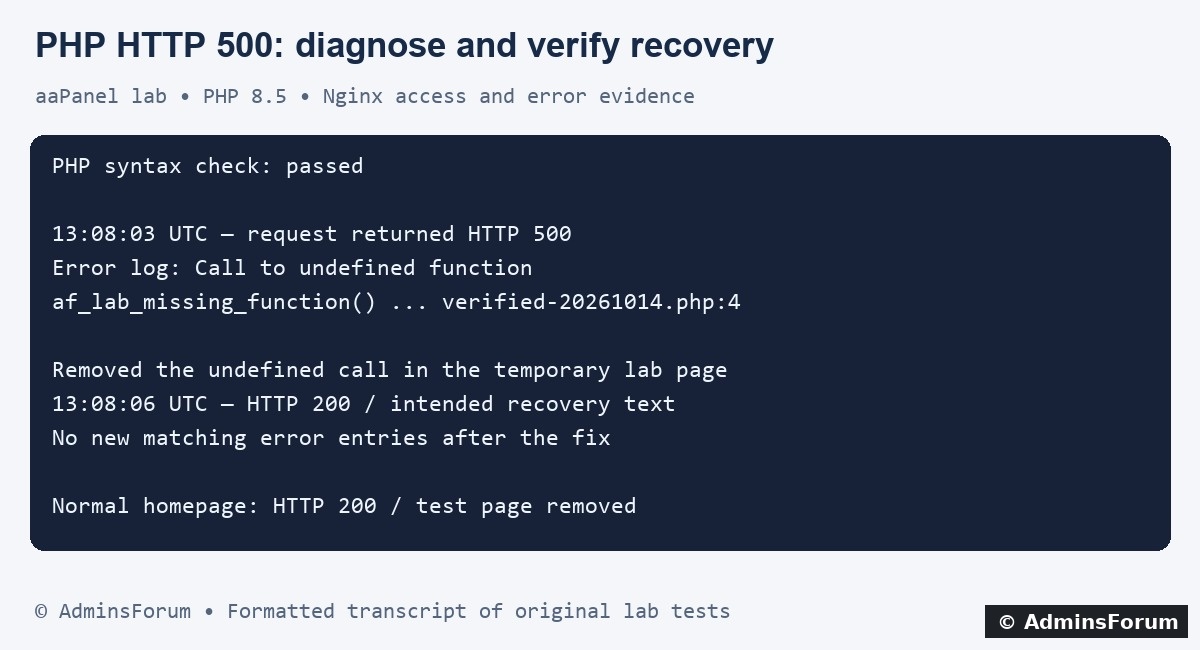
AdminsForum formatted transcript of the original lab test, not a terminal screenshot. The image abbreviates the lab script path.
4. Understand what a syntax check proves
Our faulty script passed:
Replace the path with an actual file and use the intended installed PHP binary. This command checks PHP syntax without executing the normal application workflow. It did not detect that our function was unavailable when the request ran.
A successful lint does not establish runtime compatibility, autoloading, database access or correct application behavior. The CLI and PHP-FPM can also load different ini files and extensions. Verify the website's selected PHP version and its effective serving environment; do not change versions blindly to hide an error.
5. Repair the cause shown by the error
In our isolated demonstration, the repair was to remove the deliberately undefined call and return a fixed test message. We then repeated the same request. No service restart or pool increase was needed for this code error.
For a real application, first back up and use staging or a reversible deployment. Example investigations include:
6. Keep diagnostics private and respect log-path restrictions
Use error logging rather than public stack traces. For the controlled request we kept display_errors off and log_errors enabled. Global settings may need to be set before execution to capture startup or parse failures; a line inside a script may not execute when parsing fails.
Our earlier attempt to choose a private custom log outside the website's allowed paths was blocked by open_basedir. The error appeared through FastCGI in the Nginx error log instead. We left the restriction intact and used the existing destination for the clean verification.
If a configured log is empty, check effective PHP settings, its permitted path and write permissions. Do not disable open_basedir globally or apply chmod 777 as a logging fix. Choose a supported private destination that the application's restrictions permit, or use the existing SAPI/application logger.
The FPM master log describes service diagnostics; it need not contain every application's fatal error. Avoid exposing phpinfo, debug logs or tokens on the website to discover a setting.
7. Verify HTTP status, content and fresh logs
At 13:08:06 UTC, the same temporary endpoint returned HTTP 200 and the text "AdminsForum clean recovery verified". Its access entry changed to 200, and there were no new error-log lines matching that page after the fix. The normal homepage also returned 200.
We allowed timestamp revalidation time before checking the changed file. If your deployment disables OPcache timestamp checking, use its approved invalidation/reload process; a browser refresh alone does not guarantee fresh PHP bytecode.
An old fatal entry remains historical evidence. Compare new timestamps and requests rather than clearing the log. Test an ordinary page and relevant application behavior, including reads/writes on staging where appropriate. A 200 with an error message in its body is not a complete recovery.
8. Clean up and retain a rollback
We removed both temporary diagnostic pages created during the experiment and retained private test records. Existing website content, PHP pool settings and security restrictions were unchanged.
Remove your own test files and temporary diagnostics after the observation window. Keep a known-good code/configuration backup and deliberate log retention. If a targeted change fails, restore it and verify service/application health again.
9. Distinguish a PHP 500 from a gateway failure
A 502 or upstream connection refusal may mean Nginx cannot get a usable upstream response. An executing PHP script's fatal error is a different finding. Correlate upstream service and website logs before choosing a fix.
For slow executing requests, use PHP-FPM slow logs; for shared-server pressure, use resource monitoring during a controlled test. Restarting everything can interrupt healthy services and hide useful evidence.
Reference: Official PHP error logging configuration.
Tested: aaPanel Free 8.0.7, Ubuntu 22.04.5, Nginx 1.30.5 and PHP 8.5.11. An isolated temporary PHP page called an undefined function, returned 500 and generated a fatal-error record. Removing that call returned 200 with the intended response and no new matching error entry. We removed the test page afterwards. No production application or global PHP settings were changed.
1. Record the failing request
Write down the exact hostname/path, time and timezone, method, status and recent changes. Check whether static files work, every PHP page fails or only one application action fails. Do not repeatedly submit an order, email or other side-effecting request merely to collect errors.
For a harmless GET endpoint you control:
Code:
curl -sS --max-time 15 -D - -o /dev/null https://example.com/problem-pageA CDN or application framework can return its own 500. Determine which layer handled the request before assuming the PHP service has stopped.
2. Open the matching website logs
In the tested aaPanel interface choose Website → PHP Project → the exact site's Log button. Inspect Access log and Error log and use Refresh. Confirm the displayed source path and selected hostname.
Our site used /www/wwwlogs/adminslab.com.log and /www/wwwlogs/adminslab.com.error.log. The application may use another private log too. The panel's administrative log is not a substitute for the website's log.
Read Check Website Logs in aaPanel for time matching, rotation and safe SSH searches.
3. Find the fatal error, not just the status code
The lab access log recorded the temporary page with HTTP 500 at 13:08:03 UTC. The matching Nginx error entry contained:
Code:
FastCGI sent in stderr:
PHP Fatal error: Uncaught Error:
Call to undefined function af_lab_missing_function()
.../af-http500-verified-20261014.php:4A framework stack can include several files. Trace the relevant application operation and recent deployment instead of editing a random vendor file named in the stack. Preserve a small matching excerpt before changing anything.
AdminsForum formatted transcript of the original lab test, not a terminal screenshot. The image abbreviates the lab script path.
4. Understand what a syntax check proves
Our faulty script passed:
Code:
/www/server/php/85/bin/php -l /path/to/the/affected-file.phpA successful lint does not establish runtime compatibility, autoloading, database access or correct application behavior. The CLI and PHP-FPM can also load different ini files and extensions. Verify the website's selected PHP version and its effective serving environment; do not change versions blindly to hide an error.
5. Repair the cause shown by the error
In our isolated demonstration, the repair was to remove the deliberately undefined call and return a fixed test message. We then repeated the same request. No service restart or pool increase was needed for this code error.
For a real application, first back up and use staging or a reversible deployment. Example investigations include:
- Undefined function: check the function name, expected application include/autoloader or required extension. Determine which component supplies it before installing anything.
- Class not found: inspect the deployment's dependencies and autoload configuration, including case-sensitive paths. Do not run arbitrary downloaded repair scripts.
- Parse error: inspect the named file and recent edit, validate with the matching PHP version and deploy a corrected or known-good copy.
- Memory exhausted: identify the request and resource cause. Raising memory limits without measurement may increase pressure across concurrent workers.
- Database exception: inspect the application connection and matching database error; keep credentials out of public logs or support posts.
6. Keep diagnostics private and respect log-path restrictions
Use error logging rather than public stack traces. For the controlled request we kept display_errors off and log_errors enabled. Global settings may need to be set before execution to capture startup or parse failures; a line inside a script may not execute when parsing fails.
Our earlier attempt to choose a private custom log outside the website's allowed paths was blocked by open_basedir. The error appeared through FastCGI in the Nginx error log instead. We left the restriction intact and used the existing destination for the clean verification.
If a configured log is empty, check effective PHP settings, its permitted path and write permissions. Do not disable open_basedir globally or apply chmod 777 as a logging fix. Choose a supported private destination that the application's restrictions permit, or use the existing SAPI/application logger.
The FPM master log describes service diagnostics; it need not contain every application's fatal error. Avoid exposing phpinfo, debug logs or tokens on the website to discover a setting.
7. Verify HTTP status, content and fresh logs
At 13:08:06 UTC, the same temporary endpoint returned HTTP 200 and the text "AdminsForum clean recovery verified". Its access entry changed to 200, and there were no new error-log lines matching that page after the fix. The normal homepage also returned 200.
We allowed timestamp revalidation time before checking the changed file. If your deployment disables OPcache timestamp checking, use its approved invalidation/reload process; a browser refresh alone does not guarantee fresh PHP bytecode.
An old fatal entry remains historical evidence. Compare new timestamps and requests rather than clearing the log. Test an ordinary page and relevant application behavior, including reads/writes on staging where appropriate. A 200 with an error message in its body is not a complete recovery.
8. Clean up and retain a rollback
We removed both temporary diagnostic pages created during the experiment and retained private test records. Existing website content, PHP pool settings and security restrictions were unchanged.
Remove your own test files and temporary diagnostics after the observation window. Keep a known-good code/configuration backup and deliberate log retention. If a targeted change fails, restore it and verify service/application health again.
9. Distinguish a PHP 500 from a gateway failure
A 502 or upstream connection refusal may mean Nginx cannot get a usable upstream response. An executing PHP script's fatal error is a different finding. Correlate upstream service and website logs before choosing a fix.
For slow executing requests, use PHP-FPM slow logs; for shared-server pressure, use resource monitoring during a controlled test. Restarting everything can interrupt healthy services and hide useful evidence.
Reference: Official PHP error logging configuration.