



5 hours ago
MariaDB error 1213 means a deadlock was detected and a transaction was chosen for rollback. Investigate the competing transactions and application retry behavior; increasing a timeout does not remove a circular lock dependency.
This guide uses a two-row InnoDB experiment in a separate lab database. It shows one way opposite update orders can deadlock, then verifies a consistent-order comparison. Do not reproduce deliberate lock conflicts against your live application tables.
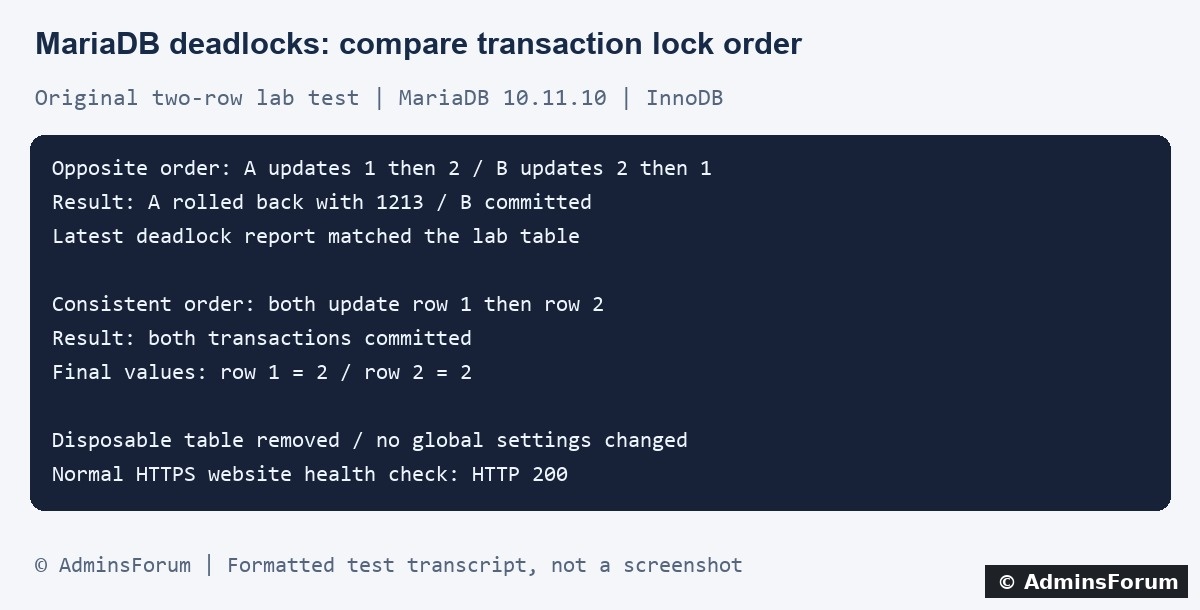
Original AdminsForum private lab results, formatted as a transcript rather than a screenshot.
1. Confirm the actual database error
Record the application action, time and timezone, request or job identifier and exact database error code. An application may show only a generic 500, so inspect its private logs as well as the website error log.
In aaPanel open the affected site's Log control under Website → PHP Project and correlate the incident time. If the application has its own log, use that too. Avoid publishing SQL containing customer data, authentication details or private values.
MariaDB identifies this error as:
Do not confuse it with error 1205, a lock-wait timeout. A slow query or high CPU reading does not by itself prove a deadlock occurred.
2. Understand the circular wait
A simplified two-row case looks like this:
Each transaction is waiting for a lock held by the other. InnoDB can break this cycle by rolling back a victim. The selected victim can vary; do not hard-code application logic around a particular worker always losing.
Consistent ordering can remove this particular cycle, but real transactions can involve multiple tables, indexes, ranges and triggers. Fix the demonstrated conflict rather than assuming every deadlock is a two-row problem.
3. Inspect the most recent InnoDB deadlock report
Through an authorized database administration session, run the read-only diagnostic:
Inspect the LATEST DETECTED DEADLOCK section. It can identify the participating transactions, SQL statements, held or requested locks and the rollback victim. Check its timestamp and affected table against your incident.
This output is server-wide and can contain sensitive SQL. Keep the full report private and share a narrowly redacted excerpt. The latest report may belong to another application or a later event; it is not a complete history of every deadlock. If access is denied, ask the database administrator for the relevant excerpt rather than granting broad privileges to a website account.
For repeated incidents, an administrator can assess dedicated deadlock logging and its retention separately. Our experiment did not enable global logging or collect unrelated database queries.
4. What our isolated aaPanel lab tested
The lab ran MariaDB 10.11.10. We created one disposable InnoDB table with two primary-key rows inside the existing separate performance-test database. Only the owned test rows were updated. No production application table or global database setting was changed.
5. Review the complete application transaction
Find where the transaction begins, what rows and tables it touches, and when it commits or rolls back. Include ORM operations, background jobs and triggers that can acquire additional locks.
Compare the order used by competing code paths. Where the application's correctness permits it, make related operations acquire locks in a consistent order across those paths. Keep transactions focused and avoid unnecessary waiting or external network calls while holding locks.
Also review query plans and indexes when transactions scan or lock more records than expected. Adding an index is not an automatic deadlock cure: confirm the actual access pattern and test correctness and write overhead in staging.
6. Handle retry at the transaction boundary
An application should recognize a deadlock and handle the rolled-back transaction deliberately. If retry is appropriate for the operation, retry the complete logical transaction using the framework or driver's supported transaction mechanism, with a bounded number of attempts and a short backoff.
Do not blindly rerun only the last SQL statement or retry indefinitely. Emails, payments and other external side effects need separate idempotency and consistency handling; a database rollback does not undo an external action. Confirm the application's transaction state before issuing another attempt.
Our lab recorded the deadlock and rollback explicitly; it did not implement or validate a real application's automatic retry strategy. Test that separately using controlled data.
7. Avoid unrelated server changes
Do not restart MariaDB, disable deadlock detection or increase connection and timeout limits just because one request reported 1213. Those changes do not repair a demonstrated circular lock order and can affect other sites.
Changing isolation levels also changes application semantics. Treat it as an application-design decision requiring appropriate testing, not a generic panel tuning step. Preserve transaction integrity and existing safeguards while gathering evidence.
8. Verify with representative controlled operations
After a code or query change, test the original operation and competing path in staging with bounded concurrency. Check final data, rollback behavior and retry limits, not merely the absence of a browser error. Monitor the relevant deadlock evidence over a representative period.
A single successful pair is useful evidence for a small reproduction, not proof that all workload conflicts are gone. Keep the original code/configuration and a tested rollback plan. Remove disposable test tables and do not delete or unlock real business data to make a test appear successful.
For a useful support request
Provide the database version, error code, time, redacted deadlock excerpt, transaction boundaries and recent application changes. Describe expected data consistency. Do not include database passwords, full customer SQL or server-wide diagnostic dumps.
Related guides
Measure MariaDB query plans and index changes
Correlate website errors with logs
Investigate PHP HTTP 500 errors
Technical references
MariaDB error 1213
SHOW ENGINE INNODB STATUS documentation
InnoDB lock-wait and deadlock settings
This guide uses a two-row InnoDB experiment in a separate lab database. It shows one way opposite update orders can deadlock, then verifies a consistent-order comparison. Do not reproduce deliberate lock conflicts against your live application tables.
Original AdminsForum private lab results, formatted as a transcript rather than a screenshot.
1. Confirm the actual database error
Record the application action, time and timezone, request or job identifier and exact database error code. An application may show only a generic 500, so inspect its private logs as well as the website error log.
In aaPanel open the affected site's Log control under Website → PHP Project and correlate the incident time. If the application has its own log, use that too. Avoid publishing SQL containing customer data, authentication details or private values.
MariaDB identifies this error as:
Code:
1213 / SQLSTATE 40001 / ER_LOCK_DEADLOCK
Deadlock found when trying to get lock; try restarting transaction2. Understand the circular wait
A simplified two-row case looks like this:
Code:
Transaction A holds row 1 and requests row 2.
Transaction B holds row 2 and requests row 1.Consistent ordering can remove this particular cycle, but real transactions can involve multiple tables, indexes, ranges and triggers. Fix the demonstrated conflict rather than assuming every deadlock is a two-row problem.
3. Inspect the most recent InnoDB deadlock report
Through an authorized database administration session, run the read-only diagnostic:
Code:
SHOW ENGINE INNODB STATUS;This output is server-wide and can contain sensitive SQL. Keep the full report private and share a narrowly redacted excerpt. The latest report may belong to another application or a later event; it is not a complete history of every deadlock. If access is denied, ask the database administrator for the relevant excerpt rather than granting broad privileges to a website account.
For repeated incidents, an administrator can assess dedicated deadlock logging and its retention separately. Our experiment did not enable global logging or collect unrelated database queries.
4. What our isolated aaPanel lab tested
The lab ran MariaDB 10.11.10. We created one disposable InnoDB table with two primary-key rows inside the existing separate performance-test database. Only the owned test rows were updated. No production application table or global database setting was changed.
- Two transactions first updated different rows, then attempted the other row in opposite order. In this run, A received error 1213 and rolled back; B committed. The latest deadlock section referenced the lab table.
- We reset the two test values, then ran both transactions in the same order: row 1 followed by row 2. Both committed in this comparison.
- The final values were 2 for row 1 and 2 for row 2, confirming that both successful transactions applied their increments.
5. Review the complete application transaction
Find where the transaction begins, what rows and tables it touches, and when it commits or rolls back. Include ORM operations, background jobs and triggers that can acquire additional locks.
Compare the order used by competing code paths. Where the application's correctness permits it, make related operations acquire locks in a consistent order across those paths. Keep transactions focused and avoid unnecessary waiting or external network calls while holding locks.
Also review query plans and indexes when transactions scan or lock more records than expected. Adding an index is not an automatic deadlock cure: confirm the actual access pattern and test correctness and write overhead in staging.
6. Handle retry at the transaction boundary
An application should recognize a deadlock and handle the rolled-back transaction deliberately. If retry is appropriate for the operation, retry the complete logical transaction using the framework or driver's supported transaction mechanism, with a bounded number of attempts and a short backoff.
Do not blindly rerun only the last SQL statement or retry indefinitely. Emails, payments and other external side effects need separate idempotency and consistency handling; a database rollback does not undo an external action. Confirm the application's transaction state before issuing another attempt.
Our lab recorded the deadlock and rollback explicitly; it did not implement or validate a real application's automatic retry strategy. Test that separately using controlled data.
7. Avoid unrelated server changes
Do not restart MariaDB, disable deadlock detection or increase connection and timeout limits just because one request reported 1213. Those changes do not repair a demonstrated circular lock order and can affect other sites.
Changing isolation levels also changes application semantics. Treat it as an application-design decision requiring appropriate testing, not a generic panel tuning step. Preserve transaction integrity and existing safeguards while gathering evidence.
8. Verify with representative controlled operations
After a code or query change, test the original operation and competing path in staging with bounded concurrency. Check final data, rollback behavior and retry limits, not merely the absence of a browser error. Monitor the relevant deadlock evidence over a representative period.
A single successful pair is useful evidence for a small reproduction, not proof that all workload conflicts are gone. Keep the original code/configuration and a tested rollback plan. Remove disposable test tables and do not delete or unlock real business data to make a test appear successful.
For a useful support request
Provide the database version, error code, time, redacted deadlock excerpt, transaction boundaries and recent application changes. Describe expected data consistency. Do not include database passwords, full customer SQL or server-wide diagnostic dumps.
Related guides
Measure MariaDB query plans and index changes
Correlate website errors with logs
Investigate PHP HTTP 500 errors
Technical references
MariaDB error 1213
SHOW ENGINE INNODB STATUS documentation
InnoDB lock-wait and deadlock settings