



4 hours ago
“Unknown collation” error 1273 during an import means the target server does not recognize a collation name used by the SQL. Confirm the target version and available collations before editing the dump or changing server defaults.
A collation defines comparison and sorting behavior. Choosing a recognized name can make a table definition run, but does not prove that sorting, equality and unique keys still match the source application's requirements.
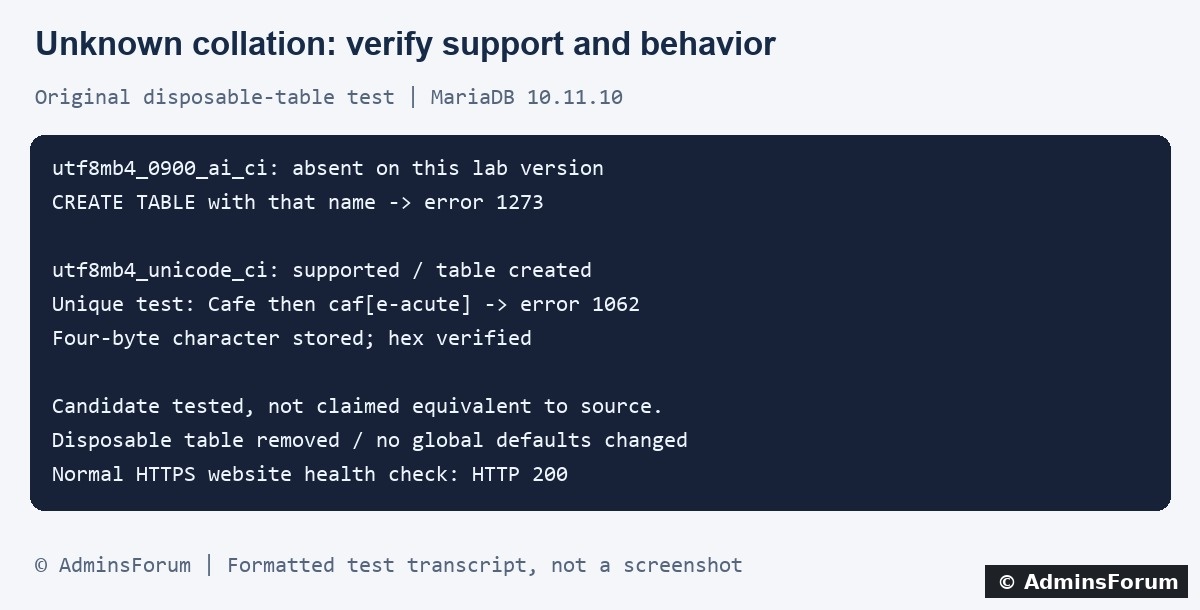
Original AdminsForum private lab results, formatted as a transcript rather than a screenshot.
1. Save the original dump and exact error
Keep an unchanged copy of the source export. Record the source database product/version, target product/version, failing statement or import position and exact collation name. Do not publish a full dump: it can contain account data, secrets and private content.
An import can execute earlier statements before stopping. Do not repeatedly run an edited file into a partly populated live database. Rehearse recovery in an isolated destination and verify what already committed before planning any production action.
2. Ask the target server what it supports
From an authorized database session on the actual destination, run:
Replace the specific name with the one in your error. An empty result for that name is evidence of absence on that server. The broader listing helps identify supported choices; it does not establish their semantic equivalence.
Do not infer support from “MySQL-compatible” branding alone. MariaDB versions differ, and newer versions can support names missing from older versions. A web-panel version is not the database-server version.
3. Locate where the unsupported name is declared
Review the failing schema statement in a protected local copy of the export. The name may appear at database, table or column level, or in another SQL expression. Identify each relevant declaration and its associated character set.
Changing only the destination database default will not necessarily override explicit table or column declarations inside the dump. Conversely, replacing every matching word in a dump can alter places you did not intend, including data text. Prefer a controlled schema/export compatibility plan over a blind global replacement.
If using aaPanel's installed database tools or phpMyAdmin, confirm you selected the isolated destination before any import. The import workflow itself is covered in the related guide; this tutorial investigates collation compatibility rather than repeating the upload steps.
4. What our private lab actually tested
The target was MariaDB 10.11.10 in the aaPanel lab. We used one disposable InnoDB table in a separate test database.
The disposable table was removed and the connection closed. No global database defaults or production tables changed. The normal HTTPS website returned 200 afterward.
5. Choose a migration approach based on requirements
Check whether the source application's export process supports the intended target server. A compatible target version or a supported export/schema strategy may be preferable to substituting collation names.
If considering a different target collation, list the behavior the application needs: language-specific ordering, case and accent treatment, comparisons, joins and unique-key rules. Test representative real-world values in a protected staging environment with appropriate data handling.
Do not assume utf8mb4_unicode_ci is the right answer merely because it worked in this small lab. It was a candidate used to demonstrate the decision process, not a universal recommendation. An upgrade also needs its own application compatibility, backup and rollback plan; do not upgrade a shared database service just to clear one import message.
6. Keep character encoding and collation separate
A compatible collation name must be considered alongside the character set and connection encoding. Removing four-byte character support to make a declaration parse can lose valid application data.
Verify representative non-ASCII and four-byte characters through the application's actual connection and read-back path. The lab's one stored string was only a narrow check, not proof that an entire export was correctly encoded or converted.
Also inspect column-level definitions after the staged import. A successful connection or a changed database default alone does not prove every text column uses the intended configuration.
7. Rehearse the import and validate the data
Use a fresh isolated target with the reviewed schema plan and keep the original dump unchanged. Confirm the schema creates, then load representative data and inspect errors and warnings. Investigate any new duplicate-key conflict; do not drop unique constraints to force completion.
Compare expected table and row counts, selected values, relationships and application behavior. Exercise searches, sorting, equality checks and uniqueness-sensitive actions. Include values that distinguish the application's required comparison rules. Check that no rows were silently skipped.
An import tool reporting completion is only one signal. The database must also preserve the application's intended data semantics. Our lab was not a full migration rehearsal and did not test a production cutover.
8. Plan the production change and rollback separately
Back up the destination and confirm a tested restore path before any real import or schema conversion. Record the reviewed changes and their scope. Schedule the migration around writes and application consistency needs, then verify the same checks after cutover.
Do not overwrite or empty a live database as a troubleshooting shortcut. If the rehearsal shows incompatible behavior, stop the conversion plan and resolve that mismatch before touching the live target.
For a support request
Include both server products/versions, exact unsupported name, redacted failing schema and whether the destination is empty or partially imported. Describe the required comparison behavior without attaching private data dumps.
Related guides
Import a SQL database file in aaPanel
Investigate duplicate-key error 1062
Back up and restore a database
Technical references
MariaDB supported character sets and collations
Setting character sets and collations
MySQL-to-MariaDB compatibility considerations
A collation defines comparison and sorting behavior. Choosing a recognized name can make a table definition run, but does not prove that sorting, equality and unique keys still match the source application's requirements.
Original AdminsForum private lab results, formatted as a transcript rather than a screenshot.
1. Save the original dump and exact error
Keep an unchanged copy of the source export. Record the source database product/version, target product/version, failing statement or import position and exact collation name. Do not publish a full dump: it can contain account data, secrets and private content.
An import can execute earlier statements before stopping. Do not repeatedly run an edited file into a partly populated live database. Rehearse recovery in an isolated destination and verify what already committed before planning any production action.
2. Ask the target server what it supports
From an authorized database session on the actual destination, run:
Code:
SELECT VERSION();
SHOW COLLATION WHERE Collation = 'utf8mb4_0900_ai_ci';
SHOW COLLATION WHERE Charset = 'utf8mb4';Do not infer support from “MySQL-compatible” branding alone. MariaDB versions differ, and newer versions can support names missing from older versions. A web-panel version is not the database-server version.
3. Locate where the unsupported name is declared
Review the failing schema statement in a protected local copy of the export. The name may appear at database, table or column level, or in another SQL expression. Identify each relevant declaration and its associated character set.
Changing only the destination database default will not necessarily override explicit table or column declarations inside the dump. Conversely, replacing every matching word in a dump can alter places you did not intend, including data text. Prefer a controlled schema/export compatibility plan over a blind global replacement.
If using aaPanel's installed database tools or phpMyAdmin, confirm you selected the isolated destination before any import. The import workflow itself is covered in the related guide; this tutorial investigates collation compatibility rather than repeating the upload steps.
4. What our private lab actually tested
The target was MariaDB 10.11.10 in the aaPanel lab. We used one disposable InnoDB table in a separate test database.
- The target's collation lookup returned no row for utf8mb4_0900_ai_ci. Creating the test table with that explicit collation returned 1273: Unknown collation.
- The lookup confirmed utf8mb4_unicode_ci was available. A disposable table using that candidate and utf8mb4 was created successfully.
- In the candidate table's unique text key, inserting Cafe and then café produced a duplicate-key error 1062 on the second value. That demonstrates equality behavior relevant to a unique key.
- A separate string containing a four-byte character was stored, and its hexadecimal bytes were read back to verify that small example.
The disposable table was removed and the connection closed. No global database defaults or production tables changed. The normal HTTPS website returned 200 afterward.
5. Choose a migration approach based on requirements
Check whether the source application's export process supports the intended target server. A compatible target version or a supported export/schema strategy may be preferable to substituting collation names.
If considering a different target collation, list the behavior the application needs: language-specific ordering, case and accent treatment, comparisons, joins and unique-key rules. Test representative real-world values in a protected staging environment with appropriate data handling.
Do not assume utf8mb4_unicode_ci is the right answer merely because it worked in this small lab. It was a candidate used to demonstrate the decision process, not a universal recommendation. An upgrade also needs its own application compatibility, backup and rollback plan; do not upgrade a shared database service just to clear one import message.
6. Keep character encoding and collation separate
A compatible collation name must be considered alongside the character set and connection encoding. Removing four-byte character support to make a declaration parse can lose valid application data.
Verify representative non-ASCII and four-byte characters through the application's actual connection and read-back path. The lab's one stored string was only a narrow check, not proof that an entire export was correctly encoded or converted.
Also inspect column-level definitions after the staged import. A successful connection or a changed database default alone does not prove every text column uses the intended configuration.
7. Rehearse the import and validate the data
Use a fresh isolated target with the reviewed schema plan and keep the original dump unchanged. Confirm the schema creates, then load representative data and inspect errors and warnings. Investigate any new duplicate-key conflict; do not drop unique constraints to force completion.
Compare expected table and row counts, selected values, relationships and application behavior. Exercise searches, sorting, equality checks and uniqueness-sensitive actions. Include values that distinguish the application's required comparison rules. Check that no rows were silently skipped.
An import tool reporting completion is only one signal. The database must also preserve the application's intended data semantics. Our lab was not a full migration rehearsal and did not test a production cutover.
8. Plan the production change and rollback separately
Back up the destination and confirm a tested restore path before any real import or schema conversion. Record the reviewed changes and their scope. Schedule the migration around writes and application consistency needs, then verify the same checks after cutover.
Do not overwrite or empty a live database as a troubleshooting shortcut. If the rehearsal shows incompatible behavior, stop the conversion plan and resolve that mismatch before touching the live target.
For a support request
Include both server products/versions, exact unsupported name, redacted failing schema and whether the destination is empty or partially imported. Describe the required comparison behavior without attaching private data dumps.
Related guides
Import a SQL database file in aaPanel
Investigate duplicate-key error 1062
Back up and restore a database
Technical references
MariaDB supported character sets and collations
Setting character sets and collations
MySQL-to-MariaDB compatibility considerations