



8 hours ago
MariaDB error 1055 with ONLY_FULL_GROUP_BY calls for a query review. Decide what each result row should represent, then make the selected columns and aggregates match that meaning. Turning validation off can hide an ambiguous report.
This guide tests one ambiguous query and two valid alternatives in disposable aaPanel lab data. It does not change the server's global SQL mode or assume a report is correct just because its SQL runs.
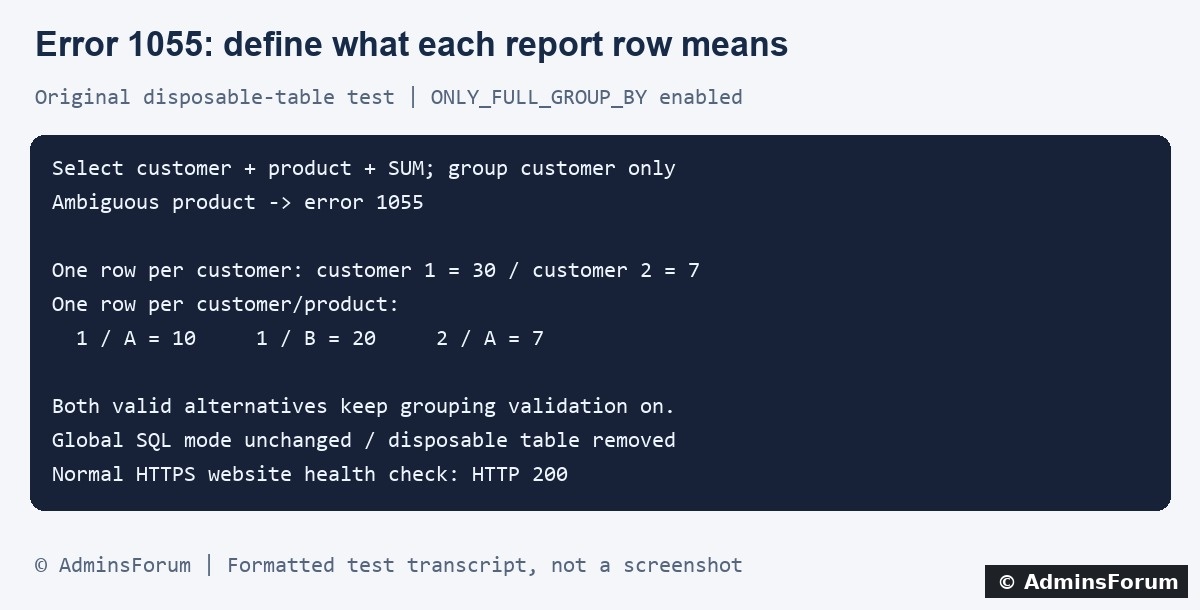
Original AdminsForum private lab results, formatted as a transcript rather than a screenshot.
1. Capture the failing query and context
Record the database error code, time, application report/action and database version. The application may show only a generic website error; inspect its private logs and correlate the website logs in aaPanel under Website → PHP Project → Log. Panel labels can vary.
Error 1055 identifies a selected field that does not meet the applicable grouping rule. Collect the actual generated SQL, including joins and filters, in a protected context. Redact private values before requesting help.
Do not edit a random SQL-mode setting because an error appeared after an upgrade. Establish whether the application query, connection configuration or database product/version changed.
2. Confirm the relevant session's SQL mode
From an authorized database session, use:
The session value belongs to the connection running the query. A phpMyAdmin result does not prove the application pool uses the same settings. Inspect the application's effective connection or its supported diagnostics too.
The global default and a connection's active mode are different scopes. Our experiment added ONLY_FULL_GROUP_BY only to its disposable test connection, preserving the other mode flags. That setting ended with the connection; we did not alter a global default or reload MariaDB.
3. See why the example is ambiguous
Our synthetic source rows were:
The following query attempted one row per customer while also asking for a single unaggregated product:
For customer 1, should product be A or B? There is no rule in that query selecting one. In our MariaDB test, ONLY_FULL_GROUP_BY rejected it with 1055.
The example table name is a placeholder. Do not copy it against a production table or assume a live report has only these three rows.
4. Choose alternative A: totals per customer
If the report needs one total per customer, product does not belong in that result row:
Our actual result was:
This query deliberately omits product because the report combines products. It is not merely a syntactic workaround; it expresses a specific report requirement.
5. Choose alternative B: totals per customer and product
If the report needs a separate total for each customer/product pair, group by both:
Our result was:
Both alternatives are valid for these lab rows, but they answer different questions. Adding every selected field to GROUP BY can change the number and meaning of rows. Choose the intended result before editing the query.
6. What the private test verified
The lab ran MariaDB 10.11.10 and used one disposable InnoDB table with the three synthetic rows above. The ambiguous query returned 1055; both explicit alternatives produced the listed totals with grouping validation still enabled.
We checked that global SQL mode was unchanged, removed the disposable table and closed the connection. No application tables or global database settings changed. The normal HTTPS website returned 200 afterward.
This is a small correctness example, not a benchmark or proof that either query is the right report for your application. We did not test a real ORM, multi-table report or production deployment.
7. Review more complex reports carefully
8. Preserve validation and verify expected data
Do not disable ONLY_FULL_GROUP_BY globally simply to make one ambiguous report run. Have the application owner confirm the intended report shape and implement a scoped query change. Preserve parameter binding and authorization filters.
Create staging cases with several products per customer, repeated values, joins, nulls and ties where relevant. Compare expected totals and row counts by hand for a small fixture, then test representative data and performance. A successful SQL execution does not establish correctness.
For a production code change, keep a tested rollback path and verify the application's real connection settings after deployment. Check logs for fresh errors and compare the displayed report with known data. Remove disposable fixtures and close diagnostic sessions.
For a support request
Share the server version, effective session mode, redacted query, relevant table definitions and a tiny synthetic sample with the expected result. Do not include private customer exports or credentials.
Related guides
Measure query plans and index changes
Find website error evidence
Investigate duplicate-key conflicts
Technical references
MariaDB GROUP BY behavior
SQL_MODE and ONLY_FULL_GROUP_BY
MariaDB error 1055
This guide tests one ambiguous query and two valid alternatives in disposable aaPanel lab data. It does not change the server's global SQL mode or assume a report is correct just because its SQL runs.
Original AdminsForum private lab results, formatted as a transcript rather than a screenshot.
1. Capture the failing query and context
Record the database error code, time, application report/action and database version. The application may show only a generic website error; inspect its private logs and correlate the website logs in aaPanel under Website → PHP Project → Log. Panel labels can vary.
Error 1055 identifies a selected field that does not meet the applicable grouping rule. Collect the actual generated SQL, including joins and filters, in a protected context. Redact private values before requesting help.
Do not edit a random SQL-mode setting because an error appeared after an upgrade. Establish whether the application query, connection configuration or database product/version changed.
2. Confirm the relevant session's SQL mode
From an authorized database session, use:
Code:
SELECT VERSION();
SELECT @@SESSION.sql_mode, @@GLOBAL.sql_mode;
The global default and a connection's active mode are different scopes. Our experiment added ONLY_FULL_GROUP_BY only to its disposable test connection, preserving the other mode flags. That setting ended with the connection; we did not alter a global default or reload MariaDB.
3. See why the example is ambiguous
Our synthetic source rows were:
Code:
customer_id | product | amount
1           | A       | 10
1           | B       | 20
2 | A | 7Code:
SELECT customer_id, product, SUM(amount)
FROM your_lab_table
GROUP BY customer_id;The example table name is a placeholder. Do not copy it against a production table or assume a live report has only these three rows.
4. Choose alternative A: totals per customer
If the report needs one total per customer, product does not belong in that result row:
Code:
SELECT customer_id, SUM(amount) AS total
FROM your_lab_table
GROUP BY customer_id
ORDER BY customer_id;Code:
customer 1 -> 30
customer 2 -> 75. Choose alternative B: totals per customer and product
If the report needs a separate total for each customer/product pair, group by both:
Code:
SELECT customer_id, product, SUM(amount) AS total
FROM your_lab_table
GROUP BY customer_id, product
ORDER BY customer_id, product;Code:
customer 1 / A -> 10
customer 1 / B -> 20
customer 2 / A -> 76. What the private test verified
The lab ran MariaDB 10.11.10 and used one disposable InnoDB table with the three synthetic rows above. The ambiguous query returned 1055; both explicit alternatives produced the listed totals with grouping validation still enabled.
We checked that global SQL mode was unchanged, removed the disposable table and closed the connection. No application tables or global database settings changed. The normal HTTPS website returned 200 afterward.
This is a small correctness example, not a benchmark or proof that either query is the right report for your application. We did not test a real ORM, multi-table report or production deployment.
7. Review more complex reports carefully
- Extra joined rows: a one-to-many join can multiply input rows and inflate sums even when the grouping is syntactically valid. Check the join cardinality and intended source records.
- A representative label: using MIN or MAX chooses an aggregate value. It does not automatically select the label from the row you meant, such as the latest order.
- Latest-record reports: define ordering and tie-breaking explicitly in a query design appropriate to your version. Do not assume an arbitrary non-grouped field comes from the row associated with a maximum date.
- Application-generated SQL: inspect ORM selections, joins and grouping together. Use supported application fixes or upgrades rather than patching unrelated global settings.
8. Preserve validation and verify expected data
Do not disable ONLY_FULL_GROUP_BY globally simply to make one ambiguous report run. Have the application owner confirm the intended report shape and implement a scoped query change. Preserve parameter binding and authorization filters.
Create staging cases with several products per customer, repeated values, joins, nulls and ties where relevant. Compare expected totals and row counts by hand for a small fixture, then test representative data and performance. A successful SQL execution does not establish correctness.
For a production code change, keep a tested rollback path and verify the application's real connection settings after deployment. Check logs for fresh errors and compare the displayed report with known data. Remove disposable fixtures and close diagnostic sessions.
For a support request
Share the server version, effective session mode, redacted query, relevant table definitions and a tiny synthetic sample with the expected result. Do not include private customer exports or credentials.
Related guides
Measure query plans and index changes
Find website error evidence
Investigate duplicate-key conflicts
Technical references
MariaDB GROUP BY behavior
SQL_MODE and ONLY_FULL_GROUP_BY
MariaDB error 1055