



11-14-2026, 12:42 PM
CyberPanel Optimize MySQL: What the One-Click Tuner Changes (Tested)
A fresh CyberPanel server runs its database (MariaDB) with small default settings, whatever the size of your server. CyberPanel has a built-in Optimize MySQL page that writes a new config based on your RAM. We ran it on a CyberPanel 3.0.8 server (Ubuntu 24.04, MariaDB 10.11, 8 GB RAM, 4 CPU cores) and checked every setting before and after. It works, but it also quietly switches off MariaDB's strict mode and sets the slow query log to a threshold that's too high to be useful. Here's the full picture.
Step 1: Look at what you have now
Over SSH as root. These lines read CyberPanel's database password from its own file, so you don't need to know it:
On our 8 GB server, before any tuning:
Step 2: Back up the config
The panel page says it itself: back up first. One command:
Step 3: Generate the suggestion
Open
(the Optimize MySQL page in the Databases section). It shows the RAM it detected and three buttons.
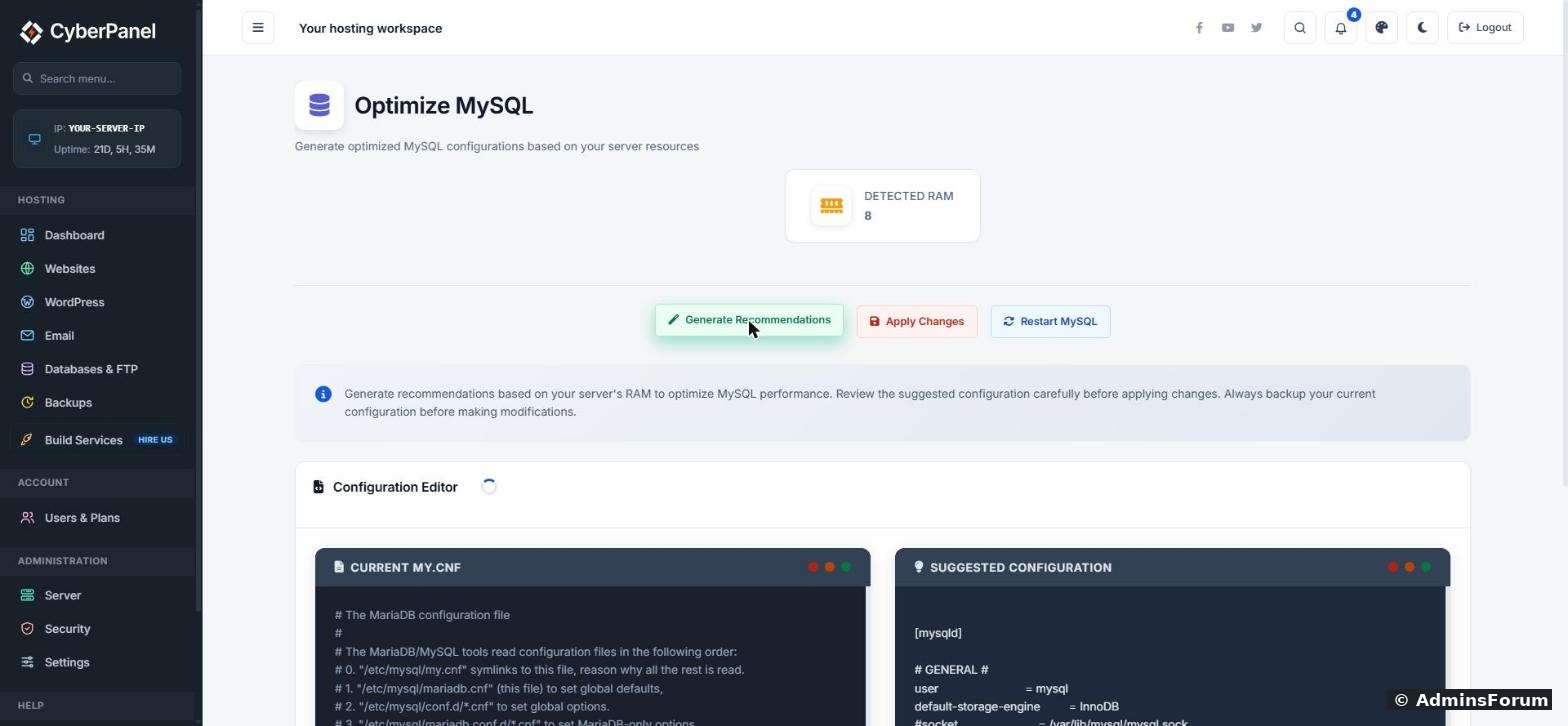
Click Generate Recommendations. Nothing changes yet. The left box shows your current config, the right box the suggested one.
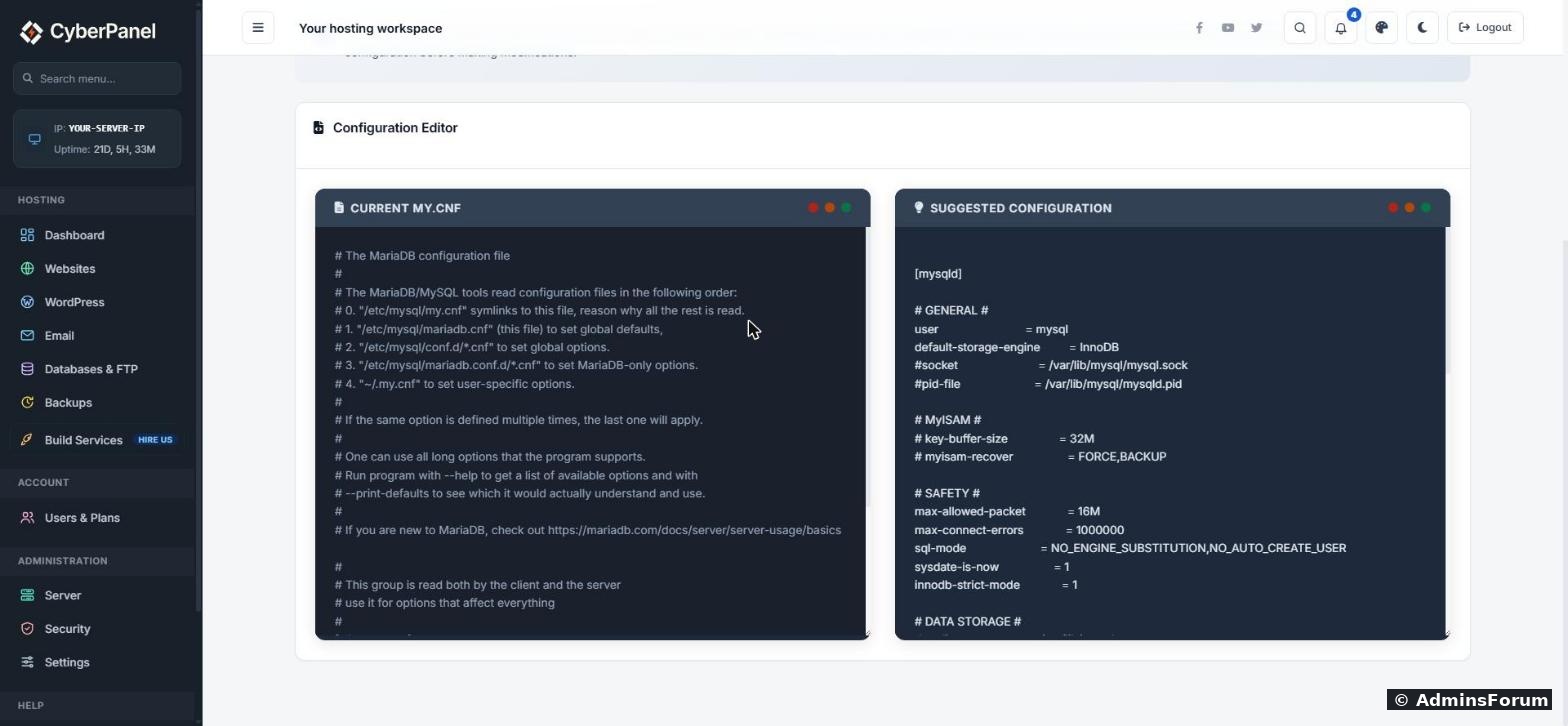
For our 8 GB server it suggested, among other things:
The buffer pool goes to about 15% of RAM. That's careful, and it's sensible on a panel server where the web server, PHP and mail need memory too.
Step 4: Apply and restart
Click Apply Changes (we got Changes successfully applied), then Restart MySQL. The restart took a few seconds. Our sites answered normally afterwards, and the new values were live:
MariaDB doesn't grab the whole buffer pool at once. Right after the restart its memory use was about the same as before (121 MB, then 145 MB). It grows as your data gets used.
What it changes that you might not expect
Step 5: Make the slow query log useful
The tool turns the slow query log on, but only for queries that take 30 seconds. Almost nothing is that slow, so the log stays empty while your site may still feel sluggish. We lowered it to 2 seconds:
Then we tested it with a query that waits 3 seconds:
The log showed it straight away:
The log file is in
and is named after your server (
). Look at it after a few days. Queries that show up there again and again are what to fix (usually a missing index or a heavy plugin). That helps far more than any config value.
If something goes wrong
If MariaDB doesn't start after a change, put the original link back and restart:
The last command shows why it failed. (We didn't need the rollback: MariaDB started fine with the new config.)
Does it make your sites faster?
Honest answer: on our test server we couldn't measure a difference, because our databases are tiny (about 7 MB in total) and already fit in the old 128 MB pool. The tool matters when your databases are bigger than the buffer pool: check your total size with
If that number is well under 128, the default pool was already enough, and the slow query log is the more useful part of this guide. If it's larger, the bigger buffer pool is a real gain.
Run the tuner on your server? Post your before and after values below (hide your server IP first).
A fresh CyberPanel server runs its database (MariaDB) with small default settings, whatever the size of your server. CyberPanel has a built-in Optimize MySQL page that writes a new config based on your RAM. We ran it on a CyberPanel 3.0.8 server (Ubuntu 24.04, MariaDB 10.11, 8 GB RAM, 4 CPU cores) and checked every setting before and after. It works, but it also quietly switches off MariaDB's strict mode and sets the slow query log to a threshold that's too high to be useful. Here's the full picture.
Step 1: Look at what you have now
Over SSH as root. These lines read CyberPanel's database password from its own file, so you don't need to know it:
Code:
PASSWORD=$(cat /etc/cyberpanel/mysqlPassword)
mysql -uroot -p"$PASSWORD" -e "SHOW GLOBAL VARIABLES WHERE Variable_name IN ('innodb_buffer_pool_size','tmp_table_size','max_connections','slow_query_log','long_query_time','sql_mode');"
mysql -uroot -p"$PASSWORD" -e "SHOW GLOBAL STATUS WHERE Variable_name IN ('Max_used_connections','Created_tmp_tables','Created_tmp_disk_tables','Slow_queries');"- innodb_buffer_pool_size: 128 MB. This is the memory MariaDB uses to keep your data ready. It's the most important setting, and the default is the same on a 1 GB and a 64 GB server.
- tmp_table_size: 16 MB. Memory for temporary tables that queries build while sorting and grouping. When a temporary table doesn't fit (or holds text columns), it goes to disk, which is slower. Ours showed 251 of 257 temporary tables created on disk.
- max_connections: 151, and the most we had ever used at once was 9.
- slow_query_log: OFF. Nothing records which queries are slow.
Step 2: Back up the config
The panel page says it itself: back up first. One command:
Code:
mkdir -p /root/mysql-backup && cp -a /etc/mysql/mariadb.cnf /etc/mysql/mariadb.conf.d/50-server.cnf /root/mysql-backup/Step 3: Generate the suggestion
Open
Code:
https://YOUR-SERVER-IP:8090/dataBases/OptimizeMySQLClick Generate Recommendations. Nothing changes yet. The left box shows your current config, the right box the suggested one.
For our 8 GB server it suggested, among other things:
Code:
max-connections                = 500
tmp-table-size                 = 32M
max-heap-table-size            = 32M
innodb-log-file-size           = 128M
innodb-buffer-pool-size        = 1228M
slow-query-log                 = 1
long_query_time                = 30
sql-mode = NO_ENGINE_SUBSTITUTION,NO_AUTO_CREATE_USERStep 4: Apply and restart
Click Apply Changes (we got Changes successfully applied), then Restart MySQL. The restart took a few seconds. Our sites answered normally afterwards, and the new values were live:
Code:
                          before     after
innodb_buffer_pool_size   128 MB     1228 MB
tmp_table_size            16 MB      32 MB
max_connections           151        500
innodb_log_file_size      96 MB      128 MB
slow_query_log            OFF        ON
long_query_time 10 s 30 sWhat it changes that you might not expect
- Strict mode is switched off. MariaDB 10.11's default
isCode:sql_mode
. After applying, ours wasCode:STRICT_TRANS_TABLES,ERROR_FOR_DIVISION_BY_ZERO,NO_AUTO_CREATE_USER,NO_ENGINE_SUBSTITUTION
. Without strict mode, MariaDB accepts bad data with a warning instead of an error (for example, it cuts off text that's too long for a column). Old apps often like that, but modern ones are written for strict mode. If you want the default back, delete theCode:NO_AUTO_CREATE_USER,NO_ENGINE_SUBSTITUTION
line fromCode:sql-mode
and restart MariaDB. (We left ours as the tool set it.)Code:/etc/mysql/my.cnf
- /etc/mysql/my.cnf is replaced. On Ubuntu this file is normally a link to
. The tool replaces the link with a real file. The originalCode:mariadb.cnf
stays untouched, and the files inCode:mariadb.cnf
are still read afterwards, so settings there (likeCode:/etc/mysql/mariadb.conf.d/
) still apply.Code:bind-address = 127.0.0.1
- One harmless warning. The MariaDB log now says 'innodb-log-files-in-group' was removed. It does nothing now. The suggested config contains a setting that MariaDB 10.11 no longer uses. You can delete that line or ignore it.
Step 5: Make the slow query log useful
The tool turns the slow query log on, but only for queries that take 30 seconds. Almost nothing is that slow, so the log stays empty while your site may still feel sluggish. We lowered it to 2 seconds:
Code:
sed -i "s/^long_query_time.*/long_query_time                = 2/" /etc/mysql/my.cnf
systemctl restart mariadbCode:
mysql -uroot -p"$PASSWORD" -e "SELECT SLEEP(3);"
tail /var/lib/mysql/*-slow.logCode:
# Query_time: 3.000337  Lock_time: 0.000000  Rows_sent: 1  Rows_examined: 0
SELECT SLEEP(3);Code:
/var/lib/mysql/Code:
HOSTNAME-slow.logIf something goes wrong
If MariaDB doesn't start after a change, put the original link back and restart:
Code:
ln -sf mariadb.cnf /etc/mysql/my.cnf
systemctl restart mariadb
journalctl -u mariadb --since "-10 min" | tail -30Does it make your sites faster?
Honest answer: on our test server we couldn't measure a difference, because our databases are tiny (about 7 MB in total) and already fit in the old 128 MB pool. The tool matters when your databases are bigger than the buffer pool: check your total size with
Code:
mysql -uroot -p"$PASSWORD" -e "SELECT ROUND(SUM(data_length+index_length)/1024/1024) AS total_mb FROM information_schema.tables;"Run the tuner on your server? Post your before and after values below (hide your server IP first).