



10-16-2026, 12:25 PM
Use DNS only while establishing that your aaPanel website works directly. Before enabling Cloudflare's proxy for a website, verify its origin HTTPS certificate, review the SSL/TLS mode and plan how to test both connections. DNS only and Proxied change the traffic path; neither option installs a certificate in aaPanel.
This guide uses our learn.adminslab.com lab hostname. On 16 October 2026 we inspected its Cloudflare DNS record and encryption controls, then checked the website directly over trusted HTTPS. We did not enable the proxy or change the zone's encryption mode. The screenshots show the actual starting configuration; the activation steps below are instructions, not a claimed completed migration.
1. Understand the two traffic paths
2. Record the existing state
In Cloudflare, select the correct domain, open DNS → Records and search for the exact website hostname. Note the record type, content, TTL and proxy status before editing. Also check whether another A or AAAA record exists for that hostname. An unexpected IPv6 record can send some visitors somewhere different.
Our lab record was A, learn.adminslab.com, 217.217.235.82, DNS only, TTL Auto. We clicked Edit to inspect the Proxy status control and cancelled without saving changes.
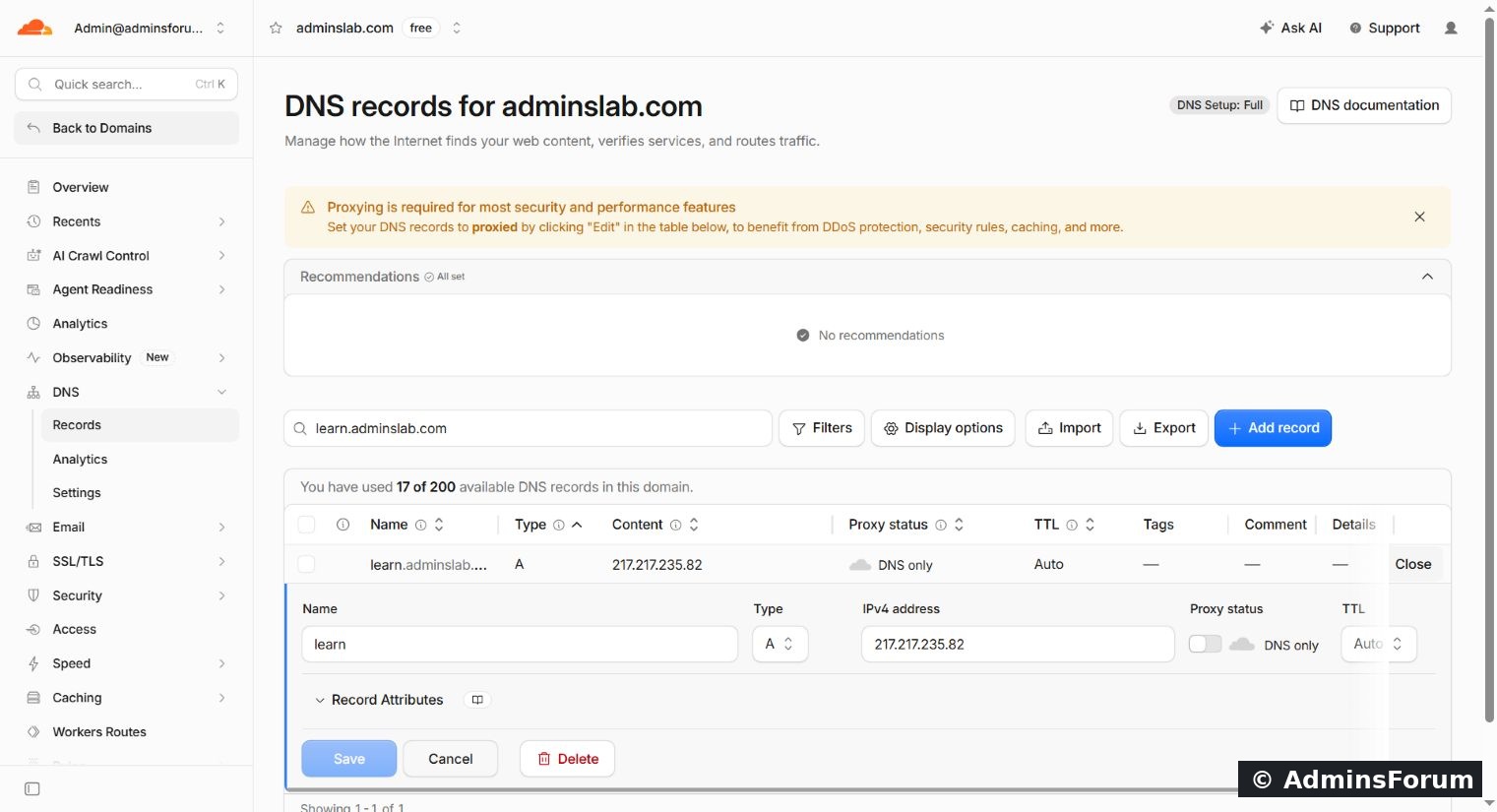
Actual DNS record editor. The Proxy status switch is off and the record is DNS only. This is a starting-state screenshot, not evidence that proxying has been enabled.
For the original website and DNS setup, follow Add a Subdomain in aaPanel with Cloudflare DNS and SSL.
3. Verify origin HTTPS before changing routing
In aaPanel, open Website, select the intended site and review its SSL certificate. Confirm that it covers the hostname, is within its validity period and is deployed to that site's HTTPS listener. An issued certificate in an inventory is not proof that the live site serves it.
With this lab record still DNS only, an external check reached 217.217.235.82 and received HTTP 200 over TLS 1.3. Certificate verification succeeded; its names included adminslab.com and *.adminslab.com, with expiry on 14 January 2027. The expected lab-page marker was present. This verifies our direct origin path at the check time, not a Cloudflare-to-origin connection.
For your site, open the exact HTTPS hostname and check both the certificate and expected content. Test an important application function too. If it is already proxied, a normal browser check shows the edge certificate; use a controlled origin check instead of assuming that is the aaPanel certificate.
For an optional command-line origin check, replace all example values:
This connects to the specified origin address while retaining the hostname for TLS and HTTP. It is a HEAD request, so follow with a normal page/application check. Do not add a certificate-verification bypass to make a failed check appear successful. The example address is a documentation placeholder, not our server.
4. Review Full (strict) and the scope of the setting
Cloudflare's Full (strict) mode validates the origin certificate as well as encrypting the HTTPS connection to it. The origin must serve HTTPS on port 443 with an unexpired matching certificate from a trusted public CA or Cloudflare Origin CA. A certificate-validation failure can produce error 526.
Open SSL/TLS → Overview → Configure. Our dashboard offered Automatic SSL/TLS, Full (Strict), Full, Flexible and Off. Automatic was selected and the current effective mode was Full. We recorded this state without saving a different selection.
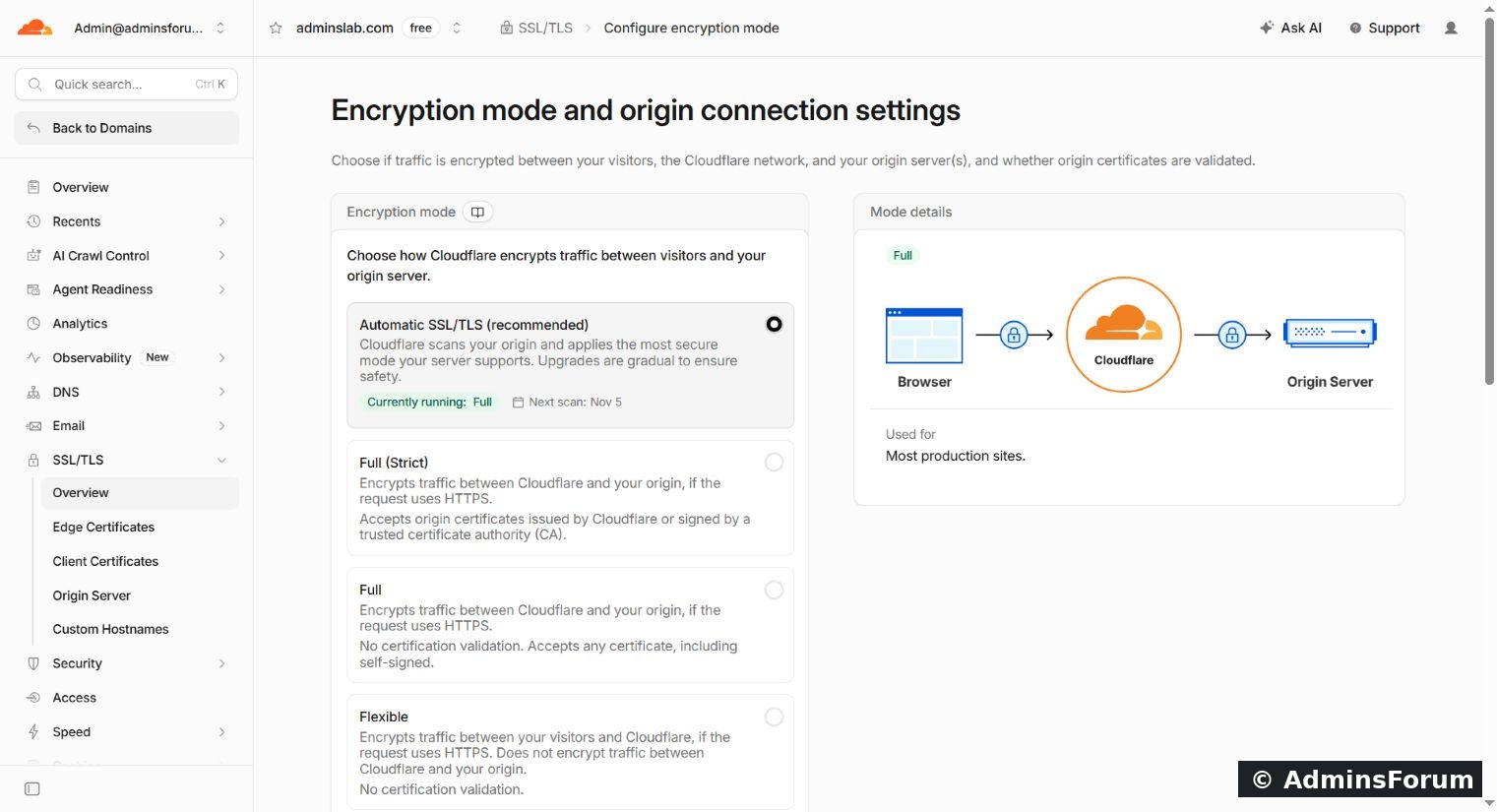
Actual encryption configuration choices. Automatic is selected in this lab; Full (Strict) is available but was not applied during this walkthrough.
Before deliberately selecting Full (Strict) and saving, check the other proxied hostnames affected by the zone setting and any relevant overrides. A certificate prepared for one subdomain does not establish readiness for every origin in that zone. Full (strict) also does not create an HTTP-to-HTTPS redirect; redirects need their own consistent configuration.
5. Enable the proxy only for the prepared website
After the origin and encryption prerequisites pass, return to DNS → Records, edit the intended A, AAAA or CNAME record, set Proxy status to Proxied and save. Recheck the exact record after saving. Allow for DNS caching and verify the visitor-facing certificate is ready for the hostname.
We stopped before this change in the lab. Do not interpret the screenshot as a successful proxy deployment. For a production change, retain the original values and an access path for diagnosis, and test during an appropriate maintenance window.
6. Verify routing, HTTPS and application behavior
Check DNS again, then load the HTTPS page and confirm expected content. Compare a normal request through Cloudflare with a deliberate direct-origin check when access permits it. Inspect response headers and logs to identify which path you tested. A Cloudflare response is not proof of a cache hit, and an HTTP 200 is not proof that login, forms or uploads work.
Test those application actions separately. Keep private pages and authenticated content out of any broad caching rule. Document the DNS status, SSL mode, certificate details and results so a later troubleshooting session has a baseline.
7. Diagnose failures without hiding the cause
For a certificate error, compare the requested hostname with the certificate actually served at the origin. Check validity, chain and the aaPanel site receiving the request. For a connection problem, check the listener, routing and relevant firewall logs. For a redirect loop, trace each Location response and review application URL settings and redirect rules together.
Do not downgrade encryption or disable certificate checks as a routine fix. If returning a previously direct site to DNS only is part of your prepared rollback, first confirm direct HTTPS still works and that origin-access rules permit it. Such a rollback changes the traffic path and removes Cloudflare's HTTP proxy protections for that hostname; it is not interchangeable with changing SSL mode.
Does Cloudflare SSL replace aaPanel SSL?
No. The visitor-to-Cloudflare and Cloudflare-to-origin connections are separate. Check the certificate presented on each relevant connection. DNS-only visitors connect directly and therefore need a certificate their browser trusts at the origin.
Does a wildcard certificate create DNS records?
No. Certificate coverage, DNS routing and the aaPanel website configuration are separate requirements. Our wildcard covers learn.adminslab.com, while its individual A record and website still had to be created.
Continue with Wildcard SSL in aaPanel, aaPanel Login Through a Domain Name, or the Domains, DNS & SSL guides. For help, include the exact error, affected hostname, proxy state and redacted relevant logs; never post private keys or API tokens.
References
Cloudflare proxy status.
Cloudflare Full (strict) requirements.
This guide uses our learn.adminslab.com lab hostname. On 16 October 2026 we inspected its Cloudflare DNS record and encryption controls, then checked the website directly over trusted HTTPS. We did not enable the proxy or change the zone's encryption mode. The screenshots show the actual starting configuration; the activation steps below are instructions, not a claimed completed migration.
1. Understand the two traffic paths
- DNS only: the hostname resolves to the configured origin address and visitors connect to that server. Cloudflare is providing DNS, but its HTTP proxy is not handling this traffic.
- Proxied: supported web traffic travels through Cloudflare before reaching the origin. Public DNS normally returns Cloudflare addresses, so that result alone cannot tell you the origin IP.
2. Record the existing state
In Cloudflare, select the correct domain, open DNS → Records and search for the exact website hostname. Note the record type, content, TTL and proxy status before editing. Also check whether another A or AAAA record exists for that hostname. An unexpected IPv6 record can send some visitors somewhere different.
Our lab record was A, learn.adminslab.com, 217.217.235.82, DNS only, TTL Auto. We clicked Edit to inspect the Proxy status control and cancelled without saving changes.
Actual DNS record editor. The Proxy status switch is off and the record is DNS only. This is a starting-state screenshot, not evidence that proxying has been enabled.
For the original website and DNS setup, follow Add a Subdomain in aaPanel with Cloudflare DNS and SSL.
3. Verify origin HTTPS before changing routing
In aaPanel, open Website, select the intended site and review its SSL certificate. Confirm that it covers the hostname, is within its validity period and is deployed to that site's HTTPS listener. An issued certificate in an inventory is not proof that the live site serves it.
With this lab record still DNS only, an external check reached 217.217.235.82 and received HTTP 200 over TLS 1.3. Certificate verification succeeded; its names included adminslab.com and *.adminslab.com, with expiry on 14 January 2027. The expected lab-page marker was present. This verifies our direct origin path at the check time, not a Cloudflare-to-origin connection.
For your site, open the exact HTTPS hostname and check both the certificate and expected content. Test an important application function too. If it is already proxied, a normal browser check shows the edge certificate; use a controlled origin check instead of assuming that is the aaPanel certificate.
For an optional command-line origin check, replace all example values:
Code:
curl --resolve example.com:443:203.0.113.10 https://example.com/ -I4. Review Full (strict) and the scope of the setting
Cloudflare's Full (strict) mode validates the origin certificate as well as encrypting the HTTPS connection to it. The origin must serve HTTPS on port 443 with an unexpired matching certificate from a trusted public CA or Cloudflare Origin CA. A certificate-validation failure can produce error 526.
Open SSL/TLS → Overview → Configure. Our dashboard offered Automatic SSL/TLS, Full (Strict), Full, Flexible and Off. Automatic was selected and the current effective mode was Full. We recorded this state without saving a different selection.
Actual encryption configuration choices. Automatic is selected in this lab; Full (Strict) is available but was not applied during this walkthrough.
Before deliberately selecting Full (Strict) and saving, check the other proxied hostnames affected by the zone setting and any relevant overrides. A certificate prepared for one subdomain does not establish readiness for every origin in that zone. Full (strict) also does not create an HTTP-to-HTTPS redirect; redirects need their own consistent configuration.
5. Enable the proxy only for the prepared website
After the origin and encryption prerequisites pass, return to DNS → Records, edit the intended A, AAAA or CNAME record, set Proxy status to Proxied and save. Recheck the exact record after saving. Allow for DNS caching and verify the visitor-facing certificate is ready for the hostname.
We stopped before this change in the lab. Do not interpret the screenshot as a successful proxy deployment. For a production change, retain the original values and an access path for diagnosis, and test during an appropriate maintenance window.
6. Verify routing, HTTPS and application behavior
Check DNS again, then load the HTTPS page and confirm expected content. Compare a normal request through Cloudflare with a deliberate direct-origin check when access permits it. Inspect response headers and logs to identify which path you tested. A Cloudflare response is not proof of a cache hit, and an HTTP 200 is not proof that login, forms or uploads work.
Test those application actions separately. Keep private pages and authenticated content out of any broad caching rule. Document the DNS status, SSL mode, certificate details and results so a later troubleshooting session has a baseline.
7. Diagnose failures without hiding the cause
For a certificate error, compare the requested hostname with the certificate actually served at the origin. Check validity, chain and the aaPanel site receiving the request. For a connection problem, check the listener, routing and relevant firewall logs. For a redirect loop, trace each Location response and review application URL settings and redirect rules together.
Do not downgrade encryption or disable certificate checks as a routine fix. If returning a previously direct site to DNS only is part of your prepared rollback, first confirm direct HTTPS still works and that origin-access rules permit it. Such a rollback changes the traffic path and removes Cloudflare's HTTP proxy protections for that hostname; it is not interchangeable with changing SSL mode.
Does Cloudflare SSL replace aaPanel SSL?
No. The visitor-to-Cloudflare and Cloudflare-to-origin connections are separate. Check the certificate presented on each relevant connection. DNS-only visitors connect directly and therefore need a certificate their browser trusts at the origin.
Does a wildcard certificate create DNS records?
No. Certificate coverage, DNS routing and the aaPanel website configuration are separate requirements. Our wildcard covers learn.adminslab.com, while its individual A record and website still had to be created.
Continue with Wildcard SSL in aaPanel, aaPanel Login Through a Domain Name, or the Domains, DNS & SSL guides. For help, include the exact error, affected hostname, proxy state and redacted relevant logs; never post private keys or API tokens.
References
Cloudflare proxy status.
Cloudflare Full (strict) requirements.