



10-16-2026, 12:12 PM
To add a subdomain in aaPanel, create its DNS record, add the hostname as a website with its own document root, publish a page and install a matching SSL certificate. DNS alone does not create a website, and an SSL certificate alone does not route requests to it.
We completed this example on aaPanel 8.0.7, Ubuntu 22.04.5 and Nginx 1.30.5 on 16 October 2026. Our test hostname is learn.adminslab.com. Use your own domain and server IP in the steps below. The example is a separate static website; it does not require FTP, database or mailbox accounts.
1. Choose a separate site or an alias
Use a separate aaPanel website when the subdomain should have its own files, application or configuration. That is what we created here. If it should show the same application as an existing site, adding a hostname binding to that site may be more appropriate, provided the application's domain configuration supports it. Do not bind the same hostname to several websites.
Our example uses a new document root:
You do not need to buy another domain to create learn.example.com under example.com. You do need control of that domain's DNS zone.
2. Add the DNS record in Cloudflare
Open the correct domain in Cloudflare, select DNS → Records and click Add record. In our lab we entered:
Use the public IPv4 address of your own VPS. A maps a hostname to IPv4; AAAA is for IPv6. Add an AAAA record only when the server and site have a working IPv6 path. Do not leave a conflicting CNAME or obsolete address for the same hostname.
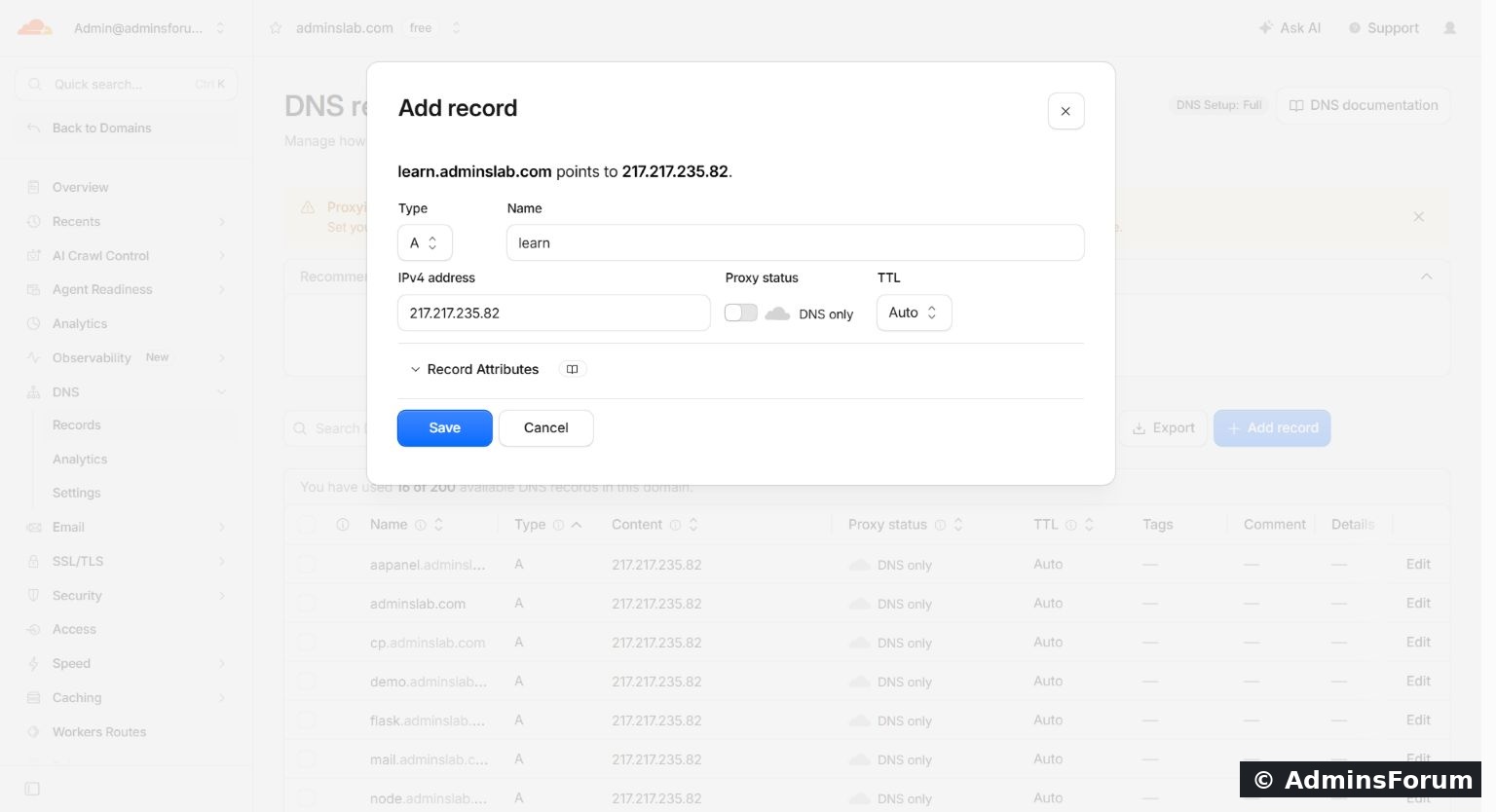
Creating the lab's learn record. DNS only lets us test the origin website and certificate directly.
Click Save and confirm the new record is listed. This example creates a new DNS-only hostname; it does not disable proxy protection on an existing website. A proxied hostname can be used later with the appropriate Cloudflare SSL and origin configuration. DNS only exposes the origin address and sends visitors directly to it, so the origin needs its own protection.
If the parent domain is not on Cloudflare yet, begin with Add a Domain to Cloudflare. A record added in an inactive DNS zone will not control public resolution.
3. Verify DNS before troubleshooting the web server
On Windows PowerShell:
On a system with dig:
Replace learn.example.com with your actual hostname. For this DNS-only example, the result should be the intended origin IP. A proxied Cloudflare hostname normally returns Cloudflare addresses instead. Cached old answers can persist until their relevant TTL expires, so compare the authoritative zone with a fresh public lookup before changing more records.
Our external lookup returned 217.217.235.82 for learn.adminslab.com.
4. Create the separate website in aaPanel
Open Website → PHP Project → Add site. This area also supports a static site in our release. Enter the full hostname without https:// or a URL path. Add a useful description and check that Website Path points to a new, separate directory.
For the static example, leave FTP and Database set to Not create, select Static in PHP version and leave Create html file enabled. We unchecked Apply for SSL at creation because we would deploy an existing wildcard certificate in a separate step.
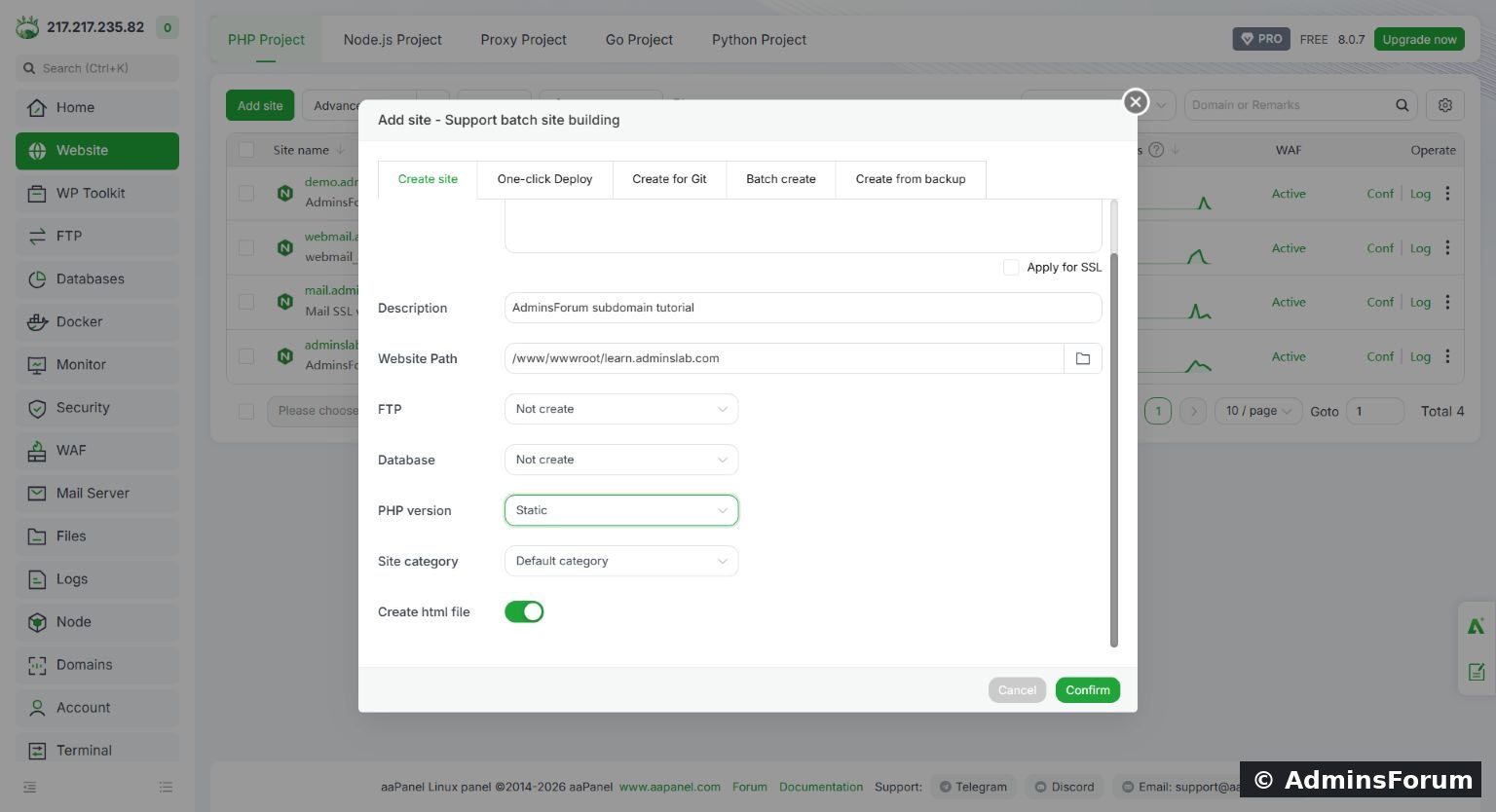
Separate document root and Static runtime. Choose a supported PHP version instead if your actual application requires PHP.
Click Confirm. Wait for creation to finish and confirm the new hostname appears in the website list. Do not point the document root at another site's folder unless sharing those files is intentional. Selecting Static is unsuitable for a PHP application such as WordPress.
5. Publish a recognizable test page
Open the new website's document root through aaPanel Files. Keep a copy of any page you intend to replace. Edit or upload index.html with a simple identifying page such as:
Save it in the new site's root, not the parent website's directory. Use an identifiable marker so a default page or cached response cannot be mistaken for your new content. Do not publish configuration dumps, credentials or phpinfo output as a test page.
We uploaded a branded static index.html to the new root using SSH file transfer, retaining the original generated page. Our page includes a noindex directive because it is a disposable demonstration rather than search content.
Open http://your-subdomain/ and confirm the page marker is visible. If you see an unrelated website, investigate hostname binding, DNS and document root before changing file permissions.
6. Enable HTTPS for the hostname
Use a certificate covering the exact hostname. A normal single-host certificate is sufficient; a wildcard is optional. If you already have a trusted *.example.com certificate, it covers learn.example.com, but not a deeper hostname such as app.learn.example.com.
For our lab, we opened Domains → SSL Certificate → Let's Encrypt and used Manage on the existing wildcard certificate. We added learn.adminslab.com to its Site deployment targets while retaining the already selected demo site, then clicked Deploy and confirmed. No new certificate was requested for this step.
Follow our verified wildcard SSL guide for the DNS-provider and deployment screens. If you do not have that certificate, use the single-site Let's Encrypt guide.
7. Verify the page and certificate from another network
Open the HTTPS address and confirm both the expected page and certificate details. A command-line check is:
Do not use -k: it bypasses certificate validation. A successful TLS handshake and the expected application response are separate checks. For our lab, external checks recorded:
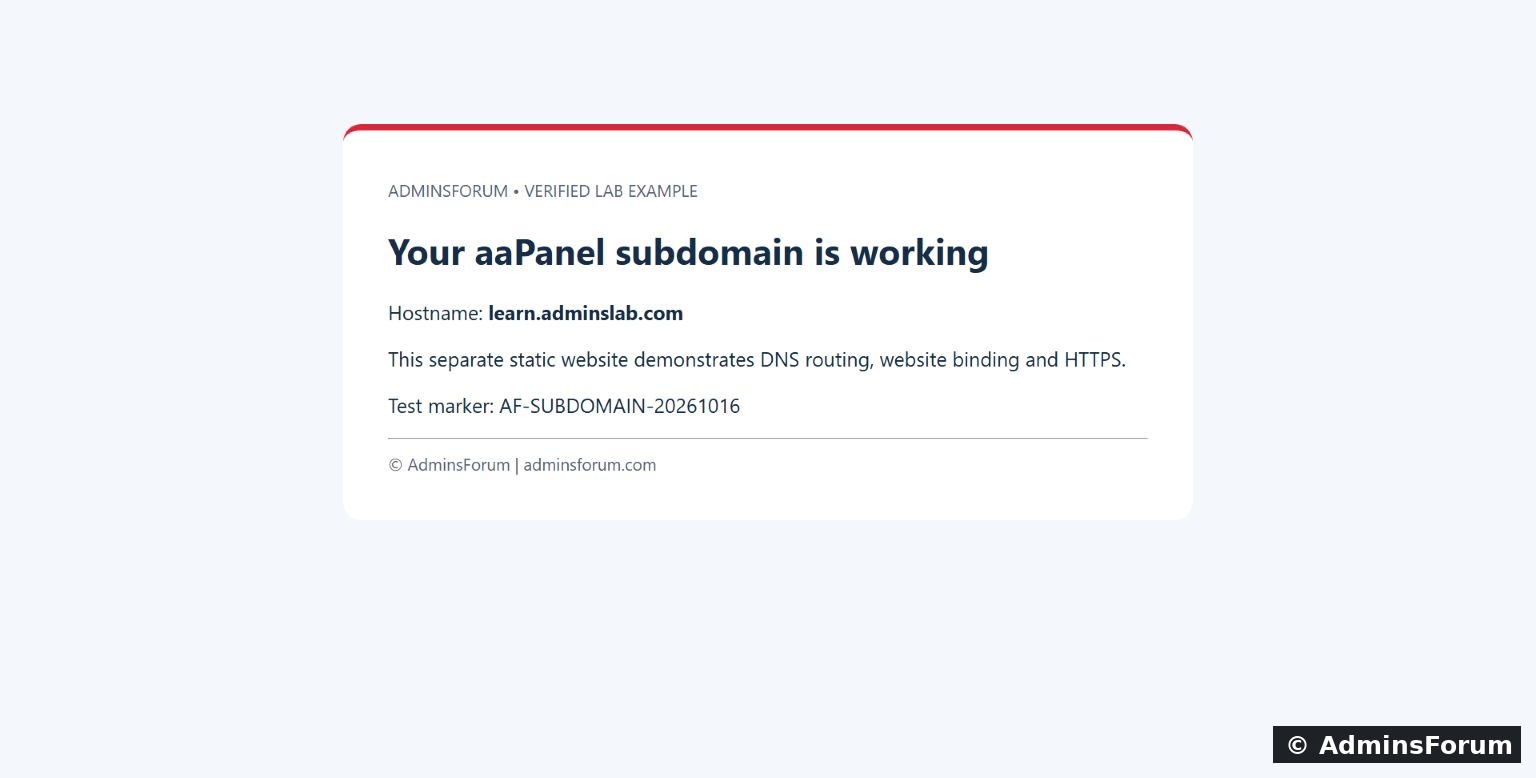
The actual lab page served at https://learn.adminslab.com after successful certificate deployment.
Once HTTPS works, configure a redirect if you want HTTP traffic to use HTTPS automatically. We verified both protocols without forcing a redirect in this test. See Redirect HTTP to HTTPS in aaPanel.
Common questions
Why does DNS work but the page is wrong?
DNS locates a server; the web server still needs the right hostname binding and document root. Check both, and confirm you are not seeing a cached proxy response.
Does a wildcard certificate create all subdomains?
No. Certificate coverage, DNS records and website routing are separate. This test created one explicit DNS record and one separate website.
Can I delete the test afterward?
Yes, after confirming it is only your disposable test. Remove its DNS record and website through their management interfaces, checking any options that also remove files or databases. Do not delete a shared wildcard certificate used by other sites. We left the isolated example available for this tutorial; it contains no application accounts or private content.
Continue with aaPanel Domains, DNS & SSL Guides, or ask in aaPanel Support with the hostname, panel version and redacted error.
References
aaPanel website basics.
Cloudflare: create subdomain records.
We completed this example on aaPanel 8.0.7, Ubuntu 22.04.5 and Nginx 1.30.5 on 16 October 2026. Our test hostname is learn.adminslab.com. Use your own domain and server IP in the steps below. The example is a separate static website; it does not require FTP, database or mailbox accounts.
1. Choose a separate site or an alias
Use a separate aaPanel website when the subdomain should have its own files, application or configuration. That is what we created here. If it should show the same application as an existing site, adding a hostname binding to that site may be more appropriate, provided the application's domain configuration supports it. Do not bind the same hostname to several websites.
Our example uses a new document root:
Code:
Hostname: learn.adminslab.com
Document root: /www/wwwroot/learn.adminslab.com
Content: static HTML
FTP: Not create
Database: Not create2. Add the DNS record in Cloudflare
Open the correct domain in Cloudflare, select DNS → Records and click Add record. In our lab we entered:
Code:
Type: A
Name: learn
IPv4 address: 217.217.235.82
Proxy status: DNS only
TTL: AutoCreating the lab's learn record. DNS only lets us test the origin website and certificate directly.
Click Save and confirm the new record is listed. This example creates a new DNS-only hostname; it does not disable proxy protection on an existing website. A proxied hostname can be used later with the appropriate Cloudflare SSL and origin configuration. DNS only exposes the origin address and sends visitors directly to it, so the origin needs its own protection.
If the parent domain is not on Cloudflare yet, begin with Add a Domain to Cloudflare. A record added in an inactive DNS zone will not control public resolution.
3. Verify DNS before troubleshooting the web server
On Windows PowerShell:
Code:
Resolve-DnsName learn.example.com -Type ACode:
dig +short A learn.example.comOur external lookup returned 217.217.235.82 for learn.adminslab.com.
4. Create the separate website in aaPanel
Open Website → PHP Project → Add site. This area also supports a static site in our release. Enter the full hostname without https:// or a URL path. Add a useful description and check that Website Path points to a new, separate directory.
For the static example, leave FTP and Database set to Not create, select Static in PHP version and leave Create html file enabled. We unchecked Apply for SSL at creation because we would deploy an existing wildcard certificate in a separate step.
Separate document root and Static runtime. Choose a supported PHP version instead if your actual application requires PHP.
Click Confirm. Wait for creation to finish and confirm the new hostname appears in the website list. Do not point the document root at another site's folder unless sharing those files is intentional. Selecting Static is unsuitable for a PHP application such as WordPress.
5. Publish a recognizable test page
Open the new website's document root through aaPanel Files. Keep a copy of any page you intend to replace. Edit or upload index.html with a simple identifying page such as:
Code:
<!doctype html>
<html lang="en">
<meta charset="utf-8">
<title>My subdomain test</title>
<h1>My subdomain is working</h1>
<p>Test marker: MY-SUBDOMAIN-CHECK</p>
</html>We uploaded a branded static index.html to the new root using SSH file transfer, retaining the original generated page. Our page includes a noindex directive because it is a disposable demonstration rather than search content.
Open http://your-subdomain/ and confirm the page marker is visible. If you see an unrelated website, investigate hostname binding, DNS and document root before changing file permissions.
6. Enable HTTPS for the hostname
Use a certificate covering the exact hostname. A normal single-host certificate is sufficient; a wildcard is optional. If you already have a trusted *.example.com certificate, it covers learn.example.com, but not a deeper hostname such as app.learn.example.com.
For our lab, we opened Domains → SSL Certificate → Let's Encrypt and used Manage on the existing wildcard certificate. We added learn.adminslab.com to its Site deployment targets while retaining the already selected demo site, then clicked Deploy and confirmed. No new certificate was requested for this step.
Follow our verified wildcard SSL guide for the DNS-provider and deployment screens. If you do not have that certificate, use the single-site Let's Encrypt guide.
7. Verify the page and certificate from another network
Open the HTTPS address and confirm both the expected page and certificate details. A command-line check is:
Code:
curl -I https://learn.example.com/Code:
learn.adminslab.com → 217.217.235.82
HTTP: 200, expected page marker found
HTTPS: 200, expected page marker found
TLS: 1.3, hostname and trust verification passed
Certificate names: *.adminslab.com, adminslab.com
Certificate expires: 14 January 2027, 09:21:39 UTC
The actual lab page served at https://learn.adminslab.com after successful certificate deployment.
Once HTTPS works, configure a redirect if you want HTTP traffic to use HTTPS automatically. We verified both protocols without forcing a redirect in this test. See Redirect HTTP to HTTPS in aaPanel.
Common questions
Why does DNS work but the page is wrong?
DNS locates a server; the web server still needs the right hostname binding and document root. Check both, and confirm you are not seeing a cached proxy response.
Does a wildcard certificate create all subdomains?
No. Certificate coverage, DNS records and website routing are separate. This test created one explicit DNS record and one separate website.
Can I delete the test afterward?
Yes, after confirming it is only your disposable test. Remove its DNS record and website through their management interfaces, checking any options that also remove files or databases. Do not delete a shared wildcard certificate used by other sites. We left the isolated example available for this tutorial; it contains no application accounts or private content.
Continue with aaPanel Domains, DNS & SSL Guides, or ask in aaPanel Support with the hostname, panel version and redacted error.
References
aaPanel website basics.
Cloudflare: create subdomain records.