



2 hours ago
An “Incorrect string value” message needs an encoding investigation, not a blanket instruction to ignore the error. Confirm the incoming text, application connection and destination column before changing data or schema.
This guide reproduces one error-1366 case: a four-byte Unicode character sent through a utf8mb4 connection to a utf8mb3 column. We corrected only a disposable lab column and verified the read-back bytes. Other 1366 messages can involve different invalid values, so read the full error.
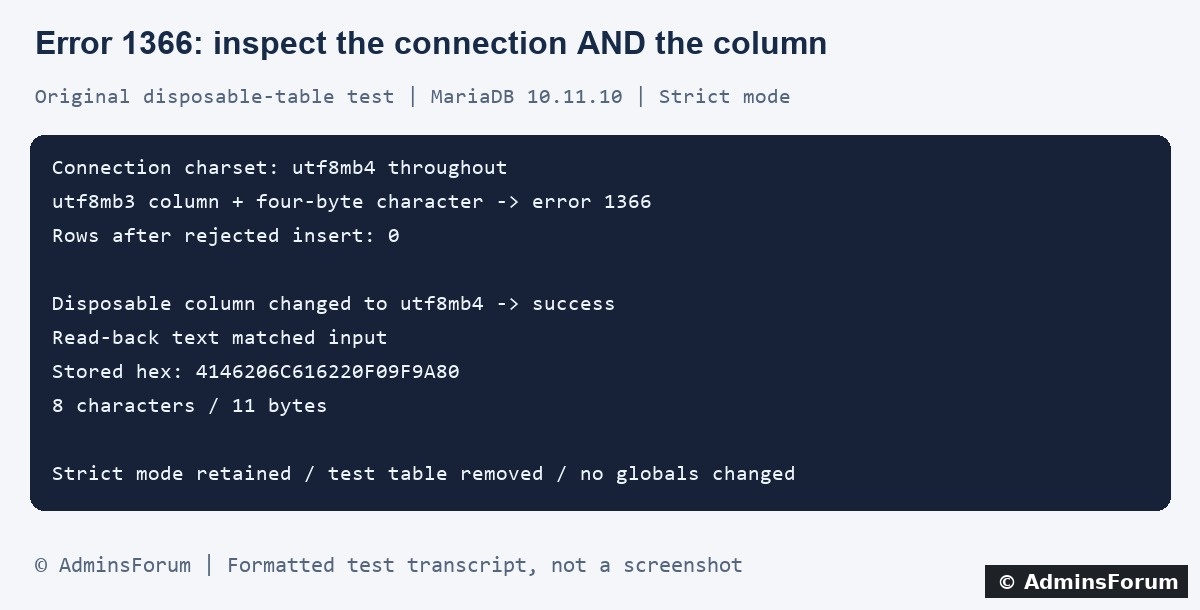
Original AdminsForum private lab results, formatted as a transcript rather than a screenshot.
1. Record the exact failure without publishing private text
Note the time, application action or import step, column and complete error type. Inspect the application's private log and correlate website errors in aaPanel through Website → PHP Project → Log. Panel labels vary.
The relevant message in this lab was 1366: Incorrect string value. The same numeric code can describe other incorrect values; a numeric-column conversion error is not automatically a Unicode storage problem.
Use a small harmless reproduction, such as a synthetic string containing a known four-byte character. Do not paste customer messages, raw SQL dumps or credentials into a public support thread.
2. Check the actual column definition
In an authorized database session, inspect the affected column in the correct database:
Replace the placeholders with the actual names. Inspect the full table definition as well when planning a schema change. A database default does not prove an existing column uses the same character set.
utf8mb3 supports a smaller Unicode repertoire than utf8mb4, which can store supplementary characters using four bytes. Do not rely on the ambiguous name utf8 without checking how the actual server resolves it.
3. Check the connection that sends the failing request
For the relevant database session, inspect:
Running this in phpMyAdmin reports that tool's connection, not necessarily the connection used by your PHP application. Verify the application's driver or framework configuration and effective session too. Use its supported character-set configuration and parameterized queries.
Changing the connection alone cannot give a utf8mb3 column four-byte storage capability. Conversely, a utf8mb4 column does not repair text that the application already misdecoded before sending it.
4. What the isolated aaPanel lab demonstrated
The lab ran MariaDB 10.11.10. We created one disposable InnoDB table in a separate test database. Its text column initially used explicit utf8mb3, while the client, connection and results settings were all utf8mb4. The existing session used STRICT_TRANS_TABLES.
This was one synthetic column test, not a full database conversion, import rehearsal or repair of already damaged text.
5. Plan a schema correction from the full definition
If evidence shows the column cannot represent required valid text, first back up and rehearse the change on a restored staging copy. Review the application's schema requirements, indexes, foreign keys, defaults, nullability, comments and other column attributes.
Do not copy a short ALTER/MODIFY example over an unknown live definition: omitted attributes can change behavior. A whole-table conversion can affect more columns and indexes than intended. Review space, locking and application compatibility before a real migration.
Choose a supported collation based on comparison and uniqueness requirements, not only on whether its name is recognized. The collation used in our disposable fixture is not a universal recommendation. Test representative values that matter to the application.
6. Preserve valid input instead of hiding rejection
Disabling strict mode, ignoring conversion warnings or stripping characters can turn a visible error into lost or altered content. That is not a verified repair. Keep the application's intended validation and data-integrity behavior while identifying the mismatch.
For an import, confirm the file's actual encoding and export settings. Editing a charset declaration without verifying the bytes can cause another mismatch. Preserve the original export and test changes in an isolated destination before retrying a partially applied import.
If stored text already contains replacement characters or incorrectly decoded sequences, a column-charset change alone cannot prove the original content has been recovered. Use a trustworthy source or backup and a separate reviewed recovery plan.
7. Verify through the complete application path
In staging, submit representative text through the real application, read it back through the same supported driver path and inspect the result. Include ordinary text, relevant non-ASCII characters and four-byte characters required by the product.
On a harmless sample row, useful checks include:
Replace the names and ID with the controlled sample. Do not publish hex-encoded private text: hexadecimal is a representation, not anonymization. Confirm expected content as well as counts and SQL success.
Also test relevant sorting, equality and unique-key behavior after a collation change. Check logs and warnings for new errors. One successfully stored emoji does not validate every application or migration requirement.
8. Rollout and cleanup
Apply only a rehearsed, appropriately scoped production change with a backup and rollback plan. Coordinate application connection settings with the schema when required. Verify the effective column definitions and application results afterward.
Remove temporary diagnostic code and disposable sample data. Keep strict-mode and data-validation safeguards intact. Do not overwrite or empty a live database to make a test pass.
For a support request
Provide the server version, redacted error, actual column definition, relevant session charset settings and a harmless reproduction. Exclude passwords, private text and complete data dumps.
Related guides
Investigate unknown collation error 1273
Check unique-key conflicts
Back up and restore a database
Technical references
MariaDB Unicode character sets
Character-set and collation configuration
MariaDB error 1366
This guide reproduces one error-1366 case: a four-byte Unicode character sent through a utf8mb4 connection to a utf8mb3 column. We corrected only a disposable lab column and verified the read-back bytes. Other 1366 messages can involve different invalid values, so read the full error.
Original AdminsForum private lab results, formatted as a transcript rather than a screenshot.
1. Record the exact failure without publishing private text
Note the time, application action or import step, column and complete error type. Inspect the application's private log and correlate website errors in aaPanel through Website → PHP Project → Log. Panel labels vary.
The relevant message in this lab was 1366: Incorrect string value. The same numeric code can describe other incorrect values; a numeric-column conversion error is not automatically a Unicode storage problem.
Use a small harmless reproduction, such as a synthetic string containing a known four-byte character. Do not paste customer messages, raw SQL dumps or credentials into a public support thread.
2. Check the actual column definition
In an authorized database session, inspect the affected column in the correct database:
Code:
SELECT COLUMN_NAME, COLUMN_TYPE, CHARACTER_SET_NAME, COLLATION_NAME
FROM information_schema.COLUMNS
WHERE TABLE_SCHEMA = 'your_database'
  AND TABLE_NAME = 'your_table'
AND COLUMN_NAME = 'your_text_column';utf8mb3 supports a smaller Unicode repertoire than utf8mb4, which can store supplementary characters using four bytes. Do not rely on the ambiguous name utf8 without checking how the actual server resolves it.
3. Check the connection that sends the failing request
For the relevant database session, inspect:
Code:
SELECT VERSION(), @@SESSION.sql_mode;
SELECT @@SESSION.character_set_client,
       @@SESSION.character_set_connection,
@@SESSION.character_set_results;Changing the connection alone cannot give a utf8mb3 column four-byte storage capability. Conversely, a utf8mb4 column does not repair text that the application already misdecoded before sending it.
4. What the isolated aaPanel lab demonstrated
The lab ran MariaDB 10.11.10. We created one disposable InnoDB table in a separate test database. Its text column initially used explicit utf8mb3, while the client, connection and results settings were all utf8mb4. The existing session used STRICT_TRANS_TABLES.
- A synthetic string consisting of “AF lab ” plus one four-byte character was rejected with 1366. A count confirmed zero rows were inserted.
- We changed only the disposable column to utf8mb4 with a supported lab collation, retaining its VARCHAR size and NOT NULL property.
- The same string then inserted successfully. Read-back text equaled the original input, and HEX(label) returned 4146206C616220F09F9A80.
- The sample measured 8 characters and 11 bytes, demonstrating why character count and byte count are different.
This was one synthetic column test, not a full database conversion, import rehearsal or repair of already damaged text.
5. Plan a schema correction from the full definition
If evidence shows the column cannot represent required valid text, first back up and rehearse the change on a restored staging copy. Review the application's schema requirements, indexes, foreign keys, defaults, nullability, comments and other column attributes.
Do not copy a short ALTER/MODIFY example over an unknown live definition: omitted attributes can change behavior. A whole-table conversion can affect more columns and indexes than intended. Review space, locking and application compatibility before a real migration.
Choose a supported collation based on comparison and uniqueness requirements, not only on whether its name is recognized. The collation used in our disposable fixture is not a universal recommendation. Test representative values that matter to the application.
6. Preserve valid input instead of hiding rejection
Disabling strict mode, ignoring conversion warnings or stripping characters can turn a visible error into lost or altered content. That is not a verified repair. Keep the application's intended validation and data-integrity behavior while identifying the mismatch.
For an import, confirm the file's actual encoding and export settings. Editing a charset declaration without verifying the bytes can cause another mismatch. Preserve the original export and test changes in an isolated destination before retrying a partially applied import.
If stored text already contains replacement characters or incorrectly decoded sequences, a column-charset change alone cannot prove the original content has been recovered. Use a trustworthy source or backup and a separate reviewed recovery plan.
7. Verify through the complete application path
In staging, submit representative text through the real application, read it back through the same supported driver path and inspect the result. Include ordinary text, relevant non-ASCII characters and four-byte characters required by the product.
On a harmless sample row, useful checks include:
Code:
SELECT HEX(your_text_column),
       CHAR_LENGTH(your_text_column),
       OCTET_LENGTH(your_text_column)
FROM your_table
WHERE id = 12345;Also test relevant sorting, equality and unique-key behavior after a collation change. Check logs and warnings for new errors. One successfully stored emoji does not validate every application or migration requirement.
8. Rollout and cleanup
Apply only a rehearsed, appropriately scoped production change with a backup and rollback plan. Coordinate application connection settings with the schema when required. Verify the effective column definitions and application results afterward.
Remove temporary diagnostic code and disposable sample data. Keep strict-mode and data-validation safeguards intact. Do not overwrite or empty a live database to make a test pass.
For a support request
Provide the server version, redacted error, actual column definition, relevant session charset settings and a harmless reproduction. Exclude passwords, private text and complete data dumps.
Related guides
Investigate unknown collation error 1273
Check unique-key conflicts
Back up and restore a database
Technical references
MariaDB Unicode character sets
Character-set and collation configuration
MariaDB error 1366