



Yesterday, 12:24 PM
FastCGI page caching can let Nginx answer an anonymous request without running PHP. Verify both cache hits and exclusions before relying on it: private or personalized responses must not be served from a shared anonymous cache.
Scope: We tested an existing WordPress FastCGI cache in aaPanel Free 8.0.7 with Nginx and PHP 8.5. This guide verifies the existing setup; it does not claim we installed a new cache or fully audited every authenticated workflow.
1. Identify the cache layer
Page caching stores a rendered HTTP response. OPcache stores compiled PHP bytecode; Redis object caching stores application objects. They solve different problems. A page-cache HIT may avoid PHP, so it cannot be used to measure PHP or SQL tuning alone.
Inspect the website's Nginx configuration and included PHP handler. Our WordPress site included enable-php-85-wpfastcgi.conf and used a WORDPRESS FastCGI cache zone.
2. Read the rules before testing
Our existing rules bypassed POST requests, nonempty query strings, WordPress administrative/login-related paths and cookies matching WordPress login or password-protected content. These rules must be checked against the actual applications on the site.
The handler used both:
The first controls whether an existing cached response is used; the second controls whether the upstream response is stored. A correct private-response policy needs both aspects considered. Do not copy an incomplete location block or override application Set-Cookie behavior blindly.
3. Inspect cache headers
Our configuration exposed Nginx-Cache with the upstream cache status. Your site may use another header or expose none.
Replace the hostname. Read the HTTP status and cache header. HIT means a stored response was served. MISS means the cache did not supply an entry; an eligible response may subsequently be stored. BYPASS means the rules skipped reading the cache. Absence of a header does not prove caching is disabled.
4. Repeat an anonymous request
We sent five sequential requests to the same lab homepage over loopback HTTPS with certificate validation. All five returned HTTP 200 and HIT; median time to first byte was approximately 58ms.
The page was already cached. We did not claim to demonstrate a fresh MISS-to-HIT transition, clear the whole cache or measure maximum throughput. Five requests are a small diagnostic sample.
5. Check query and cookie exclusions
The query-string request, synthetic login-cookie request and login page each returned HTTP 200 and BYPASS in our lab. The synthetic cookie contains no real login token; it tests the configured cookie-name rule only. It does not authenticate a user or prove actual account privacy end to end.
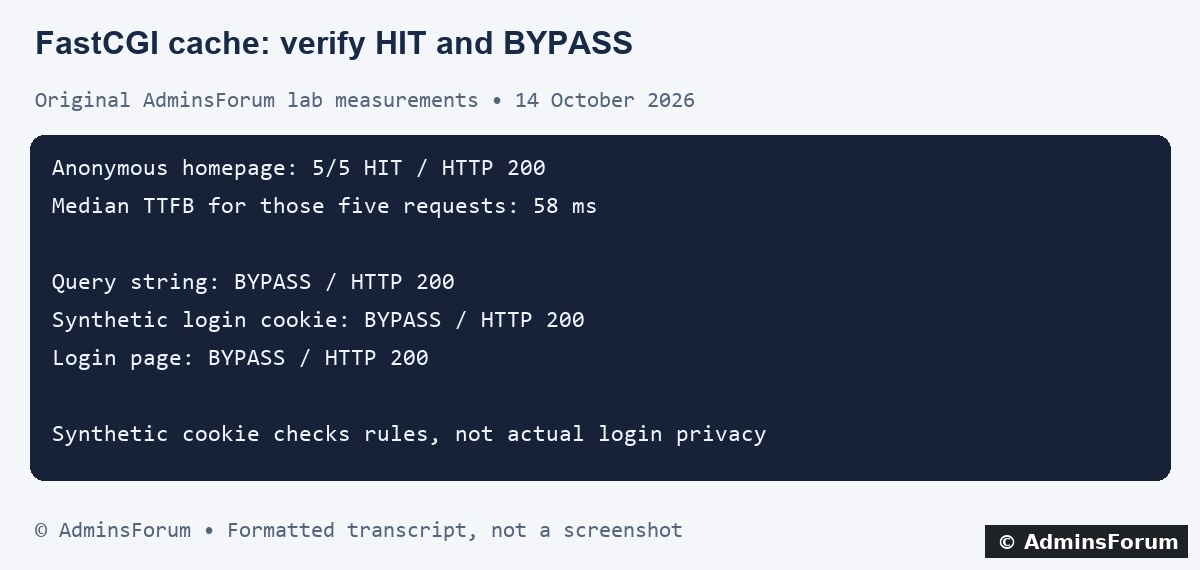
AdminsForum formatted transcript of the original checks, not a screenshot.
6. Test actual personalized workflows before rollout
With a controlled test account, verify that logged-in pages, shopping carts, checkout, account settings and password-protected content are excluded. Test two separate sessions and inspect rendered content, not just a fast response. Review authorization, cookies, cache keys and application-specific paths.
Our short check did not perform these authenticated workflows. Treat them as required verification before enabling shared page caching for a real personalized application.
7. Verify freshness and controlled purging
After updating a public test page, confirm when anonymous visitors receive the new content. Purge the relevant cache entry using your supported administration workflow and verify the result. Do not expose an unrestricted public purge endpoint.
Our existing configuration restricted its purge location to loopback. We did not weaken that restriction or perform a global purge for this guide. Cache lifetime and invalidation should match how frequently your pages change.
8. Troubleshoot a persistent BYPASS or stale page
Check whether a query string, cookie, request method or path matches an exclusion. Inspect the effective Nginx configuration and logs. If a public page bypasses unexpectedly, identify the cause rather than deleting all exclusions.
For stale content, check the correct hostname, cache key, purge method and any additional CDN or browser cache. A browser refresh alone may leave server caches untouched.
Back up before changing rules, validate Nginx syntax, reload and repeat both anonymous and private-response tests. Restore the original rules if personalized content is cached or application behavior changes.
Reference: Official Nginx FastCGI cache controls.
Scope: We tested an existing WordPress FastCGI cache in aaPanel Free 8.0.7 with Nginx and PHP 8.5. This guide verifies the existing setup; it does not claim we installed a new cache or fully audited every authenticated workflow.
1. Identify the cache layer
Page caching stores a rendered HTTP response. OPcache stores compiled PHP bytecode; Redis object caching stores application objects. They solve different problems. A page-cache HIT may avoid PHP, so it cannot be used to measure PHP or SQL tuning alone.
Inspect the website's Nginx configuration and included PHP handler. Our WordPress site included enable-php-85-wpfastcgi.conf and used a WORDPRESS FastCGI cache zone.
2. Read the rules before testing
Our existing rules bypassed POST requests, nonempty query strings, WordPress administrative/login-related paths and cookies matching WordPress login or password-protected content. These rules must be checked against the actual applications on the site.
The handler used both:
Code:
fastcgi_cache_bypass $skip_cache;
fastcgi_no_cache $skip_cache;3. Inspect cache headers
Our configuration exposed Nginx-Cache with the upstream cache status. Your site may use another header or expose none.
Code:
curl -sS -D - -o /dev/null https://example.com/4. Repeat an anonymous request
We sent five sequential requests to the same lab homepage over loopback HTTPS with certificate validation. All five returned HTTP 200 and HIT; median time to first byte was approximately 58ms.
The page was already cached. We did not claim to demonstrate a fresh MISS-to-HIT transition, clear the whole cache or measure maximum throughput. Five requests are a small diagnostic sample.
5. Check query and cookie exclusions
Code:
curl -sS -D - -o /dev/null 'https://example.com/?cache_check=1'
curl -sS -D - -o /dev/null \
  -H 'Cookie: wordpress_logged_in_lab=synthetic-test' https://example.com/
curl -sS -D - -o /dev/null https://example.com/wp-login.phpAdminsForum formatted transcript of the original checks, not a screenshot.
6. Test actual personalized workflows before rollout
With a controlled test account, verify that logged-in pages, shopping carts, checkout, account settings and password-protected content are excluded. Test two separate sessions and inspect rendered content, not just a fast response. Review authorization, cookies, cache keys and application-specific paths.
Our short check did not perform these authenticated workflows. Treat them as required verification before enabling shared page caching for a real personalized application.
7. Verify freshness and controlled purging
After updating a public test page, confirm when anonymous visitors receive the new content. Purge the relevant cache entry using your supported administration workflow and verify the result. Do not expose an unrestricted public purge endpoint.
Our existing configuration restricted its purge location to loopback. We did not weaken that restriction or perform a global purge for this guide. Cache lifetime and invalidation should match how frequently your pages change.
8. Troubleshoot a persistent BYPASS or stale page
Check whether a query string, cookie, request method or path matches an exclusion. Inspect the effective Nginx configuration and logs. If a public page bypasses unexpectedly, identify the cause rather than deleting all exclusions.
For stale content, check the correct hostname, cache key, purge method and any additional CDN or browser cache. A browser refresh alone may leave server caches untouched.
Back up before changing rules, validate Nginx syntax, reload and repeat both anonymous and private-response tests. Restore the original rules if personalized content is cached or application behavior changes.
Reference: Official Nginx FastCGI cache controls.