



11-14-2026, 12:35 PM
Run PHP 7.4 on CyberPanel (Ubuntu 24.04): Old PHP Versions with Docker (Tested)
You have an old site that needs PHP 7.4 (or 5.6, 7.0...), you open Change PHP in CyberPanel, and the oldest version in the list is PHP 8.1. On Ubuntu 24.04 that isn't a bug you can fix with a click: the old packages don't exist for this system. Here's what we found on a CyberPanel 3.0.8 server, and the workaround we tested: run the old PHP in a small Docker container and let your website pass visitors to it.
Why the old versions are missing
CyberPanel installs PHP from the LiteSpeed package repository. On Ubuntu 24.04 that repository only has PHP 8.1 to 8.5. We asked the package system directly:
On our server,
to
had no install candidate at all.
(8.1.34) up to
(8.5.12) were available. The panel shows the same thing: the PHP list under Websites → your site → Config → Change PHP stops at 8.1.
So you have three choices:
A warning first: PHP 7.4 stopped getting security fixes in November 2022. Treat this as a way to keep an old site alive while you update it, not as a permanent home. The container at least keeps the old PHP separated from the rest of your server.
Step 1: Check Docker
Over SSH as root:
Ours answered
. If the command isn't found, install Docker from CyberPanel's Docker Manager menu first (see the Docker guides in this forum).
Step 2: Start a PHP 7.4 container
Make a folder for the old site's files and put a test page in it:
Start the container:
What the parts mean:
We got:
Step 3: Send your domain to the container
Create the website in CyberPanel as usual (any PHP version, it won't be used) and get its SSL certificate. Then open Websites → your site → Config → Rewrite Rules, paste this and click Save Rewrite Rules:
means "proxy": the web server fetches the page from the container and hands it to the visitor. The visitor still sees your domain and your SSL certificate.
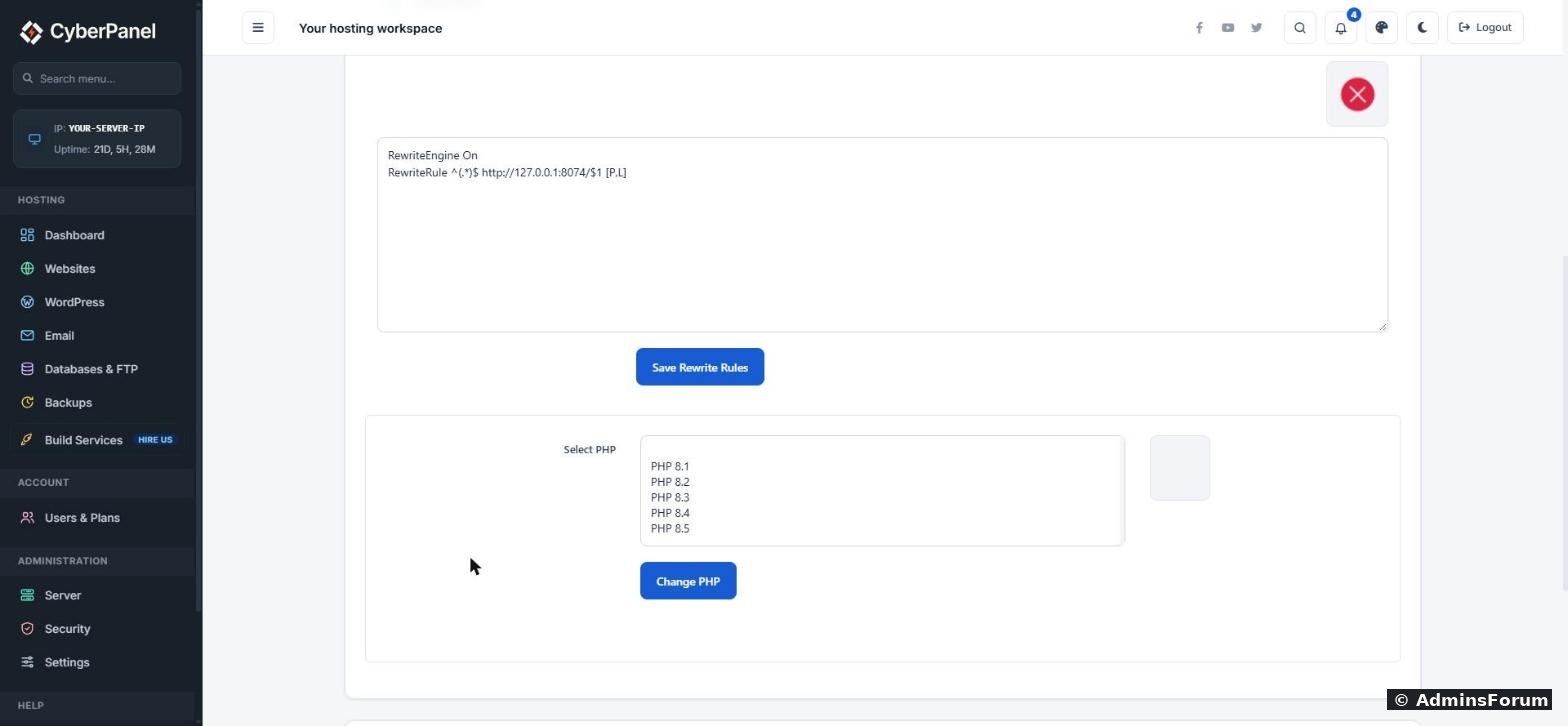
The screenshot shows the rule, and below it the PHP list that stops at 8.1.
Opening
then showed Hello from PHP 7.4.33 (apache2handler) with status 200 and a valid certificate. It worked right after saving, without restarting the web server.
Important: which web server we tested this on. Our test server runs LiteSpeed Enterprise, where a
rule can point straight at an address like
. On OpenLiteSpeed (the free default), a proxy rule needs the target defined first as an external app in the site's vHost Conf, and the rule then uses that app's name. We didn't re-test this guide on OpenLiteSpeed. Our Docker Manager guide in the Docker section of this forum shows the OpenLiteSpeed way of putting a container behind a domain.
Step 4: Move the real site in
Handy commands
To undo everything, remove the two rewrite lines in CyberPanel and remove the container.
Got an old app that won't start in the container? Reply below with the lines from
(hide your server IP and domain first).
You have an old site that needs PHP 7.4 (or 5.6, 7.0...), you open Change PHP in CyberPanel, and the oldest version in the list is PHP 8.1. On Ubuntu 24.04 that isn't a bug you can fix with a click: the old packages don't exist for this system. Here's what we found on a CyberPanel 3.0.8 server, and the workaround we tested: run the old PHP in a small Docker container and let your website pass visitors to it.
Why the old versions are missing
CyberPanel installs PHP from the LiteSpeed package repository. On Ubuntu 24.04 that repository only has PHP 8.1 to 8.5. We asked the package system directly:
Code:
apt-cache policy lsphp74 lsphp80 lsphp81 lsphp85Code:
lsphp56Code:
lsphp80Code:
lsphp81Code:
lsphp85So you have three choices:
- Update the site to PHP 8.x. The best fix, when it's possible.
- Use an older system. Ubuntu 20.04/22.04 still offer older PHP packages, but that means a different server. We didn't test that here.
- Run the old PHP in a container on the same server. That's this guide.
A warning first: PHP 7.4 stopped getting security fixes in November 2022. Treat this as a way to keep an old site alive while you update it, not as a permanent home. The container at least keeps the old PHP separated from the rest of your server.
Step 1: Check Docker
Over SSH as root:
Code:
docker --versionCode:
Docker version 29.1.3Step 2: Start a PHP 7.4 container
Make a folder for the old site's files and put a test page in it:
Code:
mkdir -p /srv/legacy-php74
cat > /srv/legacy-php74/index.php <<'EOF'
<?php echo "Hello from PHP ", PHP_VERSION, " (", php_sapi_name(), ")\n";
EOFCode:
docker run -d --name legacy-php74 --restart unless-stopped \
  -p 127.0.0.1:8074:80 \
  -v /srv/legacy-php74:/var/www/html:ro \
php:7.4-apache- is the official PHP 7.4 image with its own small web server inside. For another version, change the number (for exampleCode:
php:7.4-apache
). We only tested 7.4.Code:php:5.6-apache
- makes the container reachable on port 8074 only from the server itself. Nobody on the internet can reach it directly, and you don't have to open a firewall port.Code:
-p 127.0.0.1:8074:80
- shows your folder to the container.Code:
-v /srv/legacy-php74:/var/www/html:ro
means read-only: PHP can't change the files. RemoveCode::ro
if the site has to write files (uploads, cache folders).Code::ro
- starts the container again after a reboot.Code:
--restart unless-stopped
Code:
curl http://127.0.0.1:8074/Code:
Hello from PHP 7.4.33 (apache2handler)Step 3: Send your domain to the container
Create the website in CyberPanel as usual (any PHP version, it won't be used) and get its SSL certificate. Then open Websites → your site → Config → Rewrite Rules, paste this and click Save Rewrite Rules:
Code:
RewriteEngine On
RewriteRule ^(.*)$ http://127.0.0.1:8074/$1 [P,L]
Code:
[P]The screenshot shows the rule, and below it the PHP list that stops at 8.1.
Opening
Code:
https://yourdomain.com/Important: which web server we tested this on. Our test server runs LiteSpeed Enterprise, where a
Code:
[P]Code:
http://127.0.0.1:8074Step 4: Move the real site in
- Files: copy the old site into
(or pointCode:/srv/legacy-php74
at the folder where it already lives).Code:-v
- PHP extensions: the official image is bare. Database extensions such as
aren't included. You add them with the image's own tool, for exampleCode:mysqli
followed byCode:docker exec legacy-php74 docker-php-ext-install mysqli pdo_mysql
. We didn't need this for our test page, so check it with your own app.Code:docker restart legacy-php74
- Database: inside the container,
is the container itself, not your server. The site's database host setting has to point at the server instead. We didn't test a database connection in this guide.Code:localhost
Handy commands
Code:
docker ps --filter name=legacy-php74     # is it running?
docker logs --tail 50 legacy-php74       # PHP and web server errors
docker restart legacy-php74              # restart it
docker rm -f legacy-php74 # remove it (your files in /srv stay)Got an old app that won't start in the container? Reply below with the lines from
Code:
docker logs