



5 hours ago
If a PHP site loses session state or sends users back to login, check its session handler, storage and cookie behavior. A session-storage warning is evidence to investigate; a login loop alone does not prove the storage directory is wrong.
This guide reproduces one file-session failure in a private aaPanel lab. It then verifies that state survives across two requests. It does not test a real login, reset passwords or change any production session settings.
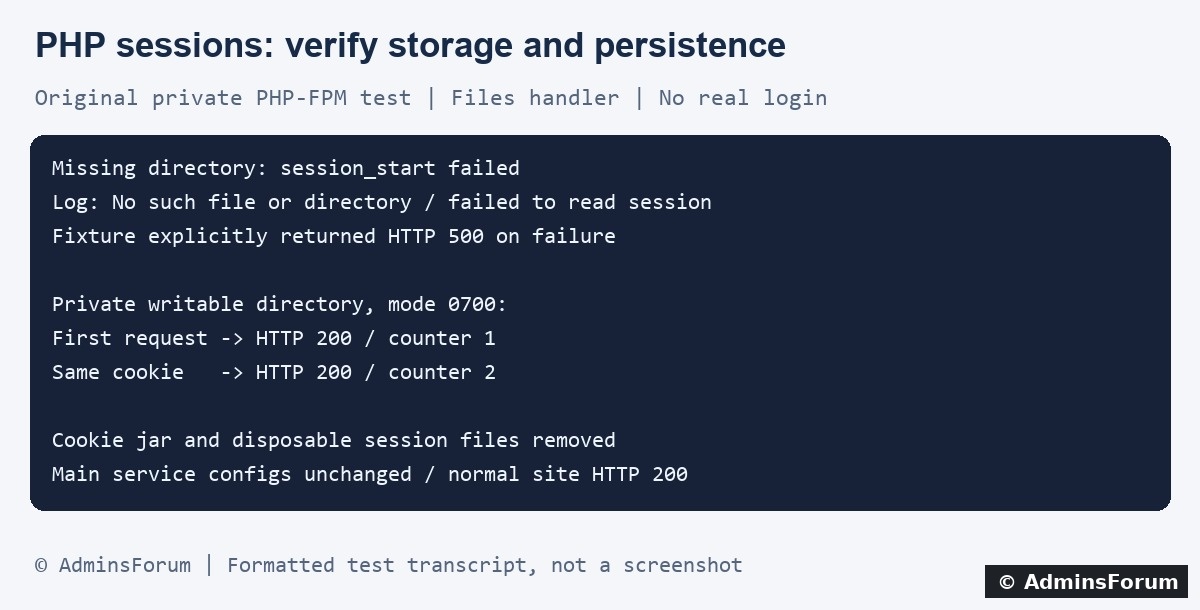
Original AdminsForum lab evidence, formatted as a transcript rather than a screenshot. No session identifiers or cookie values are shown.
1. Record the symptom and inspect the logs
Note the time and timezone, URL path, action and whether the issue affects one browser or many users. Did it begin after a deployment, PHP-version change, directory cleanup or proxy change? Avoid repeated submissions that can modify data.
In aaPanel open Website → PHP Project, locate the affected site and select Log → Error log. Match the request with the access log. Labels can vary by panel version. On our lab site's normal website, the error-log path is:
Use the path configured for your own site. A bounded SSH example is:
Keep errors logged privately rather than enabling public error display. Session identifiers can appear in filenames inside warnings; redact them before posting logs.
2. Read the specific session warning
Our private test used a deliberately nonexistent save directory and produced these shortened, redacted messages:
That evidence pointed to the test's missing directory. A permission-denied warning instead requires an access check. Disk-full, inode exhaustion and a read-only filesystem require different checks. Do not treat all session failures as the same problem.
A session_start warning does not automatically mean PHP returns HTTP 500. Our test fixture explicitly chose 500 when session_start returned false. Real applications can handle the failure differently or display an unrelated error page.
3. Confirm the website's active session configuration
Confirm the site's PHP version in aaPanel. A command-line PHP process can use different settings from PHP-FPM, and an application can override session behavior before starting a session.
In a protected diagnostic context for the relevant request, inspect:
These expressions are diagnostic aids, not a public page to leave online. Do not print the session ID, session contents, cookies or a full phpinfo dump.
For the files handler, the save path identifies filesystem storage. Other handlers, such as a configured Redis or custom application handler, need their own connectivity and application checks. Creating a local folder cannot fix a remote handler's authentication or availability problem.
4. Check the intended directory and service account
For a files-based setup, verify that the effective path exists and the PHP-FPM worker can traverse its parent directories and read and write the intended session storage. The correct account may differ from your SSH user and from the web server's worker account.
Inspect the actual deployment ownership before changing it. Do not recursively apply 777 permissions or change the ownership of all website and session directories. Session storage should be private and outside the public document root. A shared world-readable directory is not a suitable generic repair.
If a pool uses a filesystem jail or path restrictions, check how the path is seen by that pool. Investigate a specific open_basedir message without disabling the protection globally. Also check space, free inodes and filesystem state when the warning points to storage failure.
5. What our private test demonstrated
We used the installed PHP-FPM service through a separate loopback-only Nginx endpoint. The harmless fixture selected the files handler and request-local storage settings; no shared php.ini or pool configuration was changed.
The cookie jar, disposable session files, private directory and PHP fixture were removed afterward. The private listener stopped and its PID file disappeared. Hash checks confirmed the main Nginx configuration, PHP-FPM pool configuration and php.ini were unchanged. The normal HTTPS site returned 200.
6. If storage works, investigate the cookie and application flow
In the browser's Network and storage tools, confirm the application sets the intended cookie and that the next relevant request sends it back. Review the hostname, cookie domain, path, expiry and browser rejection reason. A move between hostnames or an incorrect HTTPS/proxy interpretation can change behavior.
Do not weaken Secure, HttpOnly or SameSite protections simply to make a test pass. Correct the demonstrated deployment or application mismatch while preserving the intended security model. Never post raw cookie values or authenticated network captures publicly.
If the same cookie is returned but state disappears, inspect the application's handler, expiry and cleanup behavior. Multiple backend servers need a session design that keeps a user's state available across requests. A fresh browser test is useful, but clearing cookies can hide a server-side issue rather than resolve it.
Login loops can also come from application redirects, authentication logic, CSRF handling or incorrect caching. Do not cache private authenticated responses in a shared public cache. Our counter test did not validate any real application's authentication flow.
7. Apply a narrow correction and verify persistence
Back up the relevant configuration and record the old value and scope. Correct the demonstrated path, deployment access or application setting through the supported workflow. Determine whether a PHP setting change affects other sites on the same PHP version before applying it.
Use a controlled test account and perform one safe sign-in. Confirm the intended next page and a later request retain the correct state, then test sign-out. Check for new matching log warnings. Do not rely on one HTTP 200 response as proof that authentication works.
Keep a rollback path if a configuration change causes other sites to lose sessions. Remove temporary diagnostics and do not delete live session files as a troubleshooting shortcut; that can sign users out and destroy evidence.
When requesting help
Provide the PHP version, handler type, time, short redacted warning and recent deployment changes. Describe whether the browser returns the expected cookie without revealing its value. Keep session contents and user data private.
Related guides
Locate website logs in aaPanel
Review file permissions and ownership
Diagnose storage and inode problems
Technical references
PHP session configuration
PHP session_start behavior
PHP session persistence basics
PHP session security settings
This guide reproduces one file-session failure in a private aaPanel lab. It then verifies that state survives across two requests. It does not test a real login, reset passwords or change any production session settings.
Original AdminsForum lab evidence, formatted as a transcript rather than a screenshot. No session identifiers or cookie values are shown.
1. Record the symptom and inspect the logs
Note the time and timezone, URL path, action and whether the issue affects one browser or many users. Did it begin after a deployment, PHP-version change, directory cleanup or proxy change? Avoid repeated submissions that can modify data.
In aaPanel open Website → PHP Project, locate the affected site and select Log → Error log. Match the request with the access log. Labels can vary by panel version. On our lab site's normal website, the error-log path is:
Code:
/www/wwwlogs/adminslab.com.error.logCode:
tail -n 100 /www/wwwlogs/example.com.error.log2. Read the specific session warning
Our private test used a deliberately nonexistent save directory and produced these shortened, redacted messages:
Code:
session_start(): open(.../sess_[REDACTED], O_RDWR) failed:
No such file or directory

session_start(): Failed to read session data: filesA session_start warning does not automatically mean PHP returns HTTP 500. Our test fixture explicitly chose 500 when session_start returned false. Real applications can handle the failure differently or display an unrelated error page.
3. Confirm the website's active session configuration
Confirm the site's PHP version in aaPanel. A command-line PHP process can use different settings from PHP-FPM, and an application can override session behavior before starting a session.
In a protected diagnostic context for the relevant request, inspect:
Code:
PHP_VERSION
PHP_SAPI
ini_get('session.save_handler')
session_save_path()For the files handler, the save path identifies filesystem storage. Other handlers, such as a configured Redis or custom application handler, need their own connectivity and application checks. Creating a local folder cannot fix a remote handler's authentication or availability problem.
4. Check the intended directory and service account
For a files-based setup, verify that the effective path exists and the PHP-FPM worker can traverse its parent directories and read and write the intended session storage. The correct account may differ from your SSH user and from the web server's worker account.
Inspect the actual deployment ownership before changing it. Do not recursively apply 777 permissions or change the ownership of all website and session directories. Session storage should be private and outside the public document root. A shared world-readable directory is not a suitable generic repair.
If a pool uses a filesystem jail or path restrictions, check how the path is seen by that pool. Investigate a specific open_basedir message without disabling the protection globally. Also check space, free inodes and filesystem state when the warning points to storage failure.
5. What our private test demonstrated
We used the installed PHP-FPM service through a separate loopback-only Nginx endpoint. The harmless fixture selected the files handler and request-local storage settings; no shared php.ini or pool configuration was changed.
- With the deliberately missing directory, session_start failed, warnings appeared in the private log and our fixture explicitly returned 500.
- With a disposable directory owned by the lab PHP worker account and mode 0700, a request returned 200 and stored counter 1.
- A second request reused the same private test cookie and returned 200 with counter 2. One test session file existed, confirming persistence across those requests.
The cookie jar, disposable session files, private directory and PHP fixture were removed afterward. The private listener stopped and its PID file disappeared. Hash checks confirmed the main Nginx configuration, PHP-FPM pool configuration and php.ini were unchanged. The normal HTTPS site returned 200.
6. If storage works, investigate the cookie and application flow
In the browser's Network and storage tools, confirm the application sets the intended cookie and that the next relevant request sends it back. Review the hostname, cookie domain, path, expiry and browser rejection reason. A move between hostnames or an incorrect HTTPS/proxy interpretation can change behavior.
Do not weaken Secure, HttpOnly or SameSite protections simply to make a test pass. Correct the demonstrated deployment or application mismatch while preserving the intended security model. Never post raw cookie values or authenticated network captures publicly.
If the same cookie is returned but state disappears, inspect the application's handler, expiry and cleanup behavior. Multiple backend servers need a session design that keeps a user's state available across requests. A fresh browser test is useful, but clearing cookies can hide a server-side issue rather than resolve it.
Login loops can also come from application redirects, authentication logic, CSRF handling or incorrect caching. Do not cache private authenticated responses in a shared public cache. Our counter test did not validate any real application's authentication flow.
7. Apply a narrow correction and verify persistence
Back up the relevant configuration and record the old value and scope. Correct the demonstrated path, deployment access or application setting through the supported workflow. Determine whether a PHP setting change affects other sites on the same PHP version before applying it.
Use a controlled test account and perform one safe sign-in. Confirm the intended next page and a later request retain the correct state, then test sign-out. Check for new matching log warnings. Do not rely on one HTTP 200 response as proof that authentication works.
Keep a rollback path if a configuration change causes other sites to lose sessions. Remove temporary diagnostics and do not delete live session files as a troubleshooting shortcut; that can sign users out and destroy evidence.
When requesting help
Provide the PHP version, handler type, time, short redacted warning and recent deployment changes. Describe whether the browser returns the expected cookie without revealing its value. Keep session contents and user data private.
Related guides
Locate website logs in aaPanel
Review file permissions and ownership
Diagnose storage and inode problems
Technical references
PHP session configuration
PHP session_start behavior
PHP session persistence basics
PHP session security settings