



5 hours ago
“Cannot modify header information — headers already sent” means PHP tried to change response headers after they had been sent. Find where output began and correct the response order; an HTTP 200 can still contain a failed redirect or other broken behavior.
This guide reproduces a late redirect on a private PHP-FPM endpoint, then verifies a header-first response and its final destination. It does not test a real authentication system or assume every session warning has this cause.
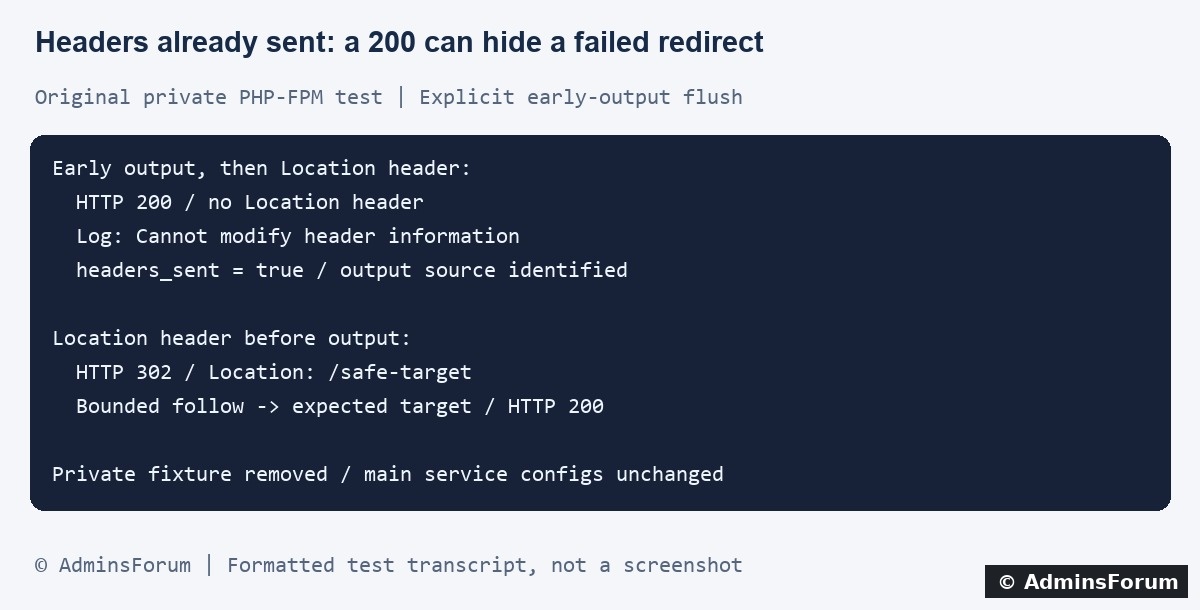
Original AdminsForum lab evidence, formatted as a transcript rather than a screenshot.
1. Find the complete warning in the log
Record the action, URL path, time and timezone. In aaPanel open Website → PHP Project, find the affected site and select Log → Error log. Correlate the request with the access log. Labels can vary by panel version.
Our lab site's normal website error log is:
Use the actual configured path for your domain. An optional bounded SSH check is:
Keep public error display off. The useful warning often identifies two locations: where output began, and where the later header operation failed. Inspect both rather than changing only the line calling header().
Our private test produced this shortened example:
Paths and line numbers above are illustrative abbreviations of the test result. Your log's actual locations are what matter.
2. Understand what counts as output
A response body can begin with HTML, echoed text, debugging output or whitespace emitted by an included file. Output from an earlier displayed warning can also complicate a later header operation.
Review the files loaded before response/session handling, including recently edited configuration, plugins and templates. Check leading or trailing whitespace outside PHP blocks and unintended byte-order marks when evidence points there. Do not rewrite every file or remove legitimate template output at random.
PHP header operations need to happen before headers are actually sent. Buffering can delay when output is sent, so “an echo occurred” is not by itself proof that the header block was already transmitted. Inspect the actual response and the effective output behavior.
3. Use headers_sent diagnostics privately
In a protected debugging context, this pattern can locate output already sent:
This is an illustrative diagnostic fragment, not a complete repair. Log privately and remove temporary diagnostics afterward. Do not print internal file paths to visitors or log cookie/session contents.
A false result only describes that moment. It does not prove later includes will stay silent, nor does it validate the application's entire response flow. Use the actual warning and request sequence together.
4. What the private test demonstrated
We used the installed PHP-FPM service through a separate Nginx listener bound only to loopback. The harmless test script ended its own output buffers and explicitly flushed early output so the failure was reproducible. That was fixture behavior, not a change to the website's PHP configuration.
The disposable PHP file was removed, the private listener stopped and its PID file disappeared. Hash checks confirmed the main Nginx configuration, PHP-FPM pool configuration and php.ini were unchanged. The normal HTTPS website returned 200 afterward.
5. Correct response order in the application's supported flow
Keep request validation, session setup and response-header decisions before rendering the body. In a framework, use its supported response and redirect mechanisms instead of mixing raw header calls with template output.
For a minimal illustrative redirect, the ordering is:
The target is a placeholder and must exist in the intended application. Do not build an unrestricted redirect destination from user input. A redirect is not a substitute for authorization, and ending the response should not skip required transaction or cleanup handling.
Back up the affected code and reproduce the change in staging. If a vendor plugin causes output, use its supported fix or a reviewed patch rather than changing unrelated server settings.
6. Treat sessions and cookies as related but separate checks
Session and cookie operations may require response headers, so early output can interfere with them too. Check the exact warning and the application's initialization order.
A login loop alone does not prove early output. Missing session storage, rejected cookies or authentication logic can cause similar symptoms. Our redirect test did not exercise those paths. Follow the separate session-storage guide when its evidence applies.
Do not weaken cookie protections or remove authentication checks to make a redirect appear successful. Confirm the intended session and authorization behavior with a controlled test account in staging.
7. Do not suppress the symptom as the first repair
Hiding warnings or wrapping header calls with error suppression does not establish that a Location or cookie header reached the browser. Increasing timeouts or memory limits also does not correct response ordering.
Output buffering can be a deliberate application feature, but enabling it globally without tracing the source can conceal an ordering problem. Assess it within the application's design and verify behavior rather than treating it as a universal switch.
8. Verify headers and destination separately
Inspect one safe response before following redirects. A bounded example for your own staging page is:
Check the intended status and Location, then follow the expected chain with a finite redirect limit and verify the final page content. Do not publish raw Set-Cookie fields or other private headers.
Check for new matching warnings and test relevant application actions. A 200 alone was misleading in our failure case. Keep a rollback path and remove diagnostic code after verification.
For a support request
Include the PHP version, action, redacted warning with both output and header-call locations, recent code changes and actual response status/Location. Exclude credentials, cookies and private captures.
Related guides
Investigate PHP session-storage errors
Trace redirect chains and loops
Find website error logs
Technical references
PHP header behavior
PHP headers_sent diagnostics
PHP header, cookie and session troubleshooting
This guide reproduces a late redirect on a private PHP-FPM endpoint, then verifies a header-first response and its final destination. It does not test a real authentication system or assume every session warning has this cause.
Original AdminsForum lab evidence, formatted as a transcript rather than a screenshot.
1. Find the complete warning in the log
Record the action, URL path, time and timezone. In aaPanel open Website → PHP Project, find the affected site and select Log → Error log. Correlate the request with the access log. Labels can vary by panel version.
Our lab site's normal website error log is:
Code:
/www/wwwlogs/adminslab.com.error.logCode:
tail -n 100 /www/wwwlogs/example.com.error.logOur private test produced this shortened example:
Code:
Cannot modify header information - headers already sent
(output started at ...probe.php:5) ... on line 72. Understand what counts as output
A response body can begin with HTML, echoed text, debugging output or whitespace emitted by an included file. Output from an earlier displayed warning can also complicate a later header operation.
Review the files loaded before response/session handling, including recently edited configuration, plugins and templates. Check leading or trailing whitespace outside PHP blocks and unintended byte-order marks when evidence points there. Do not rewrite every file or remove legitimate template output at random.
PHP header operations need to happen before headers are actually sent. Buffering can delay when output is sent, so “an echo occurred” is not by itself proof that the header block was already transmitted. Inspect the actual response and the effective output behavior.
3. Use headers_sent diagnostics privately
In a protected debugging context, this pattern can locate output already sent:
Code:
if (headers_sent($outputFile, $outputLine)) {
    error_log('Unexpected early output at ' . $outputFile . ':' . $outputLine);
}A false result only describes that moment. It does not prove later includes will stay silent, nor does it validate the application's entire response flow. Use the actual warning and request sequence together.
4. What the private test demonstrated
We used the installed PHP-FPM service through a separate Nginx listener bound only to loopback. The harmless test script ended its own output buffers and explicitly flushed early output so the failure was reproducible. That was fixture behavior, not a change to the website's PHP configuration.
- The failure branch emitted text, flushed it, then attempted a Location header. The response remained 200 with no Location header. A private diagnostic confirmed headers_sent=true and identified the output source; the log captured the header warning.
- The corrected branch sent Location before body output and exited. It returned 302 with Location: /safe-target.
- A bounded follow reached the private dummy target, returned 200 and contained the expected test message. No new matching header warning appeared in the subsequent log section.
The disposable PHP file was removed, the private listener stopped and its PID file disappeared. Hash checks confirmed the main Nginx configuration, PHP-FPM pool configuration and php.ini were unchanged. The normal HTTPS website returned 200 afterward.
5. Correct response order in the application's supported flow
Keep request validation, session setup and response-header decisions before rendering the body. In a framework, use its supported response and redirect mechanisms instead of mixing raw header calls with template output.
For a minimal illustrative redirect, the ordering is:
Code:
<?php
header('Location: /safe-target', true, 302);
exit;Back up the affected code and reproduce the change in staging. If a vendor plugin causes output, use its supported fix or a reviewed patch rather than changing unrelated server settings.
6. Treat sessions and cookies as related but separate checks
Session and cookie operations may require response headers, so early output can interfere with them too. Check the exact warning and the application's initialization order.
A login loop alone does not prove early output. Missing session storage, rejected cookies or authentication logic can cause similar symptoms. Our redirect test did not exercise those paths. Follow the separate session-storage guide when its evidence applies.
Do not weaken cookie protections or remove authentication checks to make a redirect appear successful. Confirm the intended session and authorization behavior with a controlled test account in staging.
7. Do not suppress the symptom as the first repair
Hiding warnings or wrapping header calls with error suppression does not establish that a Location or cookie header reached the browser. Increasing timeouts or memory limits also does not correct response ordering.
Output buffering can be a deliberate application feature, but enabling it globally without tracing the source can conceal an ordering problem. Assess it within the application's design and verify behavior rather than treating it as a universal switch.
8. Verify headers and destination separately
Inspect one safe response before following redirects. A bounded example for your own staging page is:
Code:
curl -sS --max-time 15 -D - -o /dev/null \
  https://example.com/safe-test-page
Check for new matching warnings and test relevant application actions. A 200 alone was misleading in our failure case. Keep a rollback path and remove diagnostic code after verification.
For a support request
Include the PHP version, action, redacted warning with both output and header-call locations, recent code changes and actual response status/Location. Exclude credentials, cookies and private captures.
Related guides
Investigate PHP session-storage errors
Trace redirect chains and loops
Find website error logs
Technical references
PHP header behavior
PHP headers_sent diagnostics
PHP header, cookie and session troubleshooting