



4 hours ago
MariaDB error 1205 means a lock wait exceeded its applicable allowance. Identify what is blocked, who holds the needed lock and what happened to the transaction before retrying.
A lock-wait timeout is not the same as error 1213, a detected deadlock. This guide demonstrates an InnoDB row-lock timeout in a separate lab database, including an earlier update that remained pending until explicit rollback. Do not deliberately block live application tables to reproduce it.
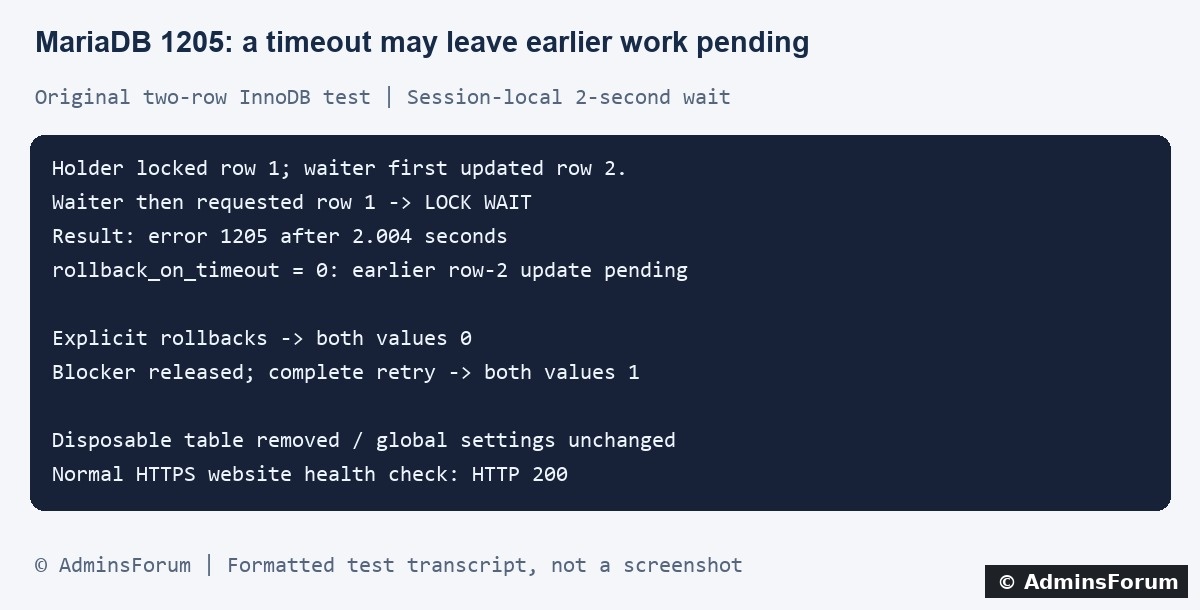
Original AdminsForum private lab evidence, formatted as a transcript rather than a screenshot.
1. Confirm the error and incident time
Record the application action, time and timezone, job or request identifier and exact database error. A website may expose only a generic 500, so inspect the application's private log and correlate it with the website logs in aaPanel.
Under Website → PHP Project, locate the affected site and open its Log control. Panel labels can vary. Do not publish raw SQL, user values, credentials or full log dumps.
The error being investigated is:
A long request is not sufficient evidence of this error. Also establish which kind of lock is involved: this lab tested an InnoDB record lock, not every metadata or table-lock situation that can produce a timeout.
2. Understand blocking without a deadlock
One transaction can hold a row lock while another waits for it. The holder does not have to be waiting for the second transaction; there may be no circular dependency. If the applicable wait expires first, the waiting statement fails.
An application that begins a transaction and leaves it open while doing other work can retain locks longer than intended. A currently idle-looking connection may still own an open transaction. Identify the transaction lifecycle rather than assuming only a visibly running SQL statement can block another request.
3. Inspect the relevant live transaction while it is waiting
An authorized database administrator can inspect the InnoDB transaction information. For a known application connection ID, an illustrative scoped query is:
Replace 12345 with the actual connection identified for the incident. Do not guess IDs or assume the phpMyAdmin connection is the same connection serving a website request. Visibility depends on privileges and version; ask the database administrator for the appropriate redacted evidence rather than granting a website account broad access.
In our test the known waiting connection appeared as LOCK WAIT. This is a point-in-time view: after the statement times out or the holder finishes, the same evidence may no longer be present. An administrator may need to correlate transaction and lock-wait information to identify the blocker. Do not publish server-wide diagnostic output containing unrelated queries.
4. Check the effective timeout and rollback behavior
For an authorized session, these read-only checks show relevant settings:
The first query describes the session running it. It does not prove a different pooled application connection uses the same timeout.
For the InnoDB timeout behavior documented by MariaDB, a timeout normally rolls back the failing statement rather than all earlier work in the transaction. With innodb_rollback_on_timeout enabled, the entire transaction can be rolled back. Confirm the actual setting and your application's transaction state before retrying.
Do not assume the instruction “try restarting transaction” means earlier work disappeared automatically. This is a material difference from a detected deadlock's transaction rollback.
5. What our isolated lab test proved
We used MariaDB 10.11.10 and one disposable two-row InnoDB table inside the existing separate performance-test database. A holding connection updated row 1 without committing. A waiting transaction first updated row 2, then attempted row 1.
6. Correct the cause of excessive lock duration
Review where the blocking transaction begins and ends. Check for missing commit or rollback handling, unnecessarily large batches, external network calls inside a transaction and competing operations on the same records.
Use representative staging data to investigate query plans and the records affected. An inefficient scan can increase contention, but adding an index without examining the real workload is not a guaranteed repair. Keep transaction boundaries aligned with the application's consistency requirements.
Do not kill arbitrary database sessions or restart MariaDB as a first response. Ending a holder can trigger rollback and affect other requests. A production intervention needs identification of the owner and the consequences, not just a large elapsed-time number.
7. Recover the whole logical operation deliberately
Use the application's supported transaction handling to return to a known state. If retry is appropriate, apply a bounded retry policy to the complete logical transaction after resolving or allowing for the blocker. Include short backoff and a clear failure path rather than an infinite retry loop.
Do not commit earlier partial work accidentally after catching only the failed statement. Also account for external effects: database rollback cannot unsend an email or undo an external payment. Idempotency and application semantics need their own tests.
Our lab explicitly rolled back before the clean retry. It did not validate any real application's error-handling code or business operation.
8. Change wait budgets only for a measured reason
A longer timeout allows more waiting; it does not release the blocking lock. It can also hold application workers and connections for longer. Consider a change only after understanding the workload, transaction duration and user-facing request budget.
Record the previous value and scope. Session settings and global defaults affect different connections; existing pooled connections may behave differently from newly created ones. Do not apply the lab's two-second value to a live site as a recommendation. Changing global rollback behavior also changes semantics and is outside this tested fix.
9. Verify data and cleanup
Test the original operation and a controlled competing path in staging. Check final values, explicit rollback behavior, bounded retries and application logs. An HTTP 200 response or the absence of one timeout does not prove the transaction completed correctly.
Monitor representative traffic after a justified change and keep a rollback plan. Remove disposable test tables and close diagnostic transactions. Do not leave a manual transaction open in a SQL tool after testing.
For a support request
Include the database version, error code, time, relevant transaction boundaries, scoped redacted wait evidence and recent changes. Do not share full customer SQL or database passwords.
Related guides
Distinguish MariaDB deadlock error 1213
Inspect query plans and index changes
Correlate website errors with logs
Technical references
MariaDB error 1205
InnoDB lock-wait and rollback settings
InnoDB transaction diagnostics
MariaDB ROLLBACK behavior
A lock-wait timeout is not the same as error 1213, a detected deadlock. This guide demonstrates an InnoDB row-lock timeout in a separate lab database, including an earlier update that remained pending until explicit rollback. Do not deliberately block live application tables to reproduce it.
Original AdminsForum private lab evidence, formatted as a transcript rather than a screenshot.
1. Confirm the error and incident time
Record the application action, time and timezone, job or request identifier and exact database error. A website may expose only a generic 500, so inspect the application's private log and correlate it with the website logs in aaPanel.
Under Website → PHP Project, locate the affected site and open its Log control. Panel labels can vary. Do not publish raw SQL, user values, credentials or full log dumps.
The error being investigated is:
Code:
1205 / HY000
Lock wait timeout exceeded; try restarting transaction2. Understand blocking without a deadlock
One transaction can hold a row lock while another waits for it. The holder does not have to be waiting for the second transaction; there may be no circular dependency. If the applicable wait expires first, the waiting statement fails.
An application that begins a transaction and leaves it open while doing other work can retain locks longer than intended. A currently idle-looking connection may still own an open transaction. Identify the transaction lifecycle rather than assuming only a visibly running SQL statement can block another request.
3. Inspect the relevant live transaction while it is waiting
An authorized database administrator can inspect the InnoDB transaction information. For a known application connection ID, an illustrative scoped query is:
Code:
SELECT trx_id, trx_state, trx_started, trx_wait_started,
       trx_mysql_thread_id
FROM information_schema.INNODB_TRX
WHERE trx_mysql_thread_id = 12345;In our test the known waiting connection appeared as LOCK WAIT. This is a point-in-time view: after the statement times out or the holder finishes, the same evidence may no longer be present. An administrator may need to correlate transaction and lock-wait information to identify the blocker. Do not publish server-wide diagnostic output containing unrelated queries.
4. Check the effective timeout and rollback behavior
For an authorized session, these read-only checks show relevant settings:
Code:
SELECT @@SESSION.innodb_lock_wait_timeout;
SELECT @@GLOBAL.innodb_rollback_on_timeout;For the InnoDB timeout behavior documented by MariaDB, a timeout normally rolls back the failing statement rather than all earlier work in the transaction. With innodb_rollback_on_timeout enabled, the entire transaction can be rolled back. Confirm the actual setting and your application's transaction state before retrying.
Do not assume the instruction “try restarting transaction” means earlier work disappeared automatically. This is a material difference from a detected deadlock's transaction rollback.
5. What our isolated lab test proved
We used MariaDB 10.11.10 and one disposable two-row InnoDB table inside the existing separate performance-test database. A holding connection updated row 1 without committing. A waiting transaction first updated row 2, then attempted row 1.
- Only the waiting test connection received a session-local two-second lock-wait limit. The blocked update returned 1205 after 2.004 seconds.
- The server's existing rollback-on-timeout value was 0. Before our explicit rollback, the waiter could still see its earlier uncommitted row-2 increment as 1.
- We explicitly rolled back the waiter and the holder. An independent check then saw both row values at 0.
- With the blocker released, a fresh complete transaction updated both rows and committed. Both final values were 1.
6. Correct the cause of excessive lock duration
Review where the blocking transaction begins and ends. Check for missing commit or rollback handling, unnecessarily large batches, external network calls inside a transaction and competing operations on the same records.
Use representative staging data to investigate query plans and the records affected. An inefficient scan can increase contention, but adding an index without examining the real workload is not a guaranteed repair. Keep transaction boundaries aligned with the application's consistency requirements.
Do not kill arbitrary database sessions or restart MariaDB as a first response. Ending a holder can trigger rollback and affect other requests. A production intervention needs identification of the owner and the consequences, not just a large elapsed-time number.
7. Recover the whole logical operation deliberately
Use the application's supported transaction handling to return to a known state. If retry is appropriate, apply a bounded retry policy to the complete logical transaction after resolving or allowing for the blocker. Include short backoff and a clear failure path rather than an infinite retry loop.
Do not commit earlier partial work accidentally after catching only the failed statement. Also account for external effects: database rollback cannot unsend an email or undo an external payment. Idempotency and application semantics need their own tests.
Our lab explicitly rolled back before the clean retry. It did not validate any real application's error-handling code or business operation.
8. Change wait budgets only for a measured reason
A longer timeout allows more waiting; it does not release the blocking lock. It can also hold application workers and connections for longer. Consider a change only after understanding the workload, transaction duration and user-facing request budget.
Record the previous value and scope. Session settings and global defaults affect different connections; existing pooled connections may behave differently from newly created ones. Do not apply the lab's two-second value to a live site as a recommendation. Changing global rollback behavior also changes semantics and is outside this tested fix.
9. Verify data and cleanup
Test the original operation and a controlled competing path in staging. Check final values, explicit rollback behavior, bounded retries and application logs. An HTTP 200 response or the absence of one timeout does not prove the transaction completed correctly.
Monitor representative traffic after a justified change and keep a rollback plan. Remove disposable test tables and close diagnostic transactions. Do not leave a manual transaction open in a SQL tool after testing.
For a support request
Include the database version, error code, time, relevant transaction boundaries, scoped redacted wait evidence and recent changes. Do not share full customer SQL or database passwords.
Related guides
Distinguish MariaDB deadlock error 1213
Inspect query plans and index changes
Correlate website errors with logs
Technical references
MariaDB error 1205
InnoDB lock-wait and rollback settings
InnoDB transaction diagnostics
MariaDB ROLLBACK behavior