



2 hours ago
A 413 “Request Entity Too Large” response can come from a request-size limit before PHP handles an upload. Identify the layer returning it, check the matching log and change the smallest relevant limit. Increasing PHP's upload setting alone cannot fix a request rejected by Nginx.
Tested: Ubuntu 22.04.5 and the aaPanel lab's installed Nginx 1.30.5 binary. We ran a separate temporary Nginx instance listening only on 127.0.0.1, with its own configuration, PID and logs. A 2KiB request failed under a 1KiB limit and reached a dummy 200 handler under a 4KiB limit. We shut down the test instance afterwards. The normal website configuration and PHP settings were not changed.
1. Record the failed operation
Note the hostname/path, time/timezone, method, approximate file size, total request size and HTTP status. Find out whether a small upload works and a larger one fails. A multipart request contains framing and other fields in addition to the file bytes.
Check the browser's failed network request and the response. The wording may vary by Nginx version or another proxy. A CDN, reverse proxy, application or upload service can impose a separate limit; a response logo alone is not proof of the failing layer.
Do not repeatedly submit production imports or other actions that might create duplicate records. Use a controlled test workflow and harmless input.
2. Match the Nginx access and error logs
In the tested aaPanel interface, open Website → PHP Project → the site's Log button → Access log / Error log. Confirm the hostname and source path. Read the website-log guide for detailed searching and time matching.
Our isolated test access log recorded POST /request-size-check with status 413. Its matching error said:
This supported a Nginx request-size diagnosis. It was not evidence of a PHP memory error, missing extension or failed database connection. If your website has no matching request, investigate the correct host/log and any earlier proxy layer before editing PHP.
3. Understand the tiny lab comparison
We sent the same 2,048-byte raw request body in both phases. With the relevant location set to:
Nginx returned 413. We changed only that test limit to:
After validation and a reload of the isolated instance, the same request received 200 and the dummy response text. The access log recorded both outcomes.
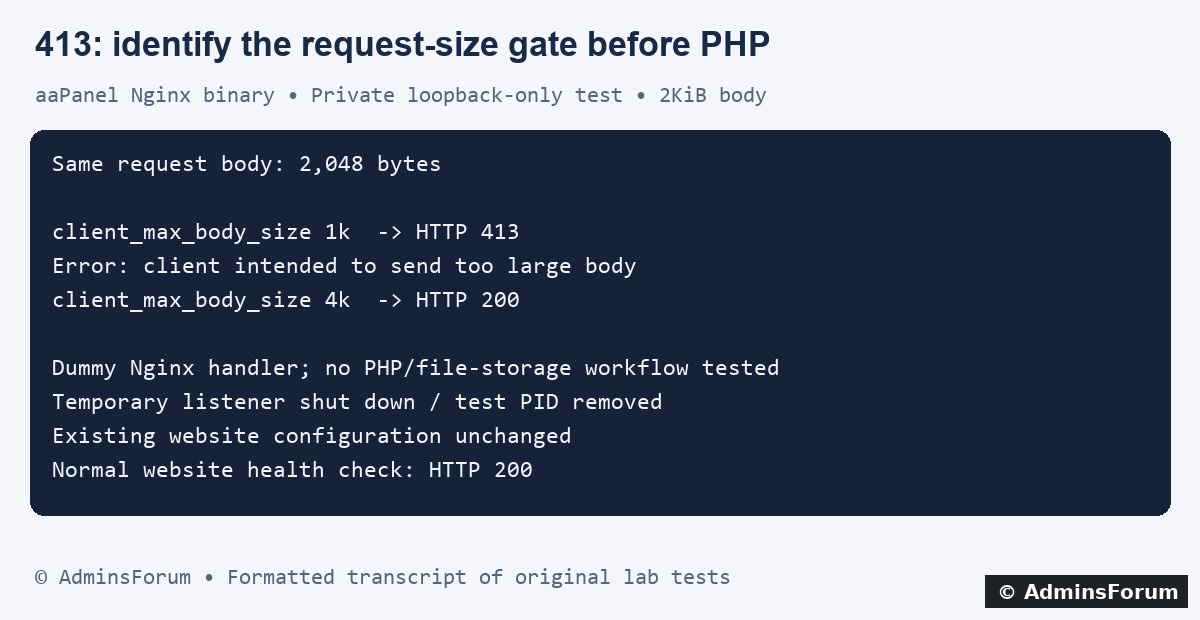
AdminsForum formatted transcript of the original experiment, not a terminal screenshot.
The handler returned a fixed message. This demonstrates the Nginx size gate; it does not prove PHP parsed multipart data, an application validated a file or anything was stored successfully. The endpoint was private, no public firewall port was opened and the normal website remained available.
4. Inspect the effective site configuration
For a real aaPanel incident, locate the affected website under Website → PHP Project and inspect its Conf/site configuration. Labels vary by release. Back up the relevant file before changing it and confirm which server/location handles the failing URL.
The Nginx directive can appear in http, server or location context. Check inherited settings and a more specific location rather than assuming a global value controls every route. Avoid adding duplicate directives in the same context or replacing an existing PHP handler with an incomplete example location.
An administrator can inspect the effective configuration privately with the installed binary:
The output can contain private configuration details. Do not upload the entire dump to a public thread.
5. Choose a finite limit for the actual workflow
An illustrative site-level value is:
This is an example, not a value applied to the existing lab website or a universal recommendation. Place a chosen limit in the appropriate existing context and consider legitimate request size, concurrent uploads, temporary storage and application policy. Setting the Nginx value to zero disables its body-size check; it was not needed for our test.
Keep limits purposeful instead of making every upload unlimited. A narrow policy can be appropriate for a particular route, but it must preserve the route's existing processing/authentication configuration.
If a CDN or another reverse proxy rejects the request earlier, an origin-only change cannot remove that layer's limit. Review the actual service's documented current limits and supported workflow rather than weakening unrelated security controls.
6. Align PHP and application limits separately
When the request reaches PHP, check the site's selected PHP version and its active FPM settings. Relevant settings include upload_max_filesize for an uploaded file and post_max_size for the total POST data. Allow for request overhead and multiple files according to the intended application behavior.
Exceeding PHP's POST limit can leave POST/file data empty, so the application's error may differ from a Nginx 413. Verify the effective serving runtime; a CLI setting may not describe the website's PHP-FPM pool.
Follow Change PHP Upload and Memory Limits and the tested WordPress 64MB upload guide for those existing workflows. Application/plugin limits, validation and available temporary storage still matter. We did not change PHP limits in this experiment.
7. Validate and verify a real repair
Before reloading the affected site configuration on a normal aaPanel-managed Nginx installation:
Use the panel's supported reload control only after validation succeeds. Our experiment reloaded only its separately configured test process, so the existing website configuration was not involved.
Test a small permitted upload and the intended larger upload through the real application, inspect the response/content and confirm the expected file or record was created. Check fresh logs and a normal page. Do not treat a dummy HTTP 200 as proof that a production upload completed.
Preserve a rollback copy. If a change breaks another route or causes resource pressure, restore the previous configuration, validate and repeat the relevant health checks.
8. Cleanup and test limits
The temporary listener was stopped, its PID file was removed by shutdown and a connection check confirmed its port was closed. The main Nginx configuration hash was unchanged and the normal website health check returned 200.
We retained the private experiment configuration and result logs as documentation. No real uploaded user file, production upload cap, PHP pool or database was modified. The tiny request was chosen to demonstrate the mechanism with bounded work rather than sending large files at a busy server.
References: Nginx client_max_body_size and PHP POST-size configuration.
Tested: Ubuntu 22.04.5 and the aaPanel lab's installed Nginx 1.30.5 binary. We ran a separate temporary Nginx instance listening only on 127.0.0.1, with its own configuration, PID and logs. A 2KiB request failed under a 1KiB limit and reached a dummy 200 handler under a 4KiB limit. We shut down the test instance afterwards. The normal website configuration and PHP settings were not changed.
1. Record the failed operation
Note the hostname/path, time/timezone, method, approximate file size, total request size and HTTP status. Find out whether a small upload works and a larger one fails. A multipart request contains framing and other fields in addition to the file bytes.
Check the browser's failed network request and the response. The wording may vary by Nginx version or another proxy. A CDN, reverse proxy, application or upload service can impose a separate limit; a response logo alone is not proof of the failing layer.
Do not repeatedly submit production imports or other actions that might create duplicate records. Use a controlled test workflow and harmless input.
2. Match the Nginx access and error logs
In the tested aaPanel interface, open Website → PHP Project → the site's Log button → Access log / Error log. Confirm the hostname and source path. Read the website-log guide for detailed searching and time matching.
Our isolated test access log recorded POST /request-size-check with status 413. Its matching error said:
Code:
client intended to send too large body: 2048 bytes3. Understand the tiny lab comparison
We sent the same 2,048-byte raw request body in both phases. With the relevant location set to:
Code:
client_max_body_size 1k;Code:
client_max_body_size 4k;AdminsForum formatted transcript of the original experiment, not a terminal screenshot.
The handler returned a fixed message. This demonstrates the Nginx size gate; it does not prove PHP parsed multipart data, an application validated a file or anything was stored successfully. The endpoint was private, no public firewall port was opened and the normal website remained available.
4. Inspect the effective site configuration
For a real aaPanel incident, locate the affected website under Website → PHP Project and inspect its Conf/site configuration. Labels vary by release. Back up the relevant file before changing it and confirm which server/location handles the failing URL.
The Nginx directive can appear in http, server or location context. Check inherited settings and a more specific location rather than assuming a global value controls every route. Avoid adding duplicate directives in the same context or replacing an existing PHP handler with an incomplete example location.
An administrator can inspect the effective configuration privately with the installed binary:
Code:
/www/server/nginx/sbin/nginx -T5. Choose a finite limit for the actual workflow
An illustrative site-level value is:
Code:
client_max_body_size 80m;Keep limits purposeful instead of making every upload unlimited. A narrow policy can be appropriate for a particular route, but it must preserve the route's existing processing/authentication configuration.
If a CDN or another reverse proxy rejects the request earlier, an origin-only change cannot remove that layer's limit. Review the actual service's documented current limits and supported workflow rather than weakening unrelated security controls.
6. Align PHP and application limits separately
When the request reaches PHP, check the site's selected PHP version and its active FPM settings. Relevant settings include upload_max_filesize for an uploaded file and post_max_size for the total POST data. Allow for request overhead and multiple files according to the intended application behavior.
Exceeding PHP's POST limit can leave POST/file data empty, so the application's error may differ from a Nginx 413. Verify the effective serving runtime; a CLI setting may not describe the website's PHP-FPM pool.
Follow Change PHP Upload and Memory Limits and the tested WordPress 64MB upload guide for those existing workflows. Application/plugin limits, validation and available temporary storage still matter. We did not change PHP limits in this experiment.
7. Validate and verify a real repair
Before reloading the affected site configuration on a normal aaPanel-managed Nginx installation:
Code:
/www/server/nginx/sbin/nginx -tTest a small permitted upload and the intended larger upload through the real application, inspect the response/content and confirm the expected file or record was created. Check fresh logs and a normal page. Do not treat a dummy HTTP 200 as proof that a production upload completed.
Preserve a rollback copy. If a change breaks another route or causes resource pressure, restore the previous configuration, validate and repeat the relevant health checks.
8. Cleanup and test limits
The temporary listener was stopped, its PID file was removed by shutdown and a connection check confirmed its port was closed. The main Nginx configuration hash was unchanged and the normal website health check returned 200.
We retained the private experiment configuration and result logs as documentation. No real uploaded user file, production upload cap, PHP pool or database was modified. The tiny request was chosen to demonstrate the mechanism with bounded work rather than sending large files at a busy server.
References: Nginx client_max_body_size and PHP POST-size configuration.