



5 hours ago
A 502 with “upstream sent too big header” in the Nginx error log means the upstream response header did not fit the applicable header-reading buffer. Identify the response and handler before changing configuration.
This is a focused troubleshooting guide, not a generic fix for every 502. A failed upstream connection, slow response and oversized response header have different log evidence and need different checks.
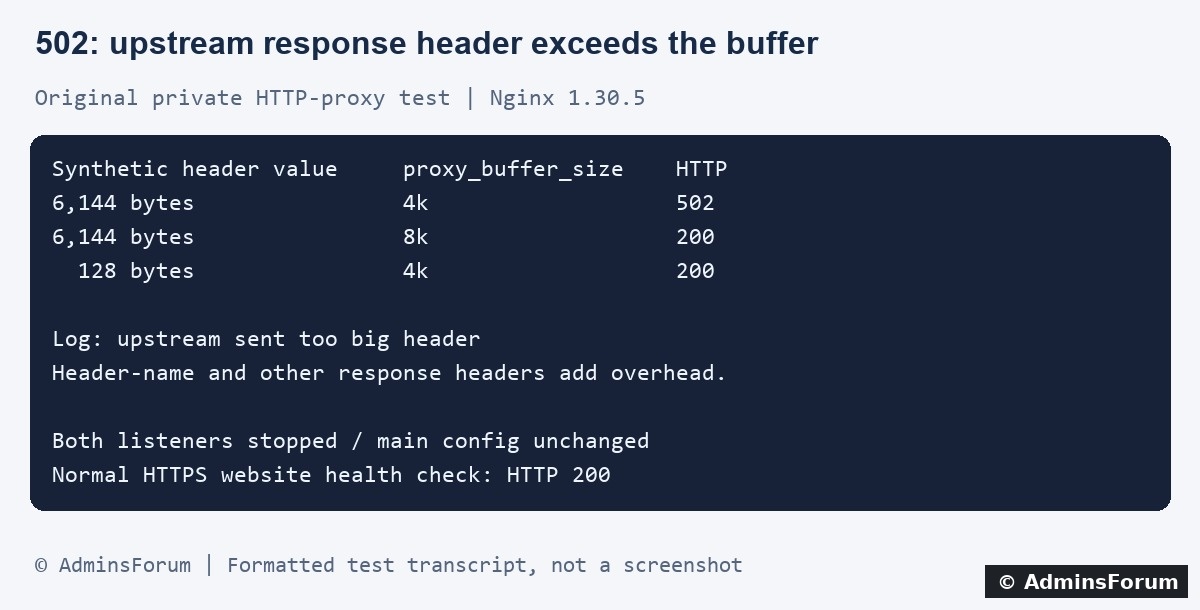
Original AdminsForum private lab results, formatted as a transcript rather than a screenshot.
1. Confirm the exact error and request
Record the URL path, time, timezone and action that failed. Does it happen after login, during a redirect or on one application page? Avoid repeatedly submitting an action that can change data.
In aaPanel open Website → PHP Project, find the affected site and select Log → Error log. Match the entry to the access log. Panel labels may vary. Our lab site's normal error log is:
For your own domain, inspect the actual configured log path. A bounded SSH example is:
Our isolated test produced:
A 502 response without this matching error does not establish a header-buffer problem. Read the rest of the line to identify the request and upstream protocol. Redact private URLs and session data before sharing evidence.
2. Distinguish response headers from request headers
The upstream response travels from the application toward Nginx. It can include Set-Cookie fields, redirects and application metadata. The browser request travels in the opposite direction and can carry a Cookie field.
A browser-cookie or oversized-request-header error is a separate problem. Increasing client-header allowances does not address the upstream-response error demonstrated here. Similarly, changing an upload body-size limit does not fix a response header.
Do not delete every visitor's session or remove authentication cookies as a generic repair. Identify whether cookies are involved, which side of the exchange is failing and what the application actually emits.
3. Identify the relevant handler
They are different directives, not interchangeable settings. Review related buffer settings and inheritance as a complete configuration. Do not add both indiscriminately or replace the panel's generated PHP location with an unrelated snippet.
4. What the isolated lab test demonstrated
We used Nginx 1.30.5 with a separate configuration and a dummy HTTP upstream. Both listeners were bound only to loopback. The upstream returned one harmless padded header and a fixed test message; no real cookies or credentials were used.
Only three requests were measured. We did not test a PHP application's cookies, CDN limits or browser acceptance of large headers. Both temporary listeners were stopped and the isolated PID file disappeared. The main Nginx configuration hash stayed unchanged, and the normal HTTPS website returned 200 afterward.
5. Inspect why the response header is large
Use protected application diagnostics or a controlled staging reproduction to inspect header names, counts and lengths. When Nginx rejects the upstream response, the browser may see only Nginx's error response, not the original oversized headers.
Review recent authentication, session, redirect and plugin changes. Look for duplicated Set-Cookie fields, excessive client-side session data, unexpectedly long redirect URLs or verbose debug metadata. These are investigation leads, not proof of the cause on your site.
Never post raw Set-Cookie or Authorization values in a support thread. Prefer a redacted summary of header names and byte lengths. Do not expose a private backend port or disable TLS validation to obtain a diagnostic capture.
6. Prefer a justified application or scoped configuration fix
If the application is unintentionally adding duplicate or excessive headers, correct that behavior through its supported settings or code. Validate login, logout, redirects and session behavior afterward. Removing a required security or session header can introduce a new problem.
If a legitimate response needs a larger allowance, back up the affected configuration and record its scope. In aaPanel inspect the site's active proxy or FastCGI section and included files. A shared include can affect other sites. Use a finite value based on measured headers, and review the full buffer configuration before applying it.
Run configuration validation first; related settings can make a proposed combination invalid. Apply only after validation passes, and keep the original configuration ready for rollback. The lab's 8k value is not a universal fix. Larger buffers can increase memory requirements under concurrent traffic.
Changing proxy settings cannot increase a separate CDN or client limit. Verify every relevant layer rather than repeatedly increasing origin values.
7. Verify the actual user action
Repeat a small number of safe requests and confirm the intended application result, not just status 200. Check for new matching log errors. For an authenticated case, test the affected login or redirect flow with a controlled test account and ensure sessions still behave correctly.
Also check an ordinary page, static assets and other sites that share any edited configuration. Remove temporary diagnostics. If the change fails validation, breaks another flow or does not address the error, restore the saved configuration and investigate the remaining evidence.
For a support request, include
The affected path without private query data, timestamp, short redacted error, HTTP-proxy versus FastCGI handler, approximate response-header lengths and recent application changes. Exclude cookies, tokens and complete configuration dumps.
Related guides
Find website access and error logs in aaPanel
Investigate upstream timeout errors
Distinguish request-body size errors
Technical references
Nginx HTTP-proxy buffer documentation
Nginx FastCGI buffer documentation
This is a focused troubleshooting guide, not a generic fix for every 502. A failed upstream connection, slow response and oversized response header have different log evidence and need different checks.
Original AdminsForum private lab results, formatted as a transcript rather than a screenshot.
1. Confirm the exact error and request
Record the URL path, time, timezone and action that failed. Does it happen after login, during a redirect or on one application page? Avoid repeatedly submitting an action that can change data.
In aaPanel open Website → PHP Project, find the affected site and select Log → Error log. Match the entry to the access log. Panel labels may vary. Our lab site's normal error log is:
Code:
/www/wwwlogs/adminslab.com.error.logCode:
tail -n 100 /www/wwwlogs/example.com.error.logCode:
upstream sent too big header while reading response header from upstream2. Distinguish response headers from request headers
The upstream response travels from the application toward Nginx. It can include Set-Cookie fields, redirects and application metadata. The browser request travels in the opposite direction and can carry a Cookie field.
A browser-cookie or oversized-request-header error is a separate problem. Increasing client-header allowances does not address the upstream-response error demonstrated here. Similarly, changing an upload body-size limit does not fix a response header.
Do not delete every visitor's session or remove authentication cookies as a generic repair. Identify whether cookies are involved, which side of the exchange is failing and what the application actually emits.
3. Identify the relevant handler
- HTTP reverse proxy: for example a Node or Python HTTP service. Inspect the active proxy location and its response-buffer configuration.
- FastCGI: commonly PHP-FPM. Inspect the selected PHP handler and included FastCGI configuration instead.
Code:
# HTTP proxy response
proxy_buffer_size

# FastCGI response
fastcgi_buffer_size4. What the isolated lab test demonstrated
We used Nginx 1.30.5 with a separate configuration and a dummy HTTP upstream. Both listeners were bound only to loopback. The upstream returned one harmless padded header and a fixed test message; no real cookies or credentials were used.
- With a 6,144-byte synthetic header value and a 4k proxy_buffer_size, the request returned 502 and the log recorded the exact oversized-header error.
- Changing only that buffer to 8k, within the already compatible private buffer configuration, returned 200 with the expected body.
- Restoring the original 4k buffer and reducing the synthetic header value to 128 bytes also returned 200.
Only three requests were measured. We did not test a PHP application's cookies, CDN limits or browser acceptance of large headers. Both temporary listeners were stopped and the isolated PID file disappeared. The main Nginx configuration hash stayed unchanged, and the normal HTTPS website returned 200 afterward.
5. Inspect why the response header is large
Use protected application diagnostics or a controlled staging reproduction to inspect header names, counts and lengths. When Nginx rejects the upstream response, the browser may see only Nginx's error response, not the original oversized headers.
Review recent authentication, session, redirect and plugin changes. Look for duplicated Set-Cookie fields, excessive client-side session data, unexpectedly long redirect URLs or verbose debug metadata. These are investigation leads, not proof of the cause on your site.
Never post raw Set-Cookie or Authorization values in a support thread. Prefer a redacted summary of header names and byte lengths. Do not expose a private backend port or disable TLS validation to obtain a diagnostic capture.
6. Prefer a justified application or scoped configuration fix
If the application is unintentionally adding duplicate or excessive headers, correct that behavior through its supported settings or code. Validate login, logout, redirects and session behavior afterward. Removing a required security or session header can introduce a new problem.
If a legitimate response needs a larger allowance, back up the affected configuration and record its scope. In aaPanel inspect the site's active proxy or FastCGI section and included files. A shared include can affect other sites. Use a finite value based on measured headers, and review the full buffer configuration before applying it.
Run configuration validation first; related settings can make a proposed combination invalid. Apply only after validation passes, and keep the original configuration ready for rollback. The lab's 8k value is not a universal fix. Larger buffers can increase memory requirements under concurrent traffic.
Changing proxy settings cannot increase a separate CDN or client limit. Verify every relevant layer rather than repeatedly increasing origin values.
7. Verify the actual user action
Repeat a small number of safe requests and confirm the intended application result, not just status 200. Check for new matching log errors. For an authenticated case, test the affected login or redirect flow with a controlled test account and ensure sessions still behave correctly.
Also check an ordinary page, static assets and other sites that share any edited configuration. Remove temporary diagnostics. If the change fails validation, breaks another flow or does not address the error, restore the saved configuration and investigate the remaining evidence.
For a support request, include
The affected path without private query data, timestamp, short redacted error, HTTP-proxy versus FastCGI handler, approximate response-header lengths and recent application changes. Exclude cookies, tokens and complete configuration dumps.
Related guides
Find website access and error logs in aaPanel
Investigate upstream timeout errors
Distinguish request-body size errors
Technical references
Nginx HTTP-proxy buffer documentation
Nginx FastCGI buffer documentation