



11-14-2026, 05:48 PM
Change MySQL Passwords on CyberPanel Without Breaking phpMyAdmin or Your Site (Tested)
Two password changes cause a lot of trouble on CyberPanel servers: changing the MySQL root password (afterwards phpMyAdmin won't open and you can't create databases), and changing a website's database password (the site shows "Error establishing a database connection"). We did both on purpose on a CyberPanel 3.0.8 server (Ubuntu 24.04, MariaDB 10.11), watched what broke, and fixed it. Here's what to change, and where.
Part 1: A website's database password
In the panel this lives under Databases → List Databases. Pick the website and use the Change button next to the database:
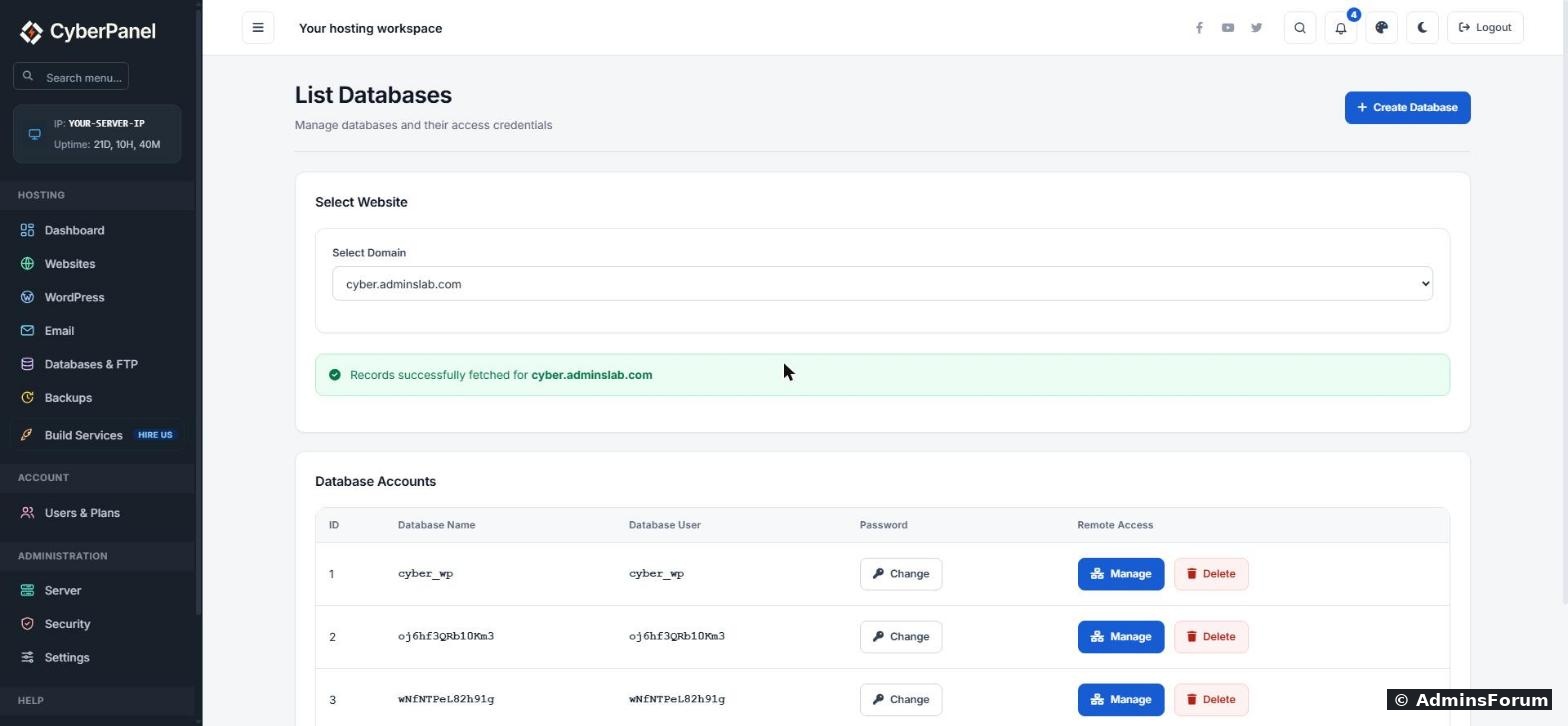
The panel changes the password in MariaDB. It does not know your website's config file, so the site keeps using the old one. We tested the same thing over SSH. Right after the password change, our WordPress site answered:
The fix is to put the new password into the site's config. For WordPress, WP-CLI does it in one line (run it as the website's user, see
on the file to find it):
It answered Success: Updated the constant 'DB_PASSWORD'. Two things we noticed:
for Laravel,
for Joomla, and so on).
Part 2: The MySQL root password
CyberPanel itself logs in to MariaDB as root to create databases and to open phpMyAdmin for you. It reads that password from its own files. If you change the password only in MariaDB, the panel is left with the old one.
What broke on our server after changing only the root password:
The three places to update. Back them up first:
Change the password in MariaDB (if you haven't yet):
Then put the same new password in:
After that, on our server:
logged in as root again, Create Database worked (the same request that had failed now returned success), and phpMyAdmin opened normally.
The trap in settings.py
On a fresh install, the first block in that DATABASES section (user
) has the same password as root. We checked: the original root password also logged in as the
database user. So if you search and replace the old password everywhere in
, you also change the first block, and then the whole panel can't reach its own database.
Change only the
block. Leave the
user's password alone unless you have a strong reason: on our server that same password was also stored in the config files of Postfix, Dovecot, PowerDNS and Pure-FTPd (
,
,
,
). Changing it means updating all of them, or mail, DNS and FTP stop. We didn't change it.
phpMyAdmin won't open? Check this first
If phpMyAdmin bounces you back to the dashboard, or database creation fails, test whether the panel's saved root password still works:
Access denied means the saved password is out of date, and Part 2 is your fix. If it prints
, the password is fine and the cause is something else. Look at the last lines of
right after you click.
Questions, or a different error after a password change? Reply below with the last lines of that log (hide passwords and your server IP).
Two password changes cause a lot of trouble on CyberPanel servers: changing the MySQL root password (afterwards phpMyAdmin won't open and you can't create databases), and changing a website's database password (the site shows "Error establishing a database connection"). We did both on purpose on a CyberPanel 3.0.8 server (Ubuntu 24.04, MariaDB 10.11), watched what broke, and fixed it. Here's what to change, and where.
Part 1: A website's database password
In the panel this lives under Databases → List Databases. Pick the website and use the Change button next to the database:
The panel changes the password in MariaDB. It does not know your website's config file, so the site keeps using the old one. We tested the same thing over SSH. Right after the password change, our WordPress site answered:
Code:
500
Error establishing a database connectionCode:
stat -c %UCode:
cd /home/yourdomain.com/public_html
sudo -u SITEUSER wp config set DB_PASSWORD 'your-new-password'- WP-CLI prints the new password on screen in that success line. Clear your terminal if someone can see it.
- Wait a few seconds before you test. We checked the site in the same second and still got the error. A moment later it was back to
. PHP keeps a copy of your files in memory and only re-reads them every 2 seconds on our server (Code:200
).Code:opcache.revalidate_freq = 2
Code:
.envCode:
configuration.phpPart 2: The MySQL root password
CyberPanel itself logs in to MariaDB as root to create databases and to open phpMyAdmin for you. It reads that password from its own files. If you change the password only in MariaDB, the panel is left with the old one.
What broke on our server after changing only the root password:
- Create Database failed with: Database creation stopped at checking_sql_namespace ... Ask the administrator to check the CyberPanel error log.
- phpMyAdmin didn't open. Clicking it just dropped us back on the dashboard, with no error message.
- The panel's log (
) showed the real reason: Access denied for user 'root'@'localhost' (using password: YES).Code:/home/cyberpanel/error-logs.txt
- Commands that rely on the saved password stopped working too (
as root without typing a password).Code:mysql
The three places to update. Back them up first:
Code:
mkdir -p /root/rootpw-backup
cp -a /etc/cyberpanel/mysqlPassword /root/.my.cnf /usr/local/CyberCP/CyberCP/settings.py /root/rootpw-backup/Code:
mysql -e "ALTER USER 'root'@'localhost' IDENTIFIED BY 'your-new-password'; FLUSH PRIVILEGES;"- : the file contains only the password.Code:
/etc/cyberpanel/mysqlPassword
- : the password line.Code:
/root/.my.cnf
- : near the end there's aCode:
/usr/local/CyberCP/CyberCP/settings.py
section with two blocks. Change theCode:DATABASES
in the second block, the one namedCode:'PASSWORD'
withCode:'rootdb'
.Code:'USER': 'root'
Code:
systemctl restart lscpdCode:
mysqlThe trap in settings.py
On a fresh install, the first block in that DATABASES section (user
Code:
cyberpanelCode:
cyberpanelCode:
settings.pyChange only the
Code:
rootdbCode:
cyberpanelCode:
/etc/postfix/mysql-virtual_*.cfCode:
/etc/dovecot/dovecot-sql.conf.extCode:
/etc/powerdns/pdns.confCode:
/etc/pure-ftpd/phpMyAdmin won't open? Check this first
If phpMyAdmin bounces you back to the dashboard, or database creation fails, test whether the panel's saved root password still works:
Code:
mysql -uroot -p"$(cat /etc/cyberpanel/mysqlPassword)" -e "SELECT 1;"Code:
1Code:
/home/cyberpanel/error-logs.txtQuestions, or a different error after a password change? Reply below with the last lines of that log (hide passwords and your server IP).