



4 hours ago
“open_basedir restriction in effect” identifies a PHP filesystem access attempt outside the configured allowed paths. Find the attempted path and why the application uses it before changing permissions or disabling a restriction.
This guide demonstrates a blocked read and a successful read from an appropriate location with the same restriction still enabled. It complements the guides for PHP script-path, session-storage and permission errors; those symptoms can look similar but require different evidence.
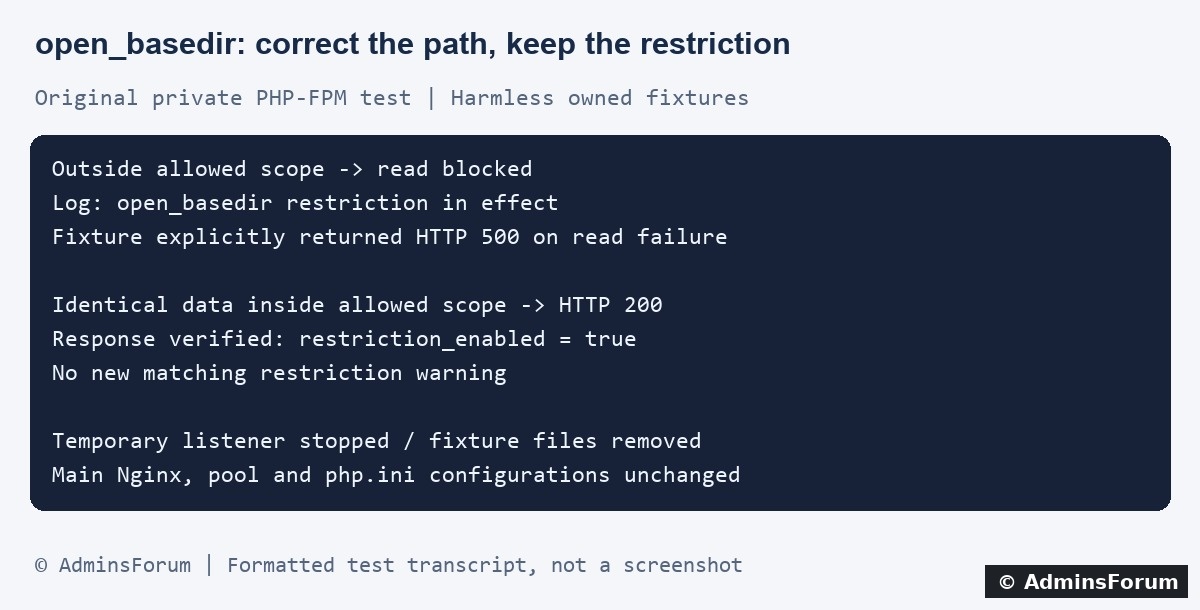
Original AdminsForum private lab evidence, formatted as a transcript rather than a screenshot.
1. Find the complete warning in the website logs
Record the failing action, request path, time and timezone. In aaPanel open Website → PHP Project, locate the affected website and select Log → Error log. Match the request in the access log. Panel labels can vary by version.
Our lab site's normal website error log is:
Use your actual domain and configured path. An optional bounded SSH check is:
Keep public error display off. Share only a short redacted excerpt: filenames can contain private account names or application details.
Our private test captured this shortened warning:
The useful evidence is the attempted file, allowed scope and code location. A generic “Failed to open stream” message without the preceding cause is less informative.
2. Distinguish a restriction from other filesystem problems
A path restriction can reject an otherwise existing and readable file. Changing it to mode 777 does not put it inside the allowed scope. Conversely, a file inside the scope can still fail because it is missing, permissions are wrong, storage is full or the filesystem is read-only.
Read the specific warning rather than changing several controls at once. If the log says Permission denied or No such file or directory without a matching restriction warning, investigate that evidence separately. A 500 response alone does not prove open_basedir is responsible.
3. Confirm the setting in the website's PHP context
Identify the PHP version selected for the affected site. CLI PHP can have a different configuration from PHP-FPM. In a protected diagnostic context for that request, inspect:
These are diagnostic expressions, not a public endpoint to leave online. Do not upload a full phpinfo page or print private application paths to visitors.
Review the setting's effective source: the panel's site configuration, PHP-FPM pool, applicable per-directory files and application startup code can all matter. A saved value in one file does not prove that it is the active value for the failing request. Inspect before editing; do not delete panel-managed files as a shortcut.
4. Work out why the application chose that location
Check whether a deployment moved to a new directory, a plugin retained an old absolute path or a temporary/cache directory points outside the intended layout. Compare application configuration with the actual files and public document root.
For an illustrative application:
These are examples, not a tested deployment recipe. Follow your application's requirements and hosting isolation model. Private storage should not be moved into a publicly served directory merely to make a read succeed.
Resolve the actual target of symlinks as part of the review. A familiar-looking path can refer to another location. Do not use symlinks or command execution to bypass the restriction.
5. What the private lab test demonstrated
We used the installed PHP-FPM service through a separate Nginx endpoint bound only to loopback. The fixture applied and verified a request-local allowed directory. Two harmless text fixtures contained identical data; one was inside that scope and one outside.
All disposable PHP and text fixtures were removed, the private directory removed and the listener stopped. Its PID file disappeared. Hash checks confirmed the main Nginx configuration, PHP-FPM pool configuration and php.ini were unchanged. The normal HTTPS site returned 200 afterward.
6. Correct the demonstrated path mismatch
Prefer correcting an unintended application path or using an appropriate existing private storage location when the application supports it. Back up configuration and data before any real move. Confirm ownership, read/write requirements and the application setting that points to the location.
If the application genuinely requires another private directory, review that requirement with the site's isolation design and configuration owner before considering a narrowly scoped allowlist change. Do not allow the filesystem root, other websites or a large parent directory just to silence one warning.
Record the previous value and affected sites. Validate any server configuration edit before applying it, and verify the effective PHP value afterward. Keep a rollback path. Do not globally disable the panel's path restriction as the first troubleshooting step.
7. Keep the limits of this protection clear
PHP documents open_basedir as an additional safeguard, not comprehensive isolation. Keep proper service-account permissions and the hosting environment's other isolation controls in place. Our two-file test demonstrates ordinary PHP file access behavior; it is not a security audit or proof that one PHP setting isolates untrusted tenants.
8. Verify the application, not only the status code
Repeat one safe version of the original action with representative data. Confirm the intended result, inspect new logs and verify the required read or write actually completed. A 200 response alone can contain an application-level error.
Check that private files remain outside the public document root and that unrelated sites were not affected by a shared setting. Remove temporary diagnostics. If the error persists, retain the redacted warning and review the exact path instead of repeatedly widening access.
For a support request, include
The PHP version and SAPI, failing action, timestamp, redacted attempted path and allowed scope, and relevant recent deployment changes. Exclude credentials, private file contents and complete configuration dumps.
Related guides
Trace PHP script-filename mismatches
Diagnose PHP session-storage errors
Review file permissions and ownership
Technical reference
PHP open_basedir behavior and security limits
This guide demonstrates a blocked read and a successful read from an appropriate location with the same restriction still enabled. It complements the guides for PHP script-path, session-storage and permission errors; those symptoms can look similar but require different evidence.
Original AdminsForum private lab evidence, formatted as a transcript rather than a screenshot.
1. Find the complete warning in the website logs
Record the failing action, request path, time and timezone. In aaPanel open Website → PHP Project, locate the affected website and select Log → Error log. Match the request in the access log. Panel labels can vary by version.
Our lab site's normal website error log is:
Code:
/www/wwwlogs/adminslab.com.error.logCode:
tail -n 100 /www/wwwlogs/example.com.error.logOur private test captured this shortened warning:
Code:
file_get_contents(): open_basedir restriction in effect.
File(...outside...) is not within the allowed path(s): (...scope...)2. Distinguish a restriction from other filesystem problems
A path restriction can reject an otherwise existing and readable file. Changing it to mode 777 does not put it inside the allowed scope. Conversely, a file inside the scope can still fail because it is missing, permissions are wrong, storage is full or the filesystem is read-only.
Read the specific warning rather than changing several controls at once. If the log says Permission denied or No such file or directory without a matching restriction warning, investigate that evidence separately. A 500 response alone does not prove open_basedir is responsible.
3. Confirm the setting in the website's PHP context
Identify the PHP version selected for the affected site. CLI PHP can have a different configuration from PHP-FPM. In a protected diagnostic context for that request, inspect:
Code:
PHP_VERSION
PHP_SAPI
ini_get('open_basedir')Review the setting's effective source: the panel's site configuration, PHP-FPM pool, applicable per-directory files and application startup code can all matter. A saved value in one file does not prove that it is the active value for the failing request. Inspect before editing; do not delete panel-managed files as a shortcut.
4. Work out why the application chose that location
Check whether a deployment moved to a new directory, a plugin retained an old absolute path or a temporary/cache directory points outside the intended layout. Compare application configuration with the actual files and public document root.
For an illustrative application:
Code:
Application files: /www/wwwroot/example.com/app
Public web root:   /www/wwwroot/example.com/app/public
Private data: /www/wwwroot/example.com/app/storageResolve the actual target of symlinks as part of the review. A familiar-looking path can refer to another location. Do not use symlinks or command execution to bypass the restriction.
5. What the private lab test demonstrated
We used the installed PHP-FPM service through a separate Nginx endpoint bound only to loopback. The fixture applied and verified a request-local allowed directory. Two harmless text fixtures contained identical data; one was inside that scope and one outside.
- The outside read failed and produced the exact open_basedir warning. The test script explicitly returned HTTP 500 when the read failed.
- A second request read the inside fixture and returned HTTP 200 with the expected data. Its response confirmed the restriction remained enabled.
- No new matching restriction warning appeared after the successful request.
All disposable PHP and text fixtures were removed, the private directory removed and the listener stopped. Its PID file disappeared. Hash checks confirmed the main Nginx configuration, PHP-FPM pool configuration and php.ini were unchanged. The normal HTTPS site returned 200 afterward.
6. Correct the demonstrated path mismatch
Prefer correcting an unintended application path or using an appropriate existing private storage location when the application supports it. Back up configuration and data before any real move. Confirm ownership, read/write requirements and the application setting that points to the location.
If the application genuinely requires another private directory, review that requirement with the site's isolation design and configuration owner before considering a narrowly scoped allowlist change. Do not allow the filesystem root, other websites or a large parent directory just to silence one warning.
Record the previous value and affected sites. Validate any server configuration edit before applying it, and verify the effective PHP value afterward. Keep a rollback path. Do not globally disable the panel's path restriction as the first troubleshooting step.
7. Keep the limits of this protection clear
PHP documents open_basedir as an additional safeguard, not comprehensive isolation. Keep proper service-account permissions and the hosting environment's other isolation controls in place. Our two-file test demonstrates ordinary PHP file access behavior; it is not a security audit or proof that one PHP setting isolates untrusted tenants.
8. Verify the application, not only the status code
Repeat one safe version of the original action with representative data. Confirm the intended result, inspect new logs and verify the required read or write actually completed. A 200 response alone can contain an application-level error.
Check that private files remain outside the public document root and that unrelated sites were not affected by a shared setting. Remove temporary diagnostics. If the error persists, retain the redacted warning and review the exact path instead of repeatedly widening access.
For a support request, include
The PHP version and SAPI, failing action, timestamp, redacted attempted path and allowed scope, and relevant recent deployment changes. Exclude credentials, private file contents and complete configuration dumps.
Related guides
Trace PHP script-filename mismatches
Diagnose PHP session-storage errors
Review file permissions and ownership
Technical reference
PHP open_basedir behavior and security limits