



10-13-2026, 06:14 PM
Create a redirect in aaPanel from Website → Conf → Redirect → Add redirect. Choose a source path or domain, set the destination and select 301 for a permanent move or 302 for a temporary one. Verify the HTTP response after saving: a rule appearing in the panel does not prove it sends visitors to the intended destination.
Tested setup
Ubuntu 22.04, aaPanel 8.0.7 Free Edition and Nginx 1.30.5. On our separate demo site we created /old-guide → the demo homepage, verified a 301 response, changed the same rule to 302 and verified it again. We then disabled the rule and confirmed that /old-guide returned 404. This guide tests a path rule; a whole-domain migration was not performed.
1. Decide whether the move is permanent
Use a permanent redirect when the old URL should permanently give way to its replacement. Use a temporary redirect when the change is temporary. Google treats permanent redirects as a canonicalization signal toward the destination; temporary redirects serve a different purpose. A redirect does not guarantee indexing or rankings.
Choose the relevant replacement page for a real moved guide. Our homepage destination is only a small lab demonstration. Record existing redirect settings before changing them, and check that the destination already works over HTTPS.
2. Open the site's redirect form
Open Website, find the correct site, click Conf, then choose Redirect. Click Add redirect. The initial form in our panel defaulted to Domain name, 301, Enable on and Keep URI param on.
For a single path, change Type to Path. Enter the source path with its leading slash. We entered /old-guide and the HTTPS demo homepage as Target URL. Keep Enable on, select 301, and turn Keep URI param off for this specific test.
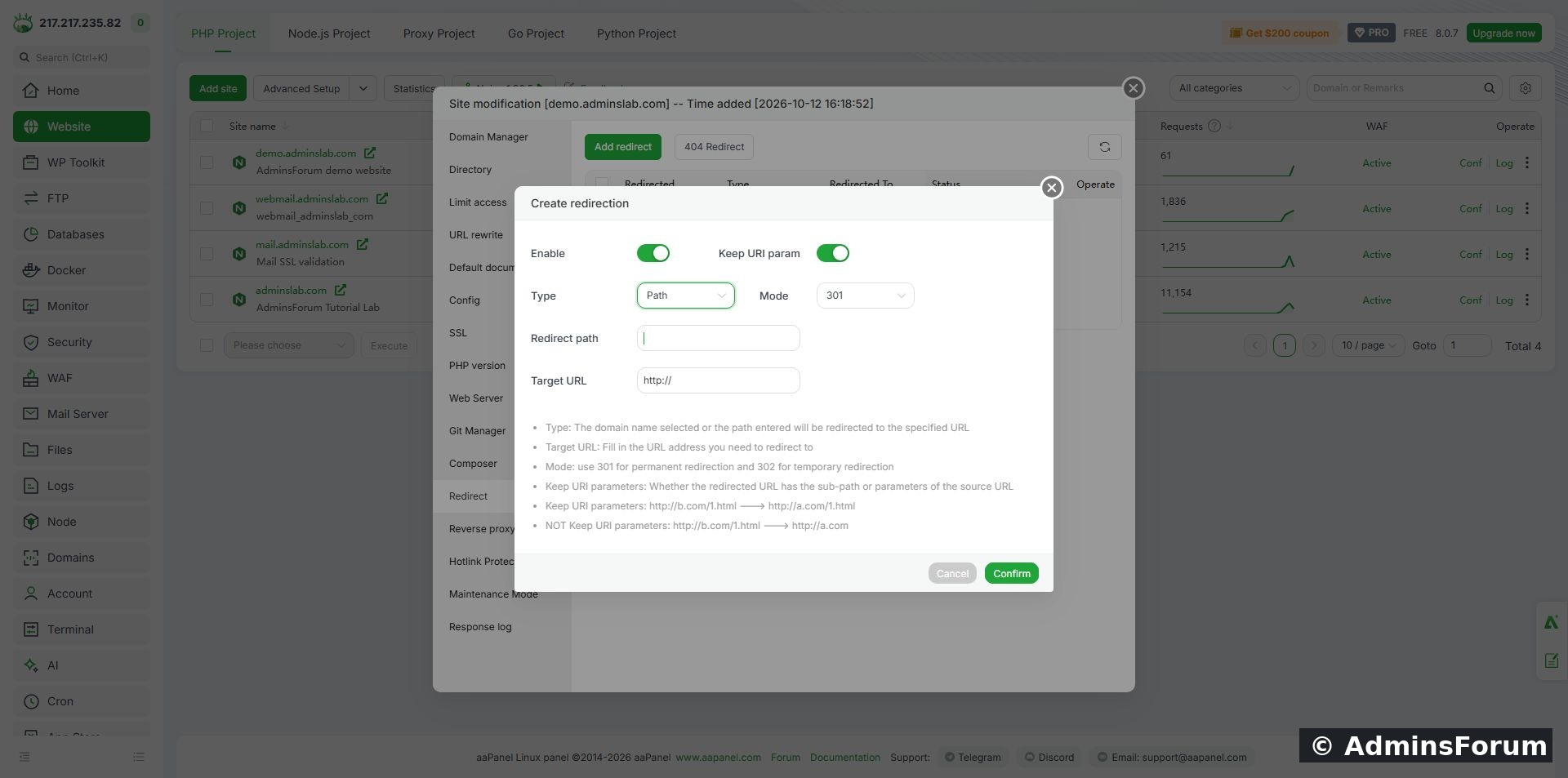
A path-specific 301 rule before saving. Use your own hostname and the correct replacement page.
A domain rule can affect much more traffic. Do not select a whole-domain source when you only intend to move one path. Avoid redirecting a URL back to itself or creating conflicting rules that send visitors in a loop.
3. Save and check the rule
Click Confirm and wait for the save result. Our redirect table then showed /old-guide, Type Path, the intended destination and Running.
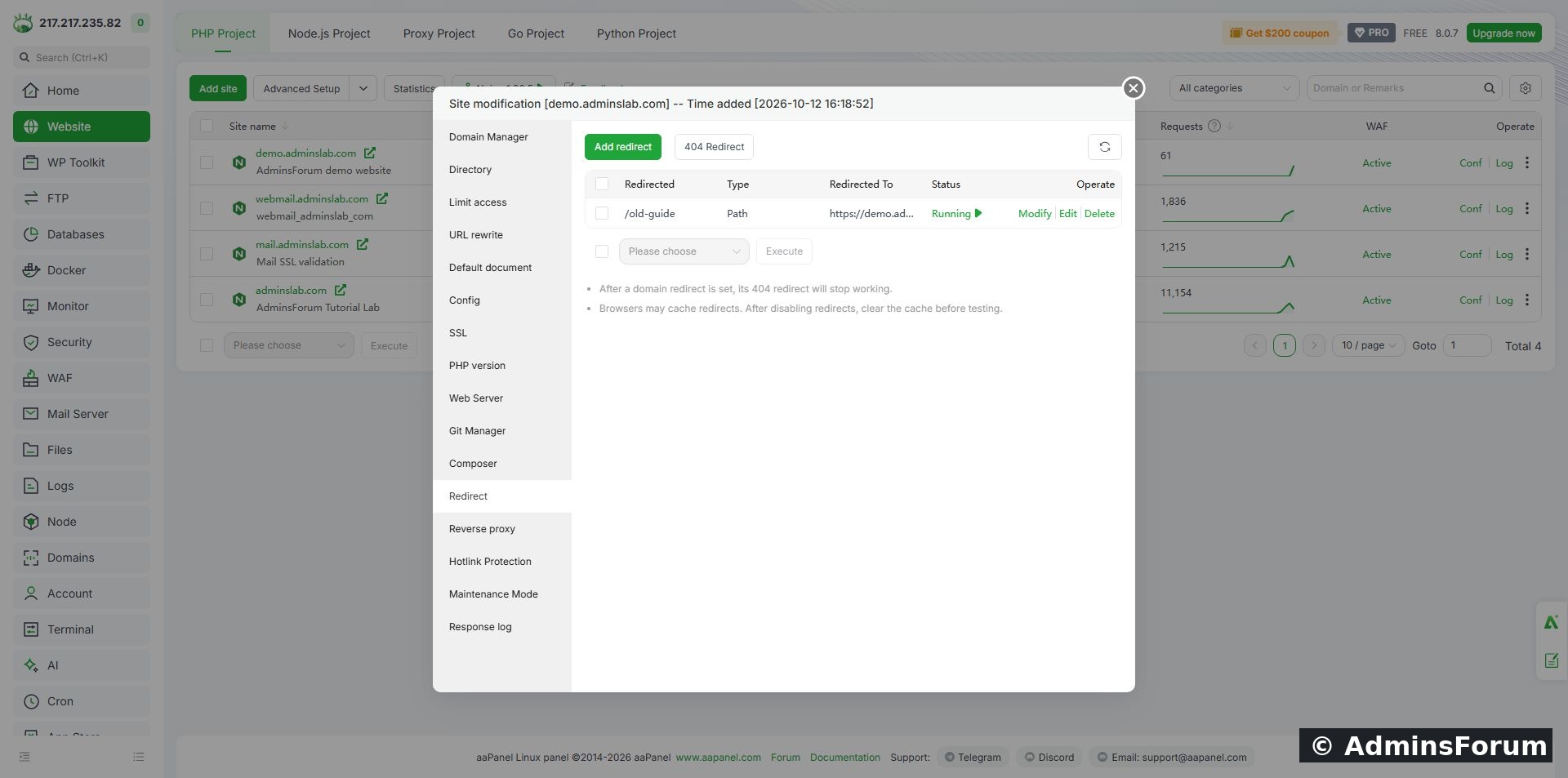
The saved test rule. Running is a configuration status; verify the actual response separately.
4. Verify the status and Location header
Use a fresh request to the old URL. An optional command for your own site is:
Replace YOUR_DOMAIN. Do not use -L for the first check because following the redirect immediately can obscure the first response. Inspect both the status code and Location. Our actual result was:
Important tested detail: Keep URI param was off, but this Nginx-generated rule still retained the query string. The panel generated a rewrite matching /old-guide and following characters. With the option off, our path suffix was removed while query arguments remained. Do not assume that switching this option off strips sensitive query values. Inspect your generated rule and test your intended URL patterns before production use. We did not change the generated configuration manually.
5. Change the rule to a temporary redirect
In the redirect table choose Edit to reopen the form. In this version, Modify opened the raw generated configuration editor instead; it was not the normal form. We inspected that configuration without saving changes.
Set Mode to 302 in the form and confirm. Other values were unchanged in our test.
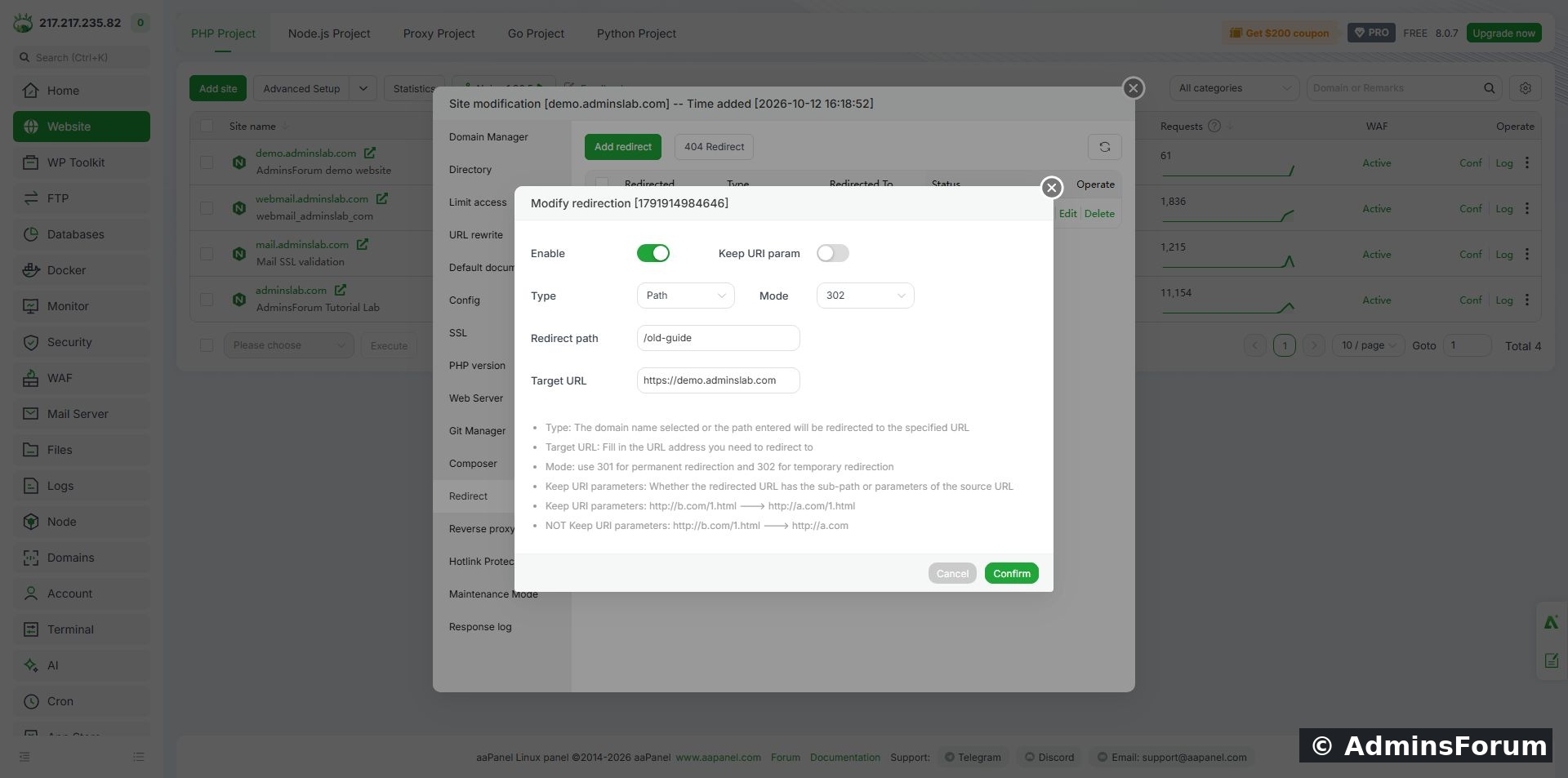
The same path rule configured as temporary, with Keep URI param still off.
A fresh request to /old-guide/chapter?lesson=temporary returned:
This proves that the mode changed and the tested subpath was matched. The /chapter suffix was not carried to the destination, but the query string remained. Test nearby paths as well if a rule must match only one exact URL.
6. Disable a test rule and verify cleanup
Choose Edit, turn Enable off and confirm. We used this reversible action rather than deleting the record. A new HTTP request to /old-guide then returned 404 Not Found, confirming that the tested redirect no longer handled the URL. The disabled record remains available for inspection; the demo homepage remains separate.
Browsers can cache redirects. If a browser still follows an old destination after disabling a rule, compare it with a fresh header request and clear the relevant cache before concluding the panel failed. Do not repeatedly create new rules to compensate for a cached response.
Troubleshooting and production checks
Final lab state
Both 301 and 302 responses verified; the temporary test rule disabled; source returns 404. No whole-domain redirect, wildcard migration or query-stripping guarantee is claimed.
Reference: Google Search Central: Redirects and Google Search.
Need help? Include the source pattern, expected destination, actual status/Location and aaPanel/web-server versions in Web Servers Support. Remove private query values before sharing URLs or logs.
Tested setup
Ubuntu 22.04, aaPanel 8.0.7 Free Edition and Nginx 1.30.5. On our separate demo site we created /old-guide → the demo homepage, verified a 301 response, changed the same rule to 302 and verified it again. We then disabled the rule and confirmed that /old-guide returned 404. This guide tests a path rule; a whole-domain migration was not performed.
1. Decide whether the move is permanent
Use a permanent redirect when the old URL should permanently give way to its replacement. Use a temporary redirect when the change is temporary. Google treats permanent redirects as a canonicalization signal toward the destination; temporary redirects serve a different purpose. A redirect does not guarantee indexing or rankings.
Choose the relevant replacement page for a real moved guide. Our homepage destination is only a small lab demonstration. Record existing redirect settings before changing them, and check that the destination already works over HTTPS.
2. Open the site's redirect form
Open Website, find the correct site, click Conf, then choose Redirect. Click Add redirect. The initial form in our panel defaulted to Domain name, 301, Enable on and Keep URI param on.
For a single path, change Type to Path. Enter the source path with its leading slash. We entered /old-guide and the HTTPS demo homepage as Target URL. Keep Enable on, select 301, and turn Keep URI param off for this specific test.
A path-specific 301 rule before saving. Use your own hostname and the correct replacement page.
A domain rule can affect much more traffic. Do not select a whole-domain source when you only intend to move one path. Avoid redirecting a URL back to itself or creating conflicting rules that send visitors in a loop.
3. Save and check the rule
Click Confirm and wait for the save result. Our redirect table then showed /old-guide, Type Path, the intended destination and Running.
The saved test rule. Running is a configuration status; verify the actual response separately.
4. Verify the status and Location header
Use a fresh request to the old URL. An optional command for your own site is:
Code:
curl -I 'https://YOUR_DOMAIN/old-guide?lesson=redirect'Code:
HTTP/1.1 301 Moved Permanently
Location: https://demo.adminslab.com?lesson=redirect
Important tested detail: Keep URI param was off, but this Nginx-generated rule still retained the query string. The panel generated a rewrite matching /old-guide and following characters. With the option off, our path suffix was removed while query arguments remained. Do not assume that switching this option off strips sensitive query values. Inspect your generated rule and test your intended URL patterns before production use. We did not change the generated configuration manually.
5. Change the rule to a temporary redirect
In the redirect table choose Edit to reopen the form. In this version, Modify opened the raw generated configuration editor instead; it was not the normal form. We inspected that configuration without saving changes.
Set Mode to 302 in the form and confirm. Other values were unchanged in our test.
The same path rule configured as temporary, with Keep URI param still off.
A fresh request to /old-guide/chapter?lesson=temporary returned:
Code:
HTTP/1.1 302 Moved Temporarily
Location: https://demo.adminslab.com?lesson=temporary6. Disable a test rule and verify cleanup
Choose Edit, turn Enable off and confirm. We used this reversible action rather than deleting the record. A new HTTP request to /old-guide then returned 404 Not Found, confirming that the tested redirect no longer handled the URL. The disabled record remains available for inspection; the demo homepage remains separate.
Browsers can cache redirects. If a browser still follows an old destination after disabling a rule, compare it with a fresh header request and clear the relevant cache before concluding the panel failed. Do not repeatedly create new rules to compensate for a cached response.
Troubleshooting and production checks
- Redirect loop: compare the source and destination plus other domain, application and HTTPS rules. Keep a single clear route to the final destination.
- Unexpected suffix or query: inspect Location and the generated rule. The option label alone is not sufficient evidence of the behaviour.
- Wrong status: check the saved mode and test a fresh request. A cached permanent redirect may differ from the current server response.
- 404 at the destination: verify that the replacement page exists and that the redirect points to its actual URL.
- SEO migration: update internal links and the sitemap to use the intended final URLs. Avoid unnecessary redirect chains. This lab did not test search-engine indexing after a migration.
Final lab state
Both 301 and 302 responses verified; the temporary test rule disabled; source returns 404. No whole-domain redirect, wildcard migration or query-stripping guarantee is claimed.
Reference: Google Search Central: Redirects and Google Search.
Need help? Include the source pattern, expected destination, actual status/Location and aaPanel/web-server versions in Web Servers Support. Remove private query values before sharing URLs or logs.