



4 hours ago
MariaDB error 1062 means an operation would violate a primary or unique key. Identify the key and intended record before changing the SQL: ignoring the error can leave the new data unsaved, while replacing a record can change existing data.
This guide uses a disposable InnoDB table in a separate aaPanel lab database. It demonstrates duplicate rejection, INSERT IGNORE warnings and a corrected distinct record while retaining the unique constraint. No live application data was edited.
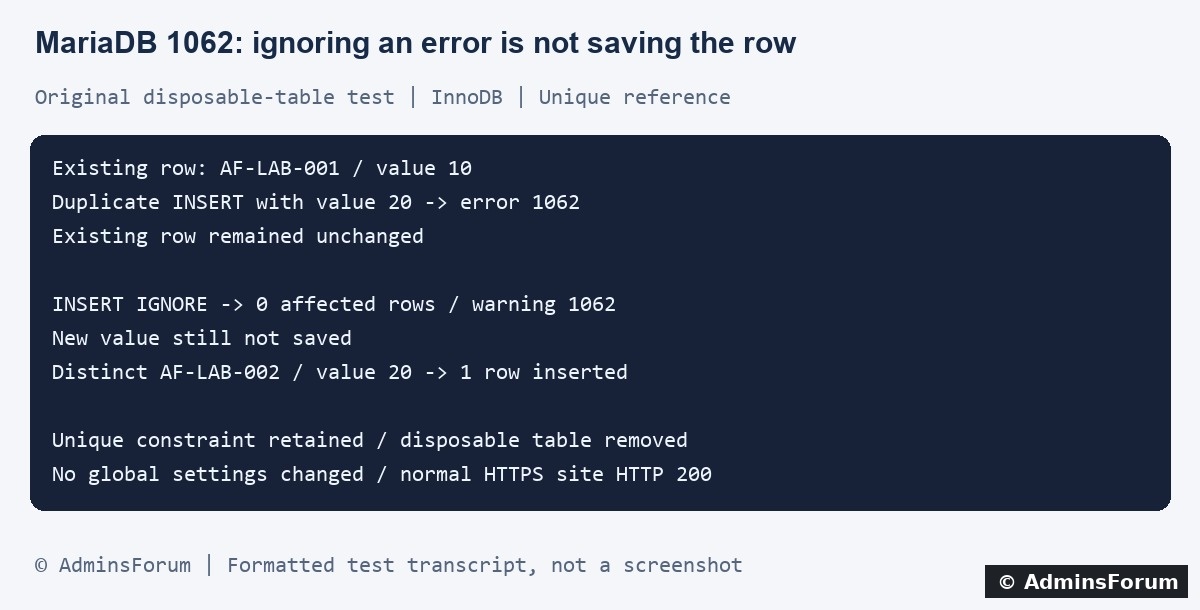
Original AdminsForum lab results, formatted as a transcript rather than a screenshot.
1. Capture the exact error and operation
Record the time, application action or import step, table and key name from the error. A browser may show only a generic failure, so inspect the application's private logs and correlate the website error log in aaPanel.
Under Website → PHP Project, find the site and open its Log control. Panel labels vary. Redact user values, email addresses and customer identifiers before sharing an error; the duplicate value can appear directly in the message.
Our harmless lab example was:
The named key was a unique reference index in our test, not necessarily the primary key. Do not assume every 1062 involves an auto-increment ID.
2. Identify the columns protected by the named key
In an authorized database session, inspect the affected table's structure or run a scoped read-only check:
Replace your_table with the actual intended table in the correct database. Find the reported key name and its column sequence. A unique key can cover more than one column; the required uniqueness may be a combination rather than one field by itself.
Then inspect only the relevant existing record using an appropriately parameterized query in the application or a careful read-only lookup in the administration tool. Do not paste untrusted values directly into SQL. Keep sensitive row contents private.
A key conflict tells you the database rejected that value combination. It does not tell you whether the new input is wrong, the operation was repeated or an existing record should be updated.
3. Decide what the operation was supposed to do
4. What our private test demonstrated
We used MariaDB 10.11.10 and a disposable two-column data example with an auto-increment primary key and an additional unique reference index. Initially AF-LAB-001 had value 10.
5. Understand why common shortcuts change behavior
6. Check repeated imports and concurrent requests
For an import, record where it stopped and whether earlier statements committed. Re-running a partially applied file can encounter records already present. Do not empty a live database or delete the conflicting row without a validated restore or merge plan and backup.
For an application, two requests can race even when each first checks whether a value exists. Retain the database constraint and handle the conflict according to the application's intended operation. An existence check alone is not a concurrency guarantee.
If the conflict is specifically on PRIMARY, inspect how that identifier was supplied and the deployment/import history. Do not reset auto-increment values or renumber related records merely because the error mentions a duplicate.
7. Apply one justified correction and read the data back
Back up affected data and configuration before any real corrective write. Use the application's supported identity and authorization checks. If a restore is intended, rehearse it in an isolated database and verify counts, relationships and representative records.
After the correction, check the actual row values and expected outcome as well as the SQL result. Inspect warnings in the same relevant session where appropriate. Confirm the unique key is retained and unrelated data is unchanged.
Our lab used a distinct synthetic record because it represented a new item. A real repeated request may instead need to return the existing result, and a real update may need a specifically authorized change. Choose the behavior from the business operation, not the easiest way to silence 1062.
For a support request
Include the database version, key name, operation type, timestamp, whether the target already held data and a redacted error. Do not share passwords, complete SQL dumps or customer records.
Related guides
Import a SQL database file in aaPanel
Back up and restore a database
Review query plans and indexes
Technical references
MariaDB error 1062
INSERT IGNORE behavior
ON DUPLICATE KEY UPDATE behavior
REPLACE semantics
This guide uses a disposable InnoDB table in a separate aaPanel lab database. It demonstrates duplicate rejection, INSERT IGNORE warnings and a corrected distinct record while retaining the unique constraint. No live application data was edited.
Original AdminsForum lab results, formatted as a transcript rather than a screenshot.
1. Capture the exact error and operation
Record the time, application action or import step, table and key name from the error. A browser may show only a generic failure, so inspect the application's private logs and correlate the website error log in aaPanel.
Under Website → PHP Project, find the site and open its Log control. Panel labels vary. Redact user values, email addresses and customer identifiers before sharing an error; the duplicate value can appear directly in the message.
Our harmless lab example was:
Code:
1062 / SQLSTATE 23000
Duplicate entry 'AF-LAB-001' for key 'uq_reference'2. Identify the columns protected by the named key
In an authorized database session, inspect the affected table's structure or run a scoped read-only check:
Code:
SHOW INDEX FROM your_table;Then inspect only the relevant existing record using an appropriately parameterized query in the application or a careful read-only lookup in the administration tool. Do not paste untrusted values directly into SQL. Keep sensitive row contents private.
A key conflict tells you the database rejected that value combination. It does not tell you whether the new input is wrong, the operation was repeated or an existing record should be updated.
3. Decide what the operation was supposed to do
- Create a genuinely new record: verify the source supplied the right unique identifier. Correct invalid input through the supported application workflow.
- Repeat the same logical request: inspect idempotency handling and the existing outcome. Repeating a request should not accidentally create a second order or account.
- Update an existing record: verify identity, authorization and intended changes before using the application's supported update path.
- Import or restore data: determine whether the target already contains earlier imported rows and what the source's merge policy is. Test the complete restore plan in an isolated destination.
4. What our private test demonstrated
We used MariaDB 10.11.10 and a disposable two-column data example with an auto-increment primary key and an additional unique reference index. Initially AF-LAB-001 had value 10.
- A normal INSERT of AF-LAB-001 with value 20 returned 1062. A read-back confirmed the existing value remained 10.
- The same duplicate with INSERT IGNORE reported zero affected rows and warning 1062. A read-back again showed only the existing value 10: the proposed value 20 was not saved.
- An intentionally distinct AF-LAB-002 record with value 20 inserted successfully. The final reference/value pairs were AF-LAB-001 → 10 and AF-LAB-002 → 20.
5. Understand why common shortcuts change behavior
- INSERT IGNORE: our test showed that a duplicate can become a warning while the row is not inserted. Review affected rows, warnings and final data; a command completing without an error is not proof all input was saved.
- ON DUPLICATE KEY UPDATE: this intentionally updates on a key conflict. That can be appropriate only when its identity and update semantics match the application. It is not a harmless switch for any failed import.
- REPLACE: this has replacement behavior involving deletion and insertion of conflicting rows. Do not treat it as a generic in-place update; review relationships, triggers and application consequences first.
- Dropping uniqueness: removing an intended unique index can permit invalid duplicates. Keep the integrity rule unless an independently reviewed schema-design change actually requires something different.
6. Check repeated imports and concurrent requests
For an import, record where it stopped and whether earlier statements committed. Re-running a partially applied file can encounter records already present. Do not empty a live database or delete the conflicting row without a validated restore or merge plan and backup.
For an application, two requests can race even when each first checks whether a value exists. Retain the database constraint and handle the conflict according to the application's intended operation. An existence check alone is not a concurrency guarantee.
If the conflict is specifically on PRIMARY, inspect how that identifier was supplied and the deployment/import history. Do not reset auto-increment values or renumber related records merely because the error mentions a duplicate.
7. Apply one justified correction and read the data back
Back up affected data and configuration before any real corrective write. Use the application's supported identity and authorization checks. If a restore is intended, rehearse it in an isolated database and verify counts, relationships and representative records.
After the correction, check the actual row values and expected outcome as well as the SQL result. Inspect warnings in the same relevant session where appropriate. Confirm the unique key is retained and unrelated data is unchanged.
Our lab used a distinct synthetic record because it represented a new item. A real repeated request may instead need to return the existing result, and a real update may need a specifically authorized change. Choose the behavior from the business operation, not the easiest way to silence 1062.
For a support request
Include the database version, key name, operation type, timestamp, whether the target already held data and a redacted error. Do not share passwords, complete SQL dumps or customer records.
Related guides
Import a SQL database file in aaPanel
Back up and restore a database
Review query plans and indexes
Technical references
MariaDB error 1062
INSERT IGNORE behavior
ON DUPLICATE KEY UPDATE behavior
REPLACE semantics