



10-12-2026, 06:31 PM
Quick answer
Open App Store → Installed → Openlitespeed → Setting → Install extensions, select the website's lsphp version and install imagemagick. Verify the Imagick PHP extension with the matching lsphp binary and then check an actual website request.
We tested this on aaPanel 8.0.6, OpenLiteSpeed 1.8.5 and lsphp 8.5.11 on our isolated Ubuntu 22.04 lab. Imagick was initially missing from lsphp, although the normal aaPanel PHP installation already had it. The lsphp installation completed and the functional image test passed on 12 October 2026.
Before you start
1. Open the lsphp extension list
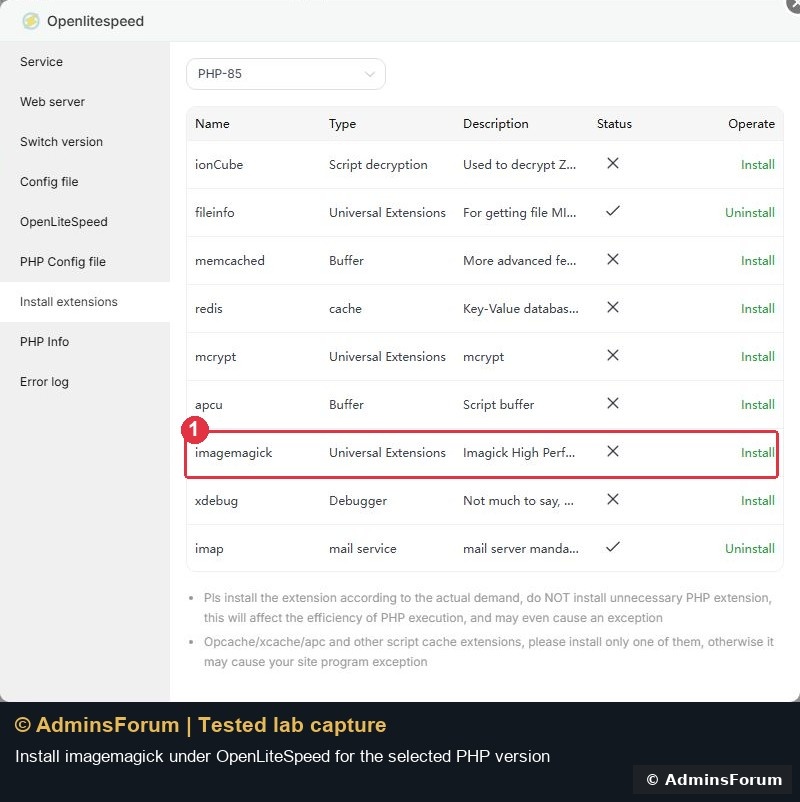
Open the installed Openlitespeed application's Setting link. Choose Install extensions and select the correct version; ours was PHP-85. Find imagemagick, described as the Imagick graphics library.
In our initial list, the row showed Install. Other extensions such as Fileinfo were already available. Install only the extension your application needs.
2. Start installation and wait for the result
Click the imagemagick row's Install link. Our row changed to Installing while aaPanel ran the setup. Wait for it to finish rather than repeatedly clicking Install.
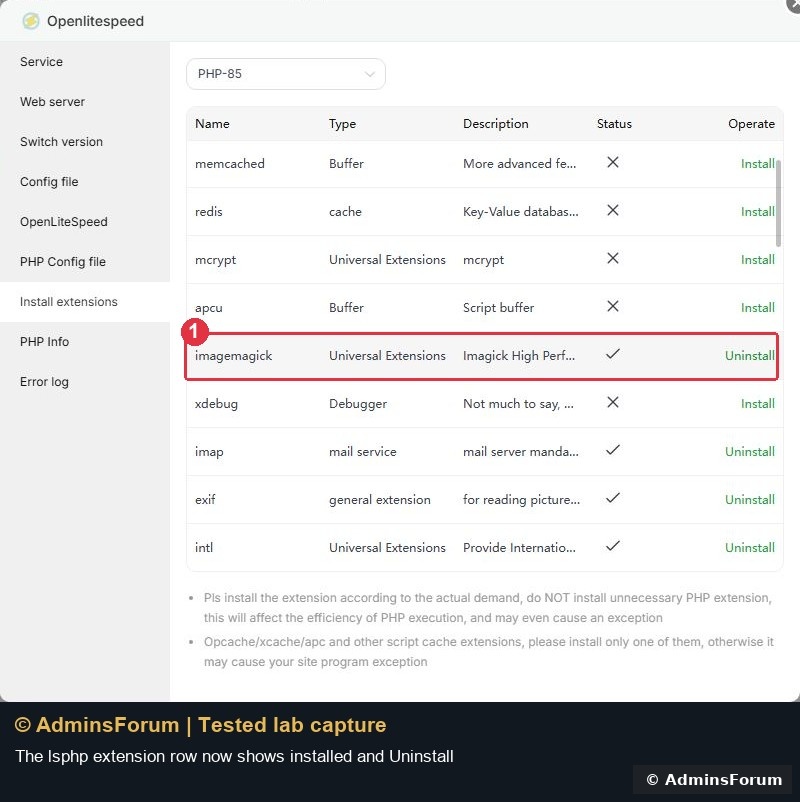
After completion, the row showed the installed checkmark and an Uninstall action. This is an installation-status check, so continue with the runtime test rather than stopping at the button label.
If installation fails, inspect the task/error result before retrying. Package/build availability depends on PHP version and operating system; do not copy an extension binary from another PHP installation.
3. Run a functional test with the lsphp binary
In the aaPanel Terminal, this exact test was run against our lsphp 8.5 installation:
It creates a 64 × 64 image in memory, resizes it to 32 × 32 and encodes a PNG. It does not write an image into a public website directory. Replace the version directory with the actual one used by your installation.
Our result was PHP 8.5.11, Imagick 3.8.1, and Resize/PNG test: 32x32; bytes=160. A different library build can produce a different byte count; the important checks are that processing succeeds, dimensions match and the encoded image is non-empty.

The loaded configuration file reported by the binary was:
Use the runtime's reported path when diagnosing configuration. In this aaPanel build, the panel's path label differed from the loaded path; we did not create or edit a second ini file to match that label.
4. Confirm the actual website detects Imagick
For WordPress, open Tools → Site Health → Info → Server. After switching our test site to Nginx + OpenLiteSpeed, it reported PHP SAPI: litespeed and Is the Imagick library available? Yes.
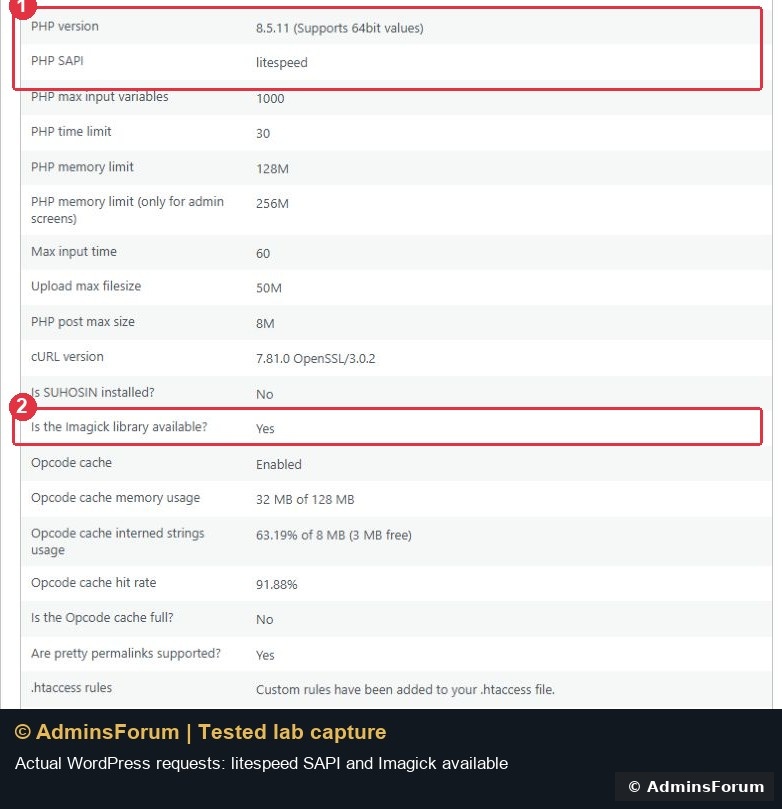
The SAPI check matters: a CLI test from the right binary still does not prove which runtime a website request uses. If an existing application still reports the old extension list, check its selected PHP version and follow the appropriate PHP-worker/service reload procedure before testing a fresh request.
We also uploaded a fresh branded JPEG through WordPress on this backend and opened its public HTTPS file successfully. That checked the upload workflow separately from the in-memory CLI image test.
If Imagick is still missing
Our verified result
The lsphp extension row showed installed, Imagick 3.8.1 processed an image, and WordPress detected Imagick under litespeed SAPI. We did not change the website's upload limits or benchmark image-processing speed.
Reference: PHP Imagick manual and aaPanel OpenLiteSpeed PHP management. Screenshots are original AdminsForum lab captures.
Open App Store → Installed → Openlitespeed → Setting → Install extensions, select the website's lsphp version and install imagemagick. Verify the Imagick PHP extension with the matching lsphp binary and then check an actual website request.
We tested this on aaPanel 8.0.6, OpenLiteSpeed 1.8.5 and lsphp 8.5.11 on our isolated Ubuntu 22.04 lab. Imagick was initially missing from lsphp, although the normal aaPanel PHP installation already had it. The lsphp installation completed and the functional image test passed on 12 October 2026.
Before you start
- Have OpenLiteSpeed installed and identify the PHP version used by the website.
- Preserve the relevant PHP/web-server configuration and a current website backup before changing the runtime.
- Use the lsphp runtime-check guide to distinguish the separate installation and its loaded configuration file.
1. Open the lsphp extension list
Open the installed Openlitespeed application's Setting link. Choose Install extensions and select the correct version; ours was PHP-85. Find imagemagick, described as the Imagick graphics library.
In our initial list, the row showed Install. Other extensions such as Fileinfo were already available. Install only the extension your application needs.
2. Start installation and wait for the result
Click the imagemagick row's Install link. Our row changed to Installing while aaPanel ran the setup. Wait for it to finish rather than repeatedly clicking Install.
After completion, the row showed the installed checkmark and an Uninstall action. This is an installation-status check, so continue with the runtime test rather than stopping at the button label.
If installation fails, inspect the task/error result before retrying. Package/build availability depends on PHP version and operating system; do not copy an extension binary from another PHP installation.
3. Run a functional test with the lsphp binary
In the aaPanel Terminal, this exact test was run against our lsphp 8.5 installation:
Code:
/usr/local/lsws/lsphp85/bin/php -r 'echo "PHP: ".PHP_VERSION.PHP_EOL;echo "INI: ".php_ini_loaded_file().PHP_EOL;if(!class_exists("Imagick"))throw new Exception("Imagick is missing");echo "Imagick: ".phpversion("imagick").PHP_EOL;$i=new Imagick();$i->newImage(64,64,new ImagickPixel("#27ae60"));$i->resizeImage(32,32,Imagick::FILTER_LANCZOS,1);$i->setImageFormat("png");echo "Resize/PNG test: ".$i->getImageWidth()."x".$i->getImageHeight()."; bytes=".strlen($i->getImageBlob()).PHP_EOL;'Our result was PHP 8.5.11, Imagick 3.8.1, and Resize/PNG test: 32x32; bytes=160. A different library build can produce a different byte count; the important checks are that processing succeeds, dimensions match and the encoded image is non-empty.
The loaded configuration file reported by the binary was:
Code:
/usr/local/lsws/lsphp85/etc/php/8.5/litespeed/php.ini4. Confirm the actual website detects Imagick
For WordPress, open Tools → Site Health → Info → Server. After switching our test site to Nginx + OpenLiteSpeed, it reported PHP SAPI: litespeed and Is the Imagick library available? Yes.
The SAPI check matters: a CLI test from the right binary still does not prove which runtime a website request uses. If an existing application still reports the old extension list, check its selected PHP version and follow the appropriate PHP-worker/service reload procedure before testing a fresh request.
We also uploaded a fresh branded JPEG through WordPress on this backend and opened its public HTTPS file successfully. That checked the upload workflow separately from the in-memory CLI image test.
If Imagick is still missing
- Confirm you installed it in the Openlitespeed manager for the selected lsphp version.
- Check the binary path, loaded ini file and application-side PHP SAPI again.
- Inspect the installation result and application errors rather than adding duplicate extension directives.
- Recheck after the appropriate worker reload if the application was already running during installation.
Our verified result
The lsphp extension row showed installed, Imagick 3.8.1 processed an image, and WordPress detected Imagick under litespeed SAPI. We did not change the website's upload limits or benchmark image-processing speed.
Reference: PHP Imagick manual and aaPanel OpenLiteSpeed PHP management. Screenshots are original AdminsForum lab captures.