



Varnish Cache for aaPanel 0.7.1-safety-beta2 — shared multi-site testing beta
Download the current beta, verify its checksum and view earlier releases
Independent community addon by AdminsForum. The approved horizontal dashboard is restored, with shared multi-site caching, separate website policies, application templates and per-site logs. This is a controlled testing beta, not a general production release. Installing the addon or adding a website does not enable caching.
Current dashboard
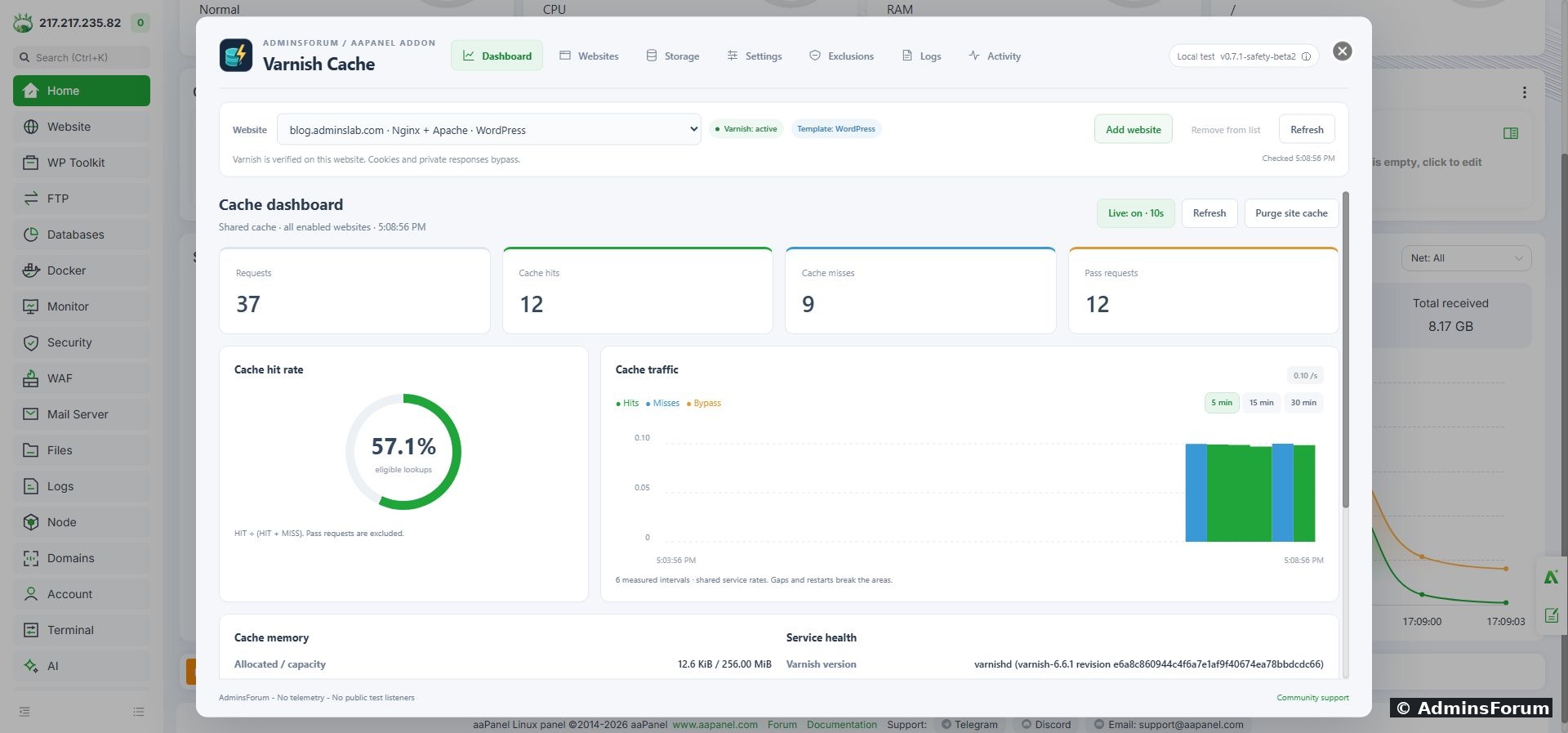
Actual demo screenshot. Shared counters include health probes; this is not a performance benchmark. Older attached screenshots are historical references.
What changed
Tested environment and scope
Ubuntu 22.04; aaPanel 8.0.7 displaying PRO; Nginx 1.31.7; Apache 2.4.69; OpenLiteSpeed 1.9.2; Varnish 6.6.1; PHP 8.5.12. Demo routing was exercised on Nginx/PHP, Nginx + Apache and Nginx + OpenLiteSpeed. This run does not establish free-edition or other OS compatibility. Standalone Apache/OpenLiteSpeed public frontends and arbitrary custom routing are not covered by these checks.
Templates include Universal, WordPress, Laravel, CodeIgniter, MyBB and Static HTML. A template does not prove application compatibility. Real Laravel/MyBB/CodeIgniter form and login testing remains pending. Unrecognized or conflicting configurations are refused rather than overwritten.
Install or upgrade — use a separate staging folder
1. Start on a disposable/test site. Keep a server/aaPanel backup and console access. Confirm the original website works directly.
2. If using the legacy 0.6 addon, disable caching in that version first and confirm direct serving. Active legacy routes are deliberately refused; automatic live 0.6-to-0.7 migration is not provided.
3. Download Beta-aaPanel-varnish-0.7.1-safety-beta2.zip and verify the SHA-256 below. Extract it into a separate private root-owned staging folder outside every website root.
4. In aaPanel Terminal, enter the extracted af_varnish folder and run its installer. For example, after extracting under /root/af-varnish-installer:
Do not import the ZIP over an already configured addon: panel importers can overwrite files before the install hook. Existing 0.7 upgrades must also use staging. Wait for INSTALLATION READY and check the installer log; a generic panel success message alone is insufficient. Engine/prerequisite package changes are outside plugin-file rollback.
5. Open Varnish Cache, choose Add website, select an aaPanel website and review its template/application detection. Registration alone leaves it on direct serving.
6. Start with Strict policy. Optionally specify reviewed public paths; this is an INCLUDE list, not exclusions. Never select authentication/admin/interactive paths. Enable caching only after preflight passes, then verify the website and its private flows.
Cache policy and application integration
Universal means eligible public content. It does not override private sessions, backend no-cache/no-store, cookies or authorization. Strict follows explicit public backend freshness. Public opt-in also requires positive permission from an audited application bridge. The internal compatibility value for Public opt-in is guest; its privacy protections remain enabled.
WordPress uses its response bridge and respects existing application cache policy. The conservative Laravel middleware and LARAVEL-BRIDGE.md are included, but are not automatically installed into your app. Use it only for reviewed, identical stateless pages; do not remove CSRF fields or session protections to obtain cache hits. MyBB's form-key helper alone does not permit guest HTML caching. JSON, forms and personalized content may correctly remain BYPASS.
Use the current Settings controls and included TESTING-GUIDE.md. The old 0.6 Follow backend cache policy checkbox and its single-site instructions do not describe this shared branch. Application headers may shorten the configured lifetime. Disable caching before changing application access rules or switching webserver mode; access-policy drift checks are not a continuous filesystem watcher.
Verified demo results — 27 October 2026
Checks to repeat on your site
Request an eligible public URL twice without cookies or query strings before expiry: MISS then HIT is expected. A MISS after expiry is normal. Verify login/logout, member sessions, CSRF/forms, private/JSON responses, language/country variations, purge and direct recovery. If pages vary per visitor, leave them uncached. Disable caching and confirm direct serving before changing the webserver or uninstalling.
Still pending
Real Laravel/MyBB/CodeIgniter end-to-end application integration; full OS reboot; clean-server install/uninstall; free-edition and broader OS coverage; representative performance workloads. WooCommerce, certificate renewal, WAF integration, arbitrary access policies and full WebSocket/long-running stream behavior are not established. Live charts and Activity cover the current panel session only; persistent history is pending. Shared counters include health checks; unavailable RSS/connection metrics are labeled unavailable.
An active site configured before the restored workspace UI may need adding again after disabling. Newly registered sites retain their workspace entry. Keep recovery backups and logs; do not delete managed runtime files when an operation reports a conflict.
File verification
Filename: Beta-aaPanel-varnish-0.7.1-safety-beta2.zip
Size: 95,690 bytes
SHA-256:
The ZIP includes SHA256SUMS, TESTING-GUIDE.md and LARAVEL-BRIDGE.md. Earlier release files remain in version history.
Feedback and fixes
Please report reproducible problems here with OS/panel versions, application/template, webserver layout, operation and redacted logs. Never post credentials, session cookies, tokens, private keys or application secrets. We will investigate confirmed issues and address them in future updates.
Download the current beta, verify its checksum and view earlier releases
Independent community addon by AdminsForum. The approved horizontal dashboard is restored, with shared multi-site caching, separate website policies, application templates and per-site logs. This is a controlled testing beta, not a general production release. Installing the addon or adding a website does not enable caching.
Current dashboard
Actual demo screenshot. Shared counters include health probes; this is not a performance benchmark. Older attached screenshots are historical references.
What changed
- Shared Varnish service supports independently managed websites without assigning the same private listener ports to separate instances.
- The approved dashboard design returns: horizontal tabs, website/template/status badges, summary cards, stacked live traffic chart and settings grid.
- All request cookies, including analytics and consent cookies, bypass. Response Set-Cookie is preserved and prevents caching. Authorization, queries and private/no-cache/no-store responses remain protected.
- Each enable/settings change rotates the policy generation, so objects admitted under older rules cannot satisfy the new policy. Aliases have separate cache keys.
- Staged upgrades retain unique previous-plugin backups and restore earlier plugin/readiness/rules on failure. External configuration conflicts preserve their routing dependencies for recovery.
- Health checks follow configured HTTP/HTTPS listeners and selected public paths. Activation waits for the actual cache route. The Add picker, application detection and status refresh were checked in the browser.
Tested environment and scope
Ubuntu 22.04; aaPanel 8.0.7 displaying PRO; Nginx 1.31.7; Apache 2.4.69; OpenLiteSpeed 1.9.2; Varnish 6.6.1; PHP 8.5.12. Demo routing was exercised on Nginx/PHP, Nginx + Apache and Nginx + OpenLiteSpeed. This run does not establish free-edition or other OS compatibility. Standalone Apache/OpenLiteSpeed public frontends and arbitrary custom routing are not covered by these checks.
Templates include Universal, WordPress, Laravel, CodeIgniter, MyBB and Static HTML. A template does not prove application compatibility. Real Laravel/MyBB/CodeIgniter form and login testing remains pending. Unrecognized or conflicting configurations are refused rather than overwritten.
Install or upgrade — use a separate staging folder
1. Start on a disposable/test site. Keep a server/aaPanel backup and console access. Confirm the original website works directly.
2. If using the legacy 0.6 addon, disable caching in that version first and confirm direct serving. Active legacy routes are deliberately refused; automatic live 0.6-to-0.7 migration is not provided.
3. Download Beta-aaPanel-varnish-0.7.1-safety-beta2.zip and verify the SHA-256 below. Extract it into a separate private root-owned staging folder outside every website root.
4. In aaPanel Terminal, enter the extracted af_varnish folder and run its installer. For example, after extracting under /root/af-varnish-installer:
Code:
cd /root/af-varnish-installer/af_varnish
bash install.sh install5. Open Varnish Cache, choose Add website, select an aaPanel website and review its template/application detection. Registration alone leaves it on direct serving.
6. Start with Strict policy. Optionally specify reviewed public paths; this is an INCLUDE list, not exclusions. Never select authentication/admin/interactive paths. Enable caching only after preflight passes, then verify the website and its private flows.
Cache policy and application integration
Universal means eligible public content. It does not override private sessions, backend no-cache/no-store, cookies or authorization. Strict follows explicit public backend freshness. Public opt-in also requires positive permission from an audited application bridge. The internal compatibility value for Public opt-in is guest; its privacy protections remain enabled.
WordPress uses its response bridge and respects existing application cache policy. The conservative Laravel middleware and LARAVEL-BRIDGE.md are included, but are not automatically installed into your app. Use it only for reviewed, identical stateless pages; do not remove CSRF fields or session protections to obtain cache hits. MyBB's form-key helper alone does not permit guest HTML caching. JSON, forms and personalized content may correctly remain BYPASS.
Use the current Settings controls and included TESTING-GUIDE.md. The old 0.6 Follow backend cache policy checkbox and its single-site instructions do not describe this shared branch. Application headers may shorten the configured lifetime. Disable caching before changing application access rules or switching webserver mode; access-policy drift checks are not a continuous filesystem watcher.
Verified demo results — 27 October 2026
- 24 Linux safety regression tests passed with no skips against the final installed payload. These include policy/privacy rules, cache generations, alias separation, access-policy drift and isolated injected rollback/persistence failures.
- 18 final real WordPress HTTP checks passed across blog, multi-apache and multi-ols: each public root returned MISS then HIT; cookie, Authorization, query and login requests returned BYPASS. All responses were HTTP 200.
- A separate reversible plain Nginx/PHP 8.5 fixture returned public MISS/HIT, with cookie/auth/query/private responses bypassed and Set-Cookie retained. The exact original static configuration was restored and both temporary files removed.
- Disabling the Apache demo left it online directly while OpenLiteSpeed continued caching. Re-adding/detecting/enabling the Apache website through the interface worked.
- Purge followed immediately by requests returned MISS then HIT on each final site. Dashboard health probes may warm the root after a purge.
- With the shared service stopped, the OpenLiteSpeed demo stayed HTTP 200 with X-AF-Cache: DIRECT. After service restart, caching recovered with MISS/HIT. This was a service restart, not a server reboot.
- The staged installer refreshed rules for three demo sites, retained a previous-plugin backup and reached readiness. All 28 installed manifest files matched; Nginx configuration was valid and the service active.
Checks to repeat on your site
Request an eligible public URL twice without cookies or query strings before expiry: MISS then HIT is expected. A MISS after expiry is normal. Verify login/logout, member sessions, CSRF/forms, private/JSON responses, language/country variations, purge and direct recovery. If pages vary per visitor, leave them uncached. Disable caching and confirm direct serving before changing the webserver or uninstalling.
Still pending
Real Laravel/MyBB/CodeIgniter end-to-end application integration; full OS reboot; clean-server install/uninstall; free-edition and broader OS coverage; representative performance workloads. WooCommerce, certificate renewal, WAF integration, arbitrary access policies and full WebSocket/long-running stream behavior are not established. Live charts and Activity cover the current panel session only; persistent history is pending. Shared counters include health checks; unavailable RSS/connection metrics are labeled unavailable.
An active site configured before the restored workspace UI may need adding again after disabling. Newly registered sites retain their workspace entry. Keep recovery backups and logs; do not delete managed runtime files when an operation reports a conflict.
File verification
Filename: Beta-aaPanel-varnish-0.7.1-safety-beta2.zip
Size: 95,690 bytes
SHA-256:
Code:
2cf83d6956cb85b459deee4a0e741448fc0d9fb755018fb117bdf39e23b7406fFeedback and fixes
Please report reproducible problems here with OS/panel versions, application/template, webserver layout, operation and redacted logs. Never post credentials, session cookies, tokens, private keys or application secrets. We will investigate confirmed issues and address them in future updates.