



11-14-2026, 05:58 PM
WebSockets on CyberPanel: The Extra Rewrite Rule Your Node.js App Needs (Tested)
Your Node.js app runs behind a CyberPanel website and normal pages load fine, but the live part (chat, notifications, socket.io) never connects. That's what happened in our test too: the usual proxy rule passes web pages but not WebSocket connections. One extra rule fixes it. We tested this on a CyberPanel 3.0.8 server with a small WebSocket app.
This guide continues our Node.js on CyberPanel guide. Set the app up with that one first.
Which web server: tested on LiteSpeed Enterprise only. OpenLiteSpeed handles WebSocket proxying with its own setting in the site's vHost Conf, not with this rule.
The problem
Our app listened on
, and the website passed everything to it with the rule from the Node.js guide:
We then tested a WebSocket connection two ways:
The confusing part: the app's own log said WebSocket client connected for both. The request reached the app, but the answer never made it back to the visitor, so the browser side just waits and gives up.
The fix: one more rule
Open Websites → your site → Config → Rewrite Rules and use these four lines instead:
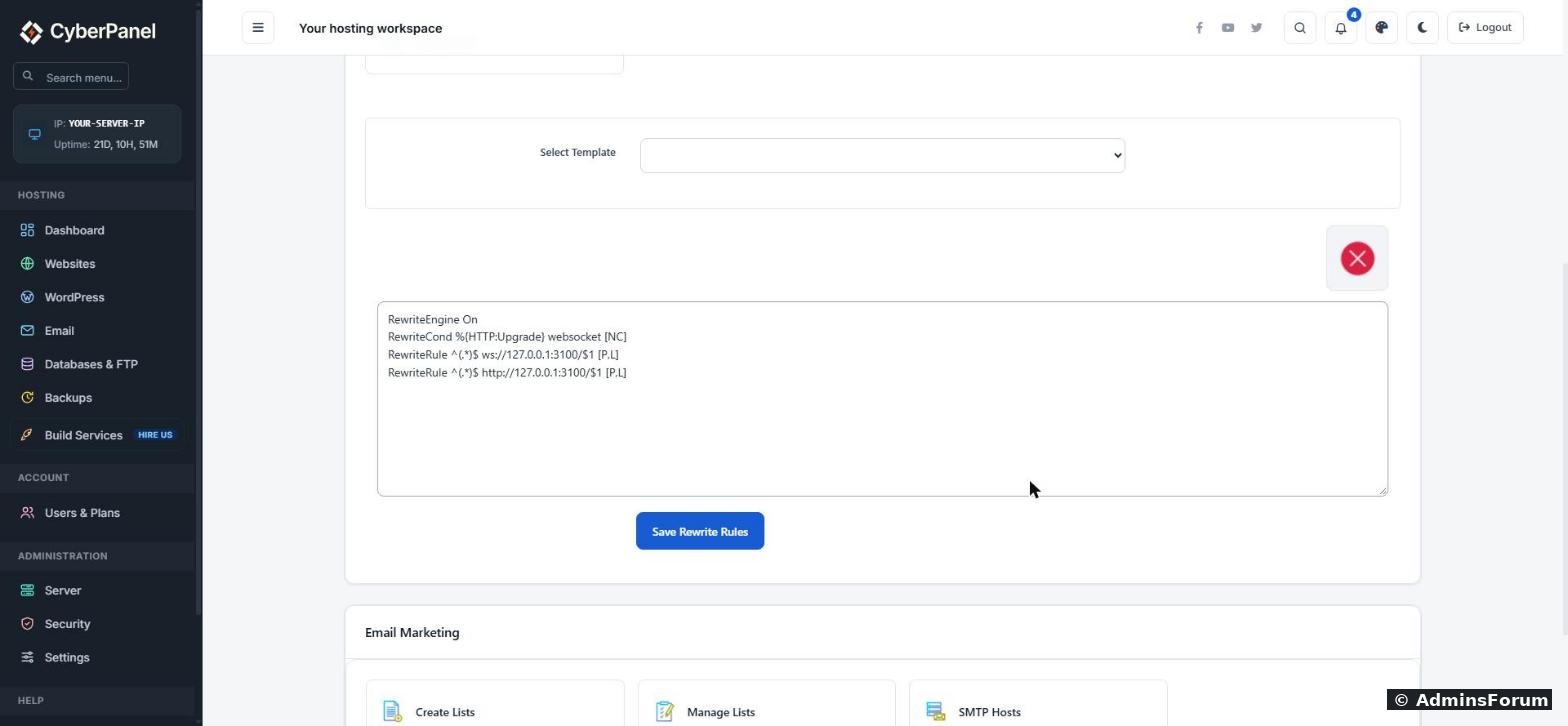
Lines 2 and 3 are new. A WebSocket connection starts as a normal request that asks to be "upgraded". Line 2 spots that request, and line 3 passes it on with
instead of
, which tells LiteSpeed to keep the connection open in both directions. Everything else still goes through line 4.
Use
in the rule even though visitors connect with
. The website handles the encryption, and the hop to your app on the same server is plain.
Our result after the change
The connection opened, messages went both ways, and it was still alive when we sent another message three seconds later. Normal pages kept loading as before. It worked right after saving the rules.
Test your own app
You can test from the server with a few lines of Node.js (needs the
package, see below). Save as
in your app folder:
Run it against your domain:
OPEN within a second or two means the rule works. TIMEOUT means the WebSocket rule is missing or not matching.
Installing packages as the website's user
We installed the
package as the website's own user, not as root, so the files belong to the right owner:
That worked on our server and created
owned by the site user.
Good to know
Still stuck? Reply below with the result of the test script and the last lines of
(hide your domain and server IP).
Your Node.js app runs behind a CyberPanel website and normal pages load fine, but the live part (chat, notifications, socket.io) never connects. That's what happened in our test too: the usual proxy rule passes web pages but not WebSocket connections. One extra rule fixes it. We tested this on a CyberPanel 3.0.8 server with a small WebSocket app.
This guide continues our Node.js on CyberPanel guide. Set the app up with that one first.
Which web server: tested on LiteSpeed Enterprise only. OpenLiteSpeed handles WebSocket proxying with its own setting in the site's vHost Conf, not with this rule.
The problem
Our app listened on
Code:
127.0.0.1:3100Code:
RewriteEngine On
RewriteRule ^(.*)$ http://127.0.0.1:3100/$1 [P,L]Code:
ws://127.0.0.1:3100/chat        OPEN   (straight to the app, on the server)
wss://yourdomain.com/chat       TIMEOUT (through the website)
The fix: one more rule
Open Websites → your site → Config → Rewrite Rules and use these four lines instead:
Code:
RewriteEngine On
RewriteCond %{HTTP:Upgrade} websocket [NC]
RewriteRule ^(.*)$ ws://127.0.0.1:3100/$1 [P,L]
RewriteRule ^(.*)$ http://127.0.0.1:3100/$1 [P,L]
Lines 2 and 3 are new. A WebSocket connection starts as a normal request that asks to be "upgraded". Line 2 spots that request, and line 3 passes it on with
Code:
ws://Code:
http://Use
Code:
ws://Code:
wss://Our result after the change
Code:
wss://yourdomain.com/chat OPEN
  got: welcome
  got: echo: ping 1
got: echo: ping after 3sTest your own app
You can test from the server with a few lines of Node.js (needs the
Code:
wsCode:
wstest.jsCode:
const WebSocket = require('ws');
const ws = new WebSocket(process.argv[2]);
setTimeout(() => { console.log('TIMEOUT'); process.exit(1); }, 8000);
ws.on('open', () => { console.log('OPEN'); ws.send('hello'); });
ws.on('message', (m) => { console.log('got: ' + m); });
ws.on('error', (e) => { console.log('ERROR ' + e.message); process.exit(1); });Code:
node wstest.js wss://yourdomain.com/your-socket-pathInstalling packages as the website's user
We installed the
Code:
wsCode:
cd /home/yourdomain.com/nodeapp
sudo -u SITEUSER npm install ws
systemctl restart nodeappCode:
node_modulesGood to know
- socket.io: it uses the same kind of connection, usually under the path
. Our rule matches every path, so it's covered. We tested with a plain WebSocket app, not with socket.io itself.Code:/socket.io/
- Long idle connections: our test ran for a few seconds. If connections drop after a minute or two of silence, have your app send a small "ping" message regularly. Most WebSocket libraries have a setting for it.
- Behind Cloudflare: WebSockets also have to be allowed there (they are by default). We tested without Cloudflare in front.
Still stuck? Reply below with the result of the test script and the last lines of
Code:
journalctl -u nodeapp