



11-14-2026, 05:59 PM
"Disk quota exceeded" on CyberPanel: Find Which Website Is Full and Fix It (Tested)
Uploads fail, WordPress can't update, or a log shows Disk quota exceeded (sometimes with the number 122), although the server's disk has plenty of free space. That message doesn't mean the disk is full. It means one website's user has hit its own limit. We looked at how this works on a CyberPanel 3.0.8 server (Ubuntu 24.04), set a limit on a test site on purpose to produce the error, and removed it again.
Disk full or quota full?
Check the whole disk first:
If that shows free space, the limit is per user. Every CyberPanel website has its own Linux user, and the system can cap how much each user may store. See everyone's usage and limits:
On our server (shortened):
used is in kilobytes (421304 is about 411 MB). soft and hard are the limits, and 0 means no limit. To find which user belongs to a website:
Something we didn't expect: our test sites were on the Default package, which says 1000 MB of disk space, but none of their users had a limit set in this list.
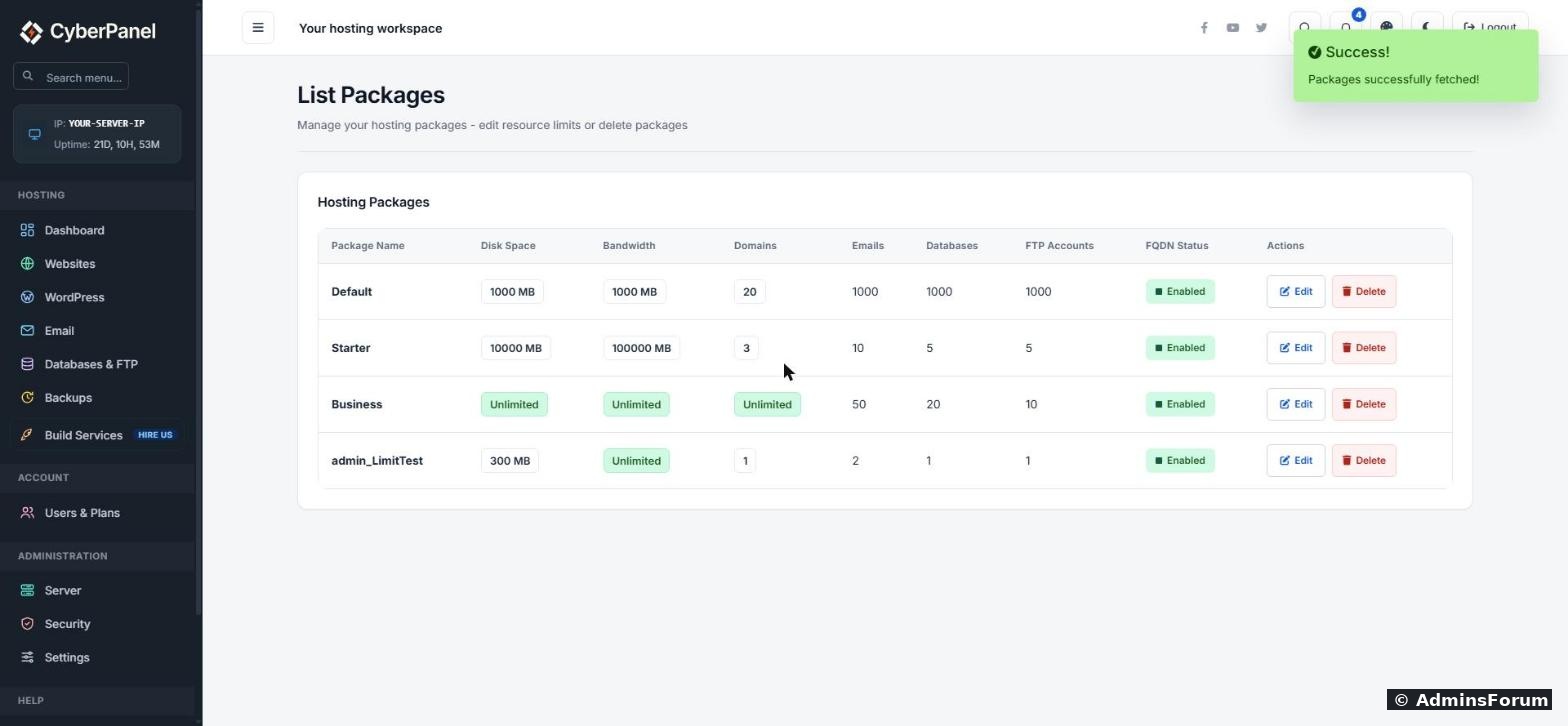
So on our server, the package's disk number was not what stops writes. If you see the quota error, look at
for the real limit instead of trusting the package page.
What the error looks like
We gave one test site's user a limit just above what it already used, then tried to write a 5 MB file as that user:
Even a tiny text file failed:
The user's own view shows a star next to the full value:
The site itself still answered normally (status 200), because serving pages only reads files. That's why this problem is easy to miss: the site looks fine until something has to write (an upload, an update, a cache file, a session).
Fix 1: Free up space
Find what's taking the room in that website's home folder:
Usual suspects are old backups inside public_html, cache folders and log files. Everything the site's user owns counts, not only public_html.
Fix 2: Raise or remove the limit
Set a new limit in kilobytes (soft, then hard), for example 5 GB:
Or remove the limit completely:
Check with
. After we removed the limit, the same write worked again straight away. No restart is needed.
Good to know
Not sure how to read your numbers? Reply below with the line for your user from
.
Uploads fail, WordPress can't update, or a log shows Disk quota exceeded (sometimes with the number 122), although the server's disk has plenty of free space. That message doesn't mean the disk is full. It means one website's user has hit its own limit. We looked at how this works on a CyberPanel 3.0.8 server (Ubuntu 24.04), set a limit on a test site on purpose to produce the error, and removed it again.
Disk full or quota full?
Check the whole disk first:
Code:
df -h /Code:
repquota -aCode:
                        Block limits
User            used    soft    hard
cyber2602 --  421304       0       0
cours5268 --  121984       0       0
cpcyb5923 -- 121980 0 0Code:
stat -c %U /home/yourdomain.com/public_htmlSomething we didn't expect: our test sites were on the Default package, which says 1000 MB of disk space, but none of their users had a limit set in this list.
So on our server, the package's disk number was not what stops writes. If you see the quota error, look at
Code:
repquotaWhat the error looks like
We gave one test site's user a limit just above what it already used, then tried to write a 5 MB file as that user:
Code:
dd: error writing '/home/yourdomain.com/big.bin': Disk quota exceededCode:
write error: Disk quota exceededCode:
sudo -u SITEUSER quota -s
     Filesystem   space   quota   limit
/dev/vda2 122M* 122M 122MFix 1: Free up space
Find what's taking the room in that website's home folder:
Code:
du -h --max-depth=2 /home/yourdomain.com | sort -rh | head -15Fix 2: Raise or remove the limit
Set a new limit in kilobytes (soft, then hard), for example 5 GB:
Code:
setquota -u SITEUSER 5242880 5242880 0 0 /Code:
setquota -u SITEUSER 0 0 0 0 /Code:
repquota -a | grep SITEUSERGood to know
- Limits only work if the disk was set up for them. On our server the main disk was mounted with
(Code:usrquota
shows it). IfCode:mount | grep ' / '
gives an error instead of a table, quotas aren't active on your disk, and your error has another cause.Code:repquota -a
- Email counts separately. Mailboxes are stored under
, not under the website's user.Code:/home/vmail
- Databases don't count toward the website user's quota either. They live in MariaDB's own folder.
- For what CyberPanel packages do and don't enforce, see our guide on packages and website limits in this section.
Not sure how to read your numbers? Reply below with the line for your user from
Code:
repquota -a