10-16-2026, 07:22 PM
For a static Nginx website in aaPanel, a custom 404 page needs two things: an error-page mapping and an HTML file. Verify a genuinely missing URL returns HTTP 404 with your custom content. Opening 404.html directly is not a sufficient test.
Tested on aaPanel 8.0.7 on 16 October 2026 using the separate static lab site learn.adminslab.com. Its existing Nginx configuration already mapped 404 errors to /404.html. We backed up that file, edited its content in aaPanel and verified the response. No web-server configuration, application routing or other website was changed.
1. Identify the correct website and server
Open Website and find your exact hostname. Our lab entry used Nginx and was marked Static. Its document root was /www/wwwroot/learn.adminslab.com.
This walkthrough is for that static Nginx setup. WordPress, Laravel, reverse proxies, Apache and OpenLiteSpeed can generate or intercept errors differently. If your problem is a valid WordPress page returning 404, use the WordPress permalink troubleshooting guide; replacing an error-page design will not repair routing.
2. Preserve the original file before editing
We copied the original 404.html into /www/backup/af-custom-404-lab-20261016/404.html.original through SSH. The source and backup SHA-256 checksums matched. The backup sits outside the public document root so visitors cannot download the old file through the website.
For your site, keep a recoverable copy before changing content. Record its original owner and permissions. Our file was owned by www and had mode 644. Do not grant broad write permissions just to make an editor save.
3. Inspect the error-page mapping
Under Website, open Conf for the correct hostname and choose Config. We inspected the existing Nginx configuration and found this active directive in its error-page section:
Our configuration also had a separate commented line in the SSL section. A line starting with # is a comment; do not assume that commented example is the active rule or modify aaPanel's SSL markers.
The active mapping already existed, so we did not add another directive or reload Nginx. If your site lacks a mapping, preserve its configuration first and review the correct server context before adding one. Do not replace the whole generated configuration with a generic example. The Nginx error_page reference explains its syntax and status handling.
4. Edit 404.html in File Manager
Close the website settings and open Files. Enter your verified document-root path in the path bar. Double-click 404.html to open Online Text Editor.
We replaced only this disposable lab file's HTML and clicked Save. The panel displayed Saved! and History: 1.
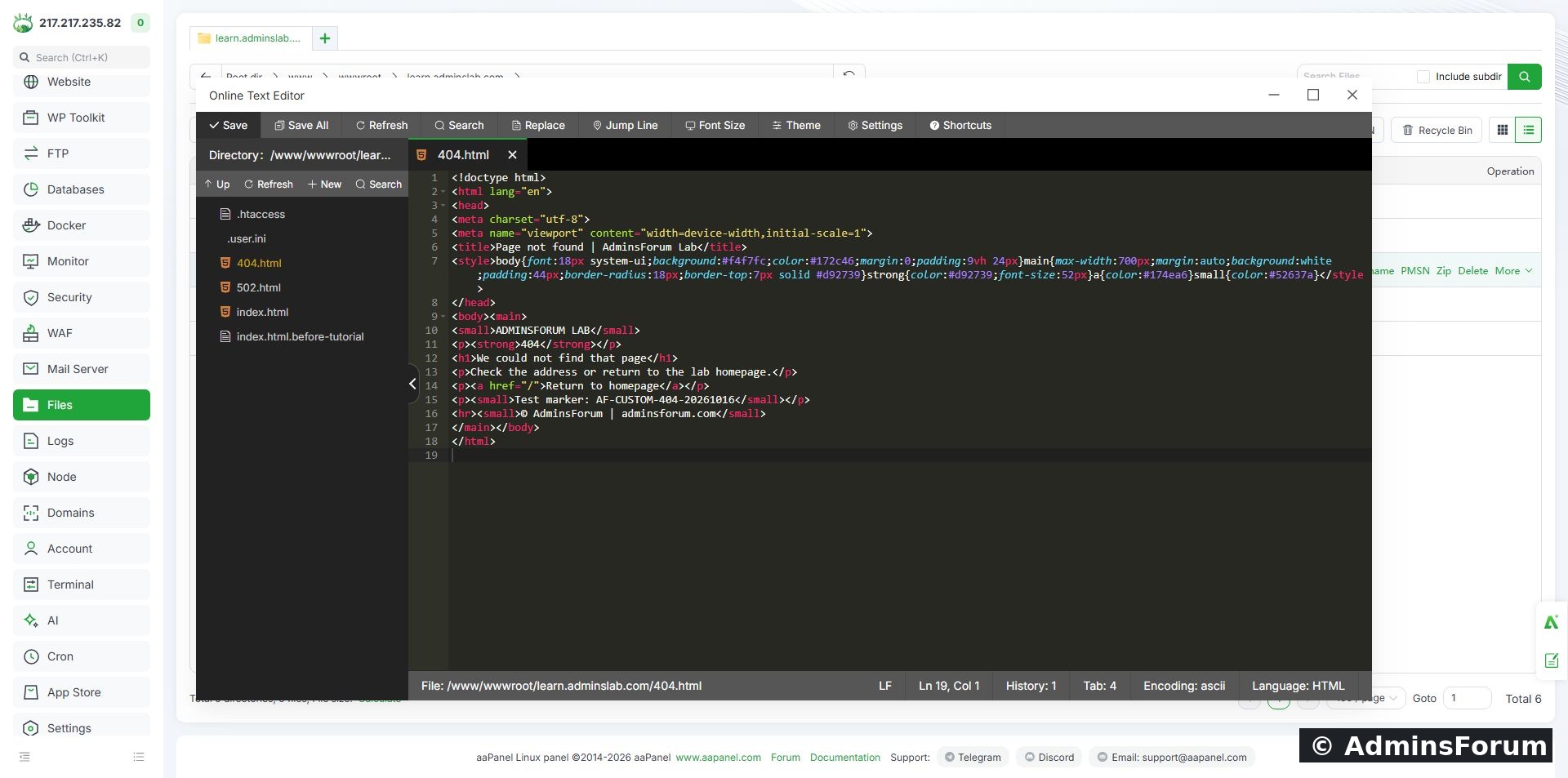
Actual lab error-page editor. The file path identifies the website being changed.
A simple starter body is:
Our actual lab page added local styling, AdminsForum branding and the test marker AF-CUSTOM-404-20261016. The starter above is deliberately shorter. Adapt the wording and navigation to your own site; avoid exposing server paths or technical exception details to visitors.
5. Request a URL that does not exist
We visited https://learn.adminslab.com/af-missing-page-20261016. The browser displayed the custom page, and its Return to homepage link led back to the expected lab homepage.
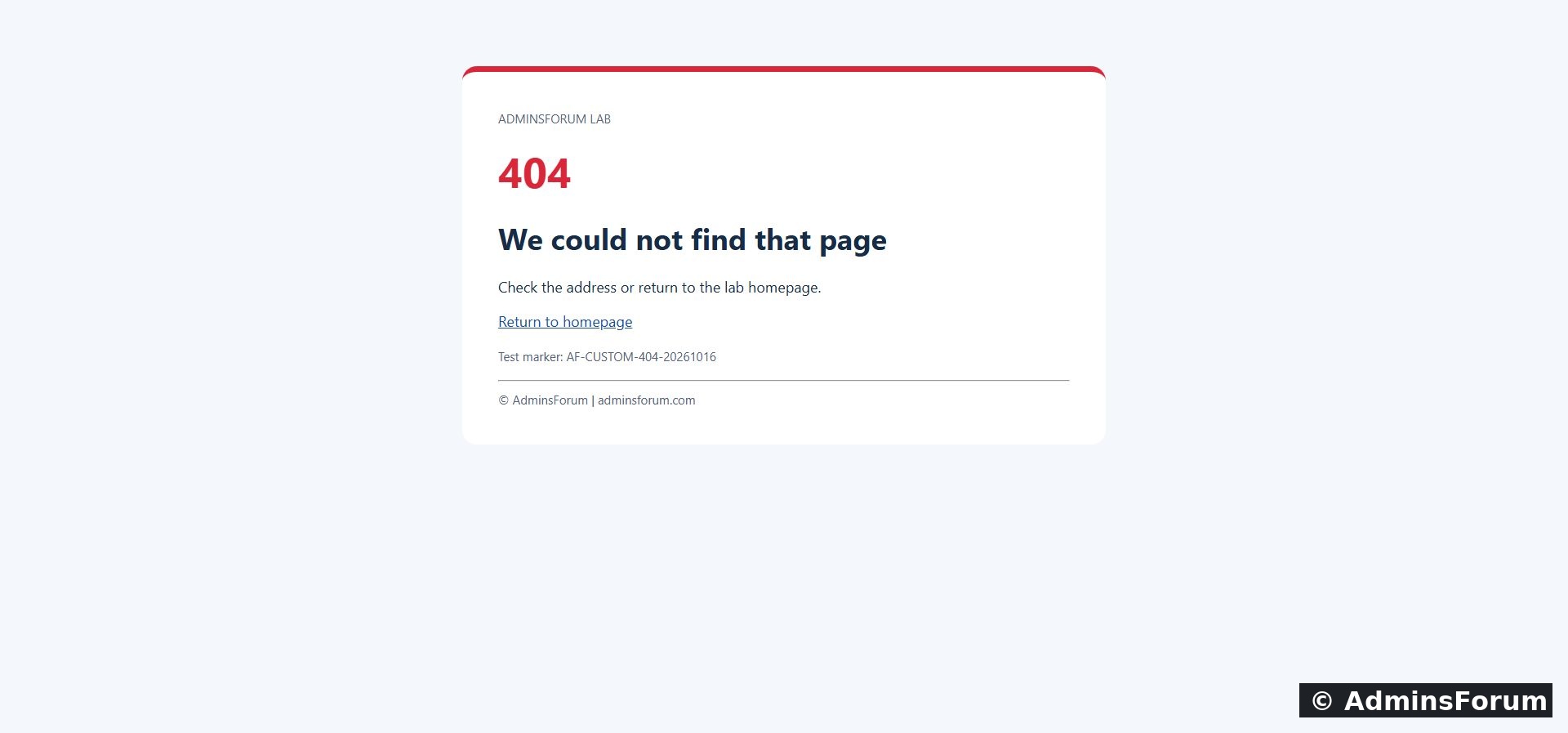
Actual missing-URL result. The visual 404 heading helps visitors, but the HTTP response status must also be checked.
Our independent HTTP checks returned:
The direct file request returned 200 because that HTML file exists. That is why testing only /404.html can mislead you. The missing URL is the important status test. Our homepage stayed available with its original content.
For a simple command-line header check, substitute your own hostname and a confirmed missing path:
Also inspect the response body using your browser or a normal GET request. Some applications handle HEAD differently, and redirects can hide the response you intended to inspect. Our recorded status checks used GET requests with certificate verification enabled.
6. Avoid a soft 404
Do not redirect every missing URL to the homepage or deliberately return 200 merely to show a friendly error message. Google describes error-like pages with successful responses as possible soft 404s. A genuine missing page should communicate the appropriate HTTP error status. See Google's HTTP status-code guidance.
We did not use an =200 override or change application rewrite rules. If an application generates the response, verify its status at that layer rather than assuming this static file controls it.
Rollback and troubleshooting
If the new design is wrong, restore the preserved HTML file and repeat both the missing-URL and homepage checks. If you changed server configuration separately, restore its own backup, validate syntax and use the appropriate controlled reload workflow. Our lesson changed only HTML, so no service restart was needed. The rollback instructions were not executed as a separate restore test.
If you still see the default design, verify the hostname, document root, active web server and browser/cache response. If the custom file is unreadable, inspect ownership and permissions. For application-generated errors, check that application's routing and logs instead of overwriting them.
For more editing and archive operations, see aaPanel File Manager: Edit, Compress and Extract.
Tested on aaPanel 8.0.7 on 16 October 2026 using the separate static lab site learn.adminslab.com. Its existing Nginx configuration already mapped 404 errors to /404.html. We backed up that file, edited its content in aaPanel and verified the response. No web-server configuration, application routing or other website was changed.
1. Identify the correct website and server
Open Website and find your exact hostname. Our lab entry used Nginx and was marked Static. Its document root was /www/wwwroot/learn.adminslab.com.
This walkthrough is for that static Nginx setup. WordPress, Laravel, reverse proxies, Apache and OpenLiteSpeed can generate or intercept errors differently. If your problem is a valid WordPress page returning 404, use the WordPress permalink troubleshooting guide; replacing an error-page design will not repair routing.
2. Preserve the original file before editing
We copied the original 404.html into /www/backup/af-custom-404-lab-20261016/404.html.original through SSH. The source and backup SHA-256 checksums matched. The backup sits outside the public document root so visitors cannot download the old file through the website.
For your site, keep a recoverable copy before changing content. Record its original owner and permissions. Our file was owned by www and had mode 644. Do not grant broad write permissions just to make an editor save.
3. Inspect the error-page mapping
Under Website, open Conf for the correct hostname and choose Config. We inspected the existing Nginx configuration and found this active directive in its error-page section:
Code:
error_page 404 /404.html;Our configuration also had a separate commented line in the SSL section. A line starting with # is a comment; do not assume that commented example is the active rule or modify aaPanel's SSL markers.
The active mapping already existed, so we did not add another directive or reload Nginx. If your site lacks a mapping, preserve its configuration first and review the correct server context before adding one. Do not replace the whole generated configuration with a generic example. The Nginx error_page reference explains its syntax and status handling.
4. Edit 404.html in File Manager
Close the website settings and open Files. Enter your verified document-root path in the path bar. Double-click 404.html to open Online Text Editor.
We replaced only this disposable lab file's HTML and clicked Save. The panel displayed Saved! and History: 1.
Actual lab error-page editor. The file path identifies the website being changed.
A simple starter body is:
Code:
<!doctype html>
<html lang="en">
<head>
<meta charset="utf-8">
<meta name="viewport" content="width=device-width,initial-scale=1">
<title>Page not found</title>
</head>
<body>
<main>
<h1>404 - Page not found</h1>
<p>Check the address or return to the homepage.</p>
<p><a href="/">Return to homepage</a></p>
</main>
</body>
</html>
Our actual lab page added local styling, AdminsForum branding and the test marker AF-CUSTOM-404-20261016. The starter above is deliberately shorter. Adapt the wording and navigation to your own site; avoid exposing server paths or technical exception details to visitors.
5. Request a URL that does not exist
We visited https://learn.adminslab.com/af-missing-page-20261016. The browser displayed the custom page, and its Return to homepage link led back to the expected lab homepage.
Actual missing-URL result. The visual 404 heading helps visitors, but the HTTP response status must also be checked.
Our independent HTTP checks returned:
- /af-missing-page-20261016: status 404; custom error marker present.
- /404.html: status 200; custom error marker present.
- /: status 200; original homepage marker present.
The direct file request returned 200 because that HTML file exists. That is why testing only /404.html can mislead you. The missing URL is the important status test. Our homepage stayed available with its original content.
For a simple command-line header check, substitute your own hostname and a confirmed missing path:
Code:
curl -I https://example.com/a-confirmed-missing-pageAlso inspect the response body using your browser or a normal GET request. Some applications handle HEAD differently, and redirects can hide the response you intended to inspect. Our recorded status checks used GET requests with certificate verification enabled.
6. Avoid a soft 404
Do not redirect every missing URL to the homepage or deliberately return 200 merely to show a friendly error message. Google describes error-like pages with successful responses as possible soft 404s. A genuine missing page should communicate the appropriate HTTP error status. See Google's HTTP status-code guidance.
We did not use an =200 override or change application rewrite rules. If an application generates the response, verify its status at that layer rather than assuming this static file controls it.
Rollback and troubleshooting
If the new design is wrong, restore the preserved HTML file and repeat both the missing-URL and homepage checks. If you changed server configuration separately, restore its own backup, validate syntax and use the appropriate controlled reload workflow. Our lesson changed only HTML, so no service restart was needed. The rollback instructions were not executed as a separate restore test.
If you still see the default design, verify the hostname, document root, active web server and browser/cache response. If the custom file is unreadable, inspect ownership and permissions. For application-generated errors, check that application's routing and logs instead of overwriting them.
For more editing and archive operations, see aaPanel File Manager: Edit, Compress and Extract.