



Yesterday, 07:06 AM
A Python project that works today can remain offline after a VPS reboot unless its startup setting is enabled. This guide enables aaPanel's native recovery option and verifies that a Flask app actually returns after a real reboot.
Tested: Ubuntu 22.04.5 and aaPanel Free 8.0.7, with Flask served by Gunicorn through Nginx. Our project is af_flask_lab and listens on 127.0.0.1:3200. Replace these values with your own project. A reboot temporarily interrupts every service on that VPS; use a lab or a planned maintenance window.
1. Confirm the app is healthy first
Complete Run Flask with Gunicorn and, if you need a public hostname, Connect Flask to a Domain and HTTPS.
Open Website → Python Project and confirm the application is running. From the VPS terminal:
You should receive HTTP 200 and your expected application response. Resolve startup errors before testing reboot recovery.
2. Enable aaPanel's Startup option
Click the project name, then open Project information. Locate Startup and tick the checkbox labelled default built-in daemon checks every 120 seconds. Click Save.
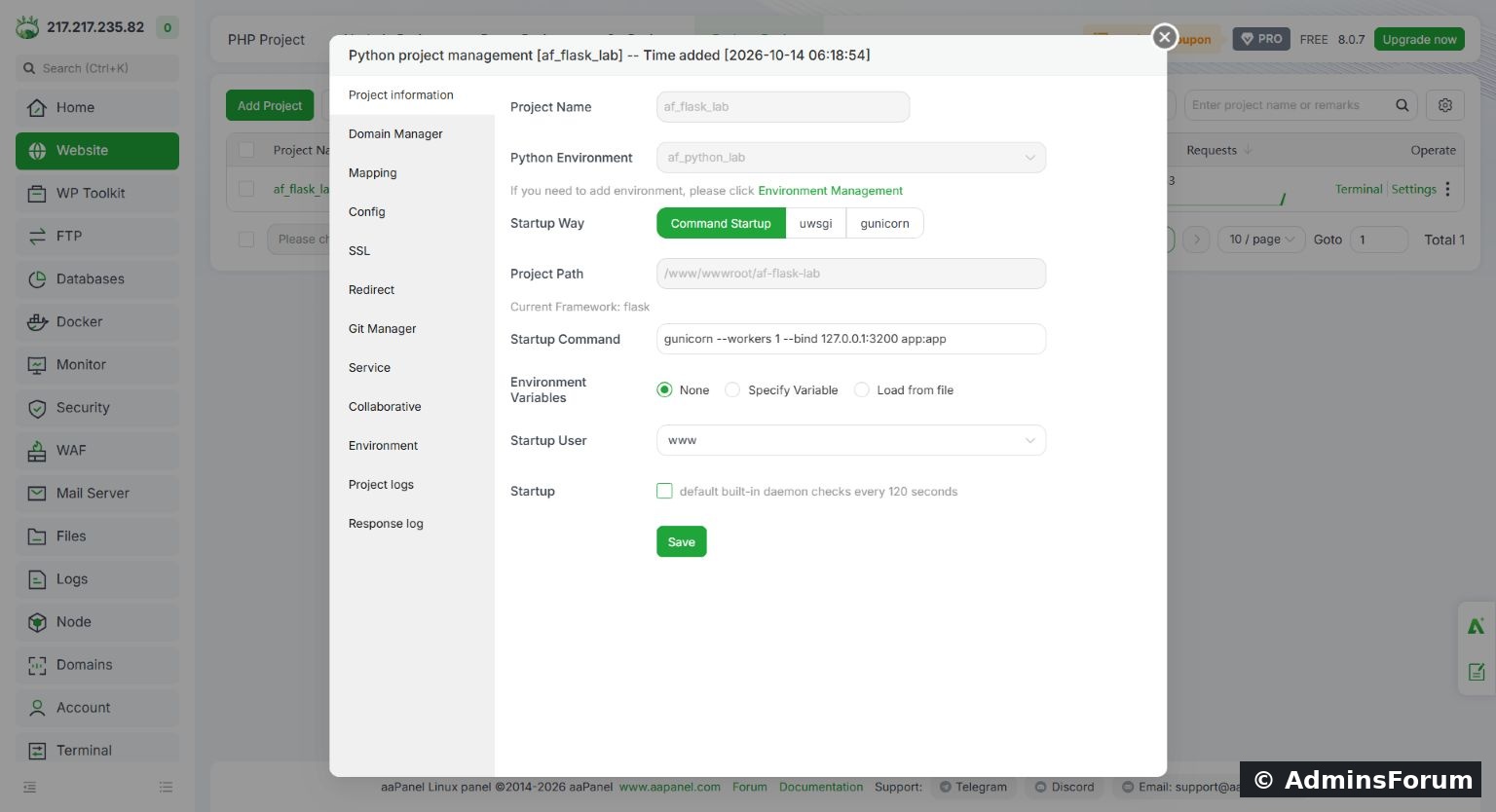
Enable the native Startup checkbox for the correct Python project, then save its settings.
This setting tells aaPanel to recover the project when its daemon finds it stopped. It is not an immediate availability guarantee: the panel advertises a 120-second check interval. Keep the same working startup command, environment, project path and non-root user.
Our command remained:
The selected environment was af_python_lab and the startup user was www. Do not create a second systemd or cron launcher for the same process while using the native panel daemon; two launchers can compete for the same port.
3. Recheck HTTP and HTTPS after saving
Before rebooting, check localhost and the public hostname again. In our aaPanel 8.0.7 lab, saving the Python project settings regenerated its Nginx configuration and removed the 443 SSL listener. The app still worked on localhost, but public HTTPS selected another site's certificate and failed hostname validation.
This is a separate configuration problem, not proof that Gunicorn failed. Check SSL and the project's Nginx Config after saving. Back up the configuration before editing it. For this lab we restored the HTTPS listener and the existing certificate references, validated Nginx configuration and reloaded Nginx. We did not issue another certificate.
The existing certificate paths in this lab were:
Your project may have different paths. Do not copy another site's certificate or publish private-key contents. Normal HTTPS validation must pass; do not hide the error with curl -k.
4. Record the current boot before rebooting
From the VPS terminal:
Keep this value locally. After the reboot it must differ, proving you tested a new server boot rather than a simple browser refresh.
Reboot only after your work is saved and you have a working way to reconnect. In a disposable test VPS, a normal reboot command is:
An SSH disconnection is expected while the server restarts. A browser tab can also lose its aaPanel session; signing back into the panel is separate from restarting the application.
5. Verify recovery without manually starting the app
Reconnect through SSH after the VPS is reachable. Check:
Wait for the native daemon's recovery interval if the application has not returned yet. Do not click Start during the automatic recovery test, because that would invalidate the test.
Our new boot ID differed from the original. Gunicorn returned automatically with a master and worker listening on 127.0.0.1:3200. After restoring the SSL listener described above, the public Flask hostname returned HTTP 200 with AdminsForum Flask lab and passed certificate validation. Nginx, Postfix and Dovecot were also active.
6. Inspect logs if recovery fails
In the project window, open Project logs. Check the latest startup attempt rather than old messages. For this project, the error log was:
Typical problems include a missing virtual environment, incorrect working directory, missing packages, a port already in use or a startup user unable to read the app files. Confirm that the same command still starts the app in its intended environment before changing the daemon.
Know the limits of this test
Completion checklist
Tested on the AdminsForum lab VPS. Screenshot and test results are from our own deployment.
Tested: Ubuntu 22.04.5 and aaPanel Free 8.0.7, with Flask served by Gunicorn through Nginx. Our project is af_flask_lab and listens on 127.0.0.1:3200. Replace these values with your own project. A reboot temporarily interrupts every service on that VPS; use a lab or a planned maintenance window.
1. Confirm the app is healthy first
Complete Run Flask with Gunicorn and, if you need a public hostname, Connect Flask to a Domain and HTTPS.
Open Website → Python Project and confirm the application is running. From the VPS terminal:
Code:
curl -i http://127.0.0.1:3200/2. Enable aaPanel's Startup option
Click the project name, then open Project information. Locate Startup and tick the checkbox labelled default built-in daemon checks every 120 seconds. Click Save.
Enable the native Startup checkbox for the correct Python project, then save its settings.
This setting tells aaPanel to recover the project when its daemon finds it stopped. It is not an immediate availability guarantee: the panel advertises a 120-second check interval. Keep the same working startup command, environment, project path and non-root user.
Our command remained:
Code:
gunicorn --workers 1 --bind 127.0.0.1:3200 app:app3. Recheck HTTP and HTTPS after saving
Before rebooting, check localhost and the public hostname again. In our aaPanel 8.0.7 lab, saving the Python project settings regenerated its Nginx configuration and removed the 443 SSL listener. The app still worked on localhost, but public HTTPS selected another site's certificate and failed hostname validation.
This is a separate configuration problem, not proof that Gunicorn failed. Check SSL and the project's Nginx Config after saving. Back up the configuration before editing it. For this lab we restored the HTTPS listener and the existing certificate references, validated Nginx configuration and reloaded Nginx. We did not issue another certificate.
The existing certificate paths in this lab were:
Code:
/www/server/panel/vhost/cert/af_flask_lab/fullchain.pem
/www/server/panel/vhost/cert/af_flask_lab/privkey.pem4. Record the current boot before rebooting
From the VPS terminal:
Code:
cat /proc/sys/kernel/random/boot_idReboot only after your work is saved and you have a working way to reconnect. In a disposable test VPS, a normal reboot command is:
Code:
sudo reboot5. Verify recovery without manually starting the app
Reconnect through SSH after the VPS is reachable. Check:
Code:
cat /proc/sys/kernel/random/boot_id
ss -lntp | grep ':3200'
curl -i http://127.0.0.1:3200/
curl -i https://your-hostname/Our new boot ID differed from the original. Gunicorn returned automatically with a master and worker listening on 127.0.0.1:3200. After restoring the SSL listener described above, the public Flask hostname returned HTTP 200 with AdminsForum Flask lab and passed certificate validation. Nginx, Postfix and Dovecot were also active.
6. Inspect logs if recovery fails
In the project window, open Project logs. Check the latest startup attempt rather than old messages. For this project, the error log was:
Code:
/www/wwwlogs/python/af_flask_lab/error.logKnow the limits of this test
- A successful reboot test confirms recovery for the tested app and configuration. It does not test database recovery, queues, upload persistence or every application dependency.
- Startup recovery can cause a short period of 502 responses while Nginx is running but Gunicorn has not started yet.
- Because the native daemon recovers stopped projects, temporarily disable Startup when deliberately keeping an app stopped for maintenance; restore it when the maintenance is finished.
- Repeat HTTP and HTTPS checks after later project edits. The SSL configuration issue above was observed on this lab version, not assumed for every aaPanel release.
Completion checklist
- Startup checkbox enabled and saved.
- Correct environment, project path and non-root user retained.
- A real reboot confirmed by a changed boot ID.
- App returned without a manual Start action.
- Local response, public mapping and HTTPS checked separately.
- Any recovery errors explained using current logs.
Tested on the AdminsForum lab VPS. Screenshot and test results are from our own deployment.