



10-13-2026, 05:20 AM
You do not need every App Store app to host a website. Start with the components your application requires, then add optional tools for a specific purpose. This reference explains all 98 rows visible in our lab's catalog on 13 October 2026. Availability, versions and prices can change. The descriptions below are our practical summaries, not claims that every plugin has been installed or tested.
1. Find and understand the App Store
Open App Store → Official App. Search by name. Use ALL for the catalog and Installed to see services already present. Deployment, Tools, Plug-ins and Professional narrow the list. Setting opens an installed component's controls; Install starts setup for an available component; paid entries may show a purchase action. Do not treat a catalog listing as proof that an app is running.
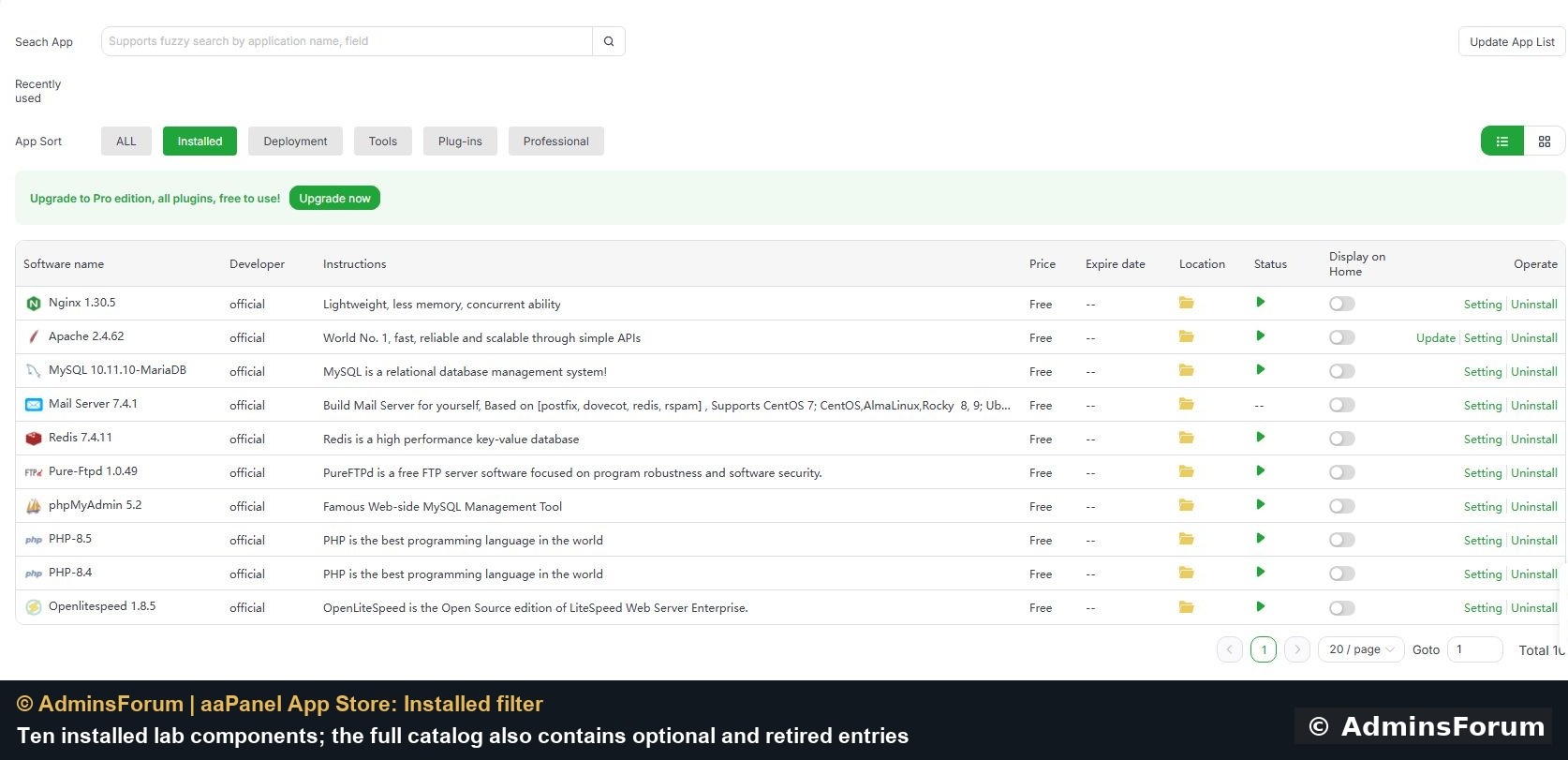
Our Installed view contains ten components. The full 98-row catalog also includes optional and retired entries.
2. Choose a small starting stack
For a typical PHP website, choose a supported web server, a PHP runtime compatible with the application and a database when required. phpMyAdmin is an optional administration interface, not the database itself. Redis is optional caching infrastructure. Mail Server and Pure-FTPd are separate services: install them only when you need to operate mail or FTP. Our lab includes multiple web servers to demonstrate hosting configurations; a beginner does not need to install all three.
3. Before clicking Install
Check operating-system and panel-version compatibility, memory/disk requirements and existing dependencies. Back up configuration and data. Review new ports and credentials. A plugin marked Free can still use a cloud account with quotas or charges. A Paid label below means the catalog listed a price; it does not define the terms of a subscription or guarantee current pricing. Review licensing in your own account. After installation, check service status, application behavior and firewall rules.
4. Core hosting, database and runtime entries
Nginx 1.30.5 — Listed Free
Serves websites and can reverse-proxy application backends.
Apache 2.4.62 — Listed Free
Serves websites with Apache modules and per-site configuration.
MySQL 10.11.10-MariaDB — Listed Free
The lab catalog label refers to the installed MariaDB relational database; applications need compatible database settings.
Mail Server 7.4.1 — Listed Free
Manages mail services; delivery also requires DNS, certificates, reverse DNS and provider connectivity.
Redis 7.4.11 — Listed Free
Provides a key-value service used for caches and other applications; secure access and avoid shared-cache flushes.
Pure-Ftpd 1.0.49 — Listed Free
Provides FTP/FTPS accounts and transfers; require encryption and restrict user folders.
phpMyAdmin 5.2 — Listed Free
Provides a browser interface for MySQL/MariaDB administration; protect access.
Node.js version manager — Listed Free
Manages Node.js runtimes; check project compatibility and conflicts with older managers.
ffmpeg manager — Listed Free
Installs and manages FFmpeg for media conversion; resource use depends on the job.
MongoDB — Listed Free
Provides a document database for applications designed to use it.
Memcached — Listed Free
Provides an in-memory cache; restrict network access and expect cache contents to be disposable.
elasticsearch — Listed Free
Provides search and analytics infrastructure; plan its memory and storage requirements.
Openlitespeed 1.8.5 — Listed Free
Provides the OpenLiteSpeed web server; its PHP handling differs from Nginx/PHP-FPM.
RabbitMQ — Listed Free
Provides a message broker for applications that need queues.
PostgreSQL Manager — Listed Free
Installs and manages PostgreSQL databases.
Supervisor — Listed Free
Keeps configured application processes running; set the correct user and working directory.
Java Manager — Listed Free
Supports Java/JSP deployment management; choose compatible runtimes.
Mariadb multi-version management (Docker) — Listed Free
Runs multiple MariaDB versions in containers; separate ports, data and backups.
5. PHP version entries
The catalog lists PHP-8.5, PHP-8.4, PHP-8.3, PHP-8.2, PHP-8.1, PHP-8.0, PHP-7.4, PHP-7.3, PHP-7.2, PHP-7.1, PHP-7.0, PHP-5.6, PHP-5.5, PHP-5.4, PHP-5.3, PHP-5.2. All were listed Free. Each is a PHP runtime version, not a different website application. Select the version required by your software and still covered by appropriate security support. Old PHP 5.x and 7.x entries are legacy choices, not recommendations for a new site. Check the official support table before choosing or migrating a version. Installing a newer runtime does not automatically switch every existing website to it. Back up and test the site, required extensions and the selected web server before changing its runtime.
6. Optional apps and plugins
Site Diagnosis — Listed Paid
Helps investigate common website failures; verify its suggestions against the actual logs.
Network Threat Detection — Listed Paid
Reviews network traffic for suspicious activity; check the supported OS before installing.
Website Analytics — Listed Paid
Adds visitor analytics; review tracking, privacy and storage requirements.
Files Sync — Listed Paid
Transfers files between locations on a schedule or continuously; test conflict and deletion behavior first.
Network Scan Detection — Listed Paid
Looks for scanning activity against the server; alerts still need investigation.
aaPanel Daily Report — Listed Paid
Summarizes operational and security information for regular review.
Website statistics-v2 — Listed Paid
Provides website traffic statistics for supported web servers.
Nginx WAF — Listed Paid
Adds application-layer filtering for Nginx; tune rules to avoid blocking legitimate requests.
Tamper-proof for Enterprise — Listed Paid
Restricts unwanted website file changes; review incompatibilities with other tamper protection.
Load Balance — Listed Paid
Distributes requests across backends; requires healthy services and a tested routing plan.
aaPanel Mobile — Listed Paid
Provides mobile management access; protect the associated account.
Apache WAF — Listed Paid
Adds application-layer filtering for Apache; review compatibility and false positives.
Microsoft OneDrive — Listed Free
Stores backups in a Microsoft cloud account; account limits and charges are separate.
PHP code security — Listed Paid
Adds PHP behavior checks; test application compatibility before enabling blocking.
Task manager — Listed Paid
Provides controls for processes and other system tasks; stopping the wrong service can interrupt hosting.
Website Tamper-proof — Listed Paid
Protects selected website files against changes; allow your legitimate deployment workflow.
aaPanel user Manager — Listed Paid
Manages panel users and menu permissions on supported panel versions; grant the minimum access needed.
System hardening — Listed Paid
Offers system protection settings; review each change and its recovery route.
File monitor — Listed Paid
Records file changes and offers related checks or backups.
Disk analysis — Listed Paid
Helps locate large files and directories; review files before cleanup.
aaCloud — Listed Free
Connects servers to centralized management; review the access and data involved.
OpenClaw(Docker) — Listed Free
Runs a self-hosted AI assistant through Docker; plan disk, memory, model and integration requirements.
OpenClaw — Listed Free
Runs a self-hosted AI assistant; use a separate lab and review messaging integrations and credentials.
Tencent EdgeOne CDN — Listed Free
Connects edge/CDN services; review the provider account, plan and DNS requirements.
Anti-intrusion — Listed Paid
Adds protections around service and process activity; validate compatibility with your workloads.
Website basic Statistics — Listed Free
Provides a basic view of website visits.
CloudFlare free CDN — Listed Free
Integrates Cloudflare website/CDN configuration; DNS and account requirements still apply.
Website Log Analyzer — Listed Free
Analyzes selected Nginx access logs to help investigate traffic.
WebSite Speed — Listed Free
Offers website acceleration controls; review its current documentation and test before enabling.
WebHook — Listed Free
Runs configured actions on callbacks; protect webhook secrets and limit command privileges.
DeepSeek-R1 — Listed Free
Provides an AI model integration; review its current deployment, memory and model requirements.
S3 Storage (AWS S3) — Listed Free
Sends backups to S3-compatible storage; protect access keys and test recovery.
Google Drive — Listed Free
Sends backups to Google Drive; verify account authorization and storage capacity.
Fail2ban Manager — Listed Free
Manages bans triggered by repeated authentication failures; verify log paths and trusted-client access.
Cloud dns — Listed Free
Manages supported DNS-provider records; use narrowly scoped provider tokens.
DDNS Manager — Listed Free
Updates supported DNS records when an address changes.
One-click migration beta — Listed Free
Helps migrate panel data; verify backups, compatibility and the destination before relying on it.
one-click deployment — Listed Free
Deploys supported applications; update and secure each application after installation.
Intrusion Detection — Listed Free
Monitors for possible intrusion activity; review alerts instead of treating them as proof.
FTP Storage — Listed Free
Sends backups to an FTP destination; review encryption support before transmitting private data.
ClamAV — Listed Free
Scans files for malware signatures; scan results do not replace patching or incident review.
frp manager — Listed Free
Manages reverse-proxy tunnels; review which private services become reachable.
Platform Ops — Listed Paid
Coordinates maintenance across servers; protect stored access and review batch operations.
Disk Mount Manager — Listed Free
Manages disk mounts; back up first and distinguish mounting from formatting.
Google Cloud Storage — Listed Free
Sends backups to Google Cloud Storage; provider permissions and charges are separate.
Performance testing — Listed Free
Runs CPU, memory, disk and network benchmarks; schedule away from busy production periods.
System boot items — Listed Free
Manages startup services and environment settings; avoid disabling hosting dependencies.
NFS Manager — Listed Paid
Manages network file shares and mounts; restrict clients and export permissions.
Server performance testing — Listed Free
Provides server benchmarking; tests can compete with live workloads.
Linux Tools — Listed Free
Provides system utilities including DNS, swap and network settings; review disruptive changes.
PHP Guardian — Listed Free
Monitors PHP-FPM availability; investigate the underlying failure rather than only restarting it.
Log cleanup — Listed Free
Removes selected logs or temporary data; retain troubleshooting and audit evidence first.
Anti-Spam Gateway — Listed Free
Filters mail through a gateway; review routing and false-positive behavior.
IP setup tool — Listed Free
Changes network address configuration; its listed OS support is old, so check compatibility and console recovery.
Nginx free firewall — Listed Free
The catalog gives little detail; check maintenance and documentation before choosing it for protection.
7. Retired or replaced catalog entries
These rows were still visible but their catalog notices direct users to replacements. Do not use an old install guide without checking the current location and support status.
Dns Manager — Listed Free
Retired catalog entry; use the panel Domains area indicated by the catalog.
aaPanel AI Assistant — Listed Free
Unmaintained plugin entry; use the current AI menu indicated by the catalog.
Sync Tool — Listed Paid
Retired entry; the catalog directs users to Files Sync.
Abnormal Push — Listed Paid
Retired entry; the catalog directs users to Settings → Alarm.
SYS Firewall — Listed Free
Retired entry; use the current Security area.
PM2 Manager — Listed Free
Retired entry; use Website → Node Project as indicated by the catalog.
Docker Manager — Listed Free
Retired entry; use the current Docker menu.
Python Manager — Listed Free
Older entry marked for replacement; use Website → Python Project.
Website statistics — Listed Paid
Retired entry; use Website statistics-v2.
8. How to verify an installation
Return to Installed, open Setting, confirm the service status and inspect logs. Test the actual function: load a website, connect to the database through the intended private route, transfer a file using encryption or restore a backup into an isolated environment. A green service indicator alone does not prove the application is configured correctly. If setup fails, record the app/version, OS, precise error and relevant redacted log lines when asking for support.
Lab scope
The installed view shows Nginx, Apache, MariaDB, Mail Server, Redis, Pure-FTPd, phpMyAdmin, PHP 8.5, PHP 8.4 and OpenLiteSpeed. Our related guides demonstrate selected functions of this stack. The remaining catalog entries are explanations based on the visible catalog; they have not all been installed, audited or benchmarked.
Continue with focused guides
WordPress Redis object cache
Pure-FTPd installation and service checks
Firewall rules after installing services
References: aaPanel App Store documentation and PHP supported versions. Catalog review and original lab screenshot: © AdminsForum.
1. Find and understand the App Store
Open App Store → Official App. Search by name. Use ALL for the catalog and Installed to see services already present. Deployment, Tools, Plug-ins and Professional narrow the list. Setting opens an installed component's controls; Install starts setup for an available component; paid entries may show a purchase action. Do not treat a catalog listing as proof that an app is running.
Our Installed view contains ten components. The full 98-row catalog also includes optional and retired entries.
2. Choose a small starting stack
For a typical PHP website, choose a supported web server, a PHP runtime compatible with the application and a database when required. phpMyAdmin is an optional administration interface, not the database itself. Redis is optional caching infrastructure. Mail Server and Pure-FTPd are separate services: install them only when you need to operate mail or FTP. Our lab includes multiple web servers to demonstrate hosting configurations; a beginner does not need to install all three.
3. Before clicking Install
Check operating-system and panel-version compatibility, memory/disk requirements and existing dependencies. Back up configuration and data. Review new ports and credentials. A plugin marked Free can still use a cloud account with quotas or charges. A Paid label below means the catalog listed a price; it does not define the terms of a subscription or guarantee current pricing. Review licensing in your own account. After installation, check service status, application behavior and firewall rules.
4. Core hosting, database and runtime entries
Nginx 1.30.5 — Listed Free
Serves websites and can reverse-proxy application backends.
Apache 2.4.62 — Listed Free
Serves websites with Apache modules and per-site configuration.
MySQL 10.11.10-MariaDB — Listed Free
The lab catalog label refers to the installed MariaDB relational database; applications need compatible database settings.
Mail Server 7.4.1 — Listed Free
Manages mail services; delivery also requires DNS, certificates, reverse DNS and provider connectivity.
Redis 7.4.11 — Listed Free
Provides a key-value service used for caches and other applications; secure access and avoid shared-cache flushes.
Pure-Ftpd 1.0.49 — Listed Free
Provides FTP/FTPS accounts and transfers; require encryption and restrict user folders.
phpMyAdmin 5.2 — Listed Free
Provides a browser interface for MySQL/MariaDB administration; protect access.
Node.js version manager — Listed Free
Manages Node.js runtimes; check project compatibility and conflicts with older managers.
ffmpeg manager — Listed Free
Installs and manages FFmpeg for media conversion; resource use depends on the job.
MongoDB — Listed Free
Provides a document database for applications designed to use it.
Memcached — Listed Free
Provides an in-memory cache; restrict network access and expect cache contents to be disposable.
elasticsearch — Listed Free
Provides search and analytics infrastructure; plan its memory and storage requirements.
Openlitespeed 1.8.5 — Listed Free
Provides the OpenLiteSpeed web server; its PHP handling differs from Nginx/PHP-FPM.
RabbitMQ — Listed Free
Provides a message broker for applications that need queues.
PostgreSQL Manager — Listed Free
Installs and manages PostgreSQL databases.
Supervisor — Listed Free
Keeps configured application processes running; set the correct user and working directory.
Java Manager — Listed Free
Supports Java/JSP deployment management; choose compatible runtimes.
Mariadb multi-version management (Docker) — Listed Free
Runs multiple MariaDB versions in containers; separate ports, data and backups.
5. PHP version entries
The catalog lists PHP-8.5, PHP-8.4, PHP-8.3, PHP-8.2, PHP-8.1, PHP-8.0, PHP-7.4, PHP-7.3, PHP-7.2, PHP-7.1, PHP-7.0, PHP-5.6, PHP-5.5, PHP-5.4, PHP-5.3, PHP-5.2. All were listed Free. Each is a PHP runtime version, not a different website application. Select the version required by your software and still covered by appropriate security support. Old PHP 5.x and 7.x entries are legacy choices, not recommendations for a new site. Check the official support table before choosing or migrating a version. Installing a newer runtime does not automatically switch every existing website to it. Back up and test the site, required extensions and the selected web server before changing its runtime.
6. Optional apps and plugins
Site Diagnosis — Listed Paid
Helps investigate common website failures; verify its suggestions against the actual logs.
Network Threat Detection — Listed Paid
Reviews network traffic for suspicious activity; check the supported OS before installing.
Website Analytics — Listed Paid
Adds visitor analytics; review tracking, privacy and storage requirements.
Files Sync — Listed Paid
Transfers files between locations on a schedule or continuously; test conflict and deletion behavior first.
Network Scan Detection — Listed Paid
Looks for scanning activity against the server; alerts still need investigation.
aaPanel Daily Report — Listed Paid
Summarizes operational and security information for regular review.
Website statistics-v2 — Listed Paid
Provides website traffic statistics for supported web servers.
Nginx WAF — Listed Paid
Adds application-layer filtering for Nginx; tune rules to avoid blocking legitimate requests.
Tamper-proof for Enterprise — Listed Paid
Restricts unwanted website file changes; review incompatibilities with other tamper protection.
Load Balance — Listed Paid
Distributes requests across backends; requires healthy services and a tested routing plan.
aaPanel Mobile — Listed Paid
Provides mobile management access; protect the associated account.
Apache WAF — Listed Paid
Adds application-layer filtering for Apache; review compatibility and false positives.
Microsoft OneDrive — Listed Free
Stores backups in a Microsoft cloud account; account limits and charges are separate.
PHP code security — Listed Paid
Adds PHP behavior checks; test application compatibility before enabling blocking.
Task manager — Listed Paid
Provides controls for processes and other system tasks; stopping the wrong service can interrupt hosting.
Website Tamper-proof — Listed Paid
Protects selected website files against changes; allow your legitimate deployment workflow.
aaPanel user Manager — Listed Paid
Manages panel users and menu permissions on supported panel versions; grant the minimum access needed.
System hardening — Listed Paid
Offers system protection settings; review each change and its recovery route.
File monitor — Listed Paid
Records file changes and offers related checks or backups.
Disk analysis — Listed Paid
Helps locate large files and directories; review files before cleanup.
aaCloud — Listed Free
Connects servers to centralized management; review the access and data involved.
OpenClaw(Docker) — Listed Free
Runs a self-hosted AI assistant through Docker; plan disk, memory, model and integration requirements.
OpenClaw — Listed Free
Runs a self-hosted AI assistant; use a separate lab and review messaging integrations and credentials.
Tencent EdgeOne CDN — Listed Free
Connects edge/CDN services; review the provider account, plan and DNS requirements.
Anti-intrusion — Listed Paid
Adds protections around service and process activity; validate compatibility with your workloads.
Website basic Statistics — Listed Free
Provides a basic view of website visits.
CloudFlare free CDN — Listed Free
Integrates Cloudflare website/CDN configuration; DNS and account requirements still apply.
Website Log Analyzer — Listed Free
Analyzes selected Nginx access logs to help investigate traffic.
WebSite Speed — Listed Free
Offers website acceleration controls; review its current documentation and test before enabling.
WebHook — Listed Free
Runs configured actions on callbacks; protect webhook secrets and limit command privileges.
DeepSeek-R1 — Listed Free
Provides an AI model integration; review its current deployment, memory and model requirements.
S3 Storage (AWS S3) — Listed Free
Sends backups to S3-compatible storage; protect access keys and test recovery.
Google Drive — Listed Free
Sends backups to Google Drive; verify account authorization and storage capacity.
Fail2ban Manager — Listed Free
Manages bans triggered by repeated authentication failures; verify log paths and trusted-client access.
Cloud dns — Listed Free
Manages supported DNS-provider records; use narrowly scoped provider tokens.
DDNS Manager — Listed Free
Updates supported DNS records when an address changes.
One-click migration beta — Listed Free
Helps migrate panel data; verify backups, compatibility and the destination before relying on it.
one-click deployment — Listed Free
Deploys supported applications; update and secure each application after installation.
Intrusion Detection — Listed Free
Monitors for possible intrusion activity; review alerts instead of treating them as proof.
FTP Storage — Listed Free
Sends backups to an FTP destination; review encryption support before transmitting private data.
ClamAV — Listed Free
Scans files for malware signatures; scan results do not replace patching or incident review.
frp manager — Listed Free
Manages reverse-proxy tunnels; review which private services become reachable.
Platform Ops — Listed Paid
Coordinates maintenance across servers; protect stored access and review batch operations.
Disk Mount Manager — Listed Free
Manages disk mounts; back up first and distinguish mounting from formatting.
Google Cloud Storage — Listed Free
Sends backups to Google Cloud Storage; provider permissions and charges are separate.
Performance testing — Listed Free
Runs CPU, memory, disk and network benchmarks; schedule away from busy production periods.
System boot items — Listed Free
Manages startup services and environment settings; avoid disabling hosting dependencies.
NFS Manager — Listed Paid
Manages network file shares and mounts; restrict clients and export permissions.
Server performance testing — Listed Free
Provides server benchmarking; tests can compete with live workloads.
Linux Tools — Listed Free
Provides system utilities including DNS, swap and network settings; review disruptive changes.
PHP Guardian — Listed Free
Monitors PHP-FPM availability; investigate the underlying failure rather than only restarting it.
Log cleanup — Listed Free
Removes selected logs or temporary data; retain troubleshooting and audit evidence first.
Anti-Spam Gateway — Listed Free
Filters mail through a gateway; review routing and false-positive behavior.
IP setup tool — Listed Free
Changes network address configuration; its listed OS support is old, so check compatibility and console recovery.
Nginx free firewall — Listed Free
The catalog gives little detail; check maintenance and documentation before choosing it for protection.
7. Retired or replaced catalog entries
These rows were still visible but their catalog notices direct users to replacements. Do not use an old install guide without checking the current location and support status.
Dns Manager — Listed Free
Retired catalog entry; use the panel Domains area indicated by the catalog.
aaPanel AI Assistant — Listed Free
Unmaintained plugin entry; use the current AI menu indicated by the catalog.
Sync Tool — Listed Paid
Retired entry; the catalog directs users to Files Sync.
Abnormal Push — Listed Paid
Retired entry; the catalog directs users to Settings → Alarm.
SYS Firewall — Listed Free
Retired entry; use the current Security area.
PM2 Manager — Listed Free
Retired entry; use Website → Node Project as indicated by the catalog.
Docker Manager — Listed Free
Retired entry; use the current Docker menu.
Python Manager — Listed Free
Older entry marked for replacement; use Website → Python Project.
Website statistics — Listed Paid
Retired entry; use Website statistics-v2.
8. How to verify an installation
Return to Installed, open Setting, confirm the service status and inspect logs. Test the actual function: load a website, connect to the database through the intended private route, transfer a file using encryption or restore a backup into an isolated environment. A green service indicator alone does not prove the application is configured correctly. If setup fails, record the app/version, OS, precise error and relevant redacted log lines when asking for support.
Lab scope
The installed view shows Nginx, Apache, MariaDB, Mail Server, Redis, Pure-FTPd, phpMyAdmin, PHP 8.5, PHP 8.4 and OpenLiteSpeed. Our related guides demonstrate selected functions of this stack. The remaining catalog entries are explanations based on the visible catalog; they have not all been installed, audited or benchmarked.
Continue with focused guides
WordPress Redis object cache
Pure-FTPd installation and service checks
Firewall rules after installing services
References: aaPanel App Store documentation and PHP supported versions. Catalog review and original lab screenshot: © AdminsForum.