10-17-2026, 09:11 AM
Quick answer
To point a subdomain to an IPv4 server in Cloudflare, open your domain's DNS > Records page, choose Add record, select A, enter the subdomain label and server IP, choose the proxy status and TTL, then save. Verify the resulting hostname with a DNS query before troubleshooting the website itself.
This guide records our own adminslab.com lab test on 17 October 2026. We added only dns-lab.adminslab.com. We did not change the main website, mail records, nameservers or an existing application. An A record supplies an address; it does not create a website, mailbox, HTTPS certificate or hosting-panel account.
1. Prepare the hostname and address
Have access to the Cloudflare zone and obtain your actual public IPv4 address from your hosting provider. Choose an unused label for practice. Our values were:
Use your own domain and server address. Do not point your domain to our lab. The name dns-lab inside this zone becomes dns-lab.adminslab.com; it is not a URL and needs no https://, port or trailing path.
Before creation we queried one of our assigned authoritative nameservers:
The response was NXDOMAIN with no answers at 09:09:05 UTC. This confirmed the unused name in this lab. Use a nameserver assigned to your own zone for the equivalent check; do not copy ours. A wildcard record can make a different domain return an answer even before an exact-name record exists.
2. Open Add record
Select the correct domain in Cloudflare, open DNS > Records and search for your intended label. Review any existing matches before adding another record. An existing record may belong to a working service.
Choose Add record. In our current dashboard this opened a dialog. Type A was already selected and proxying initially defaulted to Proxied. Always review the values rather than assuming a default matches a screenshot.
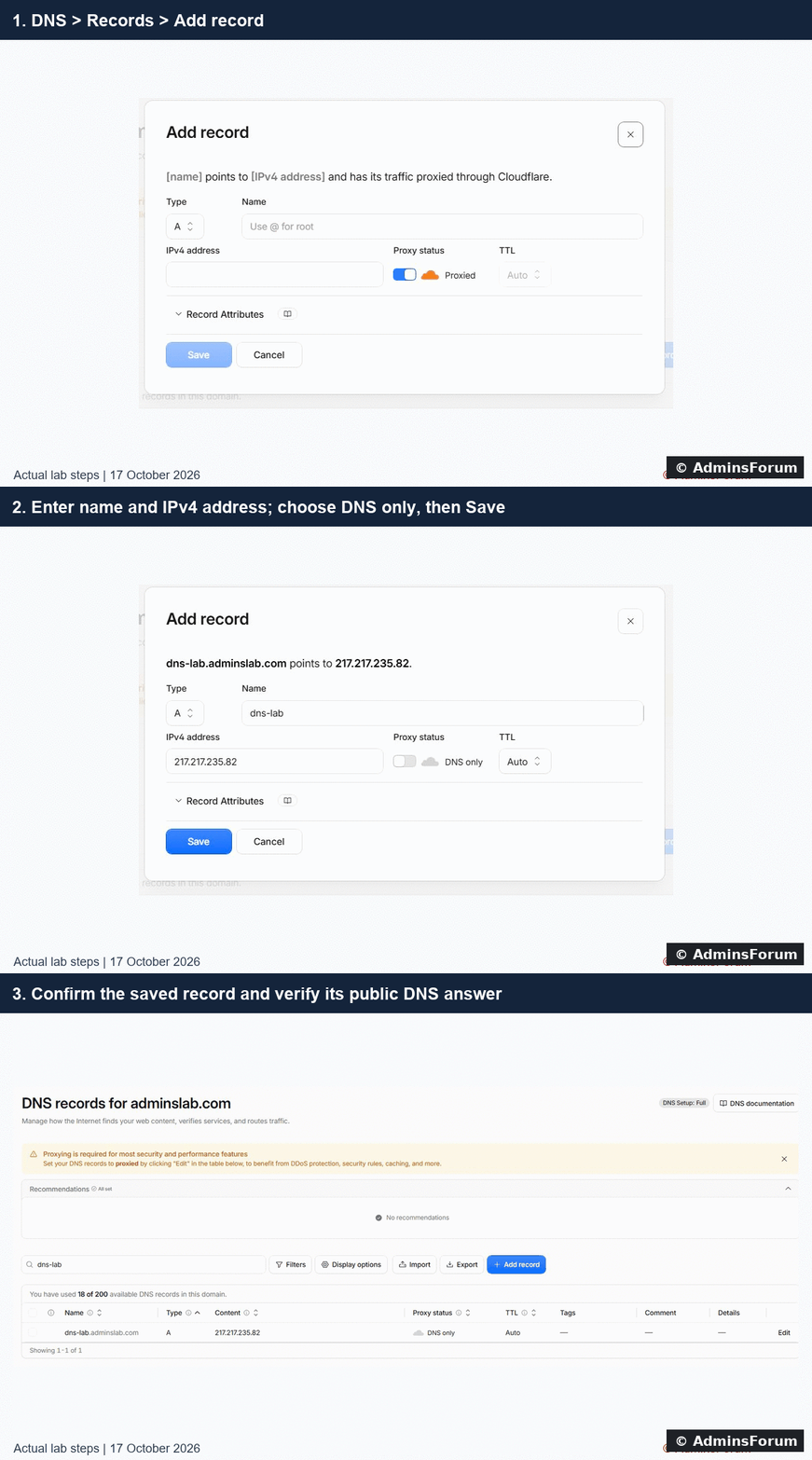
This GIF contains three annotated captures from our actual test. It is a paced step sequence rather than a continuous recording.
3. Fill the fields and review before saving
We entered dns-lab under Name and 217.217.235.82 under IPv4 address. We switched Proxy status to DNS only and retained TTL Auto. The dialog's summary showed that dns-lab.adminslab.com pointed to our server.
For this DNS lesson we chose DNS only so that the lookup could be compared directly with the saved origin address. That choice does not add Cloudflare's HTTP proxy protections. For a real website, decide proxying after checking the site's origin, HTTPS and service requirements. Do not enable proxying on a mail-service hostname as part of this exercise.
Review the complete hostname, address, gray-cloud status and TTL, then click Save once. Our filtered table displayed one A record for dns-lab.adminslab.com with the intended address, DNS only and Auto. The zone's record count increased from 17 to 18.
4. Verify the authoritative and public answers
We ran:
At 09:09:56 UTC all three returned NOERROR and this A answer:
The authoritative response also included the aa flag. A warning that recursion was requested but unavailable from that authoritative server did not invalidate this positive authoritative answer. Public recursive resolvers returned their own normal recursion flags.
Our successful checks describe those resolvers at that time, not a promise that every DNS change propagates immediately. A previous negative answer may also remain cached. Read Check Cloudflare DNS Records with dig and nslookup for how to interpret results before repeatedly changing a record.
5. What this test proves, and what comes next
The new hostname resolves to the intended IPv4 address. We did not create a virtual host or issue a certificate for this hostname, so this is not a successful website-hosting or HTTPS test. Configure the site in your hosting panel, bind the hostname, deploy the content and arrange its certificate as separate steps. A browser error after a correct DNS answer may belong to the web server, application, firewall or TLS configuration.
Correcting a mistake
If you saved the wrong IP, find the exact new record, use Edit, correct only that value and verify the new answer. Preserve the previous value before changing an existing production record. Do not remove unrelated records or replace the domain's nameservers.
Our lab record remains in place for the following DNS lessons. We did not test deletion/rollback in this walkthrough. If a disposable record is later removed, cached positive answers may persist until their TTL expires; removing DNS also does not shut down the destination server.
Reference
Cloudflare: create subdomain records. The GIF, timestamps and DNS results are from our own lab.
To point a subdomain to an IPv4 server in Cloudflare, open your domain's DNS > Records page, choose Add record, select A, enter the subdomain label and server IP, choose the proxy status and TTL, then save. Verify the resulting hostname with a DNS query before troubleshooting the website itself.
This guide records our own adminslab.com lab test on 17 October 2026. We added only dns-lab.adminslab.com. We did not change the main website, mail records, nameservers or an existing application. An A record supplies an address; it does not create a website, mailbox, HTTPS certificate or hosting-panel account.
1. Prepare the hostname and address
Have access to the Cloudflare zone and obtain your actual public IPv4 address from your hosting provider. Choose an unused label for practice. Our values were:
Code:
Domain: adminslab.com
Record type: A
Name: dns-lab
IPv4 address: 217.217.235.82
Proxy status: DNS only
TTL: AutoBefore creation we queried one of our assigned authoritative nameservers:
Code:
dig @sam.ns.cloudflare.com dns-lab.adminslab.com A +noall +comments +answer2. Open Add record
Select the correct domain in Cloudflare, open DNS > Records and search for your intended label. Review any existing matches before adding another record. An existing record may belong to a working service.
Choose Add record. In our current dashboard this opened a dialog. Type A was already selected and proxying initially defaulted to Proxied. Always review the values rather than assuming a default matches a screenshot.
This GIF contains three annotated captures from our actual test. It is a paced step sequence rather than a continuous recording.
3. Fill the fields and review before saving
We entered dns-lab under Name and 217.217.235.82 under IPv4 address. We switched Proxy status to DNS only and retained TTL Auto. The dialog's summary showed that dns-lab.adminslab.com pointed to our server.
For this DNS lesson we chose DNS only so that the lookup could be compared directly with the saved origin address. That choice does not add Cloudflare's HTTP proxy protections. For a real website, decide proxying after checking the site's origin, HTTPS and service requirements. Do not enable proxying on a mail-service hostname as part of this exercise.
Review the complete hostname, address, gray-cloud status and TTL, then click Save once. Our filtered table displayed one A record for dns-lab.adminslab.com with the intended address, DNS only and Auto. The zone's record count increased from 17 to 18.
4. Verify the authoritative and public answers
We ran:
Code:
dig @sam.ns.cloudflare.com dns-lab.adminslab.com A +noall +comments +answer
dig @1.1.1.1 dns-lab.adminslab.com A +noall +comments +answer
dig @8.8.8.8 dns-lab.adminslab.com A +noall +comments +answerCode:
dns-lab.adminslab.com. 300 IN A 217.217.235.82Our successful checks describe those resolvers at that time, not a promise that every DNS change propagates immediately. A previous negative answer may also remain cached. Read Check Cloudflare DNS Records with dig and nslookup for how to interpret results before repeatedly changing a record.
5. What this test proves, and what comes next
The new hostname resolves to the intended IPv4 address. We did not create a virtual host or issue a certificate for this hostname, so this is not a successful website-hosting or HTTPS test. Configure the site in your hosting panel, bind the hostname, deploy the content and arrange its certificate as separate steps. A browser error after a correct DNS answer may belong to the web server, application, firewall or TLS configuration.
Correcting a mistake
If you saved the wrong IP, find the exact new record, use Edit, correct only that value and verify the new answer. Preserve the previous value before changing an existing production record. Do not remove unrelated records or replace the domain's nameservers.
Our lab record remains in place for the following DNS lessons. We did not test deletion/rollback in this walkthrough. If a disposable record is later removed, cached positive answers may persist until their TTL expires; removing DNS also does not shut down the destination server.
Reference
Cloudflare: create subdomain records. The GIF, timestamps and DNS results are from our own lab.