



Yesterday, 06:15 AM
Create a separate virtual environment for a Python application so its packages do not get mixed into aaPanel's own environment. This walkthrough uses aaPanel's Python Environment controls and verifies the resulting interpreter and pip over SSH.
Tested lab: Ubuntu 22.04.5 LTS, aaPanel Free 8.0.7, system Python 3.10.12, environment af_python_lab. Tested on 14 October 2026. This records the system interpreter already present in our lab; for a new production application choose a currently maintained Python release compatible with the app and your operating-system support policy.
1. Open Python Environment
Go to Website → Python Project → Python Environment. The environment list can include the operating system's interpreter and aaPanel's own environment. Identify which is which before installing packages or changing anything.
We used the system interpreter as the source and created a new environment. We did not install application packages into aaPanel's own pyenv.
2. Create the environment
Click Create virtual environment. Enter a unique name such as af_python_lab, select the intended source interpreter and add a useful remark. In this version, clicking the source's table row selects its radio control.
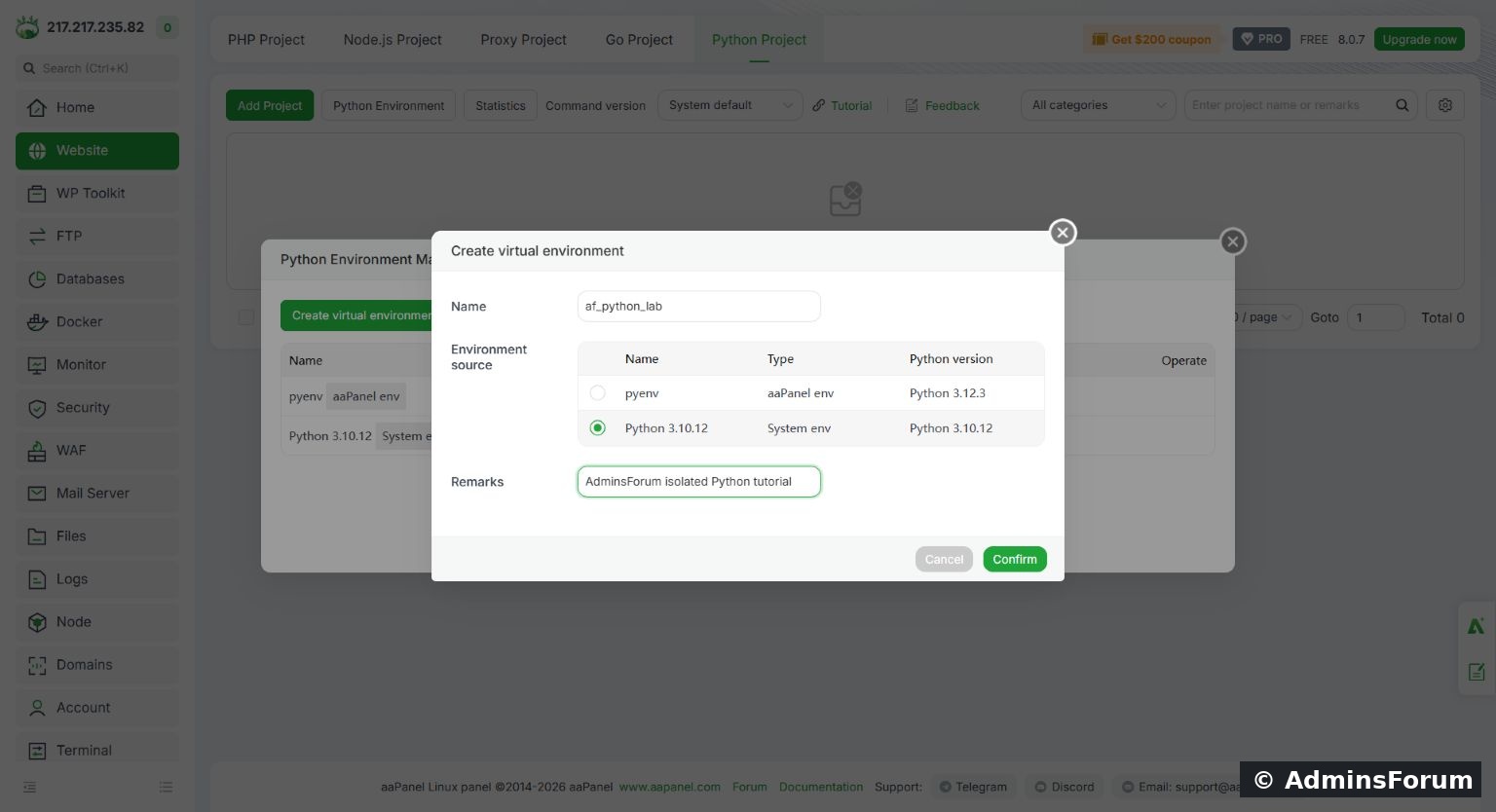
Create virtual environment: name, source interpreter and tutorial remark.
Click Confirm and wait for completion. Do not assume an environment is ready merely because a directory was created.
3. Handle missing venv support if necessary
Our first attempt failed. A direct check showed that the system interpreter lacked ensurepip support because Ubuntu's python3.10-venv package was absent. We installed the package from Ubuntu's repository and retried the same creation form. It then succeeded.
For this specific Ubuntu/Python combination, the prerequisite command was:
Other interpreter versions require their corresponding package or installation method. Do not use this package name blindly on another distribution. The separate troubleshooting guide covers diagnosis of this error in more detail.
4. Confirm the new list entry
The list should show your new environment as virtual env, with the expected Python version and remark. In our test af_python_lab appeared alongside the original system and panel environments.
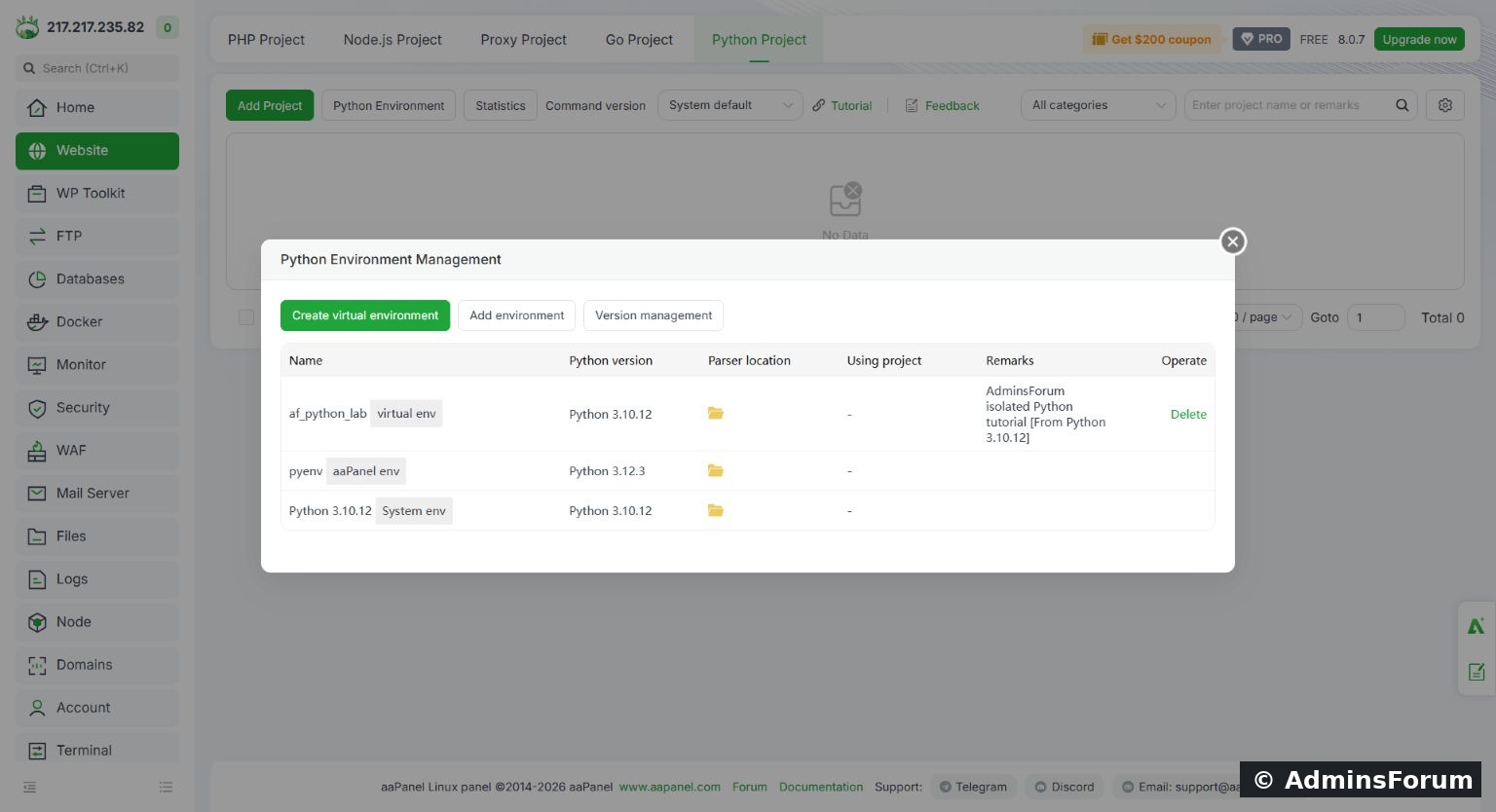
The new environment is listed separately from the panel and system environments.
It was not assigned to a project yet, so Using project showed a dash. Creating an environment alone does not deploy a website, map a domain or enable HTTPS.
5. Verify Python and pip
Find the environment's actual interpreter path. Our panel used the directory below, including its spelling:
Use the path shown on your own server rather than assuming every aaPanel version uses this location.
Run:
Our outputs identified Python 3.10.12 and pip 22.0.2 inside this environment. Using python -m pip ties the package installer to that interpreter rather than whichever pip command happens to be on PATH.
6. Verify isolation
The lab returned the environment directory, /usr as the base prefix and True. The differing prefixes confirm this interpreter is running in a virtual environment.
You can invoke the interpreter by its absolute path without activating an interactive shell. Activation is a convenience for that shell, not proof that a separately started aaPanel project uses the same interpreter.
7. Prepare for application deployment
Keep the app's source directory separate from the interpreter environment. Install its required packages into the intended application environment, then choose that environment when adding the Python project. Check the run user, start command and listening port before mapping a domain.
Do not remove an environment while a project uses it. When migrating, retain the source and dependency specification and recreate the environment deliberately instead of assuming that moving the environment folder is sufficient.
Result: aaPanel created the isolated environment after the missing Ubuntu prerequisite was installed. The environment's Python, pip and prefix-isolation checks passed. No Python website has been published by these steps alone.
Reference: Python virtual environment documentation.
Tested lab: Ubuntu 22.04.5 LTS, aaPanel Free 8.0.7, system Python 3.10.12, environment af_python_lab. Tested on 14 October 2026. This records the system interpreter already present in our lab; for a new production application choose a currently maintained Python release compatible with the app and your operating-system support policy.
1. Open Python Environment
Go to Website → Python Project → Python Environment. The environment list can include the operating system's interpreter and aaPanel's own environment. Identify which is which before installing packages or changing anything.
We used the system interpreter as the source and created a new environment. We did not install application packages into aaPanel's own pyenv.
2. Create the environment
Click Create virtual environment. Enter a unique name such as af_python_lab, select the intended source interpreter and add a useful remark. In this version, clicking the source's table row selects its radio control.
Create virtual environment: name, source interpreter and tutorial remark.
Click Confirm and wait for completion. Do not assume an environment is ready merely because a directory was created.
3. Handle missing venv support if necessary
Our first attempt failed. A direct check showed that the system interpreter lacked ensurepip support because Ubuntu's python3.10-venv package was absent. We installed the package from Ubuntu's repository and retried the same creation form. It then succeeded.
For this specific Ubuntu/Python combination, the prerequisite command was:
Code:
sudo apt-get install python3.10-venv4. Confirm the new list entry
The list should show your new environment as virtual env, with the expected Python version and remark. In our test af_python_lab appeared alongside the original system and panel environments.
The new environment is listed separately from the panel and system environments.
It was not assigned to a project yet, so Using project showed a dash. Creating an environment alone does not deploy a website, map a domain or enable HTTPS.
5. Verify Python and pip
Find the environment's actual interpreter path. Our panel used the directory below, including its spelling:
Code:
/www/server/pyporject_evn/af_python_lab/bin/pythonRun:
Code:
/www/server/pyporject_evn/af_python_lab/bin/python --version
/www/server/pyporject_evn/af_python_lab/bin/python -m pip --version6. Verify isolation
Code:
/www/server/pyporject_evn/af_python_lab/bin/python -c 'import sys; print(sys.prefix); print(sys.base_prefix); print(sys.prefix != sys.base_prefix)'You can invoke the interpreter by its absolute path without activating an interactive shell. Activation is a convenience for that shell, not proof that a separately started aaPanel project uses the same interpreter.
7. Prepare for application deployment
Keep the app's source directory separate from the interpreter environment. Install its required packages into the intended application environment, then choose that environment when adding the Python project. Check the run user, start command and listening port before mapping a domain.
Do not remove an environment while a project uses it. When migrating, retain the source and dependency specification and recreate the environment deliberately instead of assuming that moving the environment folder is sufficient.
Result: aaPanel created the isolated environment after the missing Ubuntu prerequisite was installed. The environment's Python, pip and prefix-isolation checks passed. No Python website has been published by these steps alone.
Reference: Python virtual environment documentation.