



Yesterday, 02:52 AM
For a Node.js website behind aaPanel's Nginx mapping, a 502 Bad Gateway often means the web server could not get a usable response from the application. Start by testing the app locally, then compare its listening port with the mapping. Reinstalling Node.js or disabling the firewall is not a useful first diagnostic step.
Tested lab: aaPanel Free 8.0.7, Node.js 24.21.0, project afnodelab, app at 127.0.0.1:3100, domain node.adminslab.com. On 14 October 2026 we stopped only this sample app using aaPanel's native project controls, observed HTTPS 502, started it again and observed HTTPS 200. The app is restored and running.
1. Identify which layer fails
Run these checks over SSH on the VPS:
Replace the sample port and domain with yours. The local request reaches the Node application directly. The domain request goes through DNS, TLS and the web server. Compare the results:
2. Find the actual listening port
For our sample:
The expected listener is 127.0.0.1:3100. We also tested 127.0.0.1:3101, where no app was listening, and curl returned connection refused. This demonstrates why guessing an upstream port is unreliable. We did not deliberately change the live mapping to that incorrect port.
If your app listens on another port, use that port in the local check and the aaPanel project settings. For an app behind a local reverse proxy, a localhost-only listener is appropriate. It does not need its application port opened publicly just to be reached by Nginx on the same machine.
3. Check project configuration
Open Website → Node.js Project, click the project name and inspect Project config. Compare the directory, start command, selected runtime, run user and port against the application's own configuration.
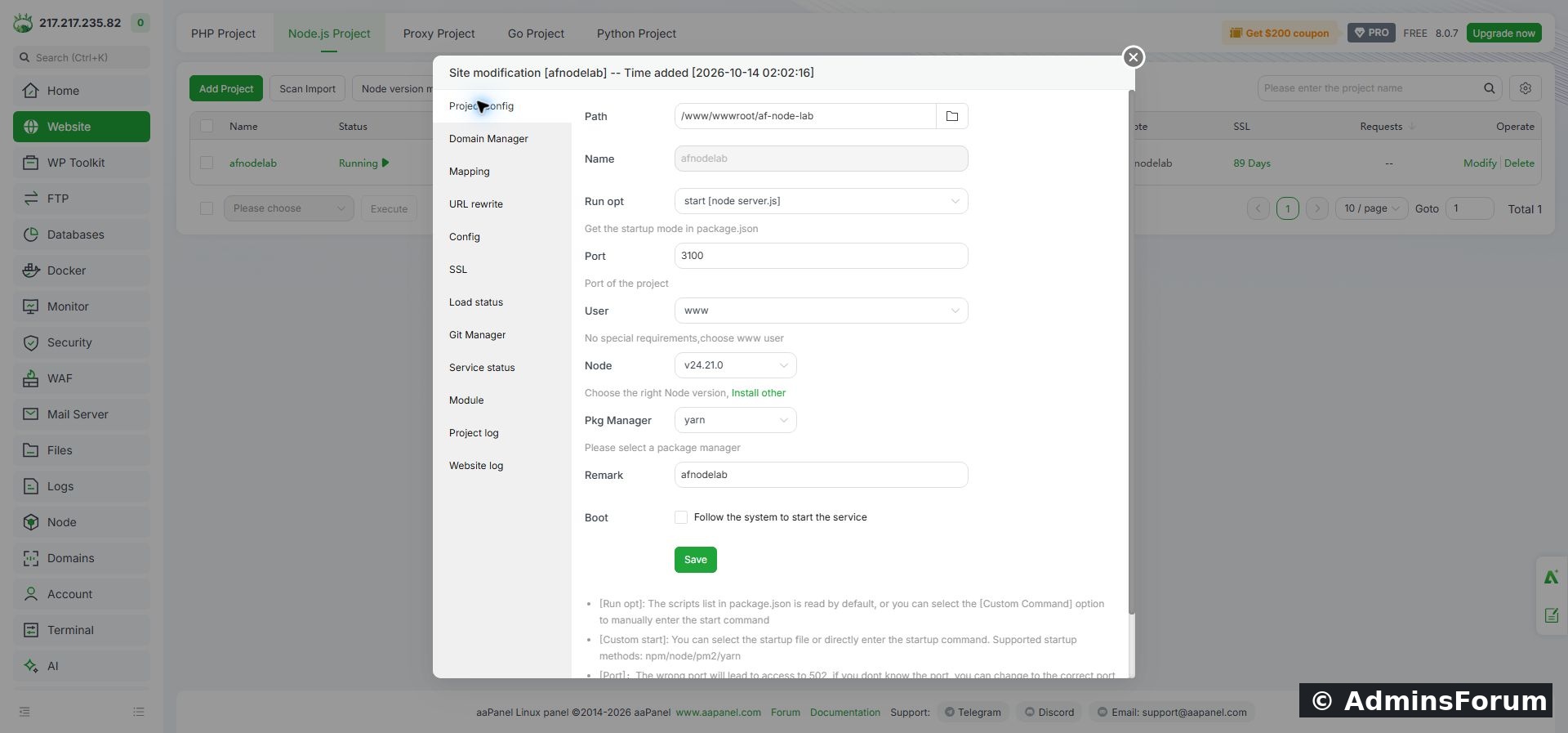
Reference screenshot from the sample deployment: project port 3100, www user and Node.js runtime.
Changing the Project Port field does not rewrite a hard-coded port in server.js. The two must agree. Also check that the selected directory contains the expected package.json and startup file. Our sample uses start → node server.js and runs as www.
4. Read Project log before restarting
Open Project log. Look for the latest startup message and any error that precedes it.
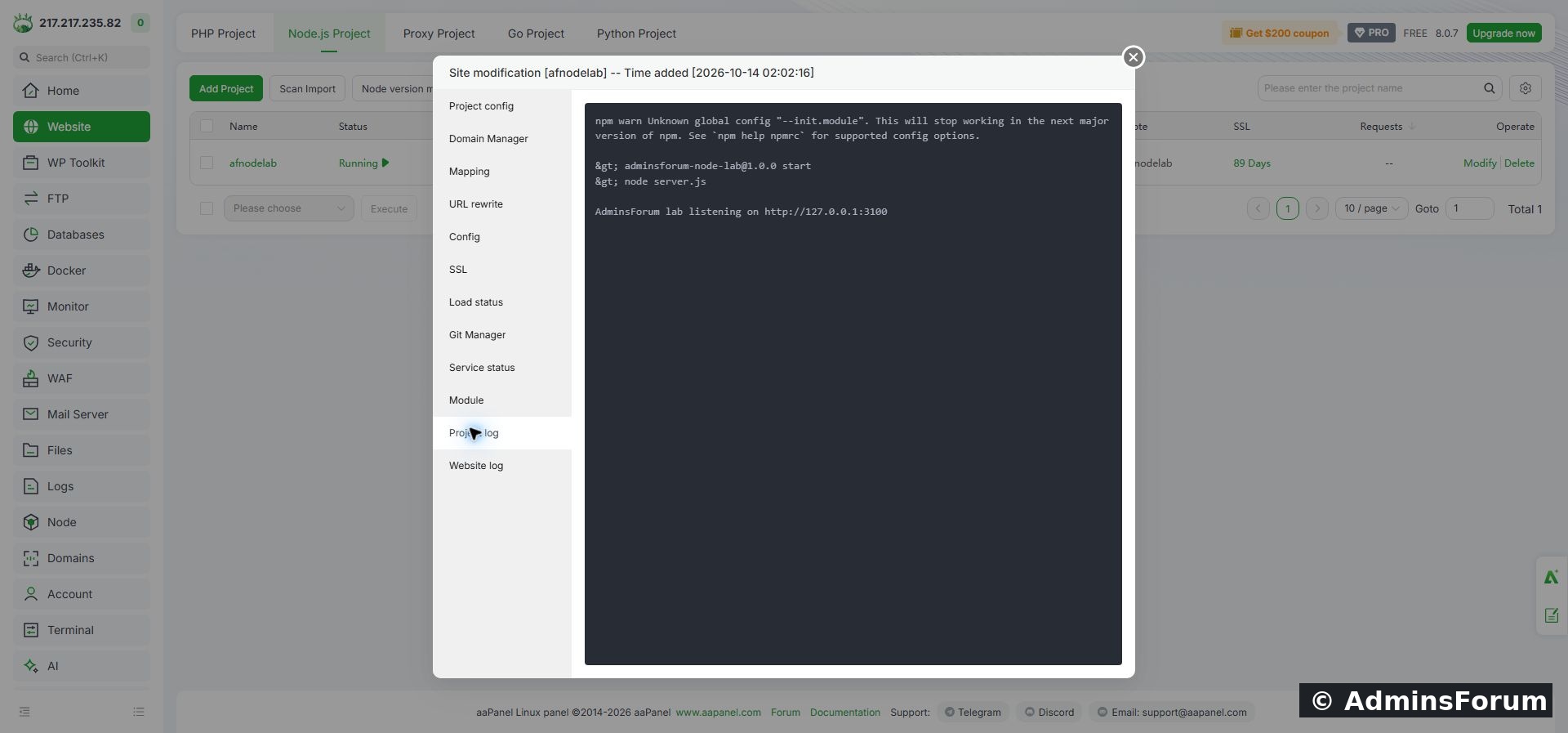
Reference startup log from the sample deployment shows the app listening on localhost:3100.
5. Check the mapping
In Domain Manager, confirm the intended hostname is present. In Mapping, confirm mapping is enabled. Check the relevant web-server configuration read-only before making changes.
Our generated configuration contains:
That upstream matches the app's listener. Configuration filenames differ between projects and versions; inspect the relevant site's configuration rather than editing an unrelated file. Prefer the panel's controls for changes, and validate the web-server configuration before reloading it.
6. Restore a stopped application
Use Service status → Start for a stopped project, or Restart when appropriate for the selected app. Confirm the action and wait for startup to finish. Repeat the local and domain checks; a Running label alone does not prove the application returns the expected page.
Our controlled test produced:
This test changed only the isolated sample project's process state and restored it in the same test. It did not require changing DNS, TLS, firewall rules or the working mapping.
7. Watch for a reboot startup delay
We previously saw a brief 502 while the VPS was coming back after reboot. The app then recovered automatically with Boot enabled. See Auto-start Node.js apps after reboot in aaPanel for the recovery test.
Allow a reasonable startup period and check the app log. If 502 persists, investigate it; do not assume that every 502 will resolve itself. If you manually start the app, record the intervention so you do not mistake it for successful automatic recovery.
8. Confirm the result
Check the expected response body as well as the status:
Use normal TLS validation. Save the relevant error and the change that fixed it. If requesting support, include the aaPanel version, Node runtime, start command, listening port and redacted error excerpt. Keep credentials and private configuration values out of the post.
Related setup: Deploy a Node.js app in aaPanel with a domain and HTTPS.
Reference: aaPanel Node.js project documentation.
Tested lab: aaPanel Free 8.0.7, Node.js 24.21.0, project afnodelab, app at 127.0.0.1:3100, domain node.adminslab.com. On 14 October 2026 we stopped only this sample app using aaPanel's native project controls, observed HTTPS 502, started it again and observed HTTPS 200. The app is restored and running.
1. Identify which layer fails
Run these checks over SSH on the VPS:
Code:
curl -i http://127.0.0.1:3100/
curl -I https://node.adminslab.com/- Local connection refused + public 502: Check whether the app is running and whether the port is correct.
- Local 200 + public 502: Check the mapping's upstream address and port, then the website error log.
- Both return 200: The fault may have cleared. Check logs and monitoring before changing settings.
- TLS validation fails: Investigate the certificate separately; a certificate error is different from an HTTP 502 response.
2. Find the actual listening port
For our sample:
Code:
ss -ltnp | grep ':3100'If your app listens on another port, use that port in the local check and the aaPanel project settings. For an app behind a local reverse proxy, a localhost-only listener is appropriate. It does not need its application port opened publicly just to be reached by Nginx on the same machine.
3. Check project configuration
Open Website → Node.js Project, click the project name and inspect Project config. Compare the directory, start command, selected runtime, run user and port against the application's own configuration.
Reference screenshot from the sample deployment: project port 3100, www user and Node.js runtime.
Changing the Project Port field does not rewrite a hard-coded port in server.js. The two must agree. Also check that the selected directory contains the expected package.json and startup file. Our sample uses start → node server.js and runs as www.
4. Read Project log before restarting
Open Project log. Look for the latest startup message and any error that precedes it.
Reference startup log from the sample deployment shows the app listening on localhost:3100.
- Module not found: Check the application's dependency installation and selected runtime.
- Permission denied: Check the run user's access to the app directory and required resources.
- Address already in use: Identify the existing listener; do not start duplicate copies.
- App starts then exits: Read the exit error and check required environment variables or external services.
5. Check the mapping
In Domain Manager, confirm the intended hostname is present. In Mapping, confirm mapping is enabled. Check the relevant web-server configuration read-only before making changes.
Our generated configuration contains:
Code:
server_name node.adminslab.com;
proxy_pass http://127.0.0.1:3100;6. Restore a stopped application
Use Service status → Start for a stopped project, or Restart when appropriate for the selected app. Confirm the action and wait for startup to finish. Repeat the local and domain checks; a Running label alone does not prove the application returns the expected page.
Our controlled test produced:
Code:
Native project stop: Stopped successfully
HTTPS while stopped: 502
Native project start: Successfully started
HTTPS after recovery: 2007. Watch for a reboot startup delay
We previously saw a brief 502 while the VPS was coming back after reboot. The app then recovered automatically with Boot enabled. See Auto-start Node.js apps after reboot in aaPanel for the recovery test.
Allow a reasonable startup period and check the app log. If 502 persists, investigate it; do not assume that every 502 will resolve itself. If you manually start the app, record the intervention so you do not mistake it for successful automatic recovery.
8. Confirm the result
Check the expected response body as well as the status:
Code:
curl -i http://127.0.0.1:3100/
curl -i https://node.adminslab.com/Related setup: Deploy a Node.js app in aaPanel with a domain and HTTPS.
Reference: aaPanel Node.js project documentation.