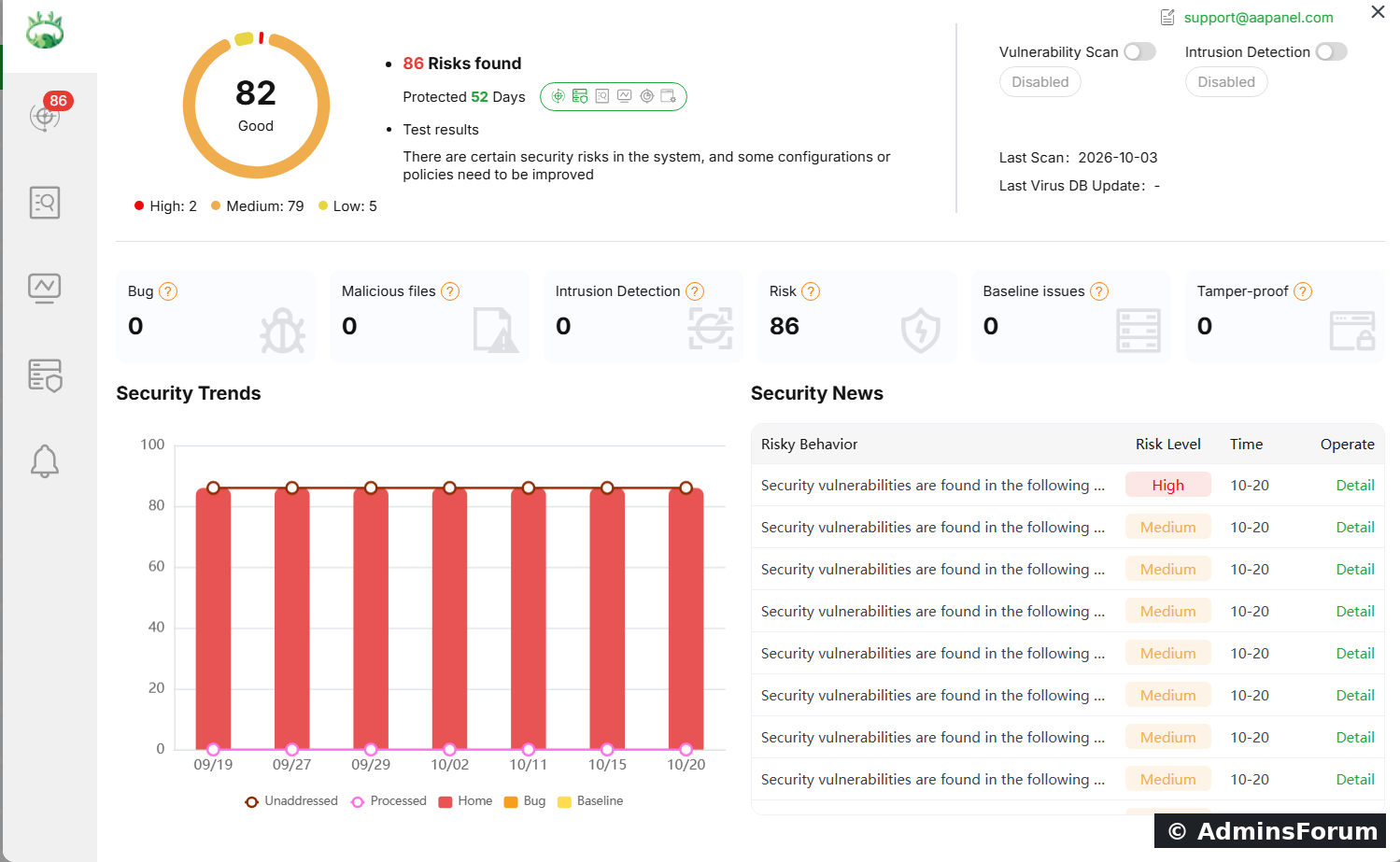
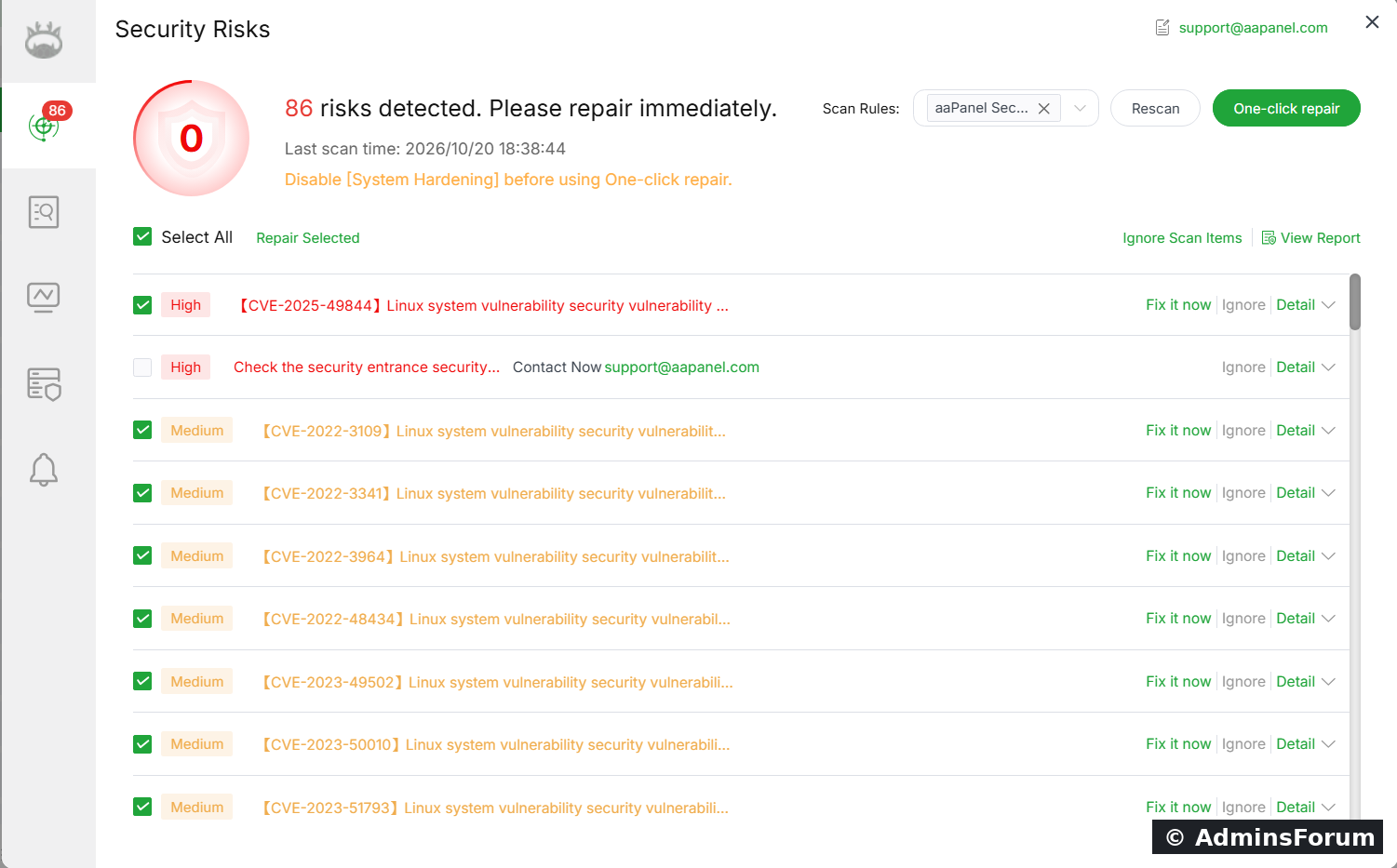
The screenshot shows 86 findings (2 high, 79 medium and 5 low). That count alone does not establish that the server has been compromised, and we need the individual findings before recommending repairs.
Please open Security > Risk, expand the two High-risk entries, and share their exact titles, detection details and suggested fixes. Also include your aaPanel version and Linux distribution/version. Redact passwords, API keys, private keys and your panel security entrance from screenshots.
Please avoid applying every repair at once: changes to SSH, firewall rules or permissions can interrupt access or websites. Keep a current backup and a working SSH session before applying changes. Once you share the two High-risk findings, we can work through them one by one, then review the medium and low items.
Your screenshot also shows vulnerability scanning and intrusion detection disabled, so those displayed zero counts do not confirm that the server has passed those checks.
Thanks, VIKRAM. The two screenshots show different issues, so let’s handle them separately.
1. Lua package finding: CVE-2025-49844
Your screenshot flags lua5.1 version 5.1.5-8.1build4 and compares it with an Ubuntu 22.04 ESM fix. Ubuntu confirms that lua5.1 on 22.04 has a fix at 5.1.5-8.1ubuntu0.22.04.1~esm1 through ESM Apps. Redis on Ubuntu 22.04 uses the system Lua library, which explains why a Redis-related CVE can appear against Lua. A Redis installed separately by aaPanel must be checked separately.
Please run these read-only checks through SSH and paste the output. They do not install updates or restart anything:
Code:
cat /etc/os-release
dpkg-query -W lua5.1 liblua5.1-0 redis-server redis-tools
apt-cache policy lua5.1 liblua5.1-0 redis-server
command -v redis-server
if [ -x /www/server/redis/src/redis-server ]; then /www/server/redis/src/redis-server --version; fi
A “package not installed” message is useful too. Please also give the aaPanel version shown on Home and say whether Redis is installed in App Store and used by any website. Redact any private repository credentials from output.
If ESM is unavailable, a normal package upgrade may not offer this particular fix. We should confirm the candidate version before choosing an update route. Do not remove Lua, replace system libraries manually, or assume updating aaPanel alone patches it.
2. Security entrance is too simple
The second finding says your panel entrance is “admin”. In aaPanel Settings, locate Security Entrance and replace it with a long, random, private path. Save the complete new HTTPS login URL privately and test it in a second browser window before closing the current session. Keep SSH/provider console access available for recovery. Do not post the new path here.
This is an additional login protection; keep your password and other authentication protections enabled. Domain binding/IP restrictions are separate changes—configure them only after confirming DNS and a stable trusted IP, to avoid locking yourself out.
After changing the entrance, rerun the security check and tell us whether that finding clears. For the Lua finding, send the version checks first so we can recommend the correct targeted update and any required service restart.
10-21-2026, 05:32 PM (This post was last modified: 10-21-2026, 05:34 PM by DEV.)
Thanks, VIKRAM. Your output narrows this down to two separate installations.
Ubuntu Lua packages
You have Ubuntu 22.04.5 with lua5.1 and liblua5.1-0 at 5.1.5-8.1build4. Your configured package sources offer that same version, so the displayed candidate does not contain Ubuntu's fix for this finding. Ubuntu lists the Jammy Lua fix as 5.1.5-8.1ubuntu0.22.04.1~esm1 through Ubuntu Pro / ESM Apps. Official Ubuntu package status
Redis is separate
The Ubuntu redis-server package is not installed, while the separate executable reports Redis 7.4.11. Redis lists 7.4.6 as the fixed release in the 7.4 branch for CVE-2025-49844, so a genuine upstream 7.4.11 build is later than that fix. This does not patch Ubuntu's separate Lua packages. Also, checking an executable's version does not prove the running service is using it. Official Redis advisory and fixed versions
Please confirm these two details next
1. Run this read-only status check and share whether esm-apps is available/enabled. If the command is unavailable, tell us that. Redact account or subscription information; do not share an attachment token.
Code:
pro status
Ubuntu Pro command reference
2. If Redis is used by a website, check the running server through its existing authenticated management tool and share only the redis_version line from INFO server. If Redis is unused, say so. Do not post its password or full connection details.
Once ESM availability is confirmed, we can choose the targeted Lua package update route. Do not replace system libraries manually or remove Lua to clear the warning. Please also tell us whether the separate security-entrance warning has cleared; keep the entrance itself private.