



10-12-2026, 03:18 AM
Quick answer
Open App Store → Installed → the PHP version your site uses → Setting → Optimization. Review the process mode and worker limits before changing them. More PHP workers do not automatically mean a faster website: they must fit available memory and the workload.
What was verified
We inspected PHP 8.5's Optimization screen in the AdminsForum aaPanel 8.0.6 lab and ran the version-specific PHP-FPM configuration test successfully. We did not change the worker settings or run a performance benchmark. The values in the screenshot describe the lab, not a universal recommended setup.
1. Select the right runtime
Check your website's PHP version in Website settings. Then open that same version in App Store → Installed. Different installed PHP versions can have separate PHP-FPM services and worker pools. Count their combined memory demands when sizing the server.
2. Open Optimization and record current values
Choose Optimization in the PHP manager. Before making a change, record Connection, Information, Running mode, max_children and the startup/spare-worker settings. Save a copy of the relevant configuration through your normal backup process too.
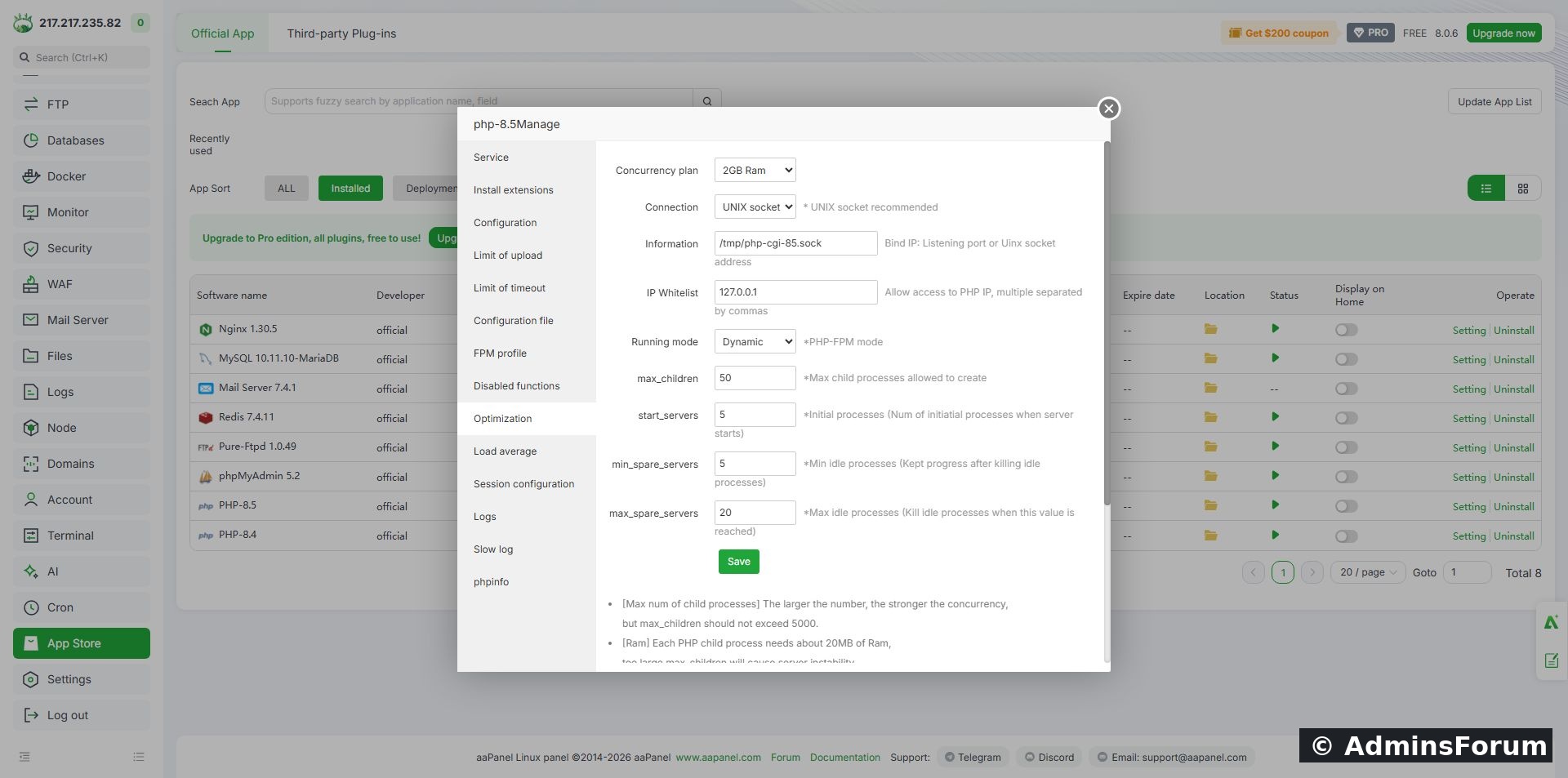
AdminsForum lab: the PHP-FPM settings screen. The displayed preset and numbers are not a benchmarked recommendation for other servers.
The lab used a UNIX socket and Dynamic mode. Its displayed worker values were max_children=50, start_servers=5, min_spare_servers=5 and max_spare_servers=20. We retained these settings for the inspection.
3. Understand the worker controls
4. Understand the process modes
5. Plan a realistic memory budget
Reserve RAM for the operating system, database, web server, panel, mail services and other processes first. Only the remaining budget can be assigned to PHP workers.
For illustration, if you reserve 1 GB for a PHP pool and measure representative busy workers at about 80 MB each, 1024 ÷ 80 is roughly 12 workers before extra headroom. Those numbers are a calculation example, not measurements from this lab. Real worker memory depends on your application, plugins and requests. Measure under representative activity and leave room for larger requests.
The PHP memory_limit setting controls a script's permitted memory; it is not the same as the total resident memory of each FPM process. Avoid multiplying a generic per-worker estimate by a large worker count and calling it guaranteed safe. Also include other active PHP versions and pools.
6. Keep the web-server connection aligned
The lab used the local UNIX socket /tmp/php-cgi-85.sock. Do not change the connection address simply while experimenting with worker limits: the web server must point to the matching PHP-FPM endpoint, or requests can fail with 502 errors. Keep FastCGI endpoints private.
See the Nginx 502 troubleshooting guide if the site fails after switching PHP versions.
7. Validate before reloading
If you decide a change is justified, change one aspect at a time and use Save. On this PHP 8.5 installation, the read-only configuration test is:
Our lab returned that its php-fpm.conf test was successful. The version-specific path matters; use the executable belonging to the runtime you changed. This checks configuration validity, not website performance or memory capacity.
If validation fails, correct the error or restore the recorded configuration before reloading. When valid, use Service → Reload and confirm the service is On. Then test the website. We verified the existing configuration but did not apply a tuning change in this walkthrough.
8. Compare the same workload
Watch CPU, memory, response time, errors and PHP-FPM logs while repeating a representative workload. A quiet homepage request is not a load test. Use aaPanel monitoring to compare the same period of activity.
If the pool reaches max_children, investigate slow PHP requests and database queries as well as capacity. Adding workers can increase simultaneous database work and make an already overloaded server slower. If memory pressure worsens after a change, restore the previous settings and review the budget.
When to roll back
If errors, swapping, service failures or response times worsen, return to your recorded values. Save, validate and reload the correct runtime. Do not keep stacking unrelated changes while trying to diagnose one issue.
Completion checklist
Reference: PHP official FPM configuration manual.
Open App Store → Installed → the PHP version your site uses → Setting → Optimization. Review the process mode and worker limits before changing them. More PHP workers do not automatically mean a faster website: they must fit available memory and the workload.
What was verified
We inspected PHP 8.5's Optimization screen in the AdminsForum aaPanel 8.0.6 lab and ran the version-specific PHP-FPM configuration test successfully. We did not change the worker settings or run a performance benchmark. The values in the screenshot describe the lab, not a universal recommended setup.
1. Select the right runtime
Check your website's PHP version in Website settings. Then open that same version in App Store → Installed. Different installed PHP versions can have separate PHP-FPM services and worker pools. Count their combined memory demands when sizing the server.
2. Open Optimization and record current values
Choose Optimization in the PHP manager. Before making a change, record Connection, Information, Running mode, max_children and the startup/spare-worker settings. Save a copy of the relevant configuration through your normal backup process too.
AdminsForum lab: the PHP-FPM settings screen. The displayed preset and numbers are not a benchmarked recommendation for other servers.
The lab used a UNIX socket and Dynamic mode. Its displayed worker values were max_children=50, start_servers=5, min_spare_servers=5 and max_spare_servers=20. We retained these settings for the inspection.
3. Understand the worker controls
- max_children: the worker limit. It constrains how many PHP requests can be handled simultaneously.
- start_servers: workers created initially in Dynamic mode.
- min_spare_servers: desired minimum number of idle workers in Dynamic mode.
- max_spare_servers: desired maximum number of idle workers in Dynamic mode.
4. Understand the process modes
- Static: maintains a fixed worker count.
- Dynamic: adjusts worker numbers using startup and spare-worker settings, within max_children.
- On-demand: creates workers when requests need them.
5. Plan a realistic memory budget
Reserve RAM for the operating system, database, web server, panel, mail services and other processes first. Only the remaining budget can be assigned to PHP workers.
For illustration, if you reserve 1 GB for a PHP pool and measure representative busy workers at about 80 MB each, 1024 ÷ 80 is roughly 12 workers before extra headroom. Those numbers are a calculation example, not measurements from this lab. Real worker memory depends on your application, plugins and requests. Measure under representative activity and leave room for larger requests.
The PHP memory_limit setting controls a script's permitted memory; it is not the same as the total resident memory of each FPM process. Avoid multiplying a generic per-worker estimate by a large worker count and calling it guaranteed safe. Also include other active PHP versions and pools.
6. Keep the web-server connection aligned
The lab used the local UNIX socket /tmp/php-cgi-85.sock. Do not change the connection address simply while experimenting with worker limits: the web server must point to the matching PHP-FPM endpoint, or requests can fail with 502 errors. Keep FastCGI endpoints private.
See the Nginx 502 troubleshooting guide if the site fails after switching PHP versions.
7. Validate before reloading
If you decide a change is justified, change one aspect at a time and use Save. On this PHP 8.5 installation, the read-only configuration test is:
Code:
/www/server/php/85/sbin/php-fpm -tIf validation fails, correct the error or restore the recorded configuration before reloading. When valid, use Service → Reload and confirm the service is On. Then test the website. We verified the existing configuration but did not apply a tuning change in this walkthrough.
8. Compare the same workload
Watch CPU, memory, response time, errors and PHP-FPM logs while repeating a representative workload. A quiet homepage request is not a load test. Use aaPanel monitoring to compare the same period of activity.
If the pool reaches max_children, investigate slow PHP requests and database queries as well as capacity. Adding workers can increase simultaneous database work and make an already overloaded server slower. If memory pressure worsens after a change, restore the previous settings and review the budget.
When to roll back
If errors, swapping, service failures or response times worsen, return to your recorded values. Save, validate and reload the correct runtime. Do not keep stacking unrelated changes while trying to diagnose one issue.
Completion checklist
- Website PHP version and corresponding PHP-FPM service identified.
- Original settings and configuration preserved.
- Worker budget includes other services and PHP versions.
- Connection endpoint kept aligned with the web server.
- Configuration validation passes before reload.
- Any change is compared against the same workload and has a rollback plan.
Reference: PHP official FPM configuration manual.