



38 minutes ago
Switch CyberPanel to LiteSpeed Enterprise: Free Trial, Results and What Breaks (Tested)
CyberPanel runs on OpenLiteSpeed (free), but it can switch your server to LiteSpeed Enterprise, the paid web server, with a free 15-day trial and no license key. We did it on a CyberPanel 3.0.8 server with four websites, measured before and after, and checked what changed. Most things kept working, but the switch quietly removed a security setting, and you can't go back.
Read this first
Step 1: Back up your site configs
The switch rebuilds every website's web server config from scratch (see "What breaks" below). Save the old ones first, so you can see what you had:
Step 2: Start the trial
Go to Server Status → LiteSpeed Status (or open
). You'll see your current version, here LiteSpeed/2.5.5 Open, and an Upgrade to LiteSpeed Enterprise box.
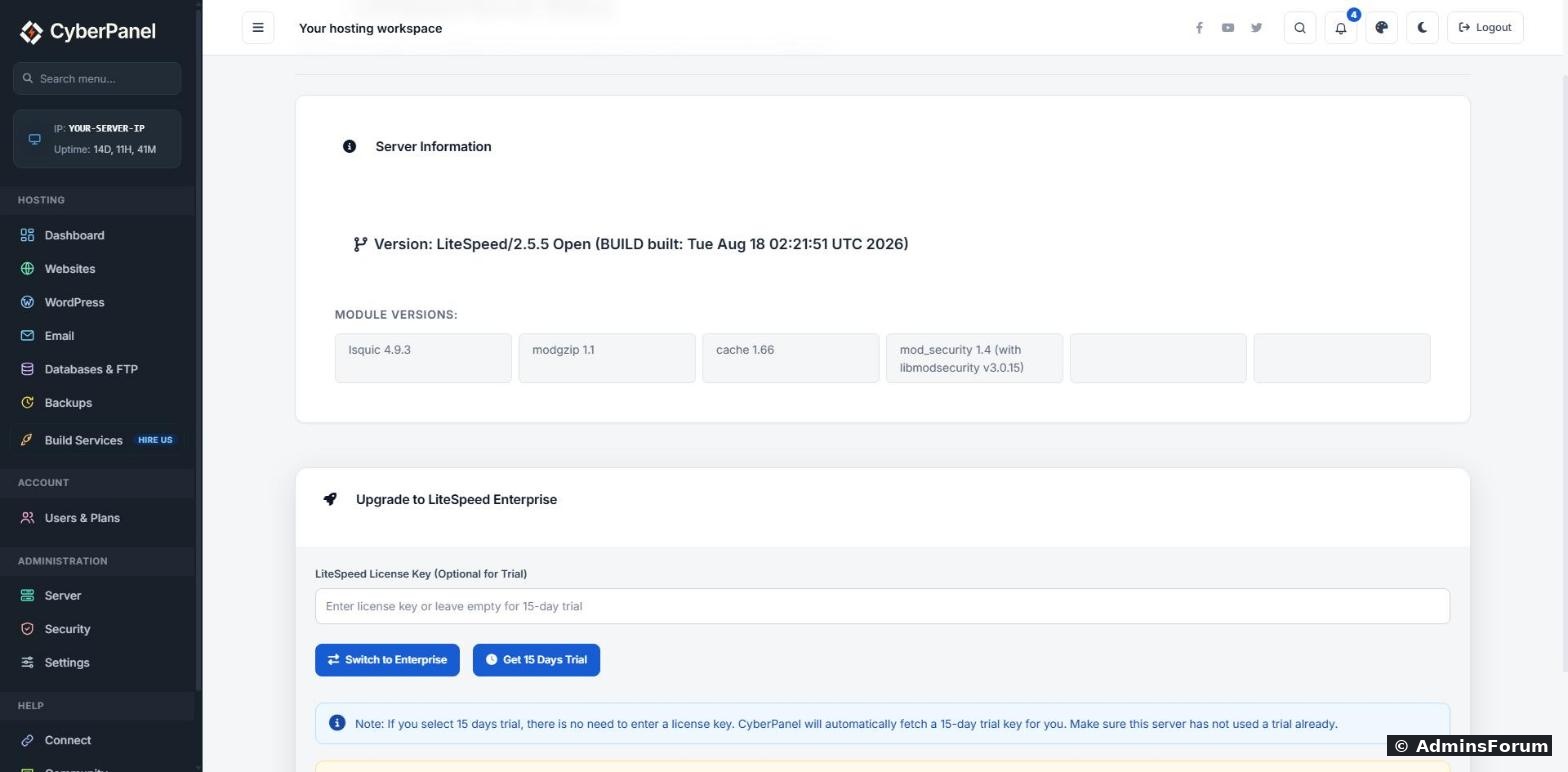
Leave the license key empty and click Get 15 Days Trial. CyberPanel asks once more on the page itself. Click Yes, Activate Trial.
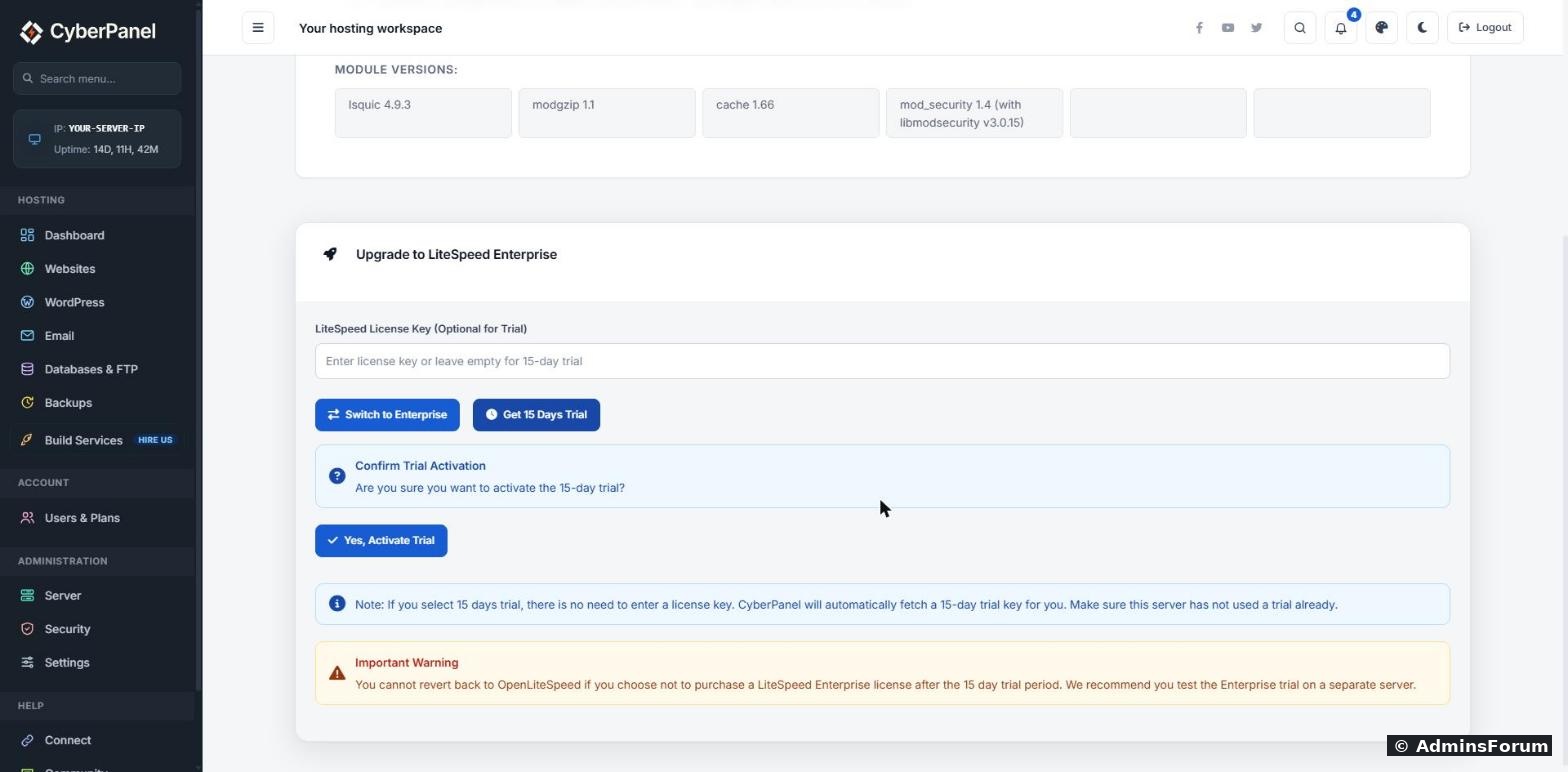
The progress log showed what happens: CyberPanel removes the
package, installs LiteSpeed Enterprise, saves the trial key in
, starts the server, and then rebuilds the config of every website, one by one. On our server it finished within a minute or two. Expect a short outage while one web server is removed and the other starts, so do it at a quiet time.
Reload the page. It now shows LiteSpeed/6.3.7 Enterprise and a License Manager. Click License Status to see the trial:
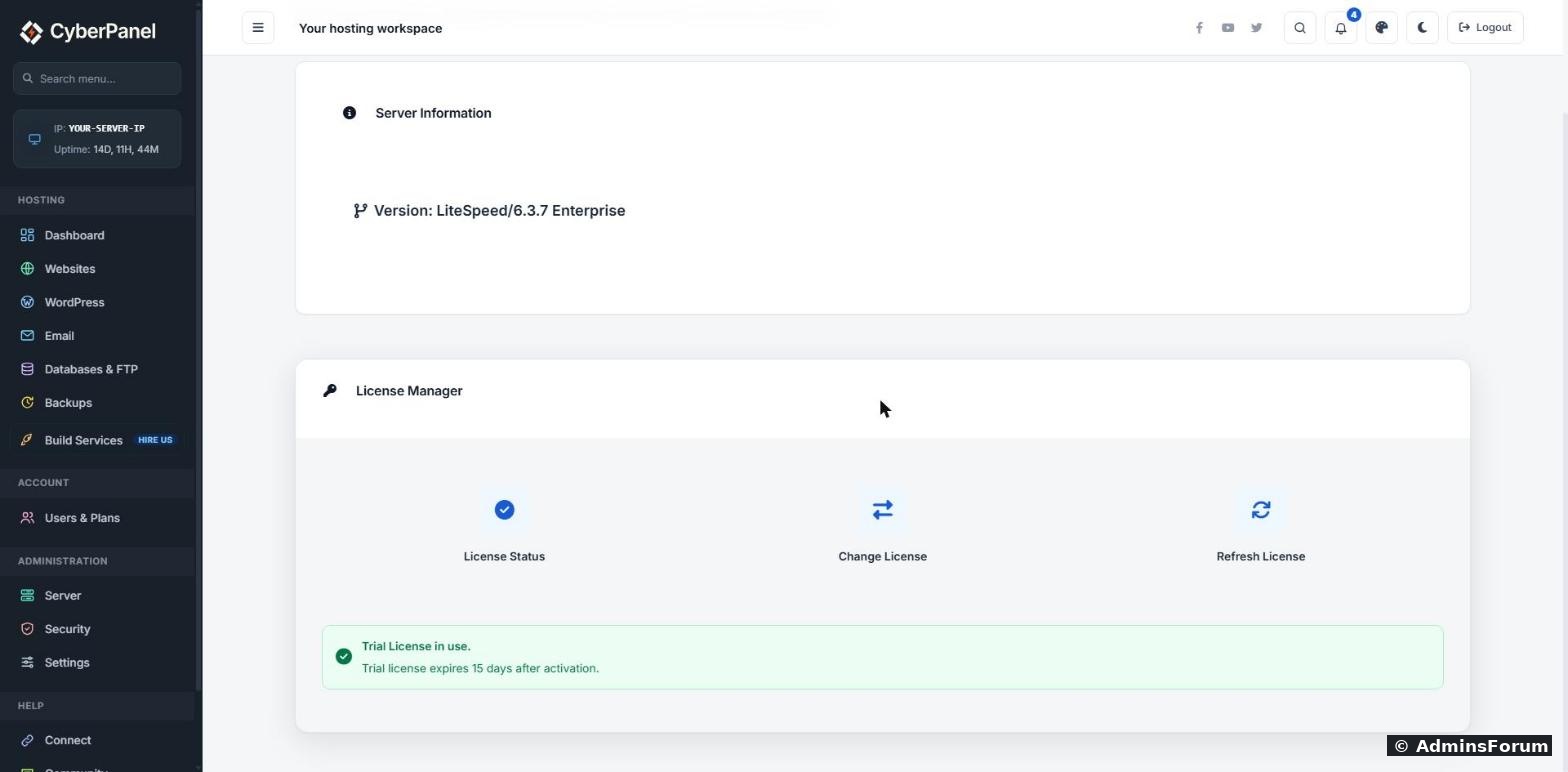
Step 3: Check your sites
All four of our sites, the CyberPanel panel itself (port 8090), and a 301 redirect we had set up kept working. LiteSpeed Cache for WordPress kept serving cached pages (
). Check yours:
What changed: real numbers
Same server, same WordPress home page, Apache Bench with 400 requests, 20 at a time (
):
Cached pages got about 11% faster. Uncached pages doubled, but be careful with that number: the switch also rebuilt each site's PHP settings, including how many PHP processes it may use, so part of that gain may come from different limits, not only from the faster server.
.htaccess now really works. OpenLiteSpeed only reads rewrite rules from
. Enterprise reads it like Apache does. Our LiteSpeed Cache plugin's Browser Cache setting writes one-year expiry rules into
: on OpenLiteSpeed they did nothing (CSS stayed at
), and on Enterprise the same file was sent with
, exactly the plugin's value. If you use plugins or apps that rely on
(php_value lines, Expires, Header rules), this is the biggest practical difference.
What breaks: custom per-site settings are lost
CyberPanel rebuilds every site's config in Apache style (
blocks) during the switch, and anything you had added by hand is gone. On our server:
Turning open_basedir back on: the open_basedir switch on the website's page in CyberPanel didn't restore it for us on Enterprise (PHP still reported it empty). What worked: open Websites → your site → Config → vHost Conf and add this line right under every
line. There are two, one for http and one for https:
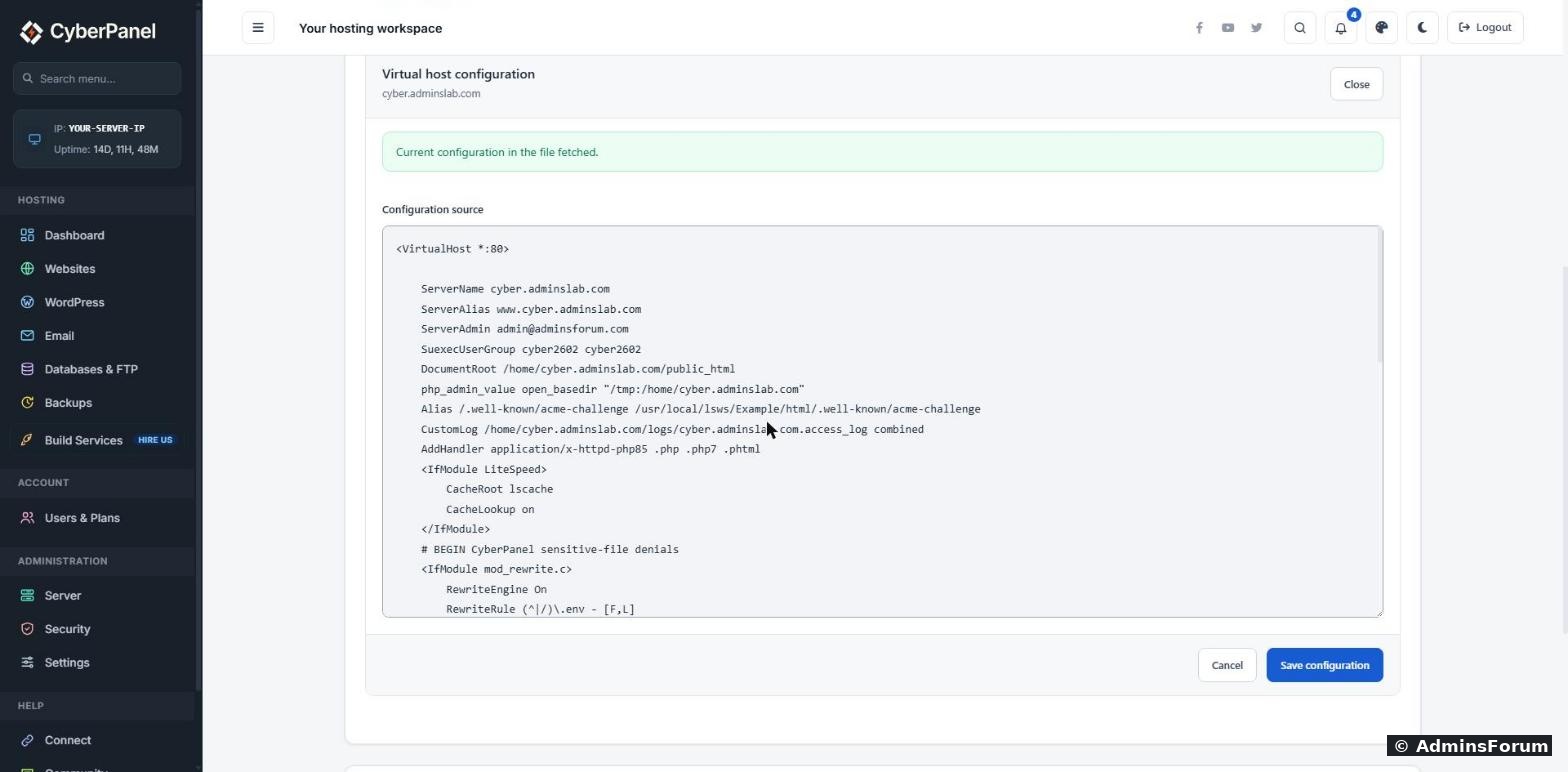
Save, then restart LiteSpeed:
PHP then reported
, and the site worked normally. Repeat for each website. Compare with the backup from step 1 to find any other settings you need to add back.
Is it worth it?
Tried the switch on your server? Share your numbers below (hide your server IP first).
CyberPanel runs on OpenLiteSpeed (free), but it can switch your server to LiteSpeed Enterprise, the paid web server, with a free 15-day trial and no license key. We did it on a CyberPanel 3.0.8 server with four websites, measured before and after, and checked what changed. Most things kept working, but the switch quietly removed a security setting, and you can't go back.
Read this first
- There's no way back to OpenLiteSpeed. CyberPanel says so on the switch page: if you don't buy a license after the trial, you can't revert. CyberPanel itself recommends testing the trial on a separate server. We agree: try it on a test VPS or a snapshot, not on your only production server.
- One trial per server. The page asks you to make sure the server hasn't used a trial before.
- Licenses after the trial: LiteSpeed has a free Free Starter license (1 domain, servers up to 2 GB RAM) and paid plans for more domains. You enter a key later under License Manager → Change License.
Step 1: Back up your site configs
The switch rebuilds every website's web server config from scratch (see "What breaks" below). Save the old ones first, so you can see what you had:
Code:
tar czf /root/vhosts-before-lsws.tgz /usr/local/lsws/conf/vhostsStep 2: Start the trial
Go to Server Status → LiteSpeed Status (or open
Code:
https://YOUR-SERVER-IP:8090/serverstatus/litespeedStatusLeave the license key empty and click Get 15 Days Trial. CyberPanel asks once more on the page itself. Click Yes, Activate Trial.
The progress log showed what happens: CyberPanel removes the
Code:
openlitespeedCode:
/usr/local/lsws/conf/trial.keyReload the page. It now shows LiteSpeed/6.3.7 Enterprise and a License Manager. Click License Status to see the trial:
Step 3: Check your sites
All four of our sites, the CyberPanel panel itself (port 8090), and a 301 redirect we had set up kept working. LiteSpeed Cache for WordPress kept serving cached pages (
Code:
x-litespeed-cache: hitCode:
curl -s -o /dev/null -w "%{http_code}\n" https://yourdomain.com/
curl -sI https://yourdomain.com/ | grep -i x-litespeed-cache
What changed: real numbers
Same server, same WordPress home page, Apache Bench with 400 requests, 20 at a time (
Code:
ab -n 400 -c 20Code:
                       OpenLiteSpeed 2.5.5   LiteSpeed Enterprise 6.3.7
Cached page            339 requests/s        376 requests/s
Uncached (PHP) 15.6 requests/s 31.5 requests/s.htaccess now really works. OpenLiteSpeed only reads rewrite rules from
Code:
.htaccessCode:
.htaccessCode:
max-age=604800Code:
max-age=31557600Code:
.htaccessWhat breaks: custom per-site settings are lost
CyberPanel rebuilds every site's config in Apache style (
Code:
<VirtualHost>- open_basedir was switched off. Our site had it on (
in the old config). After the switch, PHP reportedCode:php_admin_value open_basedir "/tmp:$VH_ROOT"
. That means one site's PHP could read other sites' files again.Code:open_basedir = ''
- A custom PHP error log setting we had added was gone.
- A custom
block we had added was gone.Code:expires
- PHP versions were kept (one site stayed on 8.5, another on 8.3).
Turning open_basedir back on: the open_basedir switch on the website's page in CyberPanel didn't restore it for us on Enterprise (PHP still reported it empty). What worked: open Websites → your site → Config → vHost Conf and add this line right under every
Code:
DocumentRootCode:
php_admin_value open_basedir "/tmp:/home/yourdomain.com"Save, then restart LiteSpeed:
Code:
/usr/local/lsws/bin/lswsctrl restartCode:
open_basedir = '/tmp:/home/yourdomain.com'Is it worth it?
- Yes, if you run busy sites, need full
support (moving from cPanel/Apache hosting), or want LiteSpeed's paid support.Code:.htaccess
- Probably not, if you run a few small sites with LiteSpeed Cache. OpenLiteSpeed already serves cached pages fast (339 vs 376 requests/s for us), and it's free forever.
Tried the switch on your server? Share your numbers below (hide your server IP first).