



10-13-2026, 05:44 PM
To return an aaPanel Git-managed website to a recorded deployment, open Git Manager → Deployments, locate the target commit and choose Rollback. Back up first, complete the confirmation, then check the active commit and the actual website. A successful code rollback does not prove that an application's database or uploads were restored.
Tested environment and result
Ubuntu 22.04, aaPanel 8.0.7 Free Edition, Nginx and a dedicated static demo website using MDN's beginner HTML/CSS repository. We started at commit 6c7a360, deliberately deployed commit 16a0f38, then used the native deployment-history Rollback action to return to 6c7a360. The history recorded Success and Active for the restored commit. The sample page and its image loaded over HTTPS afterwards.
These commits change repository administration files, so the page looked the same before and after. This rehearsal verifies the commit transition and the native recovery controls; it does not demonstrate fixing a visibly broken page, recovering database migrations or restoring a dynamic application.
Before starting
1. Inspect the current deployment
Open Website, find the correct site, click Conf and select Git Manager. The Repository screen displays Deployed commit and the last deployment time. In our controlled test, the earlier sample commit 16a0f38 became the active version after we deployed it from Commit history.
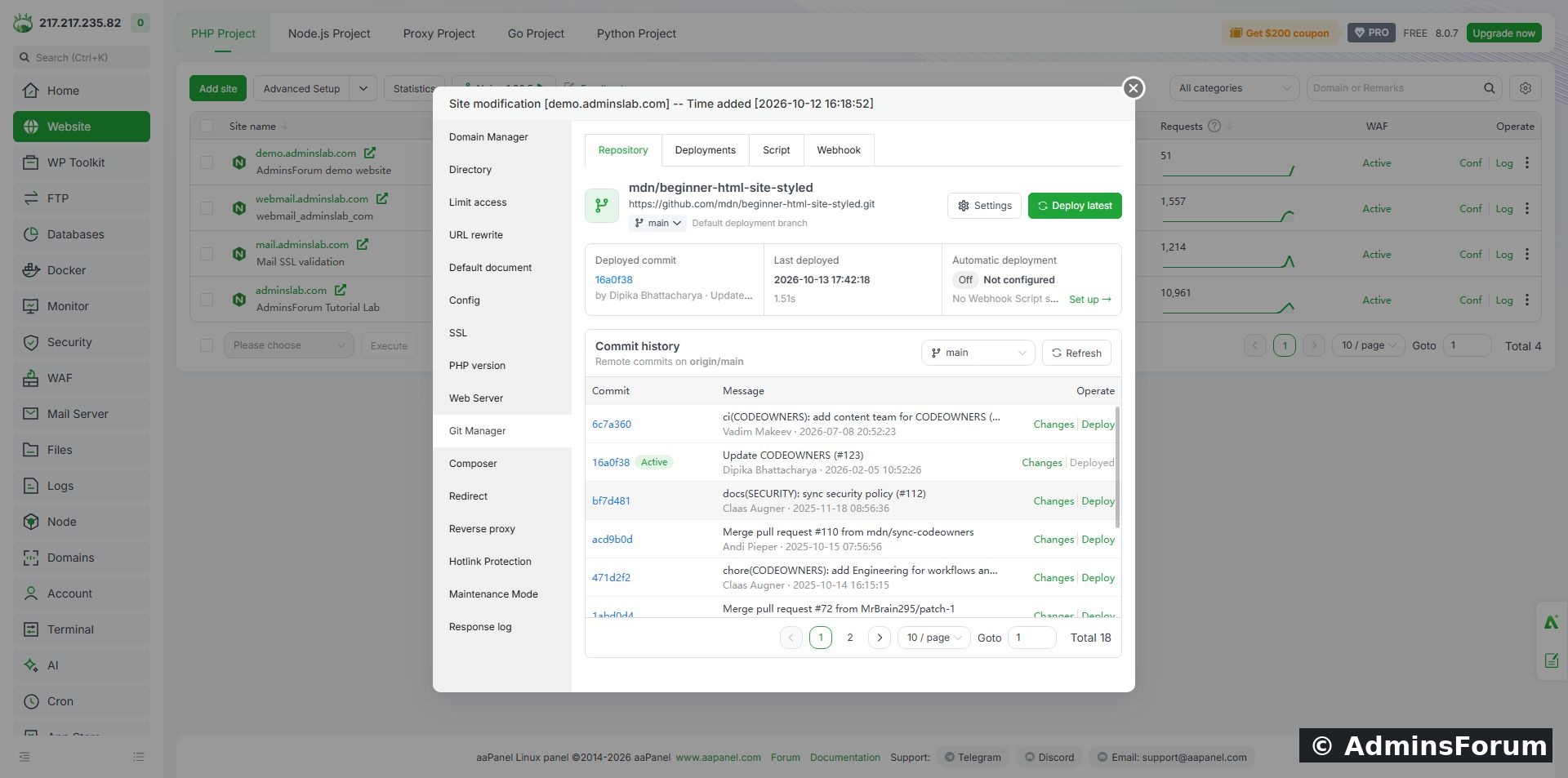
The test site at commit 16a0f38 before returning to the original recorded deployment.
The Repository page's per-commit Deploy action deploys a selected remote commit. The Rollback action used below belongs to an existing deployment-history record. Do not confuse the two controls.
2. Choose the recorded recovery target
Select Deployments. Locate the record for the commit you want to restore. In our history, 16a0f38 was Current/Active, while the earlier successful deployment of 6c7a360 offered Log and Rollback.
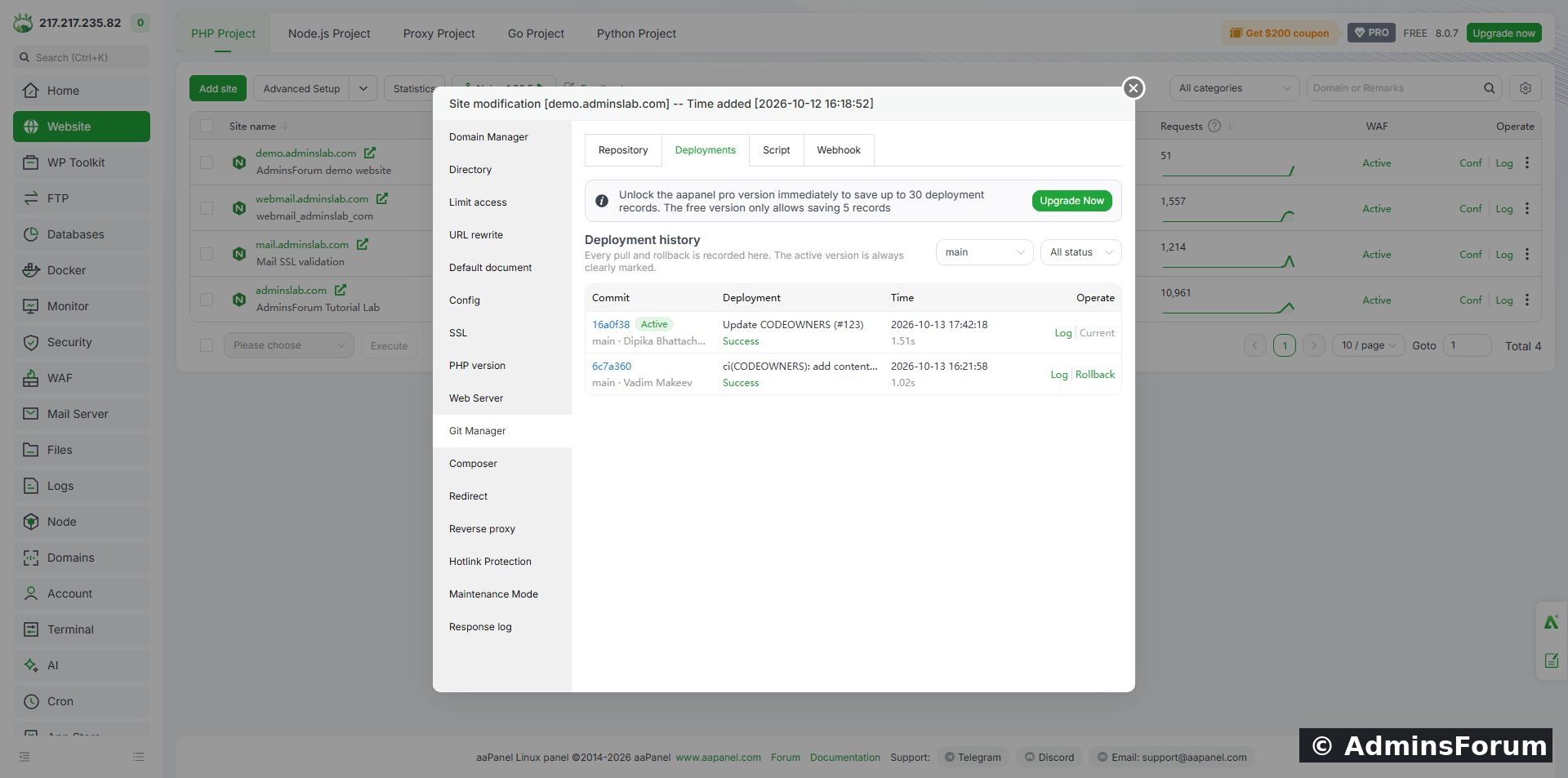
Deployment history before recovery. The target is the existing 6c7a360 record.
If you need to investigate a deployment first, open its Log. Check the result and commit carefully; a successful task is not proof that the application itself was healthy.
3. Confirm the rollback
Click Rollback on the intended record. Our panel warned that it would return the deployment to an earlier commit state and asked us to back up site files first. It also displayed an arithmetic verification field. Complete the check shown in your own panel and confirm only after checking the destination and target.
Wait for the result. Do not repeatedly submit the action while it is running. If it fails, inspect the deployment log before making another change. The exact prompt can differ across panel versions.
4. Verify the active version
The history should now show a new successful record for the restored commit, marked Active and Current. In our lab that record was 6c7a360; the intermediate 16a0f38 record was no longer active. The operation took 1.05 seconds in this tiny sample; this is not a performance guarantee.
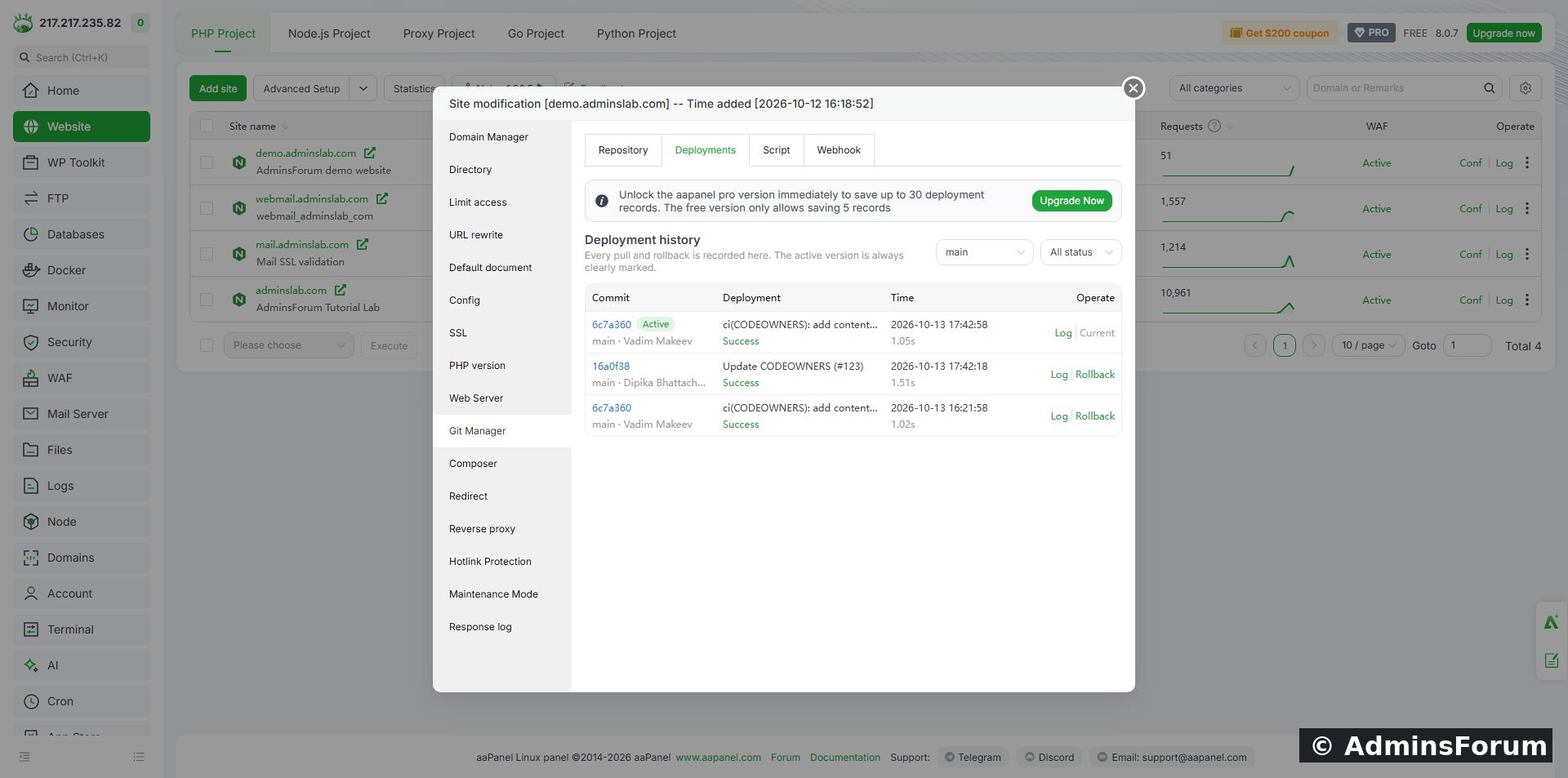
The completed native rollback records 6c7a360 as Success, Active and Current.
Reopen Repository and check the deployed commit if the history display is unclear. Then visit the website over HTTPS. Check the affected page and its assets, not just the homepage. For a dynamic application, also verify relevant login, read and write workflows without damaging production data.
5. Know what this test does not recover
Git deployment recovery is not a full server backup restore. A database schema change may be incompatible with older code. User-uploaded media, environment secrets, generated files and installed dependencies can need a separate recovery plan. Avoid assuming that every file on disk exactly matches the selected commit: the per-commit deployment warning in this installation said matching repository files would be overwritten and other site files retained. We did not independently test deletion or retention behaviour during rollback.
Our static example had no database migration, custom build script or external application state. Those workflows need their own rehearsal before production use.
History retention and troubleshooting
The installed Free panel displays a limit of 5 deployment records. Keep an independent recovery record and backups; a short history is not a long-term backup strategy. Pro availability and limits are outside this hands-on Free test.
Our final lab state
Original commit 6c7a360 restored; history Success/Active; demo website and image accessible over HTTPS; automatic deployment still Off. Existing WordPress and mail sites were outside this exercise.
Need help? Include the aaPanel version, branch, current and target commit identifiers and the relevant deployment error in Plugins & Integrations Support. Remove credentials and webhook secrets.
Tested environment and result
Ubuntu 22.04, aaPanel 8.0.7 Free Edition, Nginx and a dedicated static demo website using MDN's beginner HTML/CSS repository. We started at commit 6c7a360, deliberately deployed commit 16a0f38, then used the native deployment-history Rollback action to return to 6c7a360. The history recorded Success and Active for the restored commit. The sample page and its image loaded over HTTPS afterwards.
These commits change repository administration files, so the page looked the same before and after. This rehearsal verifies the commit transition and the native recovery controls; it does not demonstrate fixing a visibly broken page, recovering database migrations or restoring a dynamic application.
Before starting
- Use a separate test site first. Complete the Git deployment guide if the repository is not connected yet.
- Record the current commit, branch and intended recovery commit. Use the commit identifier rather than relying on a message or timestamp alone.
- Back up the site files and any separate database. Our demo's file-only backup completed before the rehearsal; restoration of that ZIP was not tested here.
- Review runtime uploads, configuration and dependencies that sit outside the repository. Keep automatic deployment off during the exercise so it cannot immediately replace your selected version.
1. Inspect the current deployment
Open Website, find the correct site, click Conf and select Git Manager. The Repository screen displays Deployed commit and the last deployment time. In our controlled test, the earlier sample commit 16a0f38 became the active version after we deployed it from Commit history.
The test site at commit 16a0f38 before returning to the original recorded deployment.
The Repository page's per-commit Deploy action deploys a selected remote commit. The Rollback action used below belongs to an existing deployment-history record. Do not confuse the two controls.
2. Choose the recorded recovery target
Select Deployments. Locate the record for the commit you want to restore. In our history, 16a0f38 was Current/Active, while the earlier successful deployment of 6c7a360 offered Log and Rollback.
Deployment history before recovery. The target is the existing 6c7a360 record.
If you need to investigate a deployment first, open its Log. Check the result and commit carefully; a successful task is not proof that the application itself was healthy.
3. Confirm the rollback
Click Rollback on the intended record. Our panel warned that it would return the deployment to an earlier commit state and asked us to back up site files first. It also displayed an arithmetic verification field. Complete the check shown in your own panel and confirm only after checking the destination and target.
Wait for the result. Do not repeatedly submit the action while it is running. If it fails, inspect the deployment log before making another change. The exact prompt can differ across panel versions.
4. Verify the active version
The history should now show a new successful record for the restored commit, marked Active and Current. In our lab that record was 6c7a360; the intermediate 16a0f38 record was no longer active. The operation took 1.05 seconds in this tiny sample; this is not a performance guarantee.
The completed native rollback records 6c7a360 as Success, Active and Current.
Reopen Repository and check the deployed commit if the history display is unclear. Then visit the website over HTTPS. Check the affected page and its assets, not just the homepage. For a dynamic application, also verify relevant login, read and write workflows without damaging production data.
5. Know what this test does not recover
Git deployment recovery is not a full server backup restore. A database schema change may be incompatible with older code. User-uploaded media, environment secrets, generated files and installed dependencies can need a separate recovery plan. Avoid assuming that every file on disk exactly matches the selected commit: the per-commit deployment warning in this installation said matching repository files would be overwritten and other site files retained. We did not independently test deletion or retention behaviour during rollback.
Our static example had no database migration, custom build script or external application state. Those workflows need their own rehearsal before production use.
History retention and troubleshooting
The installed Free panel displays a limit of 5 deployment records. Keep an independent recovery record and backups; a short history is not a long-term backup strategy. Pro availability and limits are outside this hands-on Free test.
- Target missing: confirm the branch/filter and retained history. Do not assume every remote commit has a rollback record.
- Task fails: read the record's log and check repository access and disk space. Preserve useful errors before retrying.
- Correct commit but wrong page: check the document root, default document and application/CDN caches. Verify actual content before declaring recovery complete.
- Application fails after rollback: investigate database compatibility, configuration and dependencies rather than repeatedly selecting older commits.
Our final lab state
Original commit 6c7a360 restored; history Success/Active; demo website and image accessible over HTTPS; automatic deployment still Off. Existing WordPress and mail sites were outside this exercise.
Need help? Include the aaPanel version, branch, current and target commit identifiers and the relevant deployment error in Plugins & Integrations Support. Remove credentials and webhook secrets.