10-19-2026, 02:36 PM
Quick answer
For one hostname, create a Cloudflare Single Redirect matching only its HTTP URLs and send them to the equivalent HTTPS URLs. Preserve the path and query string, then check that HTTP redirects once and HTTPS returns the expected page. Keep a working HTTPS origin and the appropriate TLS mode in place first.
We tested this on alias-lab.adminslab.com on 19 October 2026. It is a disposable static lab page, already proxied with Full (strict) verified in our previous HTTPS lesson. We added a hostname-scoped rule, not a zone-wide HTTPS toggle. Existing main-site, mail and panel records were not changed.
1. Establish what happens before the rule
At 14:32:00 UTC, a GET to both of these URLs returned HTTP 200:
So working HTTPS did not automatically mean the HTTP request was redirected. The origin certificate and Cloudflare Full (strict) setup were already checked; we did not weaken that validation to perform this lesson.
Record your own baseline before adding a redirect. Use a harmless path and non-sensitive query value. Do not test with passwords, session tokens or personal data in a URL.
2. Open Single Redirects
Select the correct Cloudflare domain, open Rules > Redirect Rules and inspect existing rules first. Our lab showed zero rules. Choose Create rule. The form offers templates and matching options; we used Wildcard pattern to keep the example limited to the exact lab hostname.
3. Enter the exact request and target patterns
Our rule was:
Replace the hostname with your own. The request pattern begins with http:// and contains a specific hostname; it is not an all-hostname or all-scheme match. The * captures the remaining portion, and ${1} places that captured portion into the target. Keep the hostname exact when practicing so another site cannot match unintentionally.
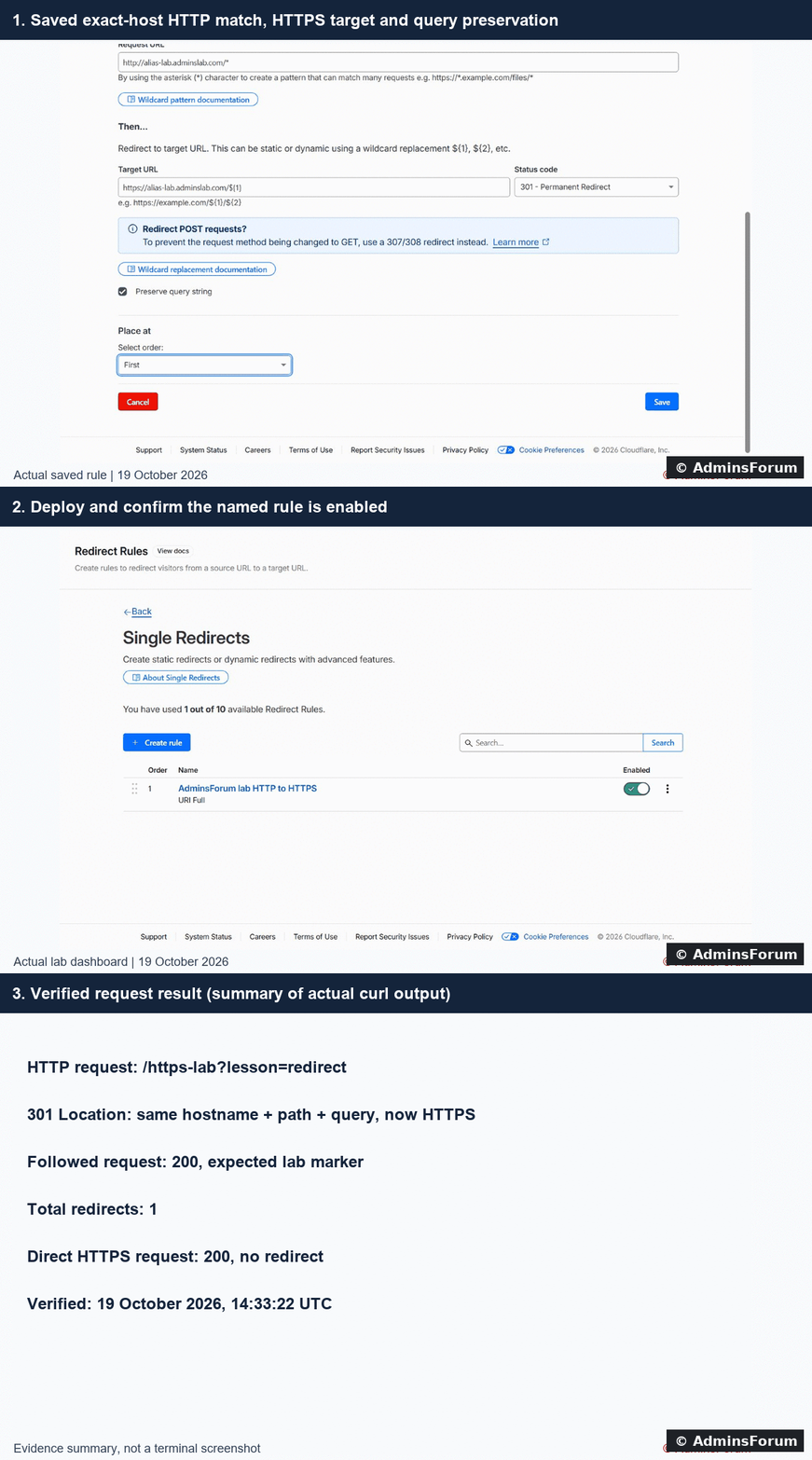
The GIF combines two actual dashboard captures with a clearly labelled summary of our request results. It is a paced sequence, not continuous video or a fabricated terminal screenshot.
We reviewed the rule, checked Preserve query string and used Deploy. The rule list then showed the named rule enabled, with one rule used. Save as Draft would not demonstrate a deployed redirect.
We used GET for this static-page test. A 301 is permanent and clients may cache it. For forms or APIs, evaluate the redirect status and method behavior separately; 307/308 preserve the request method, while 301/302 may result in a POST being followed as GET. We did not test a POST, upload or API client here.
4. Follow the chain with a limit
From the Ubuntu lab server we ran:
-L follows redirects. -D - prints response headers, including intermediate Location values. --max-redirs 5 bounds the chain rather than following it indefinitely; --max-time limits request duration. The -w output records the final status, number of redirects and effective URL.
At 14:33:22 UTC the first response was:
The followed response returned HTTP 200 and our expected static marker:
The path /https-lab and query lesson=redirect both survived. The origin log recorded the request with the same UTC timestamp and unique User-Agent. That is stronger evidence than observing a deployed toggle alone.
5. Request HTTPS directly too
Our direct HTTPS request returned 200 without a Location header. The HTTP-only rule did not redirect that HTTPS request back to itself. The successful checks were recorded server-side requests; they do not certify every browser, form or application flow.
How to diagnose a redirect loop
Read the Location headers in order. Look for HTTP and HTTPS alternating, two hostnames sending traffic back to each other, or an unchanged URL being repeatedly redirected. Check Cloudflare rules, the origin and application canonical-URL settings together. A redirect can be emitted at more than one layer.
Flexible mode combined with an origin that always redirects HTTP to HTTPS is a known conflict. An origin redirecting HTTPS back to HTTP can also oppose an edge HTTPS redirect. Fix the configuration disagreement; do not make disabling certificate validation the default repair. Keep a record of current values before changing anything.
Our working rule was tested to avoid a loop; we did not deliberately break the live lab by introducing one. Browser-cached permanent redirects can complicate retesting, so compare fresh command-line responses with browser behavior. A higher redirect limit does not repair a cycle.
Scope, recovery and separate HTTPS settings
The new lab rule remains enabled. No deletion, disabling or rollback was tested. If a newly added rule behaves incorrectly, identify its exact match and target, preserve its configuration, then plan a scoped correction. Do not disable unrelated security or redirect rules across the zone.
Always Use HTTPS is a separate broad setting, and HSTS changes browser behavior with additional persistence implications. We did not change either. DNS-only traffic does not pass through this edge rule. First confirm proxy status with the orange-cloud versus DNS-only guide.
References
Cloudflare Single Redirect settings and redirect-loop troubleshooting. The rule deployment and request results above are our own lab work.
For one hostname, create a Cloudflare Single Redirect matching only its HTTP URLs and send them to the equivalent HTTPS URLs. Preserve the path and query string, then check that HTTP redirects once and HTTPS returns the expected page. Keep a working HTTPS origin and the appropriate TLS mode in place first.
We tested this on alias-lab.adminslab.com on 19 October 2026. It is a disposable static lab page, already proxied with Full (strict) verified in our previous HTTPS lesson. We added a hostname-scoped rule, not a zone-wide HTTPS toggle. Existing main-site, mail and panel records were not changed.
1. Establish what happens before the rule
At 14:32:00 UTC, a GET to both of these URLs returned HTTP 200:
Code:
http://alias-lab.adminslab.com/https-lab?lesson=redirect
https://alias-lab.adminslab.com/https-lab?lesson=redirectRecord your own baseline before adding a redirect. Use a harmless path and non-sensitive query value. Do not test with passwords, session tokens or personal data in a URL.
2. Open Single Redirects
Select the correct Cloudflare domain, open Rules > Redirect Rules and inspect existing rules first. Our lab showed zero rules. Choose Create rule. The form offers templates and matching options; we used Wildcard pattern to keep the example limited to the exact lab hostname.
3. Enter the exact request and target patterns
Our rule was:
Code:
Rule name: AdminsForum lab HTTP to HTTPS
Match type: Wildcard pattern
Request URL: http://alias-lab.adminslab.com/*
Target URL: https://alias-lab.adminslab.com/${1}
Status code: 301 - Permanent Redirect
Preserve query string: checkedThe GIF combines two actual dashboard captures with a clearly labelled summary of our request results. It is a paced sequence, not continuous video or a fabricated terminal screenshot.
We reviewed the rule, checked Preserve query string and used Deploy. The rule list then showed the named rule enabled, with one rule used. Save as Draft would not demonstrate a deployed redirect.
We used GET for this static-page test. A 301 is permanent and clients may cache it. For forms or APIs, evaluate the redirect status and method behavior separately; 307/308 preserve the request method, while 301/302 may result in a POST being followed as GET. We did not test a POST, upload or API client here.
4. Follow the chain with a limit
From the Ubuntu lab server we ran:
Code:
curl --max-time 25 --max-redirs 5 -sS -L -D - \
  -A AdminsForum-HTTPS-Redirect-Lab-20261019 \
  -w '\nFINAL %{http_code} redirects=%{num_redirects} url=%{url_effective}\n' \
'http://alias-lab.adminslab.com/https-lab?lesson=redirect'At 14:33:22 UTC the first response was:
Code:
HTTP/1.1 301 Moved Permanently
Location: https://alias-lab.adminslab.com/https-lab?lesson=redirectCode:
AdminsForum Cloudflare TLS lab - AF-STRICT-LAB-20261019
FINAL 200 redirects=1 url=https://alias-lab.adminslab.com/https-lab?lesson=redirect5. Request HTTPS directly too
Code:
curl --max-time 20 -sS -o /dev/null -D - \
'https://alias-lab.adminslab.com/https-lab?lesson=redirect'How to diagnose a redirect loop
Read the Location headers in order. Look for HTTP and HTTPS alternating, two hostnames sending traffic back to each other, or an unchanged URL being repeatedly redirected. Check Cloudflare rules, the origin and application canonical-URL settings together. A redirect can be emitted at more than one layer.
Flexible mode combined with an origin that always redirects HTTP to HTTPS is a known conflict. An origin redirecting HTTPS back to HTTP can also oppose an edge HTTPS redirect. Fix the configuration disagreement; do not make disabling certificate validation the default repair. Keep a record of current values before changing anything.
Our working rule was tested to avoid a loop; we did not deliberately break the live lab by introducing one. Browser-cached permanent redirects can complicate retesting, so compare fresh command-line responses with browser behavior. A higher redirect limit does not repair a cycle.
Scope, recovery and separate HTTPS settings
The new lab rule remains enabled. No deletion, disabling or rollback was tested. If a newly added rule behaves incorrectly, identify its exact match and target, preserve its configuration, then plan a scoped correction. Do not disable unrelated security or redirect rules across the zone.
Always Use HTTPS is a separate broad setting, and HSTS changes browser behavior with additional persistence implications. We did not change either. DNS-only traffic does not pass through this edge rule. First confirm proxy status with the orange-cloud versus DNS-only guide.
References
Cloudflare Single Redirect settings and redirect-loop troubleshooting. The rule deployment and request results above are our own lab work.