



10-16-2026, 06:19 AM
A database connection error does not always mean the database is down. In CloudPanel, first identify whether the failure is authentication, database selection, transport or the website runtime.
This CloudPanel v2 diagnostic guide is checked against the official documentation. The image is an original workflow illustration; it is not a screenshot of a newly reproduced lab outage. Replace all example names with your own values.
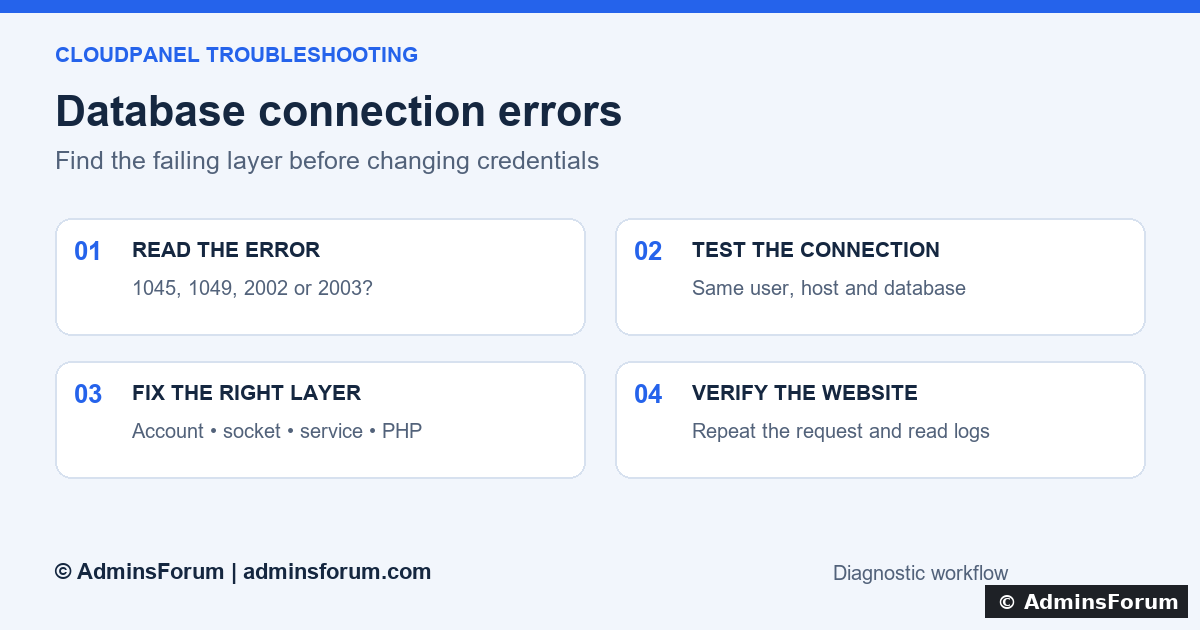
AdminsForum workflow: read the exact error, test the same connection, fix one cause and verify the application.
Before you start
You need access to the affected site's CloudPanel settings and its application configuration. SSH is needed for the optional command-line checks. Keep a protected copy of the configuration before editing it. Never paste database passwords, full connection URLs or unredacted .env files into a support thread.
1. Find the exact error
Open Sites → affected site → Logs, reproduce one harmless failed page request, and note the timestamp. Also inspect the application's private error log. A browser message such as “Error establishing a database connection” is only a summary.
2. Compare the application's connection settings
In CloudPanel, open the site's Databases area. Compare the existing database name and database user with the application's configuration. CloudPanel's SSH/site user, panel login and database user are different accounts.
Check the host, port, database name and username character by character. Read the existing password from your secure records rather than guessing. In a framework's .env file, special characters must follow that framework's quoting rules. A correct password can fail if a configuration parser truncates it at a comment character or interprets a connection URL incorrectly.
For a migrated site, confirm that the database was actually imported. Creating an empty database with the expected name does not restore its tables. Do not overwrite an existing database as a connection-error experiment.
3. Test with the website's database account
For a local TCP connection, run the following on the website server. Use the host and port from the application's actual settings; 3306 is the usual example, not a guaranteed value.
Replace app_user and app_database. The client prompts for the password; do not place it after --password or in shell history. If your installation provides the mariadb client instead, use that client with the equivalent connection options.
After a successful login, run these read-only checks:
DATABASE() should show the intended database. CURRENT_USER() identifies the account MySQL matched. SHOW TABLES should list the application's expected tables. SELECT 1 proves a basic query works, but does not prove the application can perform every required operation. Keep grant output private if it identifies internal hosts or accounts.
If this test fails, follow the matching error branch below. If it succeeds but the website fails, focus on the website's runtime, cached configuration and connection settings rather than changing the database server.
4. Separate socket and TCP problems
On Unix, MySQL clients and PHP PDO_MYSQL commonly treat localhost as a Unix socket connection. Using 127.0.0.1 selects TCP. They are not automatically interchangeable: the listener, socket location and matched account can differ.
If the application intentionally uses a socket, compare its configured socket path with the running server's actual socket path. If the intended setup is TCP, test TCP explicitly as above and use the application's documented host/port fields. Do not randomly alternate host values until one works without understanding the difference. A port setting alone may not force a localhost socket connection to use TCP.
For a remote database, test from the application server, confirm the intended endpoint and use the provider's encrypted connection requirements. Never open database port 3306 to the whole internet to troubleshoot a local website.
5. Resolve authentication or database-access errors
For 1045, compare the database username and existing credential with the application configuration. The host named in the error is useful evidence. A successful login to phpMyAdmin using a different account does not prove the website account works.
For 1049, verify spelling and whether the database belongs on this server. For 1044, inspect the selected database and the permissions assigned to that user in CloudPanel. CloudPanel supports database users with selected database permissions. Grant only what that application requires for its intended database; do not replace the website login with the MySQL root account or grant access to every database.
If a password really must be reset, plan the change and update every dependent application, worker and scheduled task together. Random password resets can turn one failure into several. Back up before database migrations or other changes that modify data.
6. Check the database service when connections are refused
On a systemd server, these read-only commands help identify the installed service:
A missing TCP listener does not prove a socket-only server is stopped. Match the check to the intended transport. Inspect the actual unit you found, for example:
Use mariadb in place of mysql if that is the installed unit. Check for startup failures, disk exhaustion or memory-related termination. Do not repeatedly restart the database without reading the failure: this can interrupt other sites and hide the original evidence.
7. Check PHP and cached application settings
If the CLI connection works, confirm which PHP version the affected website uses in CloudPanel. A CLI PHP check can help, but it may inspect a different version or configuration from PHP-FPM:
Match the required extension to the application's database driver and the website's actual PHP version. Do not leave a public phpinfo page or a credentials-based connection test online. After correcting configuration, follow the framework's documented configuration-cache procedure. Long-running application workers may also retain old settings; reload only the affected service when required.
8. Verify the website, not just the login
Repeat the original failed page and check its logs at the new timestamp. Test a normal database-backed page and, where appropriate, a reversible test operation. Confirm that scheduled jobs and background workers use the updated settings too. Remove temporary diagnostic files and keep the backup outside the public web directory.
When asking for help
Share the error code, redacted error message, CloudPanel/PHP/database versions, whether the same-account CLI test worked, and recent changes. Never share passwords or complete connection strings. This evidence lets support distinguish an account problem from a service or runtime problem quickly.
Official references
CloudPanel database management
MySQL connection troubleshooting
PHP PDO_MYSQL connection settings
This CloudPanel v2 diagnostic guide is checked against the official documentation. The image is an original workflow illustration; it is not a screenshot of a newly reproduced lab outage. Replace all example names with your own values.
AdminsForum workflow: read the exact error, test the same connection, fix one cause and verify the application.
Before you start
You need access to the affected site's CloudPanel settings and its application configuration. SSH is needed for the optional command-line checks. Keep a protected copy of the configuration before editing it. Never paste database passwords, full connection URLs or unredacted .env files into a support thread.
1. Find the exact error
Open Sites → affected site → Logs, reproduce one harmless failed page request, and note the timestamp. Also inspect the application's private error log. A browser message such as “Error establishing a database connection” is only a summary.
- 1045 / Access denied for user: investigate the username, password and matching user host.
- 1049 / Unknown database: check the database name and that you connected to the intended server.
- 1044 / Access denied to database: the account may authenticate but lack access to that database.
- 2002 / No such file or directory: a local socket path may be wrong; it does not necessarily mean a website file is missing.
- 2003 / Connection refused: check the database service, address, port and listening interface.
- could not find driver: check the PHP database extension used by the website.
2. Compare the application's connection settings
In CloudPanel, open the site's Databases area. Compare the existing database name and database user with the application's configuration. CloudPanel's SSH/site user, panel login and database user are different accounts.
Check the host, port, database name and username character by character. Read the existing password from your secure records rather than guessing. In a framework's .env file, special characters must follow that framework's quoting rules. A correct password can fail if a configuration parser truncates it at a comment character or interprets a connection URL incorrectly.
For a migrated site, confirm that the database was actually imported. Creating an empty database with the expected name does not restore its tables. Do not overwrite an existing database as a connection-error experiment.
3. Test with the website's database account
For a local TCP connection, run the following on the website server. Use the host and port from the application's actual settings; 3306 is the usual example, not a guaranteed value.
Code:
mysql --protocol=TCP --host=127.0.0.1 --port=3306 --user=app_user --password app_databaseAfter a successful login, run these read-only checks:
Code:
SELECT DATABASE(), CURRENT_USER();
SHOW TABLES;
SELECT 1;
SHOW GRANTS;
exitIf this test fails, follow the matching error branch below. If it succeeds but the website fails, focus on the website's runtime, cached configuration and connection settings rather than changing the database server.
4. Separate socket and TCP problems
On Unix, MySQL clients and PHP PDO_MYSQL commonly treat localhost as a Unix socket connection. Using 127.0.0.1 selects TCP. They are not automatically interchangeable: the listener, socket location and matched account can differ.
If the application intentionally uses a socket, compare its configured socket path with the running server's actual socket path. If the intended setup is TCP, test TCP explicitly as above and use the application's documented host/port fields. Do not randomly alternate host values until one works without understanding the difference. A port setting alone may not force a localhost socket connection to use TCP.
For a remote database, test from the application server, confirm the intended endpoint and use the provider's encrypted connection requirements. Never open database port 3306 to the whole internet to troubleshoot a local website.
5. Resolve authentication or database-access errors
For 1045, compare the database username and existing credential with the application configuration. The host named in the error is useful evidence. A successful login to phpMyAdmin using a different account does not prove the website account works.
For 1049, verify spelling and whether the database belongs on this server. For 1044, inspect the selected database and the permissions assigned to that user in CloudPanel. CloudPanel supports database users with selected database permissions. Grant only what that application requires for its intended database; do not replace the website login with the MySQL root account or grant access to every database.
If a password really must be reset, plan the change and update every dependent application, worker and scheduled task together. Random password resets can turn one failure into several. Back up before database migrations or other changes that modify data.
6. Check the database service when connections are refused
On a systemd server, these read-only commands help identify the installed service:
Code:
systemctl list-units --type=service --all | grep -Ei 'mysql|mariadb'
sudo ss -ltnp | grep ':3306'
df -h
df -iCode:
sudo systemctl status mysql --no-pager
sudo journalctl -u mysql --since '30 minutes ago' --no-pager7. Check PHP and cached application settings
If the CLI connection works, confirm which PHP version the affected website uses in CloudPanel. A CLI PHP check can help, but it may inspect a different version or configuration from PHP-FPM:
Code:
php -v
php -m | grep -Ei 'mysqli|pdo_mysql'8. Verify the website, not just the login
Repeat the original failed page and check its logs at the new timestamp. Test a normal database-backed page and, where appropriate, a reversible test operation. Confirm that scheduled jobs and background workers use the updated settings too. Remove temporary diagnostic files and keep the backup outside the public web directory.
When asking for help
Share the error code, redacted error message, CloudPanel/PHP/database versions, whether the same-account CLI test worked, and recent changes. Never share passwords or complete connection strings. This evidence lets support distinguish an account problem from a service or runtime problem quickly.
Official references
CloudPanel database management
MySQL connection troubleshooting
PHP PDO_MYSQL connection settings
